Motioneye: Feature Request : Send picture to Telegram (Other messaging app)
Is there a way to expose the picture taking process that the email notification does?
I use a command script to send a hook to telegram that motion is detected but would like to imprint a snap of the same time along with it
something ugly like this :
snap=$(raspistill -o /tmp/$date.jpg)
curl -v https://api.telegram.org/bot$super_secret_string/sendphoto -F chat_id=$chat_id -F photo=@$snap
you can then clean up images or whatever afterwards, its just for show right now.
The above wont work as the camera module (raspberry pi camera) is already be used by motion
 mpender
All 50 comments
nevermind I found it here :
https://github.com/ccrisan/motioneye/blob/master/motioneye/sendmail.py
~
for file in reversed(files):
part = MIMEBase('image', 'jpeg')
with open(file, 'rb') as f:
part.set_payload(f.read())
    Encoders.encode_base64(part)
    part.add_header('Content-Disposition', 'attachment; filename="%s"' % os.path.basename(file))
    email.attach(part)

if files:
logging.debug('attached %d pictures' % len(files))
mpender
on 5 Sep 2016
Hi @mpender, could you please show the complete script? I would like to do the same :)
 DrTon
on 16 Aug 2017
DrTon
on 16 Aug 2017
Hi @DrTon , my version of the script using python-telegram-bot
import datetime
import logging
import os
import re
import signal
import smtplib
import socket
import time
import telegram

bot = telegram.Bot(token="YOU BOT TOKEN")
chat_id=YOU CHAT ID

from email import Encoders
from email.mime.text import MIMEText
from email.MIMEMultipart import MIMEMultipart
from email.MIMEBase import MIMEBase
from email.Utils import formatdate

from tornado.ioloop import IOLoop

import settings

import config
import mediafiles
import motionctl
import tzctl

messages = {
    'motion_start': 'Motion has been detected by camera "%(camera)s/%(hostname)s" at %(moment)s (%(timezone)s).'
}

subjects = {
    'motion_start': 'motionEye: motion detected by "%(camera)s"'
}


def send_mail(server, port, account, password, tls, _from, to, subject, message, files):
    conn = smtplib.SMTP(server, port, timeout=settings.SMTP_TIMEOUT)
    if tls:
        conn.starttls()

    if account and password:
        conn.login(account, password)

    email = MIMEMultipart()
    email['Subject'] = subject
    email['From'] = _from
    email['To'] = ', '.join(to)
    email['Date'] = formatdate(localtime=True)
    email.attach(MIMEText(message))

    for file in reversed(files):
        part = MIMEBase('image', 'jpeg')
        with open(file, 'rb') as f:
            part.set_payload(f.read())

        Encoders.encode_base64(part)
        part.add_header('Content-Disposition', 'attachment; filename="%s"' % os.path.basename(file))
        email.attach(part)
    bot.sendPhoto(chat_id=chat_id, photo=open(file,'rb'))

    if files:
        logging.debug('attached %d pictures' % len(files))

    logging.debug('sending email message')


def make_message(subject, message, camera_id, moment, timespan, callback):
    camera_config = config.get_camera(camera_id)

    # we must start the IO loop for the media list subprocess polling
    io_loop = IOLoop.instance()

    def on_media_files(media_files):
        io_loop.stop()

        timestamp = time.mktime(moment.timetuple())

        if media_files:
            logging.debug('got media files')
            media_files = [m for m in media_files if abs(m['timestamp'] - timestamp) < timespan] # filter out non-recent media files
            media_files.sort(key=lambda m: m['timestamp'], reverse=True)
            media_files = [os.path.join(camera_config['target_dir'], re.sub('^/', '', m['path'])) for m in media_files]

            logging.debug('selected %d pictures' % len(media_files))

        format_dict = {
            'camera': camera_config['@name'],
            'hostname': socket.gethostname(),
            'moment': moment.strftime('%Y-%m-%d %H:%M:%S'),
        }

        if settings.LOCAL_TIME_FILE:
            format_dict['timezone'] = tzctl.get_time_zone()

        else:
            format_dict['timezone'] = 'local time'

        m = message % format_dict
        s = subject % format_dict
        s = s.replace('\n', ' ')

        m += '\n\n'
        m += 'motionEye.'

        callback(s, m, media_files)

    if not timespan:
        return on_media_files([])

    logging.debug('waiting for pictures to be taken')
    time.sleep(timespan) # give motion some time to create motion pictures

    logging.debug('creating email message')
    mediafiles.list_media(camera_config, media_type='picture', callback=on_media_files)

    io_loop.start()


def parse_options(parser, args):
    parser.add_argument('server', help='address of the SMTP server')
    parser.add_argument('port', help='port for the SMTP connection')
    parser.add_argument('account', help='SMTP account name (username)')
    parser.add_argument('password', help='SMTP account password')
    parser.add_argument('tls', help='"true" to use TLS')
    parser.add_argument('from', help='the email from field')
    parser.add_argument('to', help='the email recipient(s)')
    parser.add_argument('msg_id', help='the identifier of the message')
    parser.add_argument('thread_id', help='the id of the motion thread')
    parser.add_argument('moment', help='the moment in ISO-8601 format')
    parser.add_argument('timespan', help='picture collection time span')

    return parser.parse_args(args)


def main(parser, args):
    import meyectl

    # the motion daemon overrides SIGCHLD,
    # so we must restore it here,
    # or otherwise media listing won't work
    signal.signal(signal.SIGCHLD,signal.SIG_DFL)

    if len(args) == 12:
        # backwards compatibility with older configs lacking "from" field
        _from = 'motionEye on %s <%s>' % (socket.gethostname(), args[7].split(',')[0])
        args = args[:7] + [_from] + args[7:]

    if not args[7]:
        args[7] = 'motionEye on %s <%s>' % (socket.gethostname(), args[8].split(',')[0])

    options = parse_options(parser, args)

    meyectl.configure_logging('sendmail', options.log_to_file)

    logging.debug('hello!')

    options.port = int(options.port)
    options.tls = options.tls.lower() == 'true'
    options.timespan = int(options.timespan)
    message = messages.get(options.msg_id)
    subject = subjects.get(options.msg_id)
    options.moment = datetime.datetime.strptime(options.moment, '%Y-%m-%dT%H:%M:%S')
    options.password = options.password.replace('\\;', ';') # unescape password

    # do not wait too long for media list,
    # email notifications are critical
    settings.LIST_MEDIA_TIMEOUT = settings.LIST_MEDIA_TIMEOUT_EMAIL

    camera_id = motionctl.thread_id_to_camera_id(options.thread_id)
    _from = getattr(options, 'from')

    logging.debug('server = %s' % options.server)
    logging.debug('port = %s' % options.port)
    logging.debug('account = %s' % options.account)
    logging.debug('password = ******')
    logging.debug('server = %s' % options.server)
    logging.debug('tls = %s' % str(options.tls).lower())
    logging.debug('from = %s' % _from)
    logging.debug('to = %s' % options.to)
    logging.debug('msg_id = %s' % options.msg_id)
    logging.debug('thread_id = %s' % options.thread_id)
    logging.debug('camera_id = %s' % camera_id)
    logging.debug('moment = %s' % options.moment.strftime('%Y-%m-%d %H:%M:%S'))
    logging.debug('smtp timeout = %d' % settings.SMTP_TIMEOUT)
    logging.debug('timespan = %d' % options.timespan)

    to = [t.strip() for t in re.split('[,;| ]', options.to)]
    to = [t for t in to if t]

    def on_message(subject, message, files):
        try:
            send_mail(options.server, options.port, options.account, options.password,
                    options.tls, _from, to, subject, message, files or [])
        bot.sendMessage(chat_id=chat_id, text=message)
            logging.info('email sent')

        except Exception as e:
            logging.error('failed to send mail: %s' % e, exc_info=True)

        logging.debug('bye!')

    make_message(subject, message, camera_id, options.moment, options.timespan, on_message)
 v1k-t0r
on 17 Aug 2017
v1k-t0r
on 17 Aug 2017
Wow, not small :)
Now I'm using ugly 2-line bash script using curl, will try your script!
Thank you!
17 авг. 2017 г., в 12:25, Viktor Ganin notifications@github.com написал:
Hi @DrTon , my version of the script:
import datetime
import logging
import os
import re
import signal
import smtplib
import socket
import time
import telegrambot = telegram.Bot(token="YOU BOT TOKEN")
chat_id=YOU CHAT IDfrom email import Encoders
from email.mime.text import MIMEText
from email.MIMEMultipart import MIMEMultipart
from email.MIMEBase import MIMEBase
from email.Utils import formatdatefrom tornado.ioloop import IOLoop
import settings
import config
import mediafiles
import motionctl
import tzctlmessages = {
'motion_start': 'Motion has been detected by camera "%(camera)s/%(hostname)s" at %(moment)s (%(timezone)s).'
}subjects = {
'motion_start': 'motionEye: motion detected by "%(camera)s"'
}def send_mail(server, port, account, password, tls, _from, to, subject, message, files):
conn = smtplib.SMTP(server, port, timeout=settings.SMTP_TIMEOUT)
if tls:
conn.starttls()if account and password: conn.login(account, password) email = MIMEMultipart() email['Subject'] = subject email['From'] = _from email['To'] = ', '.join(to) email['Date'] = formatdate(localtime=True) email.attach(MIMEText(message)) for file in reversed(files): part = MIMEBase('image', 'jpeg') with open(file, 'rb') as f: part.set_payload(f.read()) Encoders.encode_base64(part) part.add_header('Content-Disposition', 'attachment; filename="%s"' % os.path.basename(file)) email.attach(part)bot.sendPhoto(chat_id=chat_id, photo=open(file,'rb'))
if files:
    logging.debug('attached %d pictures' % len(files))

logging.debug('sending email message')
def make_message(subject, message, camera_id, moment, timespan, callback):
camera_config = config.get_camera(camera_id)# we must start the IO loop for the media list subprocess polling io_loop = IOLoop.instance() def on_media_files(media_files): io_loop.stop() timestamp = time.mktime(moment.timetuple()) if media_files: logging.debug('got media files') media_files = [m for m in media_files if abs(m['timestamp'] - timestamp) < timespan] # filter out non-recent media files media_files.sort(key=lambda m: m['timestamp'], reverse=True) media_files = [os.path.join(camera_config['target_dir'], re.sub('^/', '', m['path'])) for m in media_files] logging.debug('selected %d pictures' % len(media_files)) format_dict = { 'camera': camera_config['@name'], 'hostname': socket.gethostname(), 'moment': moment.strftime('%Y-%m-%d %H:%M:%S'), } if settings.LOCAL_TIME_FILE: format_dict['timezone'] = tzctl.get_time_zone() else: format_dict['timezone'] = 'local time' m = message % format_dict s = subject % format_dict s = s.replace('\n', ' ') m += '\n\n' m += 'motionEye.' callback(s, m, media_files) if not timespan: return on_media_files([]) logging.debug('waiting for pictures to be taken') time.sleep(timespan) # give motion some time to create motion pictures logging.debug('creating email message') mediafiles.list_media(camera_config, media_type='picture', callback=on_media_files) io_loop.start()def parse_options(parser, args):
parser.add_argument('server', help='address of the SMTP server')
parser.add_argument('port', help='port for the SMTP connection')
parser.add_argument('account', help='SMTP account name (username)')
parser.add_argument('password', help='SMTP account password')
parser.add_argument('tls', help='"true" to use TLS')
parser.add_argument('from', help='the email from field')
parser.add_argument('to', help='the email recipient(s)')
parser.add_argument('msg_id', help='the identifier of the message')
parser.add_argument('thread_id', help='the id of the motion thread')
parser.add_argument('moment', help='the moment in ISO-8601 format')
parser.add_argument('timespan', help='picture collection time span')return parser.parse_args(args)def main(parser, args):
import meyectl# the motion daemon overrides SIGCHLD, # so we must restore it here, # or otherwise media listing won't work signal.signal(signal.SIGCHLD,signal.SIG_DFL) if len(args) == 12: # backwards compatibility with older configs lacking "from" field _from = 'motionEye on %s <%s>' % (socket.gethostname(), args[7].split(',')[0]) args = args[:7] + [_from] + args[7:] if not args[7]: args[7] = 'motionEye on %s <%s>' % (socket.gethostname(), args[8].split(',')[0]) options = parse_options(parser, args) meyectl.configure_logging('sendmail', options.log_to_file) logging.debug('hello!') options.port = int(options.port) options.tls = options.tls.lower() == 'true' options.timespan = int(options.timespan) message = messages.get(options.msg_id) subject = subjects.get(options.msg_id) options.moment = datetime.datetime.strptime(options.moment, '%Y-%m-%dT%H:%M:%S') options.password = options.password.replace('\\;', ';') # unescape password # do not wait too long for media list, # email notifications are critical settings.LIST_MEDIA_TIMEOUT = settings.LIST_MEDIA_TIMEOUT_EMAIL camera_id = motionctl.thread_id_to_camera_id(options.thread_id) _from = getattr(options, 'from') logging.debug('server = %s' % options.server) logging.debug('port = %s' % options.port) logging.debug('account = %s' % options.account) logging.debug('password = ******') logging.debug('server = %s' % options.server) logging.debug('tls = %s' % str(options.tls).lower()) logging.debug('from = %s' % _from) logging.debug('to = %s' % options.to) logging.debug('msg_id = %s' % options.msg_id) logging.debug('thread_id = %s' % options.thread_id) logging.debug('camera_id = %s' % camera_id) logging.debug('moment = %s' % options.moment.strftime('%Y-%m-%d %H:%M:%S')) logging.debug('smtp timeout = %d' % settings.SMTP_TIMEOUT) logging.debug('timespan = %d' % options.timespan) to = [t.strip() for t in re.split('[,;| ]', options.to)] to = [t for t in to if t] def on_message(subject, message, files): try: send_mail(options.server, options.port, options.account, options.password, options.tls, _from, to, subject, message, files or []) bot.sendMessage(chat_id=chat_id, text=message) logging.info('email sent') except Exception as e: logging.error('failed to send mail: %s' % e, exc_info=True) logging.debug('bye!') make_message(subject, message, camera_id, options.moment, options.timespan, on_message)—
You are receiving this because you were mentioned.
Reply to this email directly, view it on GitHub, or mute the thread.
DrTon
on 17 Aug 2017
it's not another script, but modification of original motioneye sendmail.py
Wow, not small :)
Now I'm using ugly 2-line bash script using curl, will try your script!
Thank you!
v1k-t0r
on 17 Aug 2017
And how i install "python-telegram-bot" on the motioneyeos?
That is not raspbian, i can not make "sudo Install"
I not find a way to send a Photo to telegram :-(((
i can send a mesage that works, but how i put a actually Photo taken by Motion in my script?
_curl -s -k "https://api.telegram.org/botxxxxxxxxxxxxxxxxxxxx/sendMessage" -d text="Alarm Hinterhofbude :-))" -d chat_id=xxxxxxxxxxx_
by,
dave
 davimas
on 16 Sep 2017
davimas
on 16 Sep 2017
Thanks to help.
Now with Time, I have find a working Setting to send a Alarm Picture to Telegram.
Simply and without telegrambot or sendmail.py
By,
davimas
on 23 Oct 2017
Hi @davimas
can you share the way you found to send an alarm pic with Telegram?
Thanks
 woody4165
on 13 Nov 2017
woody4165
on 13 Nov 2017
@davimas can you share your solution?
 mikecarr
on 7 Feb 2018
mikecarr
on 7 Feb 2018
Yes, i write/edit on this Weekend.....
works good and is simple :-)
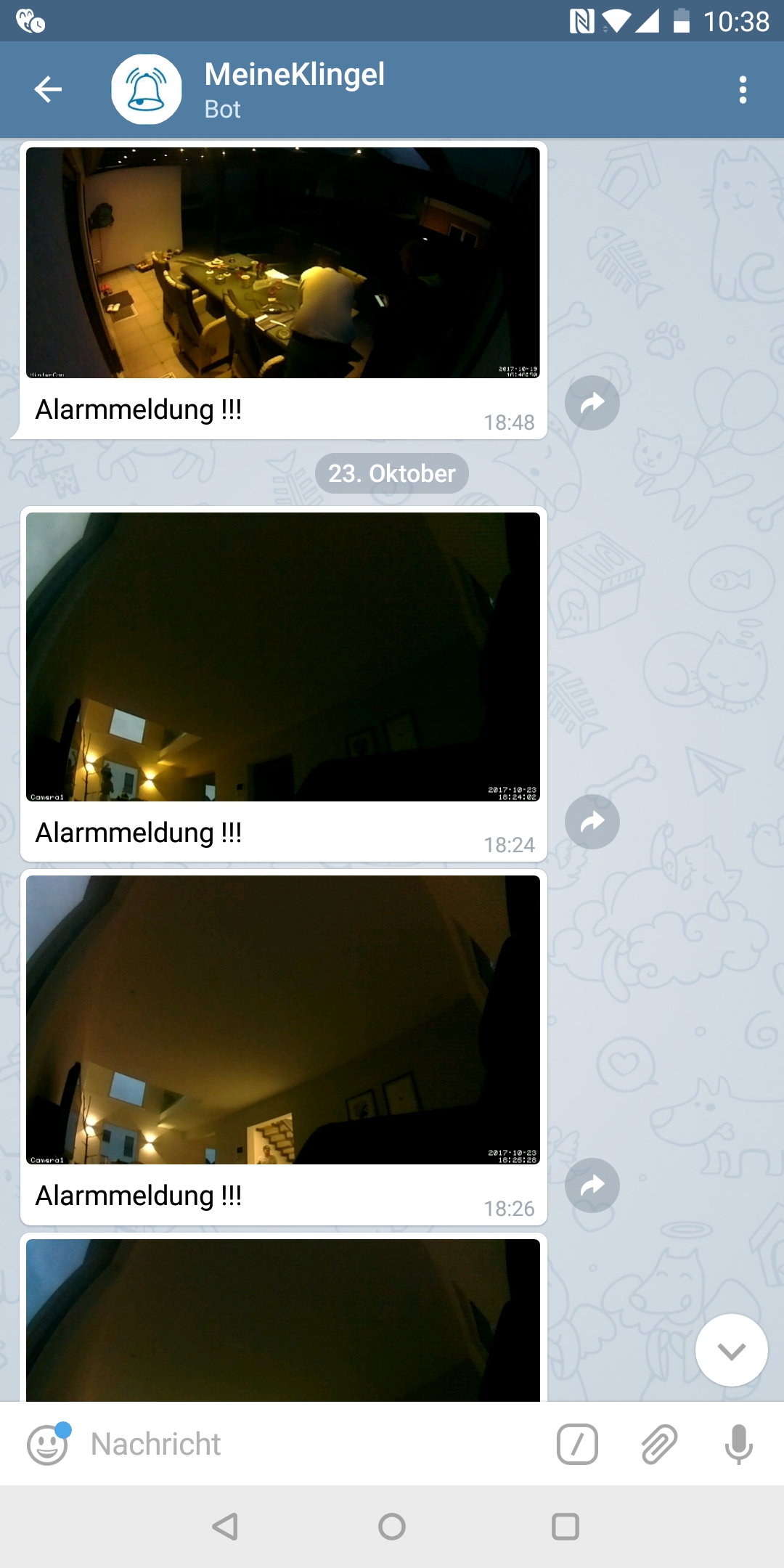
davimas
on 9 Mar 2018
For telegram notification about motion detection we should just replace a file sendmail.py and create a new bot with api?
 QuickWell
on 13 Mar 2018
QuickWell
on 13 Mar 2018
@davimas can you share the solution?because im using motioneyeos..
 petakcore
on 7 Apr 2018
petakcore
on 7 Apr 2018
I will find a solution for telegram notification with MotionEye, somebody help please
QuickWell
on 7 Apr 2018
He said he would provide solution but has not yet
mikecarr
on 11 Apr 2018
Hello. I found a way to use a telegram notification.
@vganyn modification of script email-notification is work.
Like a manual for another who would like to use telegram.
- Create a bot, take a token and input in cript.
- For recive a chat ID - used getupdates from telegram API
- Replace original files sendmail.py
- reboot motioneye
Thanks to all for help
QuickWell
on 11 Apr 2018
Hi, @QuickWell. You forget about python-telegram-bot installation step.
v1k-t0r
on 11 Apr 2018
@davimas is this how you did it?
mikecarr
on 11 Apr 2018
hi, @QuickWell is your method for motioneyeos?
petakcore
on 14 Apr 2018
Hey, sorry was not ready to Post.
So we have sunday and i tell how i did it :-)
@mikecarr No this is not the way i use, because its not positive install a telegram bot in Motioneyeos
I solved it with a script that will be executed after a Motion Detection.
davimas
on 15 Apr 2018
The First is that you have the Telegram App on your mobile and have created a Bot for yourself.
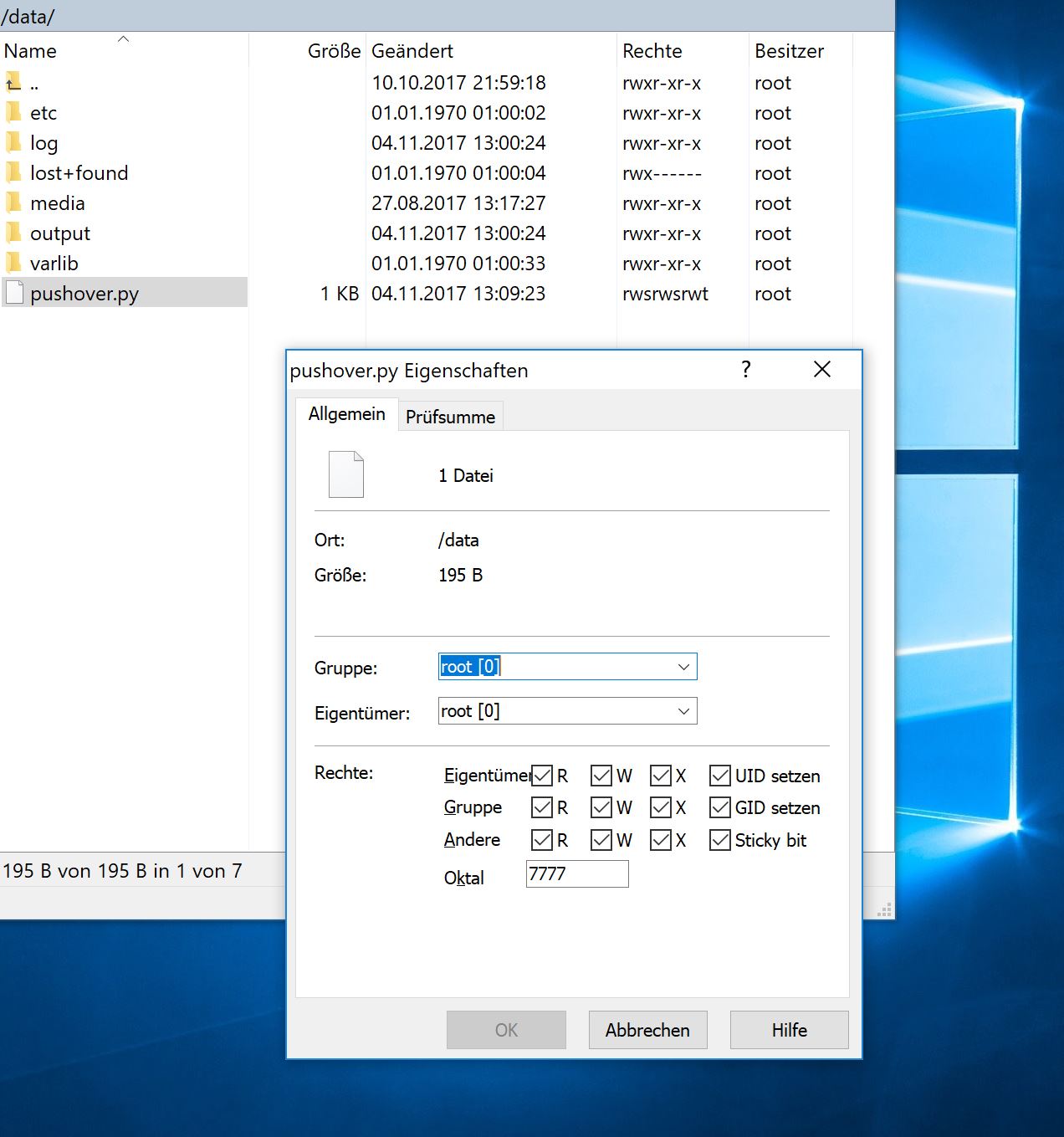
Then you need WinSCP and go to the Motioneyeos folder /data
Create a new file with notepad++ and call it pushover.py
Change the permissions from the file to 7777 or give full write rights.....
davimas
on 15 Apr 2018
In this Pushover file you fill this in:
curl -s -X POST "https://api.telegram.org/bot43333333:AAFZ8wD33jfBuhtKriTiU2JSMS6aJdn6BgU/sendPhoto" -F chat_id=409833359 -F photo="@/data/output/Camera1/Alarm.jpg" -F caption="Alarm/Carefull!!!"
In the code this replace to your TelegramBot:
bot43333333:AAFZ8wD33jfBuhtKriTiU2JSMS6aJdn6BgU
and Chat ID
chat_id=409833359
on the end, you can call your Picture like a
Alarm/Carefull!!! or Bewegung erkannt

davimas
on 15 Apr 2018
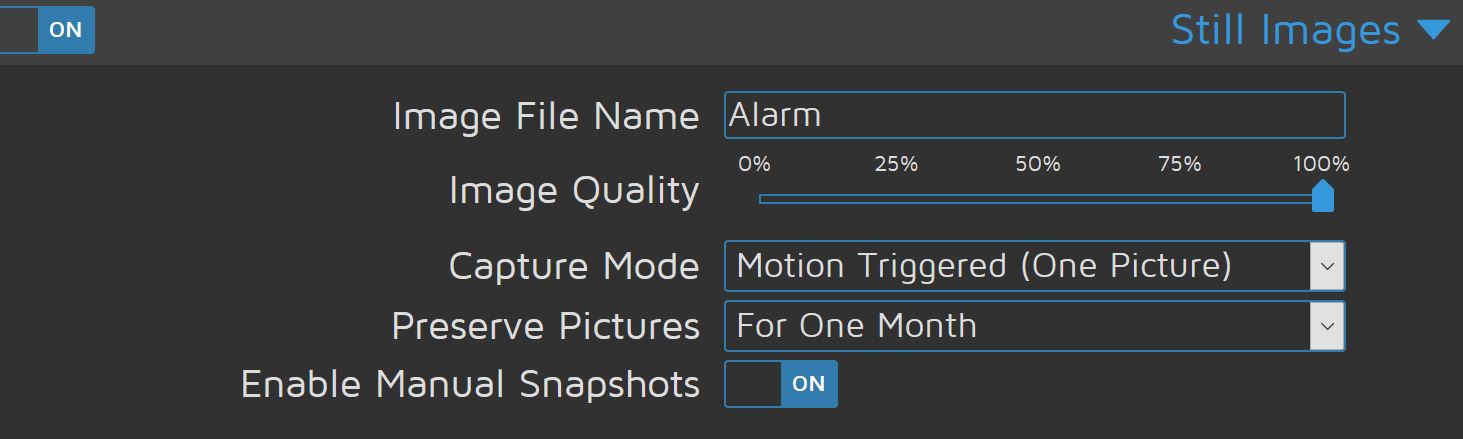
Now you Change this Settings in Options from MotioneyesOS

davimas
on 15 Apr 2018
So you have a script that is executed after a alarm detection, and always sends a photo by Telegram.
Negative of this is that there is always only one photo in the Motioneyos folder, and you became still the last one shot of the Alarm Notification.
But you have all Pictures now on your mobile phone.
And when you set the MotinGap to 3 seconds - you became every 3 Seconds a Picture from the camera when is Motion detected
By, and good Luck with this great MotioneyesOS on raspberry Pi
David
davimas
on 15 Apr 2018
@davimas großes Danke an dich für die mega gute und einfache Beschreibung. 👏👏👏 👍
 feg4274BA
on 31 Aug 2018
feg4274BA
on 31 Aug 2018
I'm also trying to achieve a Telegram bot integration along the following instructions:
https://ginolhac.github.io/posts/diy-raspberry-monitored-via-telegram/#communication-with-motion-via-telegram
What I was curious about is how you installed the additional packages on Motioneyeos? @v1k-t0r
Did you install pip first or what's the go-to procedure?
 xhain
on 9 Dec 2019
xhain
on 9 Dec 2019
@xhain it was ubuntu 16.04 not Motioneyeos
v1k-t0r
on 9 Dec 2019
I wrote a script that seems to work. This allows you to keep your motion images vs having a single file that keeps overwriting. Might need to be tweaked a little bit. I am running Debian LXC docker on my QNAP and followed the instructions to install motioneye.
pip install telepot
go into python and run the following commands. Your telegram token needs to be added into the telepot.Bot command
import telepot
bot = telepot.Bot('your-token')
bot.getMe()
You should see output similar to
{u'username': u'NAME_bot', u'first_name': u'NAME', u'can_read_all_group_messages': False, u'supports_inline_queries': False, u'is_bot': True, u'can_join_groups': True, u'id': #########}
Now create the motion script. You will need to edit your Telegram Bot, Chat ID and enter your Camera name (Case Sensitive as displayed in MotionEye) as we pass that in as a parameter.
There is a 60 second sleep time and you can try to adjust that to what works best. When you have motion events you will get lots of jpg files output in the folder and it takes time to build them. It will depend on your Capture Before/After settings. The sleep allows the files to build and to be able to get the proper motion event at the given time.
/etc/motioneye/telegram-motion.sh
!/usr/bin/python
import sys
import time
camera = str(sys.argv[1])
year = str(sys.argv[2])
month = str(sys.argv[3])
day = str(sys.argv[4])
hour = str(sys.argv[5])
minutes = str(sys.argv[6])
seconds = str(sys.argv[7])
time.sleep( 60 )
import telepot
day = ("%s-%s-%s/%s-%s-%s" %(year,month,day,hour,minutes,seconds))
path = ("/var/lib/motioneye/%s/%s.jpg" %(camera,day))
print (path)
bot = telepot.Bot('YOUR_BOT_ID')
bot.sendPhoto(YOUR_CHAT_ID, photo=open(path, 'rb'), caption='motion detected')
Set the script to execute
chmod +x /etc/motioneye/telegram-motion.sh
MotionEye Config
Set you Image file name - %Y-%m-%d/%H-%M-%S
Set your image quality to your desired % - I have 75%
Set your Capture Mode to Motion Triggered
Motion Notification Run Command: /etc/motioneye/telegram-motion.sh CAMERA_NAME %Y %m %d %H %M %S
Troubleshooting
Wait for a motion event and then run the following command
ps -aux | grep telegram
You should see something similar to
l/lib/python2.7/dist-packages/motioneye/scripts/relayevent.sh "/etc/motioneye/motioneye.conf" start 2; /etc/motioneye/telegram-motion.sh Camera2 2020 04 01 08 39 10 &
root 23232 0.3 0.0 15164 7224 ? S 08:39 0:00 /usr/bin/python /etc/motioneye/telegram-motion.sh Camera2 2020 04 01 08 39 10
Here you can see the parameters being passed into the telegram-motion.sh
Camera Name, Year, Month, Date, Hour, Minute, Second
Then do a directory listing where the camera files are stored (I am going to pass in the Hour, Minute, Second in the file name format to validate when the file is created. It should create prior to the 60 second sleep timer and then send your notification.
ls -l /var/lib/motioneye/Camera2/2020-04-01/ | grep 08-39-10
Your max movie length may also stop the images from building. I have mine set to 20 seconds.
 TheDave1022
on 1 Apr 2020
TheDave1022
on 1 Apr 2020
I wrote a script that seems to work. This allows you to keep your motion images vs having a single file that keeps overwriting. Might need to be tweaked a little bit. I am running Debian LXC docker on my QNAP and followed the instructions to install motioneye.
pip install telepotgo into python and run the following commands. Your telegram token needs to be added into the telepot.Bot command
import telepot
bot = telepot.Bot('your-token')
bot.getMe()You should see output similar to
{u'username': u'NAME_bot', u'first_name': u'NAME', u'can_read_all_group_messages': False, u'supports_inline_queries': False, u'is_bot': True, u'can_join_groups': True, u'id': #########}
Now create the motion script. You will need to edit your Telegram Bot, Chat ID and enter your Camera name (Case Sensitive as displayed in MotionEye) as we pass that in as a parameter.
There is a 60 second sleep time and you can try to adjust that to what works best. When you have motion events you will get lots of jpg files output in the folder and it takes time to build them. It will depend on your Capture Before/After settings. The sleep allows the files to build and to be able to get the proper motion event at the given time.
/etc/motioneye/telegram-motion.sh
!/usr/bin/python
import sys
import time
camera = str(sys.argv[1])
year = str(sys.argv[2])
month = str(sys.argv[3])
day = str(sys.argv[4])
hour = str(sys.argv[5])
minutes = str(sys.argv[6])
seconds = str(sys.argv[7])
time.sleep( 60 )
import telepot
day = ("%s-%s-%s/%s-%s-%s" %(year,month,day,hour,minutes,seconds))
path = ("/var/lib/motioneye/%s/%s.jpg" %(camera,day))
print (path)
bot = telepot.Bot('YOUR_BOT_ID')
bot.sendPhoto(YOUR_CHAT_ID, photo=open(path, 'rb'), caption='motion detected')Set the script to execute
chmod +x /etc/motioneye/telegram-motion.shMotionEye Config
Set you Image file name - %Y-%m-%d/%H-%M-%S
Set your image quality to your desired % - I have 75%
Set your Capture Mode to Motion Triggered
Motion Notification Run Command: /etc/motioneye/telegram-motion.sh CAMERA_NAME %Y %m %d %H %M %STroubleshooting
Wait for a motion event and then run the following command
ps -aux | grep telegramYou should see something similar to
l/lib/python2.7/dist-packages/motioneye/scripts/relayevent.sh "/etc/motioneye/motioneye.conf" start 2; /etc/motioneye/telegram-motion.sh Camera2 2020 04 01 08 39 10 &
root 23232 0.3 0.0 15164 7224 ? S 08:39 0:00 /usr/bin/python /etc/motioneye/telegram-motion.sh Camera2 2020 04 01 08 39 10Here you can see the parameters being passed into the telegram-motion.sh
Camera Name, Year, Month, Date, Hour, Minute, SecondThen do a directory listing where the camera files are stored (I am going to pass in the Hour, Minute, Second in the file name format to validate when the file is created. It should create prior to the 60 second sleep timer and then send your notification.
ls -l /var/lib/motioneye/Camera2/2020-04-01/ | grep 08-39-10Your max movie length may also stop the images from building. I have mine set to 20 seconds.
Hi, @TheDave1022 I've followed your instructions, but im stuck. this is the message i get after i do ps -aux | grep telegram
pi@raspberrypi:~ $ ps -aux | grep telegram
root 16772 0.4 0.0 1940 356 ? Ss 20:37 0:00 sh -c /usr/local/lib/python2.7/dist-packages/motioneye/scripts/relayevent.sh "/etc/motioneye/motioneye.conf" stop 1; /etc/motioneye/telegram-motion.sh camera-1 2020 04 12 20 37 47 &
root 16820 0.5 0.5 12044 4932 ? S 20:37 0:00 /usr/bin/python /etc/motioneye/telegram-motion.sh camera-1 2020 04 12 20 37 47
pi 16914 0.0 0.0 7320 572 pts/1 S+ 20:37 0:00 grep --color=auto telegram
and the message isnt sent to telegram. Also I'm not sure if command sould be start or end so i insert into end command
Can you please help me?
 frozenwave11
on 12 Apr 2020
frozenwave11
on 12 Apr 2020
I wrote a script that seems to work. This allows you to keep your motion images vs having a single file that keeps overwriting. Might need to be tweaked a little bit. I am running Debian LXC docker on my QNAP and followed the instructions to install motioneye.
pip install telepot
go into python and run the following commands. Your telegram token needs to be added into the telepot.Bot command
import telepot
bot = telepot.Bot('your-token')
bot.getMe()
You should see output similar to{u'username': u'NAME_bot', u'first_name': u'NAME', u'can_read_all_group_messages': False, u'supports_inline_queries': False, u'is_bot': True, u'can_join_groups': True, u'id': #########}
Now create the motion script. You will need to edit your Telegram Bot, Chat ID and enter your Camera name (Case Sensitive as displayed in MotionEye) as we pass that in as a parameter.
There is a 60 second sleep time and you can try to adjust that to what works best. When you have motion events you will get lots of jpg files output in the folder and it takes time to build them. It will depend on your Capture Before/After settings. The sleep allows the files to build and to be able to get the proper motion event at the given time.
/etc/motioneye/telegram-motion.sh!/usr/bin/python
import sys
import time
camera = str(sys.argv[1])
year = str(sys.argv[2])
month = str(sys.argv[3])
day = str(sys.argv[4])
hour = str(sys.argv[5])
minutes = str(sys.argv[6])
seconds = str(sys.argv[7])
time.sleep( 60 )
import telepot
day = ("%s-%s-%s/%s-%s-%s" %(year,month,day,hour,minutes,seconds))
path = ("/var/lib/motioneye/%s/%s.jpg" %(camera,day))
print (path)
bot = telepot.Bot('YOUR_BOT_ID')
bot.sendPhoto(YOUR_CHAT_ID, photo=open(path, 'rb'), caption='motion detected')
Set the script to execute
chmod +x /etc/motioneye/telegram-motion.sh
MotionEye Config
Set you Image file name - %Y-%m-%d/%H-%M-%S
Set your image quality to your desired % - I have 75%
Set your Capture Mode to Motion Triggered
Motion Notification Run Command: /etc/motioneye/telegram-motion.sh CAMERA_NAME %Y %m %d %H %M %S
Troubleshooting
Wait for a motion event and then run the following command
ps -aux | grep telegram
You should see something similar tol/lib/python2.7/dist-packages/motioneye/scripts/relayevent.sh "/etc/motioneye/motioneye.conf" start 2; /etc/motioneye/telegram-motion.sh Camera2 2020 04 01 08 39 10 &
root 23232 0.3 0.0 15164 7224 ? S 08:39 0:00 /usr/bin/python /etc/motioneye/telegram-motion.sh Camera2 2020 04 01 08 39 10Here you can see the parameters being passed into the telegram-motion.sh
Camera Name, Year, Month, Date, Hour, Minute, Second
Then do a directory listing where the camera files are stored (I am going to pass in the Hour, Minute, Second in the file name format to validate when the file is created. It should create prior to the 60 second sleep timer and then send your notification.
ls -l /var/lib/motioneye/Camera2/2020-04-01/ | grep 08-39-10
Your max movie length may also stop the images from building. I have mine set to 20 seconds.Hi, @TheDave1022 I've followed your instructions, but im stuck. this is the message i get after i do ps -aux | grep telegram
pi@raspberrypi:~ $ ps -aux | grep telegramroot 16772 0.4 0.0 1940 356 ? Ss 20:37 0:00 sh -c /usr/local/lib/python2.7/dist-packages/motioneye/scripts/relayevent.sh "/etc/motioneye/motioneye.conf" stop 1; /etc/motioneye/telegram-motion.sh camera-1 2020 04 12 20 37 47 &
root 16820 0.5 0.5 12044 4932 ? S 20:37 0:00 /usr/bin/python /etc/motioneye/telegram-motion.sh camera-1 2020 04 12 20 37 47
pi 16914 0.0 0.0 7320 572 pts/1 S+ 20:37 0:00 grep --color=auto telegramand the message isnt sent to telegram. Also I'm not sure if command sould be start or end so i insert into end command
Can you please help me?
What happens if you run the commands manually? I have mine running from the start motion.
TheDave1022
on 13 Apr 2020
`#!/usr/bin/python
import sys
import time
camera = str(sys.argv[1])
year = str(sys.argv[2])
month = str(sys.argv[3])
day = str(sys.argv[4])
hour = str(sys.argv[5])
minutes = str(sys.argv[6])
seconds = str(sys.argv[7])
time.sleep( 20 )
import telepot
day = ("%s-%s-%s/%s-%s-%s" %(year,month,day,hour,minutes,seconds))
path = ("/var/lib/motioneye/%s/%s.jpg" %(camera,day))
print (path)
bot = telepot.Bot('XXXXXXXXXXX:XXXXXXXXXXXXXXXXXXXXXXXXXXXXXXXXXXXXXX')
bot.sendPhoto(YYYYYYYYYYY, photo=open(path, 'rb'), caption='motion detected')
`
This is mine scripy, X - token, and Y - is my chat id

Its sends and i receive it on the phone.
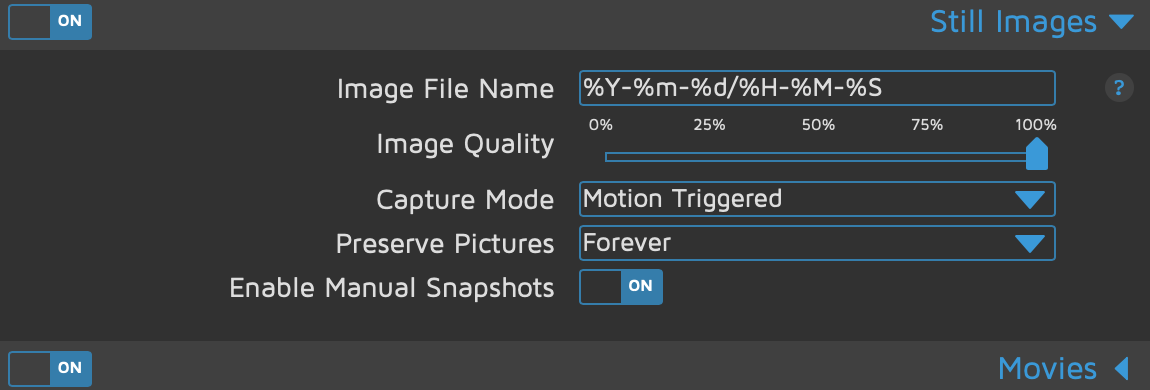
This is my end command, i switched it to the start but same problem
/etc/motioneye/telegram-motion.sh camera-1 %Y %m %d %H %M %S
frozenwave11
on 13 Apr 2020
Make sure your actual script doesnt have the ` at the beginning and the end
TheDave1022
on 14 Apr 2020
@TheDave1022 It doesn't this is because I've used githubs code function
Also this is storage path for photos and vidoes.
/var/lib/motioneye/camera-1
frozenwave11
on 14 Apr 2020
@frozenwave11 your comment yesterday said it is sends and you receive in the phone? If not, what happens when you run the command manually assuming you still the photo on the server
/etc/motioneye/telegram-motion.sh camera-1 2020 04 12 20 37-47
TheDave1022
on 14 Apr 2020
I tried
/etc/motioneye/telegram-motion.sh camera-1 2020 04 12 20 37 47
/etc/motioneye/telegram-motion.sh camera-1 2020 04 12 20 37-47
/etc/motioneye/telegram-motion.sh camera-1 2020 04 12 20-37-47
/etc/motioneye/telegram-motion.sh camera-1/2020-04-12 20/37-47
and still the same
frozenwave11
on 16 Apr 2020
when you run /etc/motioneye/telegram-motion.sh camera-1 2020 04 12 20 37 47 , are you getting an error on the command itself? or just not getting to telegram?
TheDave1022
on 17 Apr 2020
I tested it again with a second camera.
First i have snapped a photo change run command to: /etc/motioneye/telegram-motion.sh Camera2 %Y %m %d %H %M %S
this is the result. Photo hasnt been sent.
pi@raspberrypi:~ $ ps -aux | grep telegram
root 19029 0.0 0.0 1940 356 ? Ss 16:00 0:00 sh -c /usr/local/lib/python2.7/dist-packages/motioneye/scripts/relayevent.sh "/etc/motioneye/motioneye.conf" start 2; /etc/motioneye/telegram-motion.sh Camera2 2020 04 19 16 00 37 &
root 19053 0.1 0.5 12044 4936 ? S 16:00 0:00 /usr/bin/python /etc/motioneye/telegram-motion.sh Camera2 2020 04 19 16 00 37
pi 19156 0.0 0.0 4784 560 pts/0 S+ 16:01 0:00 grep --color=auto telegram
With this command (/etc/motioneye/telegram-motion.sh Camera2 2020 04 19 15 40 25) i have this log, still photo hasnt been send
pi@raspberrypi:~ $ ps -aux | grep telegram
root 21829 0.2 0.0 1940 408 ? Ss 16:09 0:00 sh -c /usr/local/lib/python2.7/dist-packages/motioneye/scripts/relayevent.sh "/etc/motioneye/motioneye.conf" start 2; /etc/motioneye/telegram-motion.sh Camera2 2020 04 19 15 40 25 &
root 21853 0.4 0.5 12044 4928 ? S 16:09 0:00 /usr/bin/python /etc/motioneye/telegram-motion.sh Camera2 2020 04 19 15 40 25
pi 21940 0.0 0.0 4784 544 pts/0 S+ 16:09 0:00 grep --color=auto telegram
frozenwave11
on 19 Apr 2020
Does running the following send a photo manually in phyton?
import telepot
bot = telepot.Bot('your-token')
bot.getMe()
returns {u'username': u'mybot', u'first_name': u'cat tracker', u'is_bot': True, u'id': uid_number}
bot.sendPhoto(uid_number, photo=open('/var/lib/motioneye/camera-1/PHOTO.JPG', 'rb'), caption='motion detected')
Replace the values in BOLD
TheDave1022
on 19 Apr 2020
Yes, thats works fine, I receive image on telegram
frozenwave11
on 19 Apr 2020
@frozenwave11 can you run which python to validate your python installation location is /usr/bin/python?
TheDave1022
on 21 Apr 2020
@TheDave1022 i run it.
pi@raspberrypi:~ $ which python
/usr/bin/python
pi@raspberrypi:~ $ python --version
Python 2.7.16
frozenwave11
on 21 Apr 2020
@TheDave1022 I fixed, actually I have reformatted sd card with fresh raspbian, and did all steps again and works perfectly.
Thanks for sharing script :)
frozenwave11
on 27 Apr 2020
@talentpierre and I made a bunch of scripts to add telegram notification to motioneye. we are pretty new to this but would like to see if it runs on other machines too. currently only raspberry pi is supported. if anybody is interested check out DaniW42/motioneye-telegram
 DaniW42
on 24 Aug 2020
DaniW42
on 24 Aug 2020
I tried the short pushover script but running in an error:
[root@picam data]# python pushover.py
File "pushover.py", line 1
curl -s -X POST "https://api.telegram.org/bot1364709354:AAEpU56_FL7h5xaKBUxqec8Cvw8Wy2LGdMo/sendPhoto" -F chat_id=1364709354 -F photo="@/data/output/Camera1/Alarm.jpg" -F caption="Achtung"
^
SyntaxError: invalid syntax
[root@picam data]#
Cant find my mistake
 SebiWolze
on 24 Sep 2020
SebiWolze
on 24 Sep 2020
@SebiWolze That's not Python you have in the script, so run it with bash or sh instead of python and it likely works (maybe als change the .py -> .sh to avoid later confusion) :)
 zagrim
on 24 Sep 2020
zagrim
on 24 Sep 2020
@SebiWolze and you should really hide your bot api key and chat id... Everybody is able to send you messages with this
DaniW42
on 24 Sep 2020
@talentpierre and I made a bunch of scripts to add telegram notification to motioneye. we are pretty new to this but would like to see if it runs on other machines to. currently only raspberry pi is supported. if anybody is interested check out DaniW42/motioneye-telegram
@DaniW42 I've tried your script and it works fine. I've ran it on a Raspberry OS 10 Lite and it was needed to install the "tree" command (sudo apt-get install tree), I think it's not installed by default. Maybe it could be included in the prerequisite section of the install instructions.
Thank's
 nukecat666
on 20 Oct 2020
nukecat666
on 20 Oct 2020
Thank you, I forgot that as I usually install it on my systems. Will fix it soon.
DaniW42
on 20 Oct 2020
Wow, not small :) Now I'm using ugly 2-line bash script using curl, will try your script! Thank you!
…
17 авг. 2017 г., в 12:25, Viktor Ganin @.> написал: Hi @DrTon , my version of the script: import datetime import logging import os import re import signal import smtplib import socket import time import telegram bot = telegram.Bot(token="YOU BOT TOKEN") chat_id=YOU CHAT ID from email import Encoders from email.mime.text import MIMEText from email.MIMEMultipart import MIMEMultipart from email.MIMEBase import MIMEBase from email.Utils import formatdate from tornado.ioloop import IOLoop import settings import config import mediafiles import motionctl import tzctl messages = { 'motion_start': 'Motion has been detected by camera "%(camera)s/%(hostname)s" at %(moment)s (%(timezone)s).' } subjects = { 'motion_start': 'motionEye: motion detected by "%(camera)s"' } def send_mail(server, port, account, password, tls, _from, to, subject, message, files): conn = smtplib.SMTP(server, port, timeout=settings.SMTP_TIMEOUT) if tls: conn.starttls() if account and password: conn.login(account, password) email = MIMEMultipart() email['Subject'] = subject email['From'] = _from email['To'] = ', '.join(to) email['Date'] = formatdate(localtime=True) email.attach(MIMEText(message)) for file in reversed(files): part = MIMEBase('image', 'jpeg') with open(file, 'rb') as f: part.set_payload(f.read()) Encoders.encode_base64(part) part.add_header('Content-Disposition', 'attachment; filename="%s"' % os.path.basename(file)) email.attach(part) bot.sendPhoto(chat_id=chat_id, photo=open(file,'rb')) if files: logging.debug('attached %d pictures' % len(files)) logging.debug('sending email message') def make_message(subject, message, camera_id, moment, timespan, callback): camera_config = config.get_camera(camera_id) # we must start the IO loop for the media list subprocess polling io_loop = IOLoop.instance() def on_media_files(media_files): io_loop.stop() timestamp = time.mktime(moment.timetuple()) if media_files: logging.debug('got media files') media_files = [m for m in media_files if abs(m['timestamp'] - timestamp) < timespan] # filter out non-recent media files media_files.sort(key=lambda m: m['timestamp'], reverse=True) media_files = [os.path.join(camera_config['target_dir'], re.sub('^/', '', m['path'])) for m in media_files] logging.debug('selected %d pictures' % len(media_files)) format_dict = { 'camera': *@.'], 'hostname': socket.gethostname(), 'moment': moment.strftime('%Y-%m-%d %H:%M:%S'), } if settings.LOCAL_TIME_FILE: format_dict['timezone'] = tzctl.get_time_zone() else: format_dict['timezone'] = 'local time' m = message % format_dict s = subject % format_dict s = s.replace('n', ' ') m += 'nn' m += 'motionEye.' callback(s, m, media_files) if not timespan: return on_media_files([]) logging.debug('waiting for pictures to be taken') time.sleep(timespan) # give motion some time to create motion pictures logging.debug('creating email message') mediafiles.list_media(camera_config, media_type='picture', callback=on_media_files) io_loop.start() def parse_options(parser, args): parser.add_argument('server', help='address of the SMTP server') parser.add_argument('port', help='port for the SMTP connection') parser.add_argument('account', help='SMTP account name (username)') parser.add_argument('password', help='SMTP account password') parser.add_argument('tls', help='"true" to use TLS') parser.add_argument('from', help='the email from field') parser.add_argument('to', help='the email recipient(s)') parser.add_argument('msg_id', help='the identifier of the message') parser.add_argument('thread_id', help='the id of the motion thread') parser.add_argument('moment', help='the moment in ISO-8601 format') parser.add_argument('timespan', help='picture collection time span') return parser.parse_args(args) def main(parser, args): import meyectl # the motion daemon overrides SIGCHLD, # so we must restore it here, # or otherwise media listing won't work signal.signal(signal.SIGCHLD,signal.SIG_DFL) if len(args) == 12: # backwards compatibility with older configs lacking "from" field _from = 'motionEye on %s <%s>' % (socket.gethostname(), args[7].split(',')[0]) args = args[:7] + [_from] + args[7:] if not args[7]: args[7] = 'motionEye on %s <%s>' % (socket.gethostname(), args[8].split(',')[0]) options = parse_options(parser, args) meyectl.configure_logging('sendmail', options.log_to_file) logging.debug('hello!') options.port = int(options.port) options.tls = options.tls.lower() == 'true' options.timespan = int(options.timespan) message = messages.get(options.msg_id) subject = subjects.get(options.msg_id) options.moment = datetime.datetime.strptime(options.moment, '%Y-%m-%dT%H:%M:%S') options.password = options.password.replace('\;', ';') # unescape password # do not wait too long for media list, # email notifications are critical settings.LIST_MEDIA_TIMEOUT = settings.LIST_MEDIA_TIMEOUT_EMAIL camera_id = motionctl.thread_id_to_camera_id(options.thread_id) _from = getattr(options, 'from') logging.debug('server = %s' % options.server) logging.debug('port = %s' % options.port) logging.debug('account = %s' % options.account) logging.debug('password = *') logging.debug('server = %s' % options.server) logging.debug('tls = %s' % str(options.tls).lower()) logging.debug('from = %s' % _from) logging.debug('to = %s' % options.to) logging.debug('msg_id = %s' % options.msg_id) logging.debug('thread_id = %s' % options.thread_id) logging.debug('camera_id = %s' % camera_id) logging.debug('moment = %s' % options.moment.strftime('%Y-%m-%d %H:%M:%S')) logging.debug('smtp timeout = %d' % settings.SMTP_TIMEOUT) logging.debug('timespan = %d' % options.timespan) to = [t.strip() for t in re.split('[,;| ]', options.to)] to = [t for t in to if t] def on_message(subject, message, files): try: send_mail(options.server, options.port, options.account, options.password, options.tls, _from, to, subject, message, files or []) bot.sendMessage(chat_id=chat_id, text=message) logging.info('email sent') except Exception as e: logging.error('failed to send mail: %s' % e, exc_info=True) logging.debug('bye!') make_message(subject, message, camera_id, options.moment, options.timespan, on_message) — You are receiving this because you were mentioned. Reply to this email directly, view it on GitHub, or mute the thread.
Hi! its' cool. where I can check logs?
 jimisan
on 15 Jan 2021
jimisan
on 15 Jan 2021
I wrote a small script for sending photos right from SNAPSHOT URL
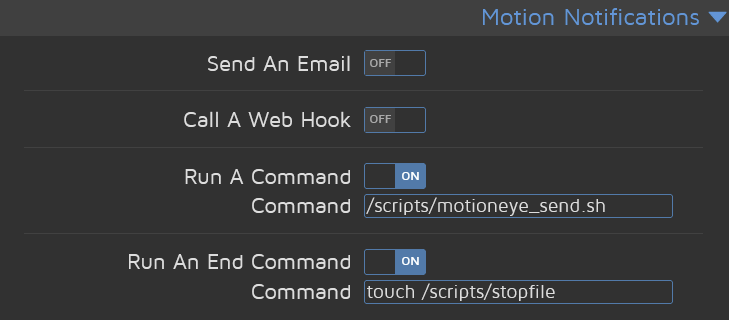
Script contain a simple for loop, where it send picture every N seconds until second event occurs.
Second event its a just a changing modification time of stopfile by touch command.
```
!/bin/bash
api_token=" link=" alarm_file="pic.jpg" # file for temp image storing timeout=2 # default timeout in seconds curl -F "chat_id=${chatid}" -F "text=${message}" start_time=$(date '+%s') # getting current time for ((i=1; i<100; i++)); do # cycle of 100 sending photos done echo
chatid="
message="alarm" # message to display
stop_file="/scripts/motioneye_bot/stopfile" # file for checking modification timesending mesage to chat
https://api.telegram.org/bot${api_token}/sendmessagecurl -o ${alarm_file} ${link} &> /dev/null # save image from SNAPSHOT_URL
# sending image to telegram
curl -F "chat_id=${chatid}" -F "photo=@${alarm_file}" \
https://api.telegram.org/bot${api_token}/sendphoto
sleep ${timeout} # waiting
if [[ -f ${stop_file} ]]; then # checking for stopfile
stop_time=$(ls -l --time-style='+%s' ${stop_file} | awk '{print $6}') # getting stopfile modification time
if [[ stop_time -gt start_time ]]; then # if stopfile was modificated after program start - stop sending photos
break
fi
else # if no stopfile - stop sending photos
break
fi
 cucumberian
on 18 Mar 2021
cucumberian
on 18 Mar 2021
@cucumberian Could you please reformat the script you posted so that the long lines don't break? Currently it would be very hard for someone to copy that so it actually would work. Instead of "quote" please use "code" for the formatting.
zagrim
on 18 Mar 2021
Related issues
 jkaberg
·
4Comments
jkaberg
·
4Comments
 ghubjules
·
4Comments
ghubjules
·
4Comments
 walterdevos
·
5Comments
walterdevos
·
5Comments
 chrivosie
·
5Comments
chrivosie
·
5Comments
 jeff-h
·
5Comments
jeff-h
·
5Comments
Most helpful comment
So you have a script that is executed after a alarm detection, and always sends a photo by Telegram.
Negative of this is that there is always only one photo in the Motioneyos folder, and you became still the last one shot of the Alarm Notification.
But you have all Pictures now on your mobile phone.
And when you set the MotinGap to 3 seconds - you became every 3 Seconds a Picture from the camera when is Motion detected
By, and good Luck with this great MotioneyesOS on raspberry Pi
David