Mosquitto: exception 0xc000007b both on W7 and 2012R2
I have trouble starting mosquitto both on windows 7 and windows server 2012R2. I keep getting 0xc000007b immediately after the launch of mosquitto.exe.
I have copied the files in multiple versions both the pthread and the 2 ssl files - no go sofar.
The event viewer does not have any additional info, just: The application was unable to start correctly (0xc000007b). Click OK to close the application.
Capturing events with process monitor reveals that mosquitto.exe is calling CreateFile on a lot of directories trying to find SSLEAY32.dll (which is in the exe dir - why not run the probe there first btw) The last thing I see (or rather seems to see) is CcmExec.exe Operation:CreateFileMapping with a FILE LOCKED WITH ONLY HEADERS
Any ideas on where to go from here?
 Laro88
All 13 comments
Not sure what is happening here, but my guess would be ABI incompatibilities somewhere. Could you confirm which versions of mosquitto, pthread and openssl you are using?
I don't control the order in which the runtime linker looks for libraries, that's down to the OS.
 ralight
on 7 Sep 2016
ralight
on 7 Sep 2016
mosquitto-1.4.10-install-win32.exe ( I am running 64bit W7 - this could in theory be the problem, but I have other Win32 programs running fine)
pthreadVC2.DLL 2.9.0.0 (also tried pthreads-w32-2-8-0-release.exe to get the Whole package)
OpenSSL was from Win32OpenSSL_Light-1_1_0.exe
I also tried a couple of the other SLL files found on my disk (some older ones)
I have tried running as Administrator, Vista Compatibility whatnot, but without any luck.
Laro88
on 8 Sep 2016
Could you please try with openssl 1.0.2? I didn't want to change major version of openssl on a fixes release.
ralight
on 8 Sep 2016
Solution confirmed.
openssl 1.0.2 light win 32 solves the issue on Win7 64 bit. I took a picture of 3 x cmd with mosquitto, pub and sub. Notice that cmd does not like the single ping (') in strings, double ping (") works.
Btw. If another mqtt broker is running in the background (emqtt was running as a service) then mosquitto fails silently without warning.

Laro88
on 9 Sep 2016
I am having the same problem as you.Please help me to solve it out.
Thanks in advance.
 shubham4coding
on 13 Apr 2017
shubham4coding
on 13 Apr 2017
Same Problem. 0.0.0.0:1883 is listening
Edit: I have Problems on Windows 10 64bit
 FDillk
on 19 Apr 2017
FDillk
on 19 Apr 2017
I fixed it by reinstalling ALL 32 bit versions. All dlls and openssl and mosquitto
FDillk
on 19 Apr 2017
Thank you. SSL 1.0.2 32bit version working good.
 Kotdnz
on 4 Sep 2017
Kotdnz
on 4 Sep 2017
Same problem, test enviroment is windows 7 x64.
should i download "Win32OpenSSL_Light-1_0_2L.exe" binary?, is it right?
after installing ssl win32, reinstall "mosquitto-1.4.14-install-win32.exe"
it gave me a 0xc000007b..
how many times do i have to try this. help me
 beyondat
on 7 Sep 2017
beyondat
on 7 Sep 2017
Correct.
You should:
-- Install mosquitto - get error.
-- download 1_0_2 32bit version.
Install it.
-- download pthread
Copy indicated above DLLs (2 from ssl and 1 from pthread) into mosquitto folder.
Try to reinstall mosquitto.
All must work fine.
P.S. please don't use mosquitto folder with spaces
Kotdnz
on 7 Sep 2017
"exception 0xc000007b" in 32/64bit Windows systems indicates that the 32 bit application trying to load some 64bit DLL lybrary.
In case with mosquitto we have next set of 3th-party DLL's in mosquitto folder:
pthreadVC2.DLL
ssleay32.dll
libeay32.dll
You must be sure that these libraries has a 32bit version.
You also need to have a properly installed Microsoft Visual C++ Redistributable to run mosquitto.exe.
Use "Dependecy Walker" utility to understand which library is loading incorrectly.
Im having the same problem and my solution is reinstall Microsoft Visual C++ Redistributable
 Fearraiser
on 26 Sep 2017
Fearraiser
on 26 Sep 2017
Solved... installing Microsoft Visual C++ 2015 Redistributable Update 3 RC:
https://www.microsoft.com/en-US/download/details.aspx?id=52685
 aogonzalez75
on 6 Dec 2017
aogonzalez75
on 6 Dec 2017
Please confirm the three DLL file are 32 bit.
pthreadVC2.DLL
ssleay32.dll
libeay32.dll

install the "Win32 OpenSSL v1.0.2o Light " from the url: http://slproweb.com/products/Win32OpenSSL.html, Note , Do not use the newest.
then, download the pthreadVC2.DLL from the url: https://cn.dll-files.com/pthreadvc2.dll.html
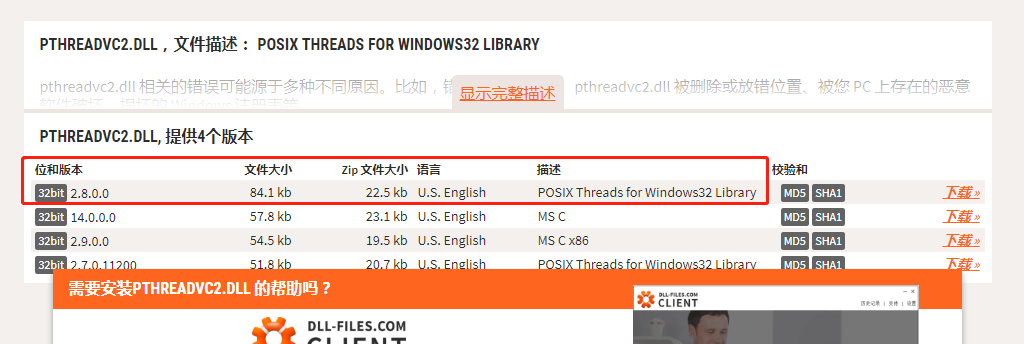
after do that, i think the mosquitto will work well.
i hope it can help you.
 Eason-Lins
on 23 Apr 2018
Eason-Lins
on 23 Apr 2018
Related issues
 OkenKhuman
·
3Comments
OkenKhuman
·
3Comments
 chipengliu
·
5Comments
chipengliu
·
5Comments
 Andreyooo
·
5Comments
Andreyooo
·
5Comments
 keytee
·
7Comments
keytee
·
7Comments
 brandond
·
3Comments
brandond
·
3Comments
Most helpful comment
Solved... installing Microsoft Visual C++ 2015 Redistributable Update 3 RC:
https://www.microsoft.com/en-US/download/details.aspx?id=52685