Hello @simolus3 , thank you for the great library, it's really helping me.
I have been developing a Flutter app using moor_flutter: ^2.0.0, and everything was working fine in the Android emulator and also on my Google Pixel 1. However, when I tested the app on my wife's phone, an Essential phone, I was getting a lot of errors logging no such table and more.
I went through the issues in this project and noticed that https://github.com/simolus3/moor/issues/157 and https://github.com/simolus3/moor/issues/134 seem to be related.
I did a lot of tests and dug deeper in the library and I found out that the call rawQuery("PRAGMA user_version") in https://github.com/tekartik/sqflite/blob/master/sqflite/lib/src/database_mixin.dart#L483 can return a value of 2 - and not 0 as it should - even for a completely fresh install (previous version completely uninstalled).
The consequence is that:
- https://github.com/tekartik/sqflite/blob/master/sqflite/lib/src/database_mixin.dart#L685 evaluates to false
- which means that https://github.com/simolus3/moor/blob/master/moor_flutter/lib/moor_flutter.dart#L71 is never called
- which means that https://github.com/simolus3/moor/blob/master/moor/lib/src/runtime/executor/helpers/engines.dart#L271 evaluates to an int > 0
- which means that https://github.com/simolus3/moor/blob/master/moor/lib/src/runtime/executor/helpers/engines.dart#L290 is not executed
- which means that the database is not created and is the reason why the queries on that table trigger
no such tableerrors
Please find here under two screenshot I did during my debugging. They both show the inspection of the return value of rawQuery("PRAGMA user_version") in https://github.com/tekartik/sqflite/blob/master/sqflite/lib/src/database_mixin.dart#L483 .
Buggy case:

Working case

I am not familiar enough with sqlite, sqflite or moor to investigate further but I hope that this can help figure out the root cause of these issues. If you need more info from me, I can happily provide you with more details so that we can solve these annoying bugs.
 vkammerer
All 21 comments
Wow - thank you so much for all the digging, this really helps a lot!
Now the interesting question is how PRAGMA user_version could return that value. We're doing some weird things with sqflite's openDatabase api. It provides an onCreate and onUpgrade callback that's meant to perform the migration and return a future, but moor only uses those methods to determine whether the upgrade is necessary and returns directly. We run all migrations in the onOpen callback from sqflite.
I've made some small changes from the released version so that moor doesn't use those apis and instead sends the PRAGMA statements itself.
Can you try to put this in your pubspec and report whether it helps?
dependency_overrides:
  moor_flutter:
    git:
      url: git://github.com/simolus3/moor.git
      ref: investigate-user-versions
      path: moor_flutter/
Flutter can be a bit weird when a dependency is overridden, you might need to run flutter clean before flutter packages get. Moor will print "using dynamic version delegate" when opening the database on that branch.
 simolus3
on 13 Oct 2019
simolus3
on 13 Oct 2019
Thank you for your quick reply!
I just tried your new branch on a fresh install on my wife's phone (previous app version completely uninstalled) and I am now getting the following errors:
I/flutter ( 4172): using dynamic version delegate
E/flutter ( 4172): [ERROR:flutter/lib/ui/ui_dart_state.cc(148)] Unhandled Exception: Exception: You've bumped the schema version for your moor database but didn't provide a strategy for schema updates. Please do that by adapting the migrations getter in your database class.
E/flutter ( 4172): #0      _defaultOnUpdate (package:moor/src/runtime/migration.dart:23:5)
E/flutter ( 4172): <asynchronous suspension>
E/flutter ( 4172): #1      GeneratedDatabase.handleDatabaseVersionChange (package:moor/src/runtime/database.dart:395:31)
E/flutter ( 4172): #2      DelegatedDatabase._runMigrations (package:moor/src/runtime/executor/helpers/engines.dart:290:26)
E/flutter ( 4172): <asynchronous suspension>
E/flutter ( 4172): #3      DelegatedDatabase.ensureOpen.<anonymous closure> (package:moor/src/runtime/executor/helpers/engines.dart:253:13)
E/flutter ( 4172): <asynchronous suspension>
E/flutter ( 4172): #4      BasicLock.synchronized (package:synchronized/src/basic_lock.dart:31:26)
E/flutter ( 4172): <asynchronous suspension>
E/flutter ( 4172): #5      DelegatedDatabase.ensureOpen (package:moor/src/runtime/executor/helpers/engines.dart:246:25)
E/flutter ( 4172): #6      QueryExecutor.doWhenOpened (package:moor/src/runtime/executor/executor.dart:26:12)
E/flutter ( 4172): #7      SimpleSelectStatement._getWithQuery (package:moor/src/runtime/statements/select.dart:191:40)
E/flutter ( 4172): <asynchronous suspension>
E/flutter ( 4172): #8      SimpleSelectStatement.watch.<anonymous closure> (package:moor/src/runtime/statements/select.dart:255:24)
E/flutter ( 4172): #9      QueryStream.fetchAndEmitData (package:moor/src/runtime/executor/stream_queries.dart:185:33)
E/flutter ( 4172): <asynchronous suspension>
E/flutter ( 4172): #10     QueryStream._onListen (package:moor/src/runtime/executor/stream_queries.dart:151:5)
E/flutter ( 4172): #11     _runGuarded (dart:async/stream_controller.dart:805:24)
E/flutter ( 4172): #12     _BroadcastStreamController._subscribe (dart:async/broadcast_stream_controller.dart:213:7)
E/flutter ( 4172): #13     _ControllerStream._createSubscription (dart:async/stream_controller.dart:818:19)
E/flutter ( 4172): #14     _StreamImpl.listen (dart:async/stream_impl.dart:472:9)
E/flutter ( 4172): #15     StartWithValueTransformer.bind.<anonymous closure> (package:moor/src/utils/start_with_value_transformer.dart:36:31)
E/flutter ( 4172): #16     _runGuarded (dart:async/stream_controller.dart:805:24)
E/flutter ( 4172): #17     _BroadcastStreamController._subscribe (dart:async/broadcast_stream_controller.dart:213:7)
E/flutter ( 4172): #18     _ControllerStream._createSubscription (dart:async/stream_controller.dart:818:19)
E/flutter ( 4172): #19     _StreamImpl.listen (dart:async/stream_impl.dart:472:9)
E/flutter ( 4172): #20     CapaeRedirectionStore.listenToDb (package:capae_redirections/app_state.dart:82:25)
E/flutter ( 4172): #21     CapaeRedirectionService.init (package:capae_redirections/services/capae_redirection_service.dart:54:18)
E/flutter ( 4172): #22     _MyGreatAppState.didInitState (package:capae_redirections/main.dart:91:29)
E/flutter ( 4172): #23     AfterInitMixin.didChangeDependencies (package:after_init/after_init.dart:14:7)
E/flutter ( 4172): #24     StatefulElement._firstBuild (package:flutter/src/widgets/framework.dart:4086:12)
E/flutter ( 4172): #25     ComponentElement.mount (package:flutter/src/widgets/framework.dart:3919:5)
E/flutter ( 4172): #26     Element.inflateWidget (package:flutter/src/widgets/framework.dart:3101:14)
E/flutter ( 4172): #27     Element.updateChild (package:flutter/src/widgets/framework.dart:2904:12)
E/flutter ( 4172): #28     ComponentElement.performRebuild (package:flutter/src/widgets/framework.dart:3961:16)
E/flutter ( 4172): #29     Element.rebuild (package:flutter/src/widgets/framework.dart:3738:5)
E/flutter ( 4172): #30     ComponentElement._firstBuild (package:flutter/src/widgets/framework.dart:3924:5)
E/flutter ( 4172): #31     StatefulElement._firstBuild (package:flutter/src/widgets/framework.dart:4088:11)
E/flutter ( 4172): #32     ComponentElement.mount (package:flutter/src/widgets/framework.dart:3919:5)
E/flutter ( 4172): #33     Element.inflateWidget (package:flutter/src/widgets/framework.dart:3101:14)
E/flutter ( 4172): #34     Element.updateChild (package:flutter/src/widgets/framework.dart:2904:12)
E/flutter ( 4172): #35     ComponentElement.performRebuild (package:flutter/src/widgets/framework.dart:3961:16)
E/flutter ( 4172): #36     Element.rebuild (package:flutter/src/widgets/framework.dart:3738:5)
E/flutter ( 4172): #37     ComponentElement._firstBuild (package:flutter/src/widgets/framework.dart:3924:5)
E/flutter ( 4172): #38     ComponentElement.mount (package:flutter/src/widgets/framework.dart:3919:5)
E/flutter ( 4172): #39     Element.inflateWidget (package:flutter/src/widgets/framework.dart:3101:14)
E/flutter ( 4172): #40     Element.updateChild (package:flutter/src/widgets/framework.dart:2904:12)
E/flutter ( 4172): #41     Co
I/flutter ( 4172): Moor: Sent SELECT capae_ussds.id AS "capae_ussds.id", capae_ussds.redirection_id AS "capae_ussds.redirection_id", capae_ussds.response_message AS "capae_ussds.response_message", capae_ussds.response_status AS "capae_ussds.response_status", capae_ussds.sim_serial_number AS "capae_ussds.sim_serial_number", capae_ussds.task AS "capae_ussds.task", capae_ussds.time AS "capae_ussds.time", capae_redirections.id AS "capae_redirections.id", capae_redirections.sim_serial_number AS "capae_redirections.sim_serial_number", capae_redirections.phone_number AS "capae_redirections.phone_number", capae_redirections.start_time AS "capae_redirections.start_time", capae_redirections.end_time AS "capae_redirections.end_time", capae_redirections.periodicity AS "capae_redirections.periodicity" FROM capae_ussds LEFT OUTER JOIN capae_redirections ON capae_redirections.id = capae_ussds.redirection_id; with args []
E/SQLiteLog( 4172): (1) no such table: capae_ussds
I/flutter ( 4172): Moor: Sent SELECT capae_alarms.id AS "capae_alarms.id", capae_alarms.redirection_id AS "capae_alarms.redirection_id", capae_alarms.time AS "capae_alarms.time", capae_alarms.task AS "capae_alarms.task", capae_redirections.id AS "capae_redirections.id", capae_redirections.sim_serial_number AS "capae_redirections.sim_serial_number", capae_redirections.phone_number AS "capae_redirections.phone_number", capae_redirections.start_time AS "capae_redirections.start_time", capae_redirections.end_time AS "capae_redirections.end_time", capae_redirections.periodicity AS "capae_redirections.periodicity" FROM capae_alarms LEFT OUTER JOIN capae_redirections ON capae_redirections.id = capae_alarms.redirection_id; with args []
E/flutter ( 4172): [ERROR:flutter/lib/ui/ui_dart_state.cc(148)] Unhandled Exception: DatabaseException(no such table: capae_ussds (code 1 SQLITE_ERROR): , while compiling: SELECT capae_ussds.id AS "capae_ussds.id", capae_ussds.redirection_id AS "capae_ussds.redirection_id", capae_ussds.response_message AS "capae_ussds.response_message", capae_ussds.response_status AS "capae_ussds.response_status", capae_ussds.sim_serial_number AS "capae_ussds.sim_serial_number", capae_ussds.task AS "capae_ussds.task", capae_ussds.time AS "capae_ussds.time", capae_redirections.id AS "capae_redirections.id", capae_redirections.sim_serial_number AS "capae_redirections.sim_serial_number", capae_redirections.phone_number AS "capae_redirections.phone_number", capae_redirections.start_time AS "capae_redirections.start_time", capae_redirections.end_time AS "capae_redirections.end_time", capae_redirections.periodicity AS "capae_redirections.periodicity" FROM capae_ussds LEFT OUTER JOIN capae_redirections ON capae_redirections.id = capae_ussds.redirection_id;) sql 'SELECT capae_ussds.id AS "capae_ussds.id", capae_ussds.redirection_id AS "capae_ussds.redirection_id", capae_ussds.response_message AS "capae_ussds.response_message", capae_ussds.response_status AS "capae_ussds.response_status", capae_ussds.sim_serial_number AS "capae_ussds.sim_serial_number", capae_ussds.task AS "capae_ussds.task", capae_ussds.time AS "capae_ussds.time", capae_redirections.id AS "capae_redirections.id", capae_redirections.sim_serial_number AS "capae_redirections.sim_serial_number", capae_redirections.phone_number AS "capae_redirections.phone_number", capae_redirections.start_time AS "capae_redirections.start_time", capae_redirections.end_time AS "capae_redirections.end_time", capae_redirections.periodicity AS "capae_redirections.periodicity" FROM capae_ussds LEFT OUTER JOIN capae_redirections ON capae_redirections.id = capae_ussds.redirection_id;' args []}
E/flutter ( 4172): #0      wrapDatabaseException (package:sqflite/src/exception_impl.dart:11:7)
E/flutter ( 4172): <asynchronous suspension>
E/flutter ( 4172): #1      SqfliteDatabaseFactoryImpl.wrapDatabaseException (package:sqflite/src/factory_impl.dart:29:7)
E/flutter ( 4172): #2      SqfliteDatabaseMixin.safeInvokeMethod (package:sqflite/src/database_mixin.dart:184:15)
E/flutter ( 4172): #3      SqfliteDatabaseMixin.txnRawQuery.<anonymous closure> (package:sqflite/src/database_mixin.dart:366:36)
E/flutter ( 4172): <asynchronous suspension>
E/flutter ( 4172): #4      SqfliteDatabaseMixin.txnSynchronized.<anonymous closure> (package:sqflite/src/database_mixin.dart:300:22)
E/flutter ( 4172): #5      BasicLock.synchronized (package:synchronized/src/basic_lock.dart:31:26)
E/flutter ( 4172): <asynchronous suspension>
E/flutter ( 4172): #6      SqfliteDatabaseMixin.txnSynchronized (package:sqflite/src/database_mixin.dart:296:43)
E/flutter ( 4172): <asynchronous suspension>
E/flutter ( 4172): #7      SqfliteDatabaseMixin.txnRawQuery (package:sqflite/src/database_mixin.dart:365:12)
E/flutter ( 4172): #8      SqfliteDatabaseExecutorMixin.rawQuery (package:sqflite/src/database_mixin.dart:115:15)
E/flutter ( 4172): #9      _SqfliteExecutor.runSelect (package:moor_flutter/moor_flutter.dart:147:29)
E/flutter ( 4172): <asynchronous suspension>
E/flutter ( 4172): #10     _ExecutorWithQueryDelegate.runSelect.<anonymous closure> (package:moor/src/runtime/executor/helpers/engines.dart:37:19)
E/flutter ( 4172): #11     _ExecutorWithQueryDelegate._synchronized (package:moor/src/runtime/executor/helpers/engines.dart:22:26)
E/flutter ( 4172): <asynchronous suspension>
E/flutter ( 4172): #12     _ExecutorWithQueryDelegate.runSelect (package:moor/src/runtime/executor/helpers/engines.dart:35:26)
E/flutter ( 4172): <asynchronous suspension>
E/flutter ( 4172): #13     JoinedSelectStatement._getWithQuery.<anonymous closure> (package:moor/src/runtime/statements/select.dart:122:24)
E/flutter ( 4172): <asynchronous suspension>
E/flutter ( 4172): #14     QueryExecutor.doWhenOpened.<anonymous closure> (package:moor/src/runtime/executor/executor.dart:26:39)
E/flutter ( 4172): #15     _rootRunUnary (dart:async/zone.dart:1132:38)
E/flutter ( 4172): #16     _CustomZone.runUnary (dart:async/zone.dart:1029:19)
E/flutter ( 4172): #17     _FutureListener.handleValue (dart:async/future_impl.dart:137:18)
E/flutter ( 4172): #18     Future._propagateToListeners.handleValueCallback (dart:async/future_impl.dart:678:45)
E/flutter ( 4172): #19     Future._propagateToListeners (dart:async/future_impl.dart:707:32)
E/flutter ( 4172): #20     Future._completeWithValue (dart:async/future_
E/SQLiteLog( 4172): (1) no such table: capae_alarms
E/flutter ( 4172): [ERROR:flutter/lib/ui/ui_dart_state.cc(148)] Unhandled Exception: DatabaseException(no such table: capae_alarms (code 1 SQLITE_ERROR): , while compiling: SELECT capae_alarms.id AS "capae_alarms.id", capae_alarms.redirection_id AS "capae_alarms.redirection_id", capae_alarms.time AS "capae_alarms.time", capae_alarms.task AS "capae_alarms.task", capae_redirections.id AS "capae_redirections.id", capae_redirections.sim_serial_number AS "capae_redirections.sim_serial_number", capae_redirections.phone_number AS "capae_redirections.phone_number", capae_redirections.start_time AS "capae_redirections.start_time", capae_redirections.end_time AS "capae_redirections.end_time", capae_redirections.periodicity AS "capae_redirections.periodicity" FROM capae_alarms LEFT OUTER JOIN capae_redirections ON capae_redirections.id = capae_alarms.redirection_id;) sql 'SELECT capae_alarms.id AS "capae_alarms.id", capae_alarms.redirection_id AS "capae_alarms.redirection_id", capae_alarms.time AS "capae_alarms.time", capae_alarms.task AS "capae_alarms.task", capae_redirections.id AS "capae_redirections.id", capae_redirections.sim_serial_number AS "capae_redirections.sim_serial_number", capae_redirections.phone_number AS "capae_redirections.phone_number", capae_redirections.start_time AS "capae_redirections.start_time", capae_redirections.end_time AS "capae_redirections.end_time", capae_redirections.periodicity AS "capae_redirections.periodicity" FROM capae_alarms LEFT OUTER JOIN capae_redirections ON capae_redirections.id = capae_alarms.redirection_id;' args []}
E/flutter ( 4172): #0      wrapDatabaseException (package:sqflite/src/exception_impl.dart:11:7)
E/flutter ( 4172): <asynchronous suspension>
E/flutter ( 4172): #1      SqfliteDatabaseFactoryImpl.wrapDatabaseException (package:sqflite/src/factory_impl.dart:29:7)
E/flutter ( 4172): #2      SqfliteDatabaseMixin.safeInvokeMethod (package:sqflite/src/database_mixin.dart:184:15)
E/flutter ( 4172): #3      SqfliteDatabaseMixin.txnRawQuery.<anonymous closure> (package:sqflite/src/database_mixin.dart:366:36)
E/flutter ( 4172): <asynchronous suspension>
E/flutter ( 4172): #4      SqfliteDatabaseMixin.txnSynchronized.<anonymous closure> (package:sqflite/src/database_mixin.dart:300:22)
E/flutter ( 4172): #5      BasicLock.synchronized (package:synchronized/src/basic_lock.dart:31:26)
E/flutter ( 4172): <asynchronous suspension>
E/flutter ( 4172): #6      SqfliteDatabaseMixin.txnSynchronized (package:sqflite/src/database_mixin.dart:296:43)
E/flutter ( 4172): <asynchronous suspension>
E/flutter ( 4172): #7      SqfliteDatabaseMixin.txnRawQuery (package:sqflite/src/database_mixin.dart:365:12)
E/flutter ( 4172): #8      SqfliteDatabaseExecutorMixin.rawQuery (package:sqflite/src/database_mixin.dart:115:15)
E/flutter ( 4172): #9      _SqfliteExecutor.runSelect (package:moor_flutter/moor_flutter.dart:147:29)
E/flutter ( 4172): <asynchronous suspension>
E/flutter ( 4172): #10     _ExecutorWithQueryDelegate.runSelect.<anonymous closure> (package:moor/src/runtime/executor/helpers/engines.dart:37:19)
E/flutter ( 4172): #11     _ExecutorWithQueryDelegate._synchronized (package:moor/src/runtime/executor/helpers/engines.dart:22:26)
E/flutter ( 4172): <asynchronous suspension>
E/flutter ( 4172): #12     _ExecutorWithQueryDelegate.runSelect (package:moor/src/runtime/executor/helpers/engines.dart:35:26)
E/flutter ( 4172): <asynchronous suspension>
E/flutter ( 4172): #13     JoinedSelectStatement._getWithQuery.<anonymous closure> (package:moor/src/runtime/statements/select.dart:122:24)
E/flutter ( 4172): <asynchronous suspension>
E/flutter ( 4172): #14     QueryExecutor.doWhenOpened.<anonymous closure> (package:moor/src/runtime/executor/executor.dart:26:39)
E/flutter ( 4172): #15     _rootRunUnary (dart:async/zone.dart:1132:38)
E/flutter ( 4172): #16     _CustomZone.runUnary (dart:async/zone.dart:1029:19)
E/flutter ( 4172): #17     _FutureListener.handleValue (dart:async/future_impl.dart:137:18)
E/flutter ( 4172): #18     Future._propagateToListeners.handleValueCallback (dart:async/future_impl.dart:678:45)
E/flutter ( 4172): #19     Future._propagateToListeners (dart:async/future_impl.dart:707:32)
E/flutter ( 4172): #20     Future._completeWithValue (dart:async/future_impl.dart:522:5)
E/flutter ( 4172): #21     _AsyncAwaitCompleter.complete (dart:async-patch/async_patch.dart:30:15)
E/flutter ( 4172): #22     _completeOnAsyncReturn (dart:async-patch/async_patch.dart:288:13)
E/flutter ( 4172): #23     BasicLock.synchronized (package:synchronized/src/basic_lock.dart)
E/flutter ( 4172): <asynchronous suspension>
E/flutter ( 4172): #24     DelegatedDatabase.ensureOpen (package:moor/src/runtime/executor/helpers/engines.dart
vkammerer
on 13 Oct 2019
So it really looks like the database on the device is sending bogus data. In 578f258caf865b43b1e229c196e53b551f1f4822, I tried manually setting the user version to 0 if the database file doesn't exist. If that doesn't work moor could create its own table to store user versions.
simolus3
on 13 Oct 2019
I noticed the “buggy case” screenshot is opening a file called “db.sqlite” and the “working case” screenshot is opening “db1.sqlite” - could that be related?
 Mike278
on 13 Oct 2019
Mike278
on 13 Oct 2019
Interesting. @vkammerer did you change the database path in your code after re-running the app? Moor doesn't do anything that could cause this AFAIK, I'm not sure if that's one of the hacks employed by sqflite to work around device specific limitations.
simolus3
on 13 Oct 2019
@Mike278 @simolus3 yes sorry, I should definitely have mentioned this earlier too.
The reason I didn't mention it at first is because the issue came up on my wife's phone when using the path db.sqlite, but this path was working fine with my Pixel and on the emulator.. so the working screenshot could also have displayed db.sqlite if it had been taken while running on the other devices.
Indeed, at first I was doing tests by switching phones every time. But after a while I tried changing the path on the Essential and I noticed that simply changing the path to anything else than db.sqlite was making it work too.
So in summary:
The working case happens:
- with the path
db.sqliteor any other path on my Google Pixel 1 - with the path
db.sqliteor any other path on the emulator - with the path
db1.sqliteordb2.sqlite(only ones tested so far but maybe any other path thandb.sqlite) on the Essential phone
The buggy case happens:
- with the path
db.sqliteon the Essential phone
vkammerer
on 13 Oct 2019
Hmm strange, maybe the Essential phone isn't properly deleting all the app's files when uninstalling?
Mike278
on 14 Oct 2019
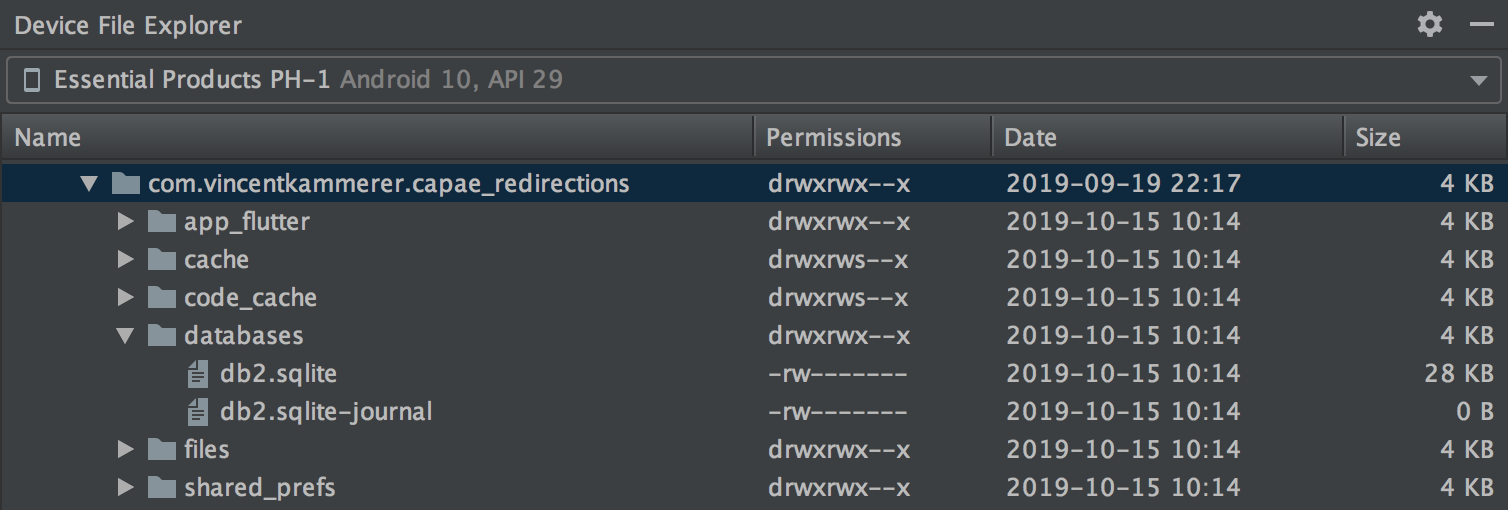
So I did some more investigation on the buggy Essential phone using the Device File Explorer in Android Studio and I could see that:
- the data package in
data/data/com.vincentkammerer.capae_redirectionsis completely deleted when the app is uninstalled, as expected. (com.vincentkammerer.capae_redirectionsis my app). - when I then install the app and set a breakpoint in the
mainfunction, right before executingrunApp, the data package is created and a database folder is created, with adb.sqlitefile in it! (even though my code references adb2.sqlitefor its path). - when I keep executing the normal flow after the breakpoint, the data package now includes the database
db2.sqlite, along with the uselessdb.sqlite.
I have repeated the same workflow with my working Google Pixel 1 and only the database db2.sqlite is created, as expected.
Here under some screenshots.
Buggy phone = Essential
Fresh install, breakpoint before runApp
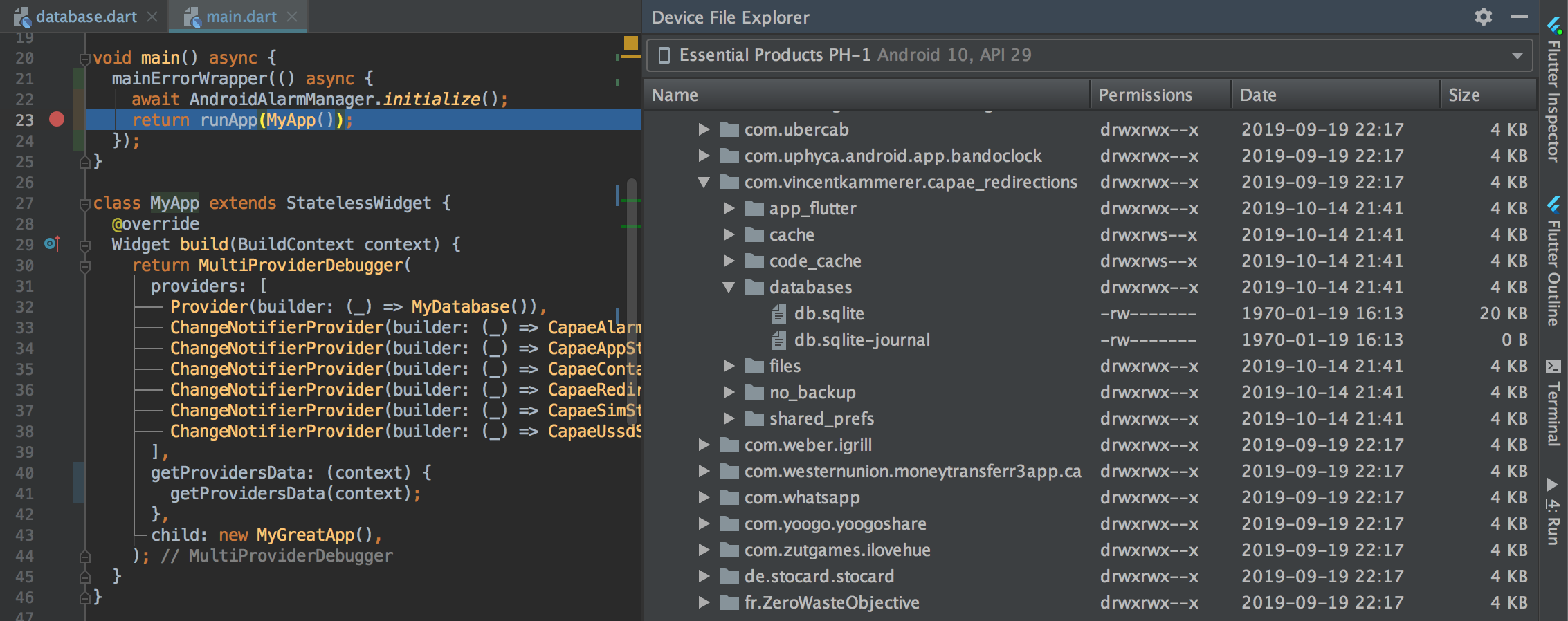
After normal execution after breakpoint

Working phone = Google Pixel
Fresh install, breakpoint before runApp
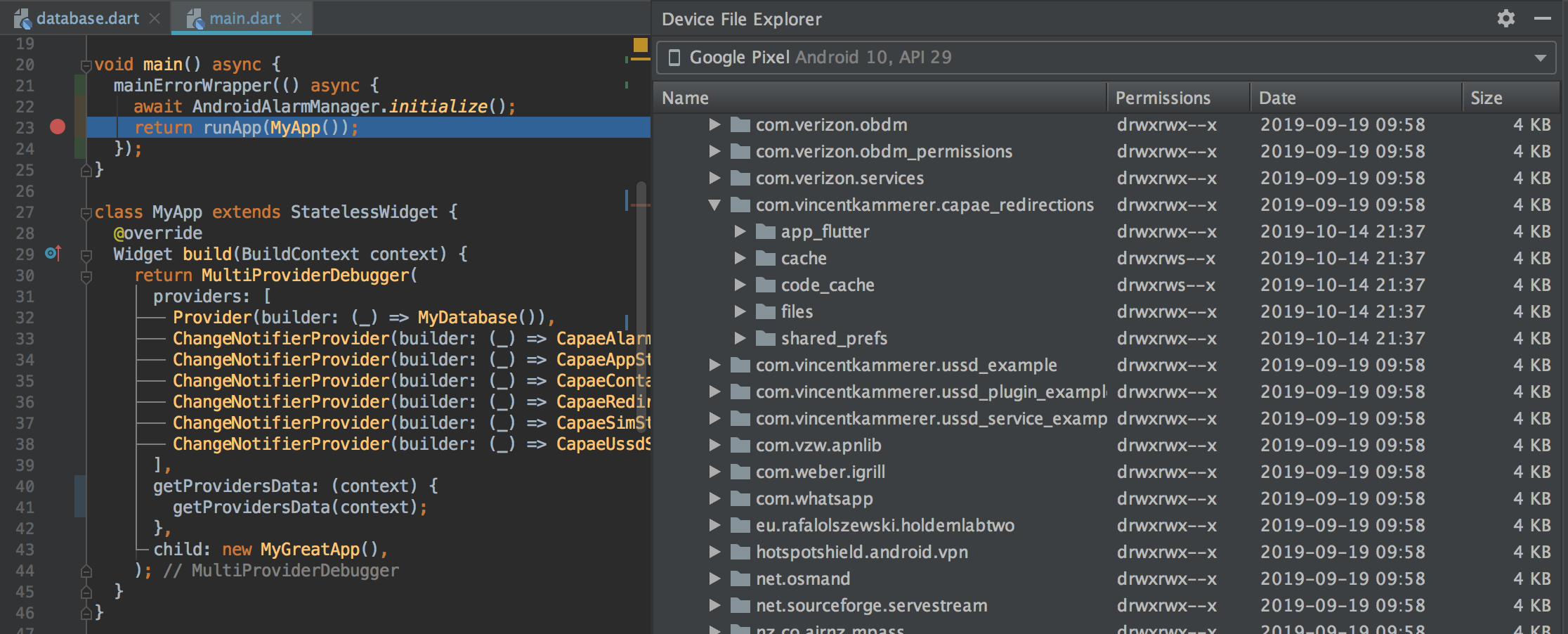
After normal execution after breakpoint

vkammerer
on 14 Oct 2019
Just to be sure - your code works on the essential phone if you chose a the different database name (e.g. db2.sqlite)? There are no "no such table" errors?
when I then install the app and set a breakpoint in the main function, right before executing runApp, the data package is created and a database folder is created, with a db.sqlite file in it! (even though my code references a db2.sqlite for its path).
To be honest I'm not sure what could cause this. db.sqlite is a pretty general database name, maybe there is some other component writing that file (seems bizarre that this only happens on Essential Phones though). You might find out a bit more if you pull that file from the device and analyze it locally. If you have the command line tool for sqlite installed, you can use these commands to analyze the table structure. Maybe that gives some insights on why the file was written.
simolus3
on 14 Oct 2019
Hi @simolus3 . Yes, my code works fine on the buggy Essential phone when I set the database name to db2.sqlite: no error is logged.
I just ran a fresh install again and downloaded the 2 databases that are created: db.sqlite and db2.sqlite, and inspected them with the sqlite3 CLI.
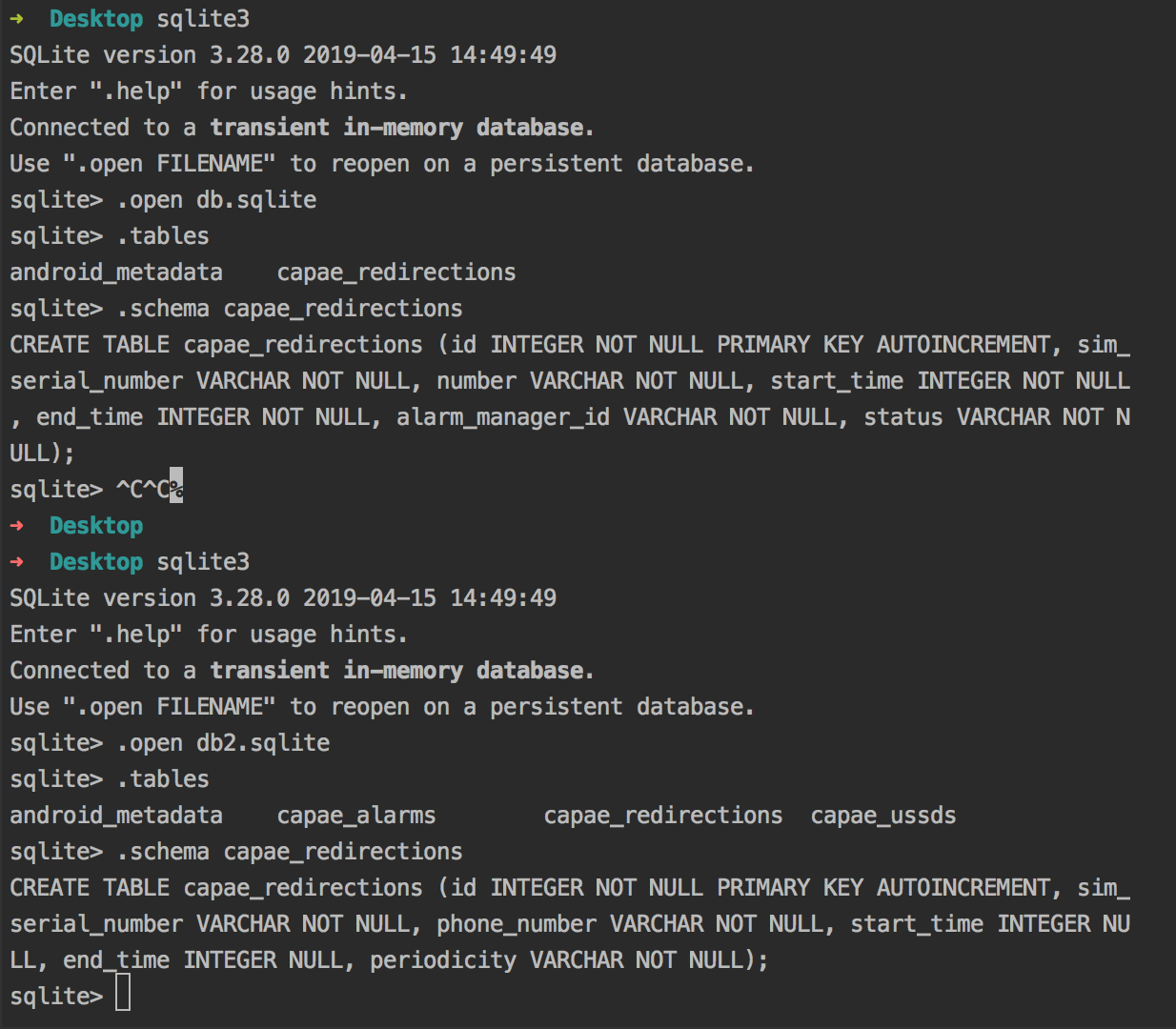
It looks like the db structure of db.sqlite is the one of a previous version of the app, which I had tested on my wife's phone about a week ago. Indeed, capae_redirections is the first table I created, and the number field has now been renamed to phone_number.
I grepped my project directory for db.sqlite and even number and can find no code that would be responsible for creating that db or that db structure.
Moreover, I can see that the data directory is completely removed when I uninstall the app, as you can see here.
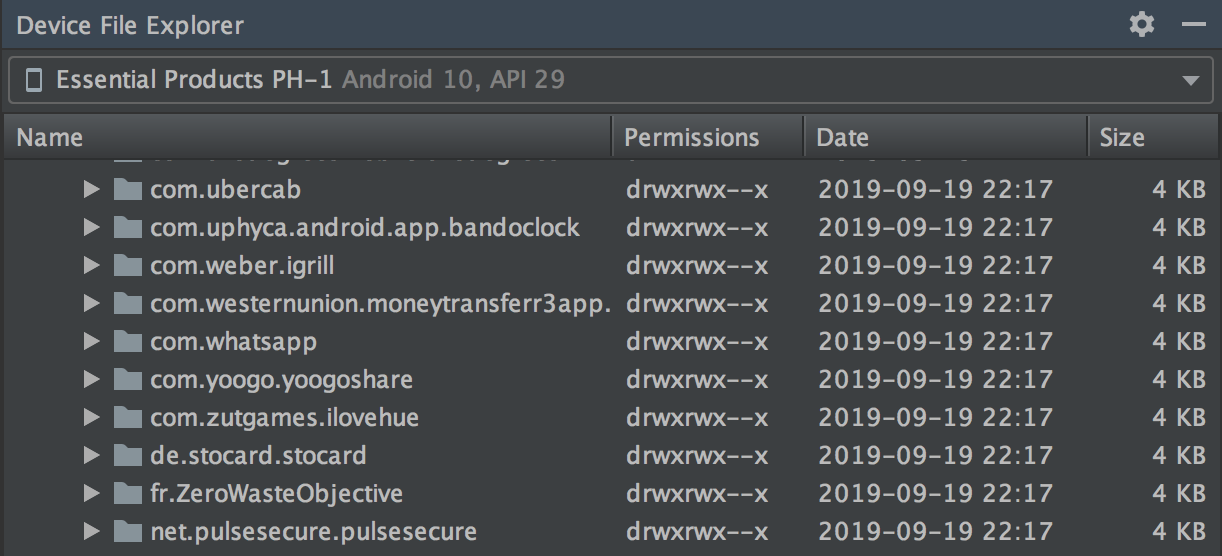
So it looks like the Essential is keeping a cached version of the db somewhere, and copying it when the app installs again.
It looks like this is not an issue with moor but probably a bug with the phone itself. Let's hope that this thread can help others diagnose why they get such errors..
vkammerer
on 14 Oct 2019
So it looks like the Essential is keeping a cached version of the db somewhere, and copying it when the app installs again.
Oh boy. But thanks a lot for finding the root cause of this issue! I'm wondering if that's the same cause for similar issues mentioned by others...
Also, I'm puzzled how that could cause "no such table" errors when the table name from the cached database is the same.
I'll definitely put something like this in moor's FAQ section on the docs, I'm just not sure what developers could actually do against that. Writing code to delete the database file and re-open the database when a no such table error is thrown feels kind of dangerous.
simolus3
on 14 Oct 2019
I have done a few more tests and can now see that:
If the app is completely uninstalled (application icon dragged from the application list to
Uninstall):- the data directory for my app is completely deleted
- when I then reinstall my app, the cached file
db.sqliteis recreated
If the app is not uninstalled, but that its storage and cached data are deleted (long press on icon > App Info > Storage & Cache > Clear Storage + Clear Cache)
- the data directory for my app exists but is empty, as expected
- when I then reinstall my app from Android Studio, the cached
db.sqlitefile is not here. - when I then uninstall the app and reinstall it, the cached
db.sqlitereappears.
So it really looks like this recreation of an old version of the database happens only when the app has been completely uninstalled and then reinstalled.
After complete uninstallation (application icon dragged from the application list to Uninstall) and reinstallation from Android Studio

After clearing Storage and Cache and reinstallation from Android Studio
vkammerer
on 14 Oct 2019
Also, I'm puzzled how that could cause "no such table" errors when the table name from the cached database is the same.
It looks like the "no such table" error is not triggered when the table name is the same, but rather because my database includes new tables (capae_ussds and capae_alarms - see sqlite3 output above).
vkammerer
on 14 Oct 2019
I think I found the culprit!
https://stackoverflow.com/a/41355502/2542603
As explained in https://developer.android.com/guide/topics/data/autobackup.html , even after a complete uninstallation, the data may be kept by Google Drive and reinstalled before the app launches.
I checked on the Essential phone and its Google Drive has a cached version of my app's data that dates back from 5 days ago.
Whereas on the working phone, my Google Pixel, Google Drive has no cached data for my app.
vkammerer
on 15 Oct 2019
It looks like one of the solutions could either be to recommend developers:
- to open their Google Drive app and make sure that there is no entry for their app under Settings > Backup and reset > App data when they encounter that error.
- or to set
<application android:allowBackup="false">
when iterating / developing prototypes, as explained in https://developer.android.com/guide/topics/data/autobackup.html#EnablingAutoBackup
And that once they're ready to deploy their apps for the first time, they can then decide whether they want to enable that feature again.
vkammerer
on 15 Oct 2019
This threat saved my week. My users are running in this issue too. And this seems the same issue that I'm facing right now.
Device:
Xiaomi K20
Android 9
 pedromassango
on 19 Nov 2019
pedromassango
on 19 Nov 2019
My users are running in this issue too
That would likely indicate another problem, then :( This can pretty much only happen if you change the tables without writing a migration and instead rely on uninstalls to reset the database.
simolus3
on 19 Nov 2019
Same error here.
My app just show information, users do not write anything on database. So, instead use migration scripts (that enlarge the apk of my point of view), I just remove the old database and do copy a new one. I control this saving the version number of the current database in 'shared preferences', and the new version of the new release is a static value inside my databaseHelper class. If is higher, I delete the old .db and copy the new.
While works for most of users, some starts to complaining about this errors now.
The -journal database files should be causing it?
 daybson
on 18 Apr 2020
daybson
on 18 Apr 2020
I think it might be those journal files, yes. To be sure, maybe you can put the database into its own subfolder, so that journal and lock files will be in the same folder. Then you can just delete the entire folder without missing anything.
Another approach would be to write DROP TABLE statements for everything and then set PRAGMA user_version = 0. Moor should then re-create the database when opening it again.
simolus3
on 18 Apr 2020
You might have had a syntax error with your onCreate.
I had similar issues and what I did was to uninstall the app and this will delete the database file. Check that your syntax works by copying the syntax to an SQLite browser or mini app to verify that it's working. Paste back the working syntax and it should be okay.
That was what I did when I was faced with this issue.
 jobic10
on 24 Apr 2020
jobic10
on 24 Apr 2020
I will leave this here in case someone makes the same mistake as I did;
For me the source of the issue was using a custom constraint for foreign keys with the wrong table name:
IntColumn get fkOtherTableId =>
      integer().customConstraint("REFERENCES otherTable(id)")();
should have been
IntColumn get fkOtherTableId =>
      integer().customConstraint("REFERENCES other_table(id)")();
So, if you get this error on an insert, be sure to have a look at your constraints.
 ltOgt
on 5 Jul 2020
ltOgt
on 5 Jul 2020
Related issues
 tony123S
·
4Comments
simolus3
·
4Comments
tony123S
·
4Comments
simolus3
·
4Comments
 cadaniel
·
4Comments
cadaniel
·
4Comments
 KKRoko
·
3Comments
KKRoko
·
3Comments
 Holofox
·
4Comments
Holofox
·
4Comments
Most helpful comment
It looks like one of the solutions could either be to recommend developers:
when iterating / developing prototypes, as explained in https://developer.android.com/guide/topics/data/autobackup.html#EnablingAutoBackup
And that once they're ready to deploy their apps for the first time, they can then decide whether they want to enable that feature again.