Monogame: Unable to build content - Cannot load FreeImage
C:/BuildAgent/work/e640bfb9e46917d7/SimpullsContent/Debug/../clouds.png: error:
Importer 'TextureImporter' had unexpected failure!
System.DllNotFoundException: Unable to load DLL 'FreeImage': The specified modul
e could not be found. (Exception from HRESULT: 0x8007007E)
   at FreeImageAPI.FreeImage.GetFileType(String filename, Int32 size)
   at FreeImageAPI.FreeImage.LoadEx(String filename, FREE_IMAGE_LOAD_FLAGS flags
, FREE_IMAGE_FORMAT& format)
   at FreeImageAPI.FreeImage.LoadEx(String filename)
   at Microsoft.Xna.Framework.Content.Pipeline.TextureImporter.Import(String fil
ename, ContentImporterContext context) in c:\Users\danzel\Code\Simpulls\MonoGame
\MonoGame.Framework.Content.Pipeline\TextureImporter.cs:line 85
   at Microsoft.Xna.Framework.Content.Pipeline.ContentImporter`1.Microsoft.Xna.F
ramework.Content.Pipeline.IContentImporter.Import(String filename, ContentImport
erContext context) in c:\Users\danzel\Code\Simpulls\MonoGame\MonoGame.Framework.
Content.Pipeline\ContentImporter.cs:line 45
   at MonoGame.Framework.Content.Pipeline.Builder.PipelineManager.ProcessContent
(PipelineBuildEvent pipelineEvent) in c:\Users\danzel\Code\Simpulls\MonoGame\Mon
oGame.Framework.Content.Pipeline\Builder\PipelineManager.cs:line 575
Build 0 succeeded, 1 failed.

Time elapsed 00:00:00.29.
Solution was to install the x64 version of vs 2012 c++ redistributable
http://www.microsoft.com/en-NZ/download/details.aspx?id=30679
We should probably have a nicer error for this if we can, spent ages bashing at this! (Dependency Walker told me what the missing dll was)
 danzel
All 16 comments
Hum... the redist we need vcredist_x64.exe is only 7MB. If you download and run it from the command line:
vcredist_x64.exe -?
It tells you that it has /quiet and /norestart mode:

We should be able to embed this into the Windows installer fairly easily if we want.
Either that or we just add a note about it on the download site.
 tomspilman
on 21 Feb 2015
tomspilman
on 21 Feb 2015
Nobody reads websites - installers should include everything that is needed..
 theZMan
on 22 Feb 2015
theZMan
on 22 Feb 2015
Include it and use the quiet install mode.
 KonajuGames
on 23 Feb 2015
KonajuGames
on 23 Feb 2015
Thanks mate, I had the same issue, thankfully found this posts.
 Vutov
on 12 Jun 2015
Vutov
on 12 Jun 2015
UPDATE:
Problem solved. Despite the fact that I am using VS2012 I needed to install the 2013 redistributable. Right here for anyone who comes across this problem https://www.microsoft.com/en-us/download/details.aspx?id=40784
ORIGINAL:
I'm having this issue now after upgrading to MonoGame 3.5. I'm using Visual Studio 2012 and .NET 4.5. I tried using vcredist_x64.exe and the installer seemed to work, so I'm kind of lost on what to do here. I verified that FreeImage.dll is in the right folder.
Build started 3/20/2016 8:44:44 PM

E:/Documents/Visual Studio 2012/Projects/temp/Game1/Game1/Content/20151010_120240.jpg
E:/Documents/Visual Studio 2012/Projects/temp/Game1/Game1/Content/20151010_120240.jpg: error: Importer 'TextureImporter' had unexpected failure!
System.DllNotFoundException: Unable to load DLL 'FreeImage': The specified module could not be found. (Exception from HRESULT: 0x8007007E)
   at FreeImageAPI.FreeImage.GetFileType(String filename, Int32 size)
   at FreeImageAPI.FreeImage.LoadEx(String filename, FREE_IMAGE_LOAD_FLAGS flags, FREE_IMAGE_FORMAT& format)
   at Microsoft.Xna.Framework.Content.Pipeline.TextureImporter.Import(String filename, ContentImporterContext context)
   at Microsoft.Xna.Framework.Content.Pipeline.ContentImporter`1.Microsoft.Xna.Framework.Content.Pipeline.IContentImporter.Import(String filename, ContentImporterContext context)
   at MonoGame.Framework.Content.Pipeline.Builder.PipelineManager.ProcessContent(PipelineBuildEvent pipelineEvent)
E:/Documents/Visual Studio 2012/Projects/temp/Game1/Game1/Content/signature.png
E:/Documents/Visual Studio 2012/Projects/temp/Game1/Game1/Content/signature.png: error: Importer 'TextureImporter' had unexpected failure!
System.DllNotFoundException: Unable to load DLL 'FreeImage': The specified module could not be found. (Exception from HRESULT: 0x8007007E)
   at FreeImageAPI.FreeImage.GetFileType(String filename, Int32 size)
   at FreeImageAPI.FreeImage.LoadEx(String filename, FREE_IMAGE_LOAD_FLAGS flags, FREE_IMAGE_FORMAT& format)
   at Microsoft.Xna.Framework.Content.Pipeline.TextureImporter.Import(String filename, ContentImporterContext context)
   at Microsoft.Xna.Framework.Content.Pipeline.ContentImporter`1.Microsoft.Xna.Framework.Content.Pipeline.IContentImporter.Import(String filename, ContentImporterContext context)
   at MonoGame.Framework.Content.Pipeline.Builder.PipelineManager.ProcessContent(PipelineBuildEvent pipelineEvent)

Build 0 succeeded, 2 failed.

Time elapsed 00:00:00.13.
 gms9rc
on 21 Mar 2016
gms9rc
on 21 Mar 2016
I'm having a very similar problem where freetype6.dll can't be found although it's in the same folder of the pipeline tool.
Building Font C:\WINDOWS\Fonts\arial.ttf
System.DllNotFoundException: Unable to load DLL 'freetype6.dll': The specified module could not be found. (Exception from HRESULT: 0x8007007E)
at SharpFont.FT.FT_Init_FreeType(IntPtr& alibrary)
at SharpFont.Library..ctor()
I've attached the list of redists installed on my machine so I'm not sure if this is a redist issue or something else.

 ricardosabino
on 16 Apr 2016
ricardosabino
on 16 Apr 2016
I have just compared your redist with mine, and the only difference is that from the 2013 ones I only have the version 12.0.21005, and from the 2012 packages you are missing the x86 11.0.60610, the rest are the same
 Tzenchor
on 16 Apr 2016
Tzenchor
on 16 Apr 2016
I was able to fix it by repairing my 2012 x64 redist 11.0.61030.0.
ricardosabino
on 17 Apr 2016
I'll just say I came here having the same problem, thankfully it was solved by installing the 2013 redistributable, but I think i my case the culprit was a DivX update (as soon as I noticed it was installing some c++ libraries I thought "this will haunt me later, right?")
 abyssdoor
on 22 Jun 2016
abyssdoor
on 22 Jun 2016
So, I ran into this today, and this is super weird, because I was able to build this project in mid-April (2016) on _this_ machine -- I haven't uninstalled the VC redists or anything since then, but it all worked at that time -- I'm running the same version of MonoGame that I was then (literally, nothing has changed) -- same version of Visual Studio, everything. -- but today I opened the project, and it won't build with this error.
I installed the VC++ 2013 (x64) Redistributable that @gms9rc linked to; and that fixed it... but ... how come I didn't need this in April, and suddenly I need this now?? O.O
 BrainSlugs83
on 3 Jul 2016
BrainSlugs83
on 3 Jul 2016
based from my own experience you probably installed or updated something in your computer that updated c++ libraries in the background, in my case it was the DivX Updater which messed with them
abyssdoor
on 3 Jul 2016
Actually the best fix here is to rebuild FreeImage to use the static version of the C runtime libraries. This way it won't have any dependency on those redistributables.
This is the same issue with MojoShader... see https://github.com/mono/MonoGame/issues/4485.
tomspilman
on 3 Jul 2016
I have the same error. MonoGame is not working !!! (((
 imex7
on 4 Feb 2017
imex7
on 4 Feb 2017
I ran into this exact issue today when attempting to build images into my content pipeline under a fresh install of Windows 10 Pro, Visual Studio 2017, and the stable release of MonoGame 3.6.0.1625. It was fixed by installing the 2013 redistributable as linked in gms9rc's post above.
This was accompanied by a similar error when the pipeline got up to building in my SpriteFont:
Processor 'FontDescriptionProcessor' had unexpected failure!
System.DllNotFoundException: Unable to load DLL 'freetype6.dll': The specified module could not be found. (Exception from HRESULT: 0x8007007E)
at SharpFont.FT.FT_Init_FreeType(IntPtr& alibrary)
at SharpFont.Library..ctor()
at Microsoft.Xna.Framework.Content.Pipeline.Graphics.SharpFontImporter.Import(FontDescription options, String fontName)
...
I was able to fix this issue by installing this: (http://www.microsoft.com/en-NZ/download/details.aspx?id=30679)
as recommended here: (http://community.monogame.net/t/monogame-noob-unable-to-load-freeimage/6255)
It's unfortunate that these components have to be manually fetched...it'd be great if this was easier in the future! (If a more recent MonoGame build has already fixed this, I apologize for not trying it.)
 yyr57695
on 20 Mar 2017
yyr57695
on 20 Mar 2017
Same issue with freetype6.dll and FreeImage (using MonoGame 3.7.1 with VS2017).
Installing _C++2012 x64_ solve the problem for freetype, and _C++2013 x64_ for FreeImage.
My config is now: C++2010-2012-2013-2017 (x64).
 Al3xlab
on 17 Apr 2019
Al3xlab
on 17 Apr 2019
Well.. I pretty much installed (and re-installed) them all but VS still complains about FreeImage. I’m using latest version of VS 2019 and Monogame. Any help is appreciated~
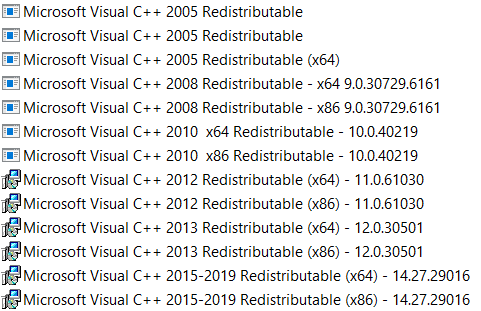
 jshial
on 20 Sep 2020
jshial
on 20 Sep 2020
Related issues
tomspilman
·
4Comments
 Jjagg
·
5Comments
Jjagg
·
5Comments
 MichaelDePiazzi
·
4Comments
MichaelDePiazzi
·
4Comments
 harry-cpp
·
5Comments
harry-cpp
·
5Comments
 rds1983
·
5Comments
rds1983
·
5Comments
Most helpful comment
UPDATE:
Problem solved. Despite the fact that I am using VS2012 I needed to install the 2013 redistributable. Right here for anyone who comes across this problem https://www.microsoft.com/en-us/download/details.aspx?id=40784
ORIGINAL:
I'm having this issue now after upgrading to MonoGame 3.5. I'm using Visual Studio 2012 and .NET 4.5. I tried using vcredist_x64.exe and the installer seemed to work, so I'm kind of lost on what to do here. I verified that FreeImage.dll is in the right folder.