Monogame: glTF support via Content Pipeline.
Currently, processing glTF files through the content pipeline is provided by Assimp importer, which presents a number of problems:
- Monogame Framework's Model miss a lot of glTF features, so when importing a glTF, many features are lost, specially those related to skeleton skinning, animation and materials.
- glTF is a relatively new format that keeps improving every day. Assimp is lagging behind into it's adoption, and MonoGame is lagging behind into adopting newer versions of Assimp, which results in a very outdated pipeline.
As a consequence, actual glTF support in monogame is very limited, when not broken.
In order to have a temporary solution, I developed a project that allows to load a glTF with full skeleton skinning and animation support, which can be found here:
https://github.com/vpenades/SharpGLTF/tree/master/examples/MonoGameScene~~
https://github.com/vpenades/SharpGLTF.Monogame.Example
But it still has two limitations:
- It uses MonoGame's BasicEffect and SkinnedEffect, so it's missing PBR materials.
- It needs to load the files at runtime, so it's limited to Desktop applications.
Ideally we should be able to process glTF files through the content pipeline with at least the same level of accuracy, or better.
So I've opened this discussion to talk about what might be needed in order to improve glTF support with the content pipeline.
glTF features:
File Specification (two variants)
- glTF json files, which reference external binary blob files and texture files.
- GLB files which are self contained and have blobs and textures embedded.
Layout specification
- Default material is PBR, with additional materials available via extensions.
- Texture formats:
- JPEG
- PNG
- DDS (Extension)
- WEBP (Extension)
- Binomial Basis (Extension, WIP)
- An internal structure that treats meshes, textures, animations, etc as resources.
- Multiple scenes support.
- A single scene can contain:
- One or many hierarchical node trees.
- Cameras[Info]
- Lights[Info]
- Meshes
- Rigid
- Skinned
- Morphable
- Skinned + Morphable
- Subdivision Surface Meshes (Extension, WIP)
- Nodes of the scene can have one or multiple animation tracks.
- Linear and Cubic spline curves are supported.
- Mesh GPU Instancing (Extension, WIP)
- LOD (Extension)
Features required by MonoGame to fully support glTF
- The content pipeline only accepts model textures as external referenced files. So a new API would be required for embedded textures.
- We need a new PBR effect capable of handling skinning and morphing, with joint mapping and inverse bind matrices, hopefully, exceeding the 72 bone limit.
- A new Framework's Graphics Model class that covers all glTF features, and probably more.
- A new set of Content Pipeline's Builder classes able to handle glTF rich features.
- For animation, Quaternion curves are required.
 vpenades
All 27 comments
For sure supporting a new importer would be great.
Also I don't mind see us extend the basic "model" support we have for something more modern.
But i don't want to see us have a "Scene", "Camera", or "Light" types of classes built into the core of MonoGame. That takes us down the path of being an engine and starting to enforce rules on how a game scene has to work.
One possibility is to just have lightweight "CameraInfo" or "LightInfo" types and pass thru the raw data which can either be transformed by a custom game specific content processor or used raw at runtime for simple cases. This lets the developer write their own camera and light systems.
Another possibility is to make all of this a completely separate assembly that is totally optional to include in your project if you want to use it. Still we would want to keep all types flexible so they can be extended or modified without needing to dive into the source.
 tomspilman
on 8 Nov 2019
tomspilman
on 8 Nov 2019
But i don't want to see us have a "Scene", "Camera", or "Light" types of classes built into the core of MonoGame. That takes us down the path of being an engine and starting to enforce rules on how a game scene has to work.
I am using glTF naming convention, where a "Scene" is essentially the model's root node.
It is true that a "scene" in gltf can contain a fully fledged scene with multiple skeletons, lights, cameras, etc. but I fully agree with you that we should not expose that complexity to developers.
At most, the model would expose the camera and lights information of the model in case a developer wants to use them, otherwise, within monogame, I don't want to know how glTF internals are fleshed out, I just want to draw the model with a single GltfModel.Draw(...) as we always do.
Multi Scene Support:
Although most glTF files you will encounter around will have only a single Scene inside, the format specification supports multiple scenes, and there's a reason for it: to save memory on resources.
Internally, glTF treats meshes, textures, animations, etc as resources that can be instanced on every scene, so, let's say you have 10 models that share not only most of the textures, but also lots of geometry meshes and animations. In monogame, you would import each model separately, the textures would be shared, but the meshes and the animations would be duplicated across each model.
But with glTF, you would import a sort of "ModelCollection" with multiple Models inside, with the benefit that many MeshParts, textures and animations would be shared between meshes. Saving a lot of memory.
So far, I am not asking to support all the features of glTF, I am just showcasing these features to discuss what Monogame would support and what not.
vpenades
on 8 Nov 2019
But with glTF, you would import a sort of "ModelCollection" with multiple Models inside
That seems reasonable to me.
tomspilman
on 8 Nov 2019
Last i looked the model class is just plain missing a lot even for fbx.
The loader i wrote out for assimp has a bunch of stuff that monogames importer and model class doesn't read in. Which is why i wrote my own model class to go with it.
Im guessing that the other guys around here that wrote them have observed the same thing.
 willmotil
on 9 Nov 2019
willmotil
on 9 Nov 2019
Indeed, a prerequisite to support glTF, and more advanced FBX features, MonoGame would need a new Model class
vpenades
on 10 Nov 2019
The support for modern graphics in MonoGame is lagging entirely. No uniform/constant/shader storage buffers, no “advanced” texture types, no support for graphics/tessellation/compute shaders, or for unordered access views (aka image load/store). MonoGame is still pretty much in the pre-DX10 phase yet, and modern/PBR features require them, so I suggest waiting until proper support for modern techniques is ready before pushing such an advanced model.
 JoaoBaptMG
on 10 Nov 2019
JoaoBaptMG
on 10 Nov 2019
waiting until proper support for modern techniques is ready before pushing such an advanced model
If we sit around waiting nothing's gonna happen. The point of discussions like this is to make things happen. So I suggest we don't wait.
 Jjagg
on 10 Nov 2019
Jjagg
on 10 Nov 2019
So I suggest we don't wait.
We can use the proposal of supporting glTF to push the boundaries in the other directions, too.
JoaoBaptMG
on 10 Nov 2019
Then I believe the first thing to do would be to define an advanced Effect that supports all the required features; this requirement precedes anything else because all other glTF (or FBX features) will depend on this new advanced effect.
glTF uses PBR Metallic Roughness as default material, but by extension, other PBR formats are already supported, like PBR Specular Glossiness and more advanced ones are being developed.
Any glTF material supports, by default, these texture channels:
- Occlusion texture
- Normal texture
- Emissive texture
Metallic Roughness material adds these:
- BaseColor texture
- MetallicRoughness texture
Specular Glossiness material adds these:
- Diffuse texture
- Specular texture
PBR usually works well with environment cube maps in addition to normal lights, so the effect would also need a way to support them.
Regarding vertex format support, glTF supports skinning with 4 and 8 joints, with unlimited number of joints. (to overcome the max bone limit, texture constants are used instead)
But to me, the most problematic feature is to support morph targets AND skinning, which ca be used at the same time, which requires to heave each morph target in an individual vertex buffer, and the vertex attributes in a separated vertex buffer, so you need to bind the appropiate morph target vertex buffers and the attributes vertex buffer simultaneously. I don't know if MonoGame can support this under the hood.
Finally, these days, any modern engine supports some sort of shadow mapping. Certainly this is not related to glTF or FBX, but certainly it could be desirable to have some kind of shadowing support.
vpenades
on 11 Nov 2019
I’d say do away with the Effect class and somehow expose directly the shader state in the GraphicsDevice, along with some kind of vertex array object to store the attribute structure. I know Direct3D does not use a program-esque class anymore, and OpenGL already allows the creation of separate shader stages.
JoaoBaptMG
on 11 Nov 2019
I’d say do away with the Effect class and somehow expose directly the shader state in the
GraphicsDevice,
We should support both so that people that want to write their own material stage can do so, but Effect exists as a starting point for those that don't.
We already have a Shader and ConstantBuffer API in there that Effect uses internally... we just need to improve it and expose it.
tomspilman
on 11 Nov 2019
Regardless of whether more or less API is exposed to allow developers to create more advanced effects/shaders, I believe it's about time we have an in-built Effect that goes beyond BasicEffect and it's up to date with modern technologies. Not everybody wants to deal with shaders, or reinvent the wheel for every new project...
vpenades
on 11 Nov 2019
I believe it's about time we have an in-built Effect that goes beyond BasicEffect
For sure... PBREffect would be a good start.
tomspilman
on 11 Nov 2019
Even before that what are we loading gltf with? Assimp isn't perfect at loading files either.
Forget the shader that will probably be the easy part.
Last time i tried to load in gltf under Assimp it was a pain in the ass just to get it to load.
Much less properly make sense of it and Assimp doesn't always load all the material textures either or the attributes right for many files even for fbx.
It also has some problems with scaling depending on what program exports what model and how it does so and i don't blame assimp for that every model program seems to want to have is own proprietary non standardized version of the model format it reads and writes.
For example blender can export with translational animations that just move the whole object around by the mesh these or bone animations (these are scale translation rotations animation keys that are interpolated thru) but assimp makes no distinction between the two at the root nodes were it will drop in scaling for bones too. I spent two weeks just trying to figure out how to deduce the difference and failed. Then you get a maya file and its doing it totally different thru the root bone and some extra transformation node its added.
gltf Deformations sounds terrible it shouldn't even be that complicated its basically just more bones and vertice attributes. Sounds like yet another crappy non-standardized format in the making.
Need to get nkast in here as well he wrote his own too and his looks a lot better then the testing slop i threw together.
Lots of work for this just starting with loading.
Need to list all the stuff Assimp can and can't do.
Were it fails to load what it loads but features it misses.
What are the options to by pass the problems.
How do we notify people of or handle the limitations it has.
Need fully and partially complex models for testing that we know work in other programs.
Need to layout...
What is needed in both the shader and the model for fields and variables. Simultaneously as we find out what we can get out of the loader when pulling in a model from file vs what wont work.
My experience is that the more models you test the more random the results appear to be and the more problems you find. So some official testing models lots of them would be good.
ect... off the hip.
Edit here are some more values that assimp will produce.
while this output has a seperate problem the dude.fbx we are all familiar with shows lots of stuff that has been parsed out as well.
Try finding any of this info in the model.
Assimp is pretty good there is a chance no one around here really knows how to use it well. Including me i spent weeks reading the docs and i still barely know how to use it.
Material[0]
Material[0].Name DefaultMaterial
 Name: DefaultMaterial  GetAllMaterialTextures Length 0


   Material[0]   HasBlendMode:False  HasBumpScaling: False  HasOpacity: False  HasShadingMode: False  HasTwoSided: False  IsTwoSided: False
   Material[0]   HasBlendMode:False  HasTextureDisplacement:False  HasTextureEmissive:False  HasTextureReflection:False
   Material[0]   HasTextureReflection False  HasTextureLightMap False  Reflectivity 0
   Material[0]   ColorAmbient:{R:0.2 G:0.2 B:0.2 A:1}  ColorDiffuse: {R:0.8 G:0.8 B:0.8 A:1}  ColorSpecular: {R:0 G:0 B:0 A:1}
   Material[0]   ColorReflective:{R:0 G:0 B:0 A:1}  ColorEmissive: {R:0 G:0 B:0 A:1}  ColorTransparent: {R:0 G:0 B:0 A:1}

Material[1]
Material[1].Name aircraft_Glas.000
 Name: aircraft_Glas.000  GetAllMaterialTextures Length 0


   Material[1]   HasBlendMode:False  HasBumpScaling: False  HasOpacity: False  HasShadingMode: False  HasTwoSided: False  IsTwoSided: False
   Material[1]   HasBlendMode:True  HasTextureDisplacement:False  HasTextureEmissive:False  HasTextureReflection:False
   Material[1]   HasTextureReflection False  HasTextureLightMap False  Reflectivity 0
   Material[1]   ColorAmbient:{R:0 G:0 B:0 A:1}  ColorDiffuse: {R:0.00278698 G:0.00278698 B:0.00278698 A:1}  ColorSpecular: {R:0 G:0 B:0 A:1}
   Material[1]   ColorReflective:{R:0 G:0 B:0 A:1}  ColorEmissive: {R:0 G:0 B:0 A:1}  ColorTransparent: {R:0 G:0 B:0 A:1}

Material[2]
Material[2].Name a1.000
 Name: a1.000  GetAllMaterialTextures Length 3

   Texture[0]    Index:0   Type: Diffuse   Filepath: textures\Aircraft C.jpg
   Texture[1]    Index:0   Type: Specular   Filepath: textures\Aircraft S.jpg
   Texture[2]    Index:0   Type: Normals   Filepath: textures\Aircraft N.jpg

   Material[2]   HasBlendMode:False  HasBumpScaling: False  HasOpacity: False  HasShadingMode: False  HasTwoSided: False  IsTwoSided: False
   Material[2]   HasBlendMode:True  HasTextureDisplacement:False  HasTextureEmissive:False  HasTextureReflection:False
   Material[2]   HasTextureReflection False  HasTextureLightMap False  Reflectivity 0
   Material[2]   ColorAmbient:{R:0 G:0 B:0 A:1}  ColorDiffuse: {R:0.64 G:0.64 B:0.64 A:1}  ColorSpecular: {R:0.5 G:0.5 B:0.5 A:1}
   Material[2]   ColorReflective:{R:0 G:0 B:0 A:1}  ColorEmissive: {R:0 G:0 B:0 A:1}  ColorTransparent: {R:0 G:0 B:0 A:1}

Material[3]
Material[3].Name Material.000
 Name: Material.000  GetAllMaterialTextures Length 3

   Texture[0]    Index:0   Type: Diffuse   Filepath: textures\Aircraft C.jpg
   Texture[1]    Index:0   Type: Specular   Filepath: textures\Aircraft S.jpg
   Texture[2]    Index:0   Type: Normals   Filepath: textures\Aircraft N.jpg

   Material[3]   HasBlendMode:False  HasBumpScaling: False  HasOpacity: False  HasShadingMode: False  HasTwoSided: False  IsTwoSided: False
   Material[3]   HasBlendMode:True  HasTextureDisplacement:False  HasTextureEmissive:False  HasTextureReflection:False
   Material[3]   HasTextureReflection False  HasTextureLightMap False  Reflectivity 0
   Material[3]   ColorAmbient:{R:0 G:0 B:0 A:1}  ColorDiffuse: {R:0.64 G:0.64 B:0.64 A:1}  ColorSpecular: {R:0.5 G:0.5 B:0.5 A:1}
   Material[3]   ColorReflective:{R:0 G:0 B:0 A:1}  ColorEmissive: {R:0 G:0 B:0 A:1}  ColorTransparent: {R:0 G:0 B:0 A:1}
Even before that what are we loading gltf with?
Assimp falls short to the task, indeed, so a glTF specific library will be needed.
One advantage of the content pipeline is that it can call to native libraries, and there's a number of glTF native libraries around.
If we want a 100% c# solution, we have official khronos loader but it has not been updated for a while, and it's little more than a json schema to c# dump....
And then there's my SharpGLTF library, which is what I am using in the Runtime GLTF MonoGame Demo I showed in my first post.
gltf Deformations sounds terrible it shouldn't even be that complicated its basically just more bones and vertice attributes. Sounds like yet another crappy non-standardized format in the making.
glTF supports two kinds of animation:
- Bone skinning (with bones, and vertex attributes with joint-weight pairs)
- Morphing (using additinal vertex buffers for position-normal pairs)
The complicated thing is that it's able to handle _both_ at the same time, where morphing precedes skinning.
vpenades
on 15 Nov 2019
The ironic part here is that Assimp actually supports gltf and gltf2.0 as well as tons of other formats some that are actually easier to get working then fbx or .x ... But we only have the fbx and .x option in the content pipeline.
From more reading on the site it looks like they just got it working a few months back.
Well here is the current issue list for gltf2 and assimp it looks like lots of people are chipping in on making it work now.
https://github.com/assimp/assimp/issues?utf8=%E2%9C%93&q=gltf+2
The model itself ultimately is pretty easy to standardize. Once you get the data and the matrices in properly and can make sense of it you put the data into a standard model format and turn it into a xnb.
I made my model classes to actually mimic assimp itself just in c# i basically i converted everything over to a monogame format with just a couple of extra allowances for the future so i could trim it down and optimize it later.
Matters less how they want to do it skinning morphing ect. More that you understand what is supposed to be done with the data you read in.
As well as if you are reading in good data because every program is exporting model data willy nilly for itself not to a standard and in some case not even sensibly blender can export files that it can't even read on import itself 5 seconds later. its infuriating.
willmotil
on 15 Nov 2019
But we only have the fbx and .x option in the content pipeline.
We don't, we support everything assimp does.
Their glTF support is apparently not very good and of course the imported data must fit with their format which comes with a lot of issues, so I'd like us to use a glTF specific importer. I'm in favor of using SharpGLTF.
Jjagg
on 15 Nov 2019
FYI, AssimpNet has been updated to assimp 5.0 and is released in beta on nuget. From my understanding, there were many gltf fixes in 5.0
 Starnick
on 20 Feb 2020
Starnick
on 20 Feb 2020
FYI, AssimpNet has been updated to assimp 5.0 and is released in beta on nuget. From my understanding, there were many gltf fixes in 5.0
And... Assimp.Net has been upgraded too? usually it lags behind the native counterpart...
But having better assimp.net support for gltf is only a small part of the problem, there's bigger ones:
Even if Assimp improves glTF support, it's would mean processing the model through three ecosystems:
glTF > Assimp > monogame
And some features are lost on each step, Specially the most exotic glTF features which are probably discarded by Assimp. I believe the less steps in the way of processing a model, the better.
The monogame content pipeline requires textures to be in separate files, which prevents importing GLB files, from assimp or any other importer.
glTF's primary materials is PBR, which is missing by default in MonoGame.
And the biggest one: glTF has a rich animation and skinning system that cannot be replicated within monogame's runtime 'Model' counterpart, so a new, more advanced Model will be required.
So unless you're going to import non animated models with basic texture setups, you cannot import glTFs... and for doing just that there's no need for glTF at all, you can already go with wavefront obj and other good old similar formats.
vpenades
on 20 Feb 2020
Ya 5.01 its a pre-release im using it right now, didn't try the gltf but the assimp site is doing what i would describe right now as house cleaning.
https://github.com/assimp/assimp/issues
Gltf is still a work in progress over there still lots of issues.
Anyways if we use SharpGLTF just for gltf and Assimp for the rest The model format has to cover pretty much the most complicated of both. So i think its like.
GlTF > (GLTF) Content Pipeline> Monogame Model.
Assimp > (Not GLTF) Content Pipeline > Monogame Model.
The monogame content pipeline requires textures to be in separate files, which prevents importing GLB files, from assimp or any other importer.
Maybe one of the other guys can comment on this it's probably possible to do it im not that good with it to say. But i was able to write a exporter importer that would combine files into one xnb.
_Well your gltf importer looks good but i couldn't get it to work in mg but maybe i just gave up a bit to quickly_
willmotil
on 20 Feb 2020
Well your gltf importer looks good but i couldn't get it to work in mg but maybe i just gave up a bit to quickly
@willmotil You mean this? https://github.com/vpenades/SharpGLTF/tree/master/examples/MonoGameScene
Which kind of issues did you have?
vpenades
on 20 Feb 2020
And... Assimp.Net has been upgraded too? usually it lags behind the native counterpart...
Yes thats what I mean. And yes it does lag, I know, I'm the author :)
Starnick
on 20 Feb 2020
@vpenades
You mean this? https://github.com/vpenades/SharpGLTF/tree/master/examples/MonoGameScene
Which kind of issues did you have?
Yes references errors mostly just didn't understand how to get it to build.
I tried to download the whole thing and build it instead of cloning it, but the nuget references in many of the projects and other references were broken.
I tried to just use the example projects in a separate solution and link in the nugets as per the notes on dependency's.
The project depends on SharpGLTF.Runtime.MonoGame, which also depends on SharpGLTF.Core, that's everything you need to load and render glTF models into MonoGame.
That didn't work either just more reference and nuget reference errors :(
Trying to re download the nugets changing my target to 4.7.1 didn't help either.
No instructions beyond that errors msgs didn't help and no patience to guess.
willmotil
on 21 Feb 2020
@willmotil That's really weird... anyway, I've just copied the monogame gltf demo to its own repository here: https://github.com/vpenades/SharpGLTF.Monogame.Example
It only references packages on github, so it should run out of the box: just clone, compile, and run MonoGameScene.exe.
Let me know if you had any problem with it.
vpenades
on 22 Feb 2020
@vpenades Excellent that works right off the rip no changes required at all.
vs2017 win 10. with .net 4.7.1 installed.
Now if i could only figure out how to get assimp to handle complex fbx models with different mesh bone offsets to the same bone in the node tree hierarchy.
willmotil
on 23 Feb 2020
@willmotil the original repository has some NET.Core3 projects which require vs2019, so that's why it wasn't working for you.
glTF is designed around a very powerful skinning paradigm that gives a lot of flexibility to artists and allows for very complex scenes. But unfortunately this paradigm is not supported by most major engines, which struggle when importing some glTF files.
In fact, MonoGame does not support this paradigm either. That's why I had to write this library, and why I am proposing a new model object for monogame.
vpenades
on 23 Feb 2020
@vpenades
@willmotil the original repository has some NET.Core3 projects which require vs2019, so that's why it wasn't working for you.
Ya i kinda figured i can't put core3 in vs2017 just 2.
...
I didn't have time to take much of a look at it yesterday but i was glancing it over today.
Im really impressed. Not that i understand a bit of it wish i did.
So just to run a futher test.
I went onto sketch fab found and downloaded a animated fbx that was auto converted to gltf.
I then looked up another converter, to convert it to a .glb.
I was suprised to find a drag and drop web converter here.
https://sbtron.github.io/makeglb/
I replaced one of the models you had loaded with that twice converted model and ran it.
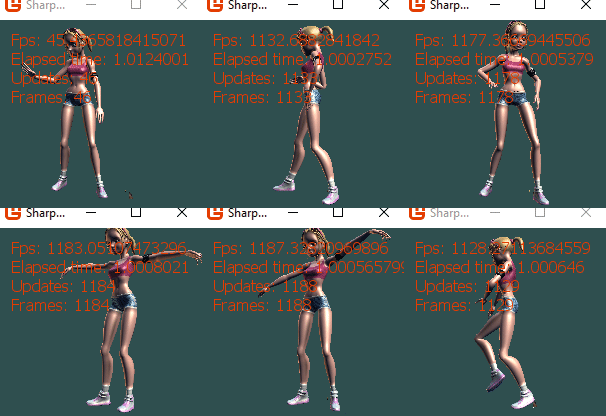
I kinda wish this was in a custom model class without using basic effect so i could see how it was put together easier. Ya i don't even understand it enough to ask any questions.
But that is truly awesome it just worked after all that.
willmotil
on 23 Feb 2020
Related issues
 MichaelDePiazzi
·
4Comments
MichaelDePiazzi
·
4Comments
 NET-D3v3l0p3r
·
3Comments
NET-D3v3l0p3r
·
3Comments
 harry-cpp
·
5Comments
harry-cpp
·
5Comments
 dazinator
·
5Comments
dazinator
·
5Comments
 Ellesent
·
5Comments
Ellesent
·
5Comments
Most helpful comment
Yes thats what I mean. And yes it does lag, I know, I'm the author :)