I don't believe there's been much discussion of the design of the Pipeline dotnet global tool. I'm interested in helping with that next, as I think that's the last piece that need to be nugetized.
Open Questions
Future of Pipeline tool. [EDIT] Resolved: Pipeline is here to stay, while cra0zy is working on his own alternative.
@Jjagg I am in process of writing something custom for the content builder, among the other stuff, so I'm leaving this to you. I really don't wanna touch MGCB/Pipeline Tool anymore.
_Originally posted by @cra0zy in https://github.com/MonoGame/MonoGame/pull/6905#issuecomment-546690990_
Should we be expecting something to replace the current tooling, or is that just personal preference or maybe an alternative option? (I assume the latter)
Name. [EDIT] Resolved: MGCB Editor is currently the top contender, with commands like
dotnet tool run mgcb-editorAs a public package, "Pipeline" is too generic. What name should be used for the package and the command? (Note: our other tools are
dotnet-mgcbanddotnet-2mgfx.) For example:- Tool:
dotnet-mgpipeline - Global command:
mgpipeline - Local command:
dotnet tool run mgpipeline
- Tool:
Structure. [EDIT] Resolved: The platform packages can't be unified, because we want native UI controls on Windows. We can, however, package them together and have a cross-platform launcher so the experience is seamless across all platforms.
Should we package platform-specific Pipeline tools, or unify them? Is UI the only thing preventing these from being unified? Presumably shaders can just continue to not compile on non-Windows for now.
- Platform-specific would be easiest since it would keep the same structure and Eto dependencies. We can publish
dotnet-mgpipeline-windows,dotnet-mgpipeline-mac,dotnet-mgpipeline-linux, but this is clearly not ideal. - We can switch to a new cross-platform .NET Core UI framework and publish a single cross-platform tool. The most popular appears to be Avalonia.
- We can use MonoGame.DesktopGL itself for the UI -- either a 3rd party UI framework, or maintain an _extremely_ slim set of controls just for the tools (not a part of the MG framework).
- Platform-specific would be easiest since it would keep the same structure and Eto dependencies. We can publish
MGCB dependency. [EDIT] Resolved: MGCB will be packaged directly into MGCB Editor. The duplicated files aren't too large and shouldn't be much concern for devs.
How should the MGCB dependency be handled?
- Just package MGCB binaries into the Pipeline tool as well? Then users who use the Pipeline tool and build with the MonoGame.Content.Builder package (#6905) would have a handful of files duplicated, but it's not a big issue. Is there a concern about the two versions needing to be manually kept in sync?
- Package MGCB binaries into the Pipeline tool, but don't additionally required the MGCB tool when using the Pipeline tool. Instead use MGCB out of the Pipeline tool. See the _Usage_ option below for more details.
- Have the Pipeline tool depend on the MGCB dotnet tool. This would be difficult, because if the Pipeline tool is installed globally, then it would have to also install the MGCB tool globally, which is an option we decided to avoid with MonoGame.Content.Builder. This could also be difficult to run locally out of the MonoGame repo, because the Pipeline tool would need to be able to either depend on the MGCB dotnet tool or use the local MGCB project.
Usage. [EDIT] Resolved: /register and /unregister CLI commands will be available to associate the app with the .mgcb extension by running
pipeline /register(global) ordotnet tool run pipeline /register(local).I expect a common scenario to be installing as a global tool, but can we enable more options?
- As an additional option, I was thinking about being able to specify an option in the MonoGame.Content.Builder package (#6905) to restore the Pipeline tool instead of MGCB. This would make it easier for content designers to just clone a repo and automatically get the recommended tooling. And obviously this wouldn't have to compromise any of the core MonoGame.Content.Builder functionality.
- Will we need to give up associating the
.mgcbfile extension with the tool? This doesn't seem like a good option anymore since dotnet tools can be installed globally or locally. Following the potential usage option above, in my own repos I plan to change my Pipeline extensions project into a netcoreapp that can simply calldotnet tool run pipelineon the correct.mgcbfile.
 jnoyola
All 102 comments
- Should we be expecting something to replace the current tooling, or is that just personal preference or maybe an alternative option? (I assume the latter)
Alternative thing, basically you get a code project for compiling content. Right now the basic design goal is to be able to do something like:
```c#
// Add content stuff
contentBuilder.Add("Textures/*", new TextureImporter(), new TextureProcessor());
// This one will override the file if it was selected above
contentBuilder.Add(("Textures/SpecificTexture", new TextureImporter() { SomeProperty = 0.3f; }, new TextureProcessor());
// Build everything added
contentBuilder.Build();
```
 harry-cpp
on 29 Oct 2019
harry-cpp
on 29 Oct 2019
Right now the basic design goal is to be able to do something like
Cool. Reminds me of some of those Cake alternatives like Nuke or Bullseye.
jnoyola
on 29 Oct 2019
Pipeline will be around for quite some time, I believe, so this discussion is very welcome. It's still something very useful to new users.
I'm personally very fine with
mgpipeline, it continues the naming convention of the other tools and the templates.Shaders will need more work that are safer to be addressed in a separate topic. For the time being, I think that the best is to stick with platform specific builds. Switching to a net core UI library sounds interesting to unify! But that sure sounds like quite some work.
Having the Pipeline to rely on the Content Builder would be the best, but if it's too much of mess regarding what's global and what's local, I think it's better to go with everything packed into a single package (duplicate files are a minor issue IMO compared to having everything up and running).
This actually sounds like a plan! It would make everything much smoother and easier to document.
Now that I think about it, I don't know about you all, but "Pipeline" always sounded confusing to me. Do you think that changing the name would prove useful? E.g. "MGCB GUI"
(We can discuss this in another thread if you believe that's too much for now.)
 mrhelmut
on 7 Nov 2019
mrhelmut
on 7 Nov 2019
"Pipeline" always sounded confusing to me
+1. "Pipeline" doesn't really describe what it does, and it's also easy to confuse with the Pipeline library. Fine with me to discuss other options here. I agree, something involving "Content", "MGCB", or "GUI" could be better.
I'm personally very fine with
mgpipelineI suppose this should be deferred until we decide whether to change the name.
Shaders will need more work that are safer to be addressed in a separate topic.
I agree a discussion about shaders won't be productive here. I just wanted to check: if we can merge the platforms under a single net core UI library, will this work without touching the shader code at all?
It might be a lot of work. I can look into that, unless anyone else is familiar with Avalonia.
jnoyola
on 8 Nov 2019
The shader code is a part of MonoGame.Framework.Content.Pipeline. It does not concern the Pipeline Tool. Currently the Pipeline Tool uses MGCB by executing it in a separate process, so it does not have a hard dependency on MGCB. In fact, something that cra0zy and me briefly talked about is that the pipeline tool could have a UI to pick what version of MGCB to use. Because the installations are not tied together, the Pipeline Tool could install MGCB as a local tool in the working directory, just like MonoGame.Content.Builder.
I do not think it is a good idea to rewrite the UI of the Pipeline Tool. A lot of issues users have with it are because of underlying design issues with the Content Pipeline. I'd rather see us focus on improving in that area than writing a new UI that only fixes the issue of portability. In fact I believe the best way to improve the CP is designing a new system from scratch, but let's not get into that in this thread.
Regarding cross-platformness, can we not make things work with a single nuget package? Or maybe we can have refactor things so we have runtime abstractions instead of build time (I'm not sure you can do that with Eto.Forms).
 Jjagg
on 8 Nov 2019
Jjagg
on 8 Nov 2019
By the way, regarding the naming:
- (MonoGame) Content Pipeline = the library underneath MGCB that contains the framework for building content writers and the built-in writers.
- MGCB = the CLI for Content Pipeline
- (MonoGame) Pipeline Tool = the GUI to build response files (text files with command line options) for MGCB. In the end the Pipelie Tool simply runs MGCB with a bunch of arguments.
Jjagg
on 8 Nov 2019
I find it quite complex to have "MonoGame Content Pipeline" "MGCB" "Pipeline Tool" and "MonoGame Content Builder" all being different aspects of the same thing. Pretty sure we can come up with a more straightforward naming for all of those.
Regarding the Pipeline discussion, I guess that the short term goal would be to package it as-is for Windows, macOS, and Linux, and therefore have 3 nugets.
I don't know if it would be useful to choose which MGCB version to use, the typical use case is that you'd use the same version as the main framework.
My personal take would be to package both MGCB and the Pipeline Tool as one unique package to load with the builder, but this is assuming that we overcome the cross-platform issue. It'd be less complex and easier to explain, and users would have everything at hand without anything extra to do (e.g. install the templates and call it a day).
mrhelmut
on 8 Nov 2019
I find it quite complex to have "MonoGame Content Pipeline" "MGCB" "Pipeline Tool" and "MonoGame Content Builder" all being different aspects of the same thing.
This is especially true for MGCB and the content builder nuget because they're basically named the same except we use the acronym for the CLI tool.
Regarding the Pipeline discussion, I guess that the short term goal would be to package it as-is for Windows, macOS, and Linux, and therefore have 3 nugets.
I think that's fine for moving forward with this. It'll probably take longer to get this right with a single nuget, we shouldn't let that block us.
I don't know if it would be useful to choose which MGCB version to use, the typical use case is that you'd use the same version as the main framework.
Yeah, you're right. The way to make it the most useful is to tie the versions together so users don't have to configure the version or anything. I don't think there's a way for us to have the pipeline tool detect the version in any way.
How do we want users to use the pipeline tool? Launch it from the command line? What steps should they take?
It would be nice if we could still register it in the registry to make the file association with .mgcb files. I think I also discussed that with cra0zy. The dotnet tool for the pipeline tool could have an install command that can do things like making the mgcb association or creating a start menu entry on windows or a .desktop file on Linux.
Edit: I should mention I'm not 100% sure this is possible.
Jjagg
on 8 Nov 2019
It would be nice if we could still register it in the registry to make the file association with .mgcb files. I think I also discussed that with cra0zy. The dotnet tool for the pipeline tool could have an install command that can do things like making the mgcb association or creating a start menu entry on windows or a .desktop file on Linux.
That would sound like a plan.
I've been thinking about distributing it as an "extra" on the MonoGame's website with its own installer (which wouldn't be quite smooth of a user experience), but if we can perform the file association and not necessarily having to launch it from the CLI with just a nuget, that would be way better.
mrhelmut
on 8 Nov 2019
It would be nice if we could still register it in the registry to make the file association with .mgcb files.
So what happens when i have two different projects i'm working on my PC and both use different versions of MG? Both of them cannot be associated the .mgcb files at the same time.
Maybe something to consider there.
 tomspilman
on 8 Nov 2019
tomspilman
on 8 Nov 2019
I find it quite complex to have "MonoGame Content Pipeline" "MGCB" "Pipeline Tool" and "MonoGame Content Builder" all being different aspects of the same thing.
What about leaving the Pipeline library, but then reflecting the relation between the others by naming them MGCB, MGCB.GUI, and MGCB.BuildTools, or something like that.
Both of them cannot be associated the .mgcb files at the same time.
Yeah, that’s what I was trying to point out in the OP. Having associations and icons just doesn’t seem feasible if we want it to be a dotnet tool.
jnoyola
on 8 Nov 2019
So what happens when i have two different projects i'm working on my PC and both use different versions of MG?
Then you open it from the command line. This is not an issue unique to the new setup. If you have the tool installed on the system, you have a certain version installed. My proposal basically makes the version of the Pipeline tool that you run it with the system installed version. You can change the version by running the install command with a different version. If we want the benefits of a local installation (like file association) we need do support this somehow.
If we want to solve versioning in combination with the local installation features, our only option is to decouple Pipeline Tool and MGCB version like I said before. But the pipeline tool needs to figure out what version of mgcb to use somehow. I don't know how we can solve that. We could store MGCB version in the MGCB file, but that does not really make sense because it's (mostly) a response file.
Jjagg
on 8 Nov 2019
This is not an issue unique to the new setup. If you have the tool installed on the system, you have a certain version installed.
I guess dot net tools allow you to install multiple copies at once and not just have one running.
I wonder if we could have some sort of pipeline.exe /register or something that you can do to have it self register as the default handler for MG files.
tomspilman
on 8 Nov 2019
If we want to solve versioning in combination with the local installation features, our only option is to decouple Pipeline Tool and MGCB version like I said before.
I have two concerns with that still.
- The Pipeline tool itself has it's own changes between versions. Your two projects could want different versions of the Pipeline tool itself, aside from the different versions of MGCB. In that case, which is associated with files -- the one installed later? That would be similar to how it would work with the current Pipeline tool I suppose.
- Global tools are installed to a different location from local tools. If you install the Pipeline tool globally, but a project also installs it locally, which gets the association or desktop icon?
have it self register as the default handler for MG files
Do you mean you manually run this to choose which instance of the tool to associate with mgcb files? That seems reasonable to me.
jnoyola
on 8 Nov 2019
I guess I wasn't clear about my proposal.
Users can install any version they want using the dotnet tool system, global or local. If they want to, they can execute a command with an installed pipeline tool (as a dotnet tool, not sure if we can do this for local tools though) to make that the one that handles mgcb files, similar to what happens when you run the SDK installer now. That's what I mean for the install command to do, and I think that's also what Tom means with /register.
This is what I meant from the beginning.
In that case, which is associated with files -- the one installed later?
The last one the user ran the register command for. You can't have context sensitive file associations, there's no way around this. The version of the Pipeline Tool does not affect content in any way, so unless the format of MGCB changes any Pipeline Tool works with any MGCB version. We can track this like we do with shaders, by having an MGCB format version in MGCB files that gets incremented if the format changes. But generally you only need to have a recent version installed. Because the Pipeline Tool does not directly affect content you don't really need a specific version unless you have bugs or missing features in the UI itself (or a mgcb format mismatch).
Jjagg
on 8 Nov 2019
Ah, my mistake. I didn't realize you were also referring to a manual "register" command. Yes, I like that too.
jnoyola
on 8 Nov 2019
Regarding the naming, we should probably rename MonoGame.Content.Builder at least. I'd go with MGCB.Build or MGCB.Task. If we're gonna change the Pipeline Tool's name too, I like MGCB.Gui.
Jjagg
on 8 Nov 2019
I'd go with MGCB.Build
That seems reasonable to me.... although it is in there twice... MonoGame Content Builder Build.
If we're gonna change the Pipeline Tool's name too, I like MGCB.Gui.
Always disliked the GUI idea... seemed like it didn't describe enough of what it does.
Some random thoughts...
- MGCB.Editor
- MGCB.Edit
- MGCB.Designer
- MGCB.Organizer
- MGCB.Inspector
- MGCB.Maker
- MGCB.Planner
- MGCB.Author
- MGCB.Creator
- MGCB.Writer
- MGCB.Scribe
- MGCB.Composer
- MGCB.Architect
tomspilman
on 9 Nov 2019
I vote for MGCB.Editor.
harry-cpp
on 9 Nov 2019
I like Editor too!
Jjagg
on 9 Nov 2019
So the project can be MGCB.Editor, and the tool dotnet-mgcb-editor?
And it occurred to me that the library nugets are MonoGame.*, so should we use some expanded form of MGCB.Build for consistency there? (e.g. MonoGame.Content.Builder.Build) The current pattern is acronym for the tools but full name for the libraries.
jnoyola
on 9 Nov 2019
I think it makes sense to write out the names. So then we'll have
MonoGame.Content.Builderwith dotnet tool commandmgcb, referred to as MGCB.MonoGame.Content.Builder.Editorwith dotnet tool commandmgcb-editor, referred to as MGCB editor (pipeline tool might stick around, but we should probably try and avoid that).MonoGame.Content.Builder.Task(?) referred to as MGCB build task.
Jjagg
on 9 Nov 2019
I like that, but I still think something other than Task might be more appropriate, since it’s technically not a task like the current project. Although “Builder.Build” could also be confusing. Where’s Tom with his thesaurus :P
jnoyola
on 9 Nov 2019
It is a task, except it's not explicitly run by users. Maybe Builder.Target or Builder.Run? I still like Build because 'Builder' implies the program can build something, but 'Build' implies it actually does the thing. An alternative interpretation is that it runs MonoGame.Content.Builder at Build time. That's how I justify it anyway.
Jjagg
on 9 Nov 2019
I feel like Builder.Task or Builder.Runner are as close as it can get. Or maybe AutoRun?
mrhelmut
on 9 Nov 2019
So not sure what all the rules are here. But why can it not be MonoGame.Content.Builder and MonoGame.Content.Editor ?
tomspilman
on 9 Nov 2019
I think the general idea is that MonoGame.Content.Builder (mgcb) is the CLI that builds content. And then we need names for the mgcb editor, and the package that runs mgcb as part of a build. These packages aren’t directly building content or editing content.
It is a task, except it's not explicitly run by users.
I was just pointing out the technicality that the old Tasks project contains actual MSBuild tasks that require a UsingTask to run, but the new package is really just a collection of Targets that are run as part of the build. I’m still fine with MonoGame.Content.Builder.Task if you guys think that’s best.
jnoyola
on 9 Nov 2019
But why can it not be MonoGame.Content.Builder and MonoGame.Content.Editor
Yeah, MonoGame Content Builder is what mgcb stands for. That's exactly the confusion we want to avoid.
Unless we change mgcb's name too. Then we can have MonoGame.Content.Cli, MonoGame.Content.Build and MonoGame.Content.Editor. But mgcb is nice as a short command to run for the dotnet tool and I'm not sure what we should replace it with then. Also the other two use mgcb, so it makes sense to have their name be hierarchically below mgcb's name.
Jjagg
on 9 Nov 2019
Regarding the UI framework, I realized Eto can’t build all platforms on .NET Core, even as separate projects. So if we want it to be a .NET tool, we’d need a different framework anyway, right?
jnoyola
on 10 Nov 2019
@jnoyola I think only Mac might be troublesome. Windows should be easy with .NET Core 3 and Linux should work with @cra0zy's GTK stuff. Relevant issue in Eto: https://github.com/picoe/Eto/issues/457
Jjagg
on 10 Nov 2019
Yeah I was looking at that. I wonder how troublesome for Mac. I’m not super familiar with Eto.
jnoyola
on 10 Nov 2019
Technically speaking you can use Eto.Gtk for Mac if you want to build it for .NET Core. Gtk works on all desktop platforms.
harry-cpp
on 11 Nov 2019
Doesn't GTK need to be installed manually on Mac though? And even if we could somehow include it in the package, that would probably be too much extra bloat for Linux and Windows, so we might still want to keep those separate.
jnoyola
on 11 Nov 2019
Native dependencies for each platform aren't an Issue I believe, the tool already comes with a bunch of dependencies that kind of bloat it and we don't really a choice there.
If we can make a GTK version to run as a core app, that would be cool actually (providing GTK runtimes can be included).
mrhelmut
on 11 Nov 2019
providing GTK runtimes can be included
That's the big 'if' for which I still haven't found anything promising.
jnoyola
on 11 Nov 2019
Bundling Gtk for Mac should add around an extra 50 MB once zipped.
harry-cpp
on 11 Nov 2019
I found some prebuilt Windows GTK binaries, but Eto is hardcoded to not use GTK for Windows.
Do we really want to use .NET Core 3.0 WPF for Windows? That would restrict users to Windows 10, right?
jnoyola
on 11 Nov 2019
Isn't .NET Core 3.0 supported down to Windows 7 SP1? https://github.com/dotnet/core/blob/master/release-notes/3.0/3.0-supported-os.md
 persn
on 11 Nov 2019
persn
on 11 Nov 2019
Isn't .NET Core 3.0 supported down to Windows 7 SP1?
Oops, my mistake! I was just looking at that page but missed 7 SP1.
EDIT: Ok, so the plan is to use the following?
- .NET Core 2.1 (for broader OS support) with GDK for Linux/Mac
- .NET Core 3.0 (for WPF support) WPF for Windows
WPF requires Sdk="Microsoft.NET.Sdk.WindowsDesktop" -- can these be packaged together?
jnoyola
on 11 Nov 2019
WPF requires
Sdk="Microsoft.NET.Sdk.WindowsDesktop"-- can these be packaged together?
It looks like this isn’t possible. (And neither is multitargeting a dotnet tool in a single package either, but that’s not necessary if we can’t package GTK and WPF together.)
So I guess the next plan would be to try GTK for all platforms. @cra0zy do you know how to use Eto.Gtk on Windows? I see lots of threads about it, but it appears to be impossible based on the link in my previous comment, which I believe was written by you. Any insight?
EDIT: Never mind. It looks like you can just force the platform instead of using auto-detect. Now to see if the Windows GTK runtime will work.
jnoyola
on 12 Nov 2019
You answered all your questions XD
Anyway as long as you update both GtkSharp and Eto, and override the starting platform, the pipeline tool works without problems on Windows with Gtk backend (use Linux solution to run it):

harry-cpp
on 12 Nov 2019
Were you running that with the installed version of GTK? I tried placing the prebuilt vcpkg binaries in the same folder but still got a not found error for the GTK DLL.
jnoyola
on 12 Nov 2019
Were you running that with the installed version of GTK? I tried placing the prebuilt vcpkg binaries in the same folder but still got a not found error for the GTK DLL.
No, just use nuget to get the latest version of GtkSharp and Eto.Platform.Gtk packages instead of local refs, you don't need to manually install Gtk.
harry-cpp
on 12 Nov 2019
use nuget to get the latest version of GtkSharp and Eto.Platform.Gtk
That’s what I did. But don’t those just contain libraries for making calls to GTK, not the GTK runtime itself?
cc @mrhelmut since he seemed to have the same impression
jnoyola
on 12 Nov 2019
not the GTK runtime itself?
I made the newest version include an automated downloader for Gtk under Windows platform.
harry-cpp
on 12 Nov 2019
PS. Do the following if you wanna see something cool 😈 :
dotnet new -i MonoGame.Template.Gtk.CSharp
dotnet new mggtk
dotnet run
I made the newest version include an automated downloader for Gtk under Windows platform.
That's cool. Maybe include a line in the readme. I saw you removed the part about installing GTK on Windows but I wasn't sure why.
However, this only automatically installs the runtime for devs when you build the project, right? Packing/Publishing the project doesn't include the runtime for distribution. If I copy the project to another computer, it still gets the DLL not found error. It would be cool if there were some option to copy the runtime to the output when building.
jnoyola
on 12 Nov 2019
However, this only automatically installs the runtime for devs when you build the project, right? Packing/Publishing the project doesn't include the runtime for distribution. If I copy the project to another computer, it still gets the DLL not found error. It would be cool if there were some option to copy the runtime to the output when building.
Packaging for Windows with Gtk is something that you should manually do as you can optimize the file size and install time by a lot if you know what you need.
If you are lazy you can just extract the following lib inside the publish folder and it will work just fine: https://github.com/GtkSharp/Dependencies/blob/master/gtk-3.24.zip
harry-cpp
on 12 Nov 2019
Ah makes sense. For the proof of concept I'm going to be lazy 😛
For final packaging, I might need help knowing what we need. I imagine it should be pretty simple to validate the UI, icons, file selection. MGCB.Editor doesn't really have uncommon edge cases.
jnoyola
on 12 Nov 2019
Now I started thinking and I could totally make an easy to use publish targets. I just need to have users specify which libraries they need (I can easily check the lib dependencies) and which icons they need.
harry-cpp
on 12 Nov 2019
I tried unzipping into the bin, but it couldn't find the pixbuf loaders. I tried setting GDK_PIXBUF_MODULE_FILE and GDK_PIXBUF_MODULEDIR but now it looks for MonoGame\Tools\Pipeline\lib\gdk-pixbuf-2.0\2.10.0\loaders\libpixbufloader-png.dll instead of MonoGame\Tools\Pipeline\bin\Debug\netcoreapp2.1\lib\gdk-pixbuf-2.0\2.10.0\loaders\libpixbufloader-png.dll
jnoyola
on 12 Nov 2019
GTK for all platforms.
@cra0zy
I'm very skeptical of this approach. This is where an app starts to work like shit on Windows... when they use Linux GUI libs and not native controls. Things will just behave a little wrong and make the app unpleasant to use.
Is there any other possible way we can do this that won't cripple Windows to make things work for the 5% of users on Mac and Linux?
tomspilman
on 13 Nov 2019
Is there any other possible way we can do this that won't cripple Windows to make things work for the 5% of users on Mac and Linux?
As far as I'm aware, native controls on Windows requires the WindowsDesktop project SDK, which means it would have to be packaged separately from the Mac/Linux tool. I think that's the biggest downside.
EDIT: Practically, that means Windows users would have to do dotnet tool install dotnet-mgcb-editor-windows, while other platforms' users install the other versions of the tool. Additionally you couldn't easily check the MGCB.Editor dependency into a repo since each user might need a different version of the tool.
EDIT 2: With some manual behind-the-scenes trickery, we may be able to pack a .NET Core 3.0 WPF app and a .NET Core 2.1 GTK app into the same package, and have a tool shim that picks the right one depending on the platform. Although will there be compatibility issues with different .NET SDKs? We could have both be .NET Core 3.0, but would that drop too many Mac/Linux users? It's primarily OS X 10.12 that's lost between 2.1 and 3.0.
jnoyola
on 13 Nov 2019
Can't we have separate packages, and then a "master" package that check the system and installs the correct one?
macOS developers are very largely on recent versions of macOS because using XCode kind of forces you to be constantly on the bleeding edge (current version of XCode requries macOS 10.14).
mrhelmut
on 13 Nov 2019
Can't we have separate packages, and then a "master" package that check the system and installs the correct one?
Sure, that's mainly the same. I figured packaging them together is easier if you weren't concerned about bloat, because otherwise you have the same questions we touched briefly earlier in the thread regarding the content builder tool: Do we always install locally, or if the master package is installed globally, do we install the platform package globally too? Do we remove the platform package when you uninstall? How do you know if there are other dependencies on it?
And if you have a master package and platform packages, the same question of .NET Core compatibility still apply: If the master has to be 2.1 for compatibility, how do we handle cases where a Windows user doesn't have 3.0 and is able to install the master package but not run the WPF package?
tl;dr if we're not concerned about package size or macOS 10.12 users, packing the master, WPF, and GTK together as a .NET Core 3.0 tool is simplest.
jnoyola
on 13 Nov 2019
Hmmm, yeah, I feel like having 4 packages on nuget would make things worse from a user experience.
Sounds more reasonable to have one package.
I think that the short term solution would be your suggestion: packing WPF and GTK in the same package. We won't be able to do much about size and bloat in the current context, I guess.
Maybe trying to do a universal editor should be part of a future project.
mrhelmut
on 13 Nov 2019
I tried unzipping into the bin, but it couldn't find the pixbuf loaders. I tried setting
GDK_PIXBUF_MODULE_FILEandGDK_PIXBUF_MODULEDIRbut now it looks forMonoGame\Tools\Pipeline\lib\gdk-pixbuf-2.0\2.10.0\loaders\libpixbufloader-png.dllinstead ofMonoGame\Tools\Pipeline\bin\Debug\netcoreapp2.1\lib\gdk-pixbuf-2.0\2.10.0\loaders\libpixbufloader-png.dll
dotnet run overrides the working directory.
harry-cpp
on 13 Nov 2019
dotnet run overrides the working directory.
I'm not sure I understand your point. I tried setting the paths for those variables to be absolute and relative, and they give the same results. And if dotnet did change my working directory, I imagine it would set it to the DLL's directory, not 2 levels up.
if we're not concerned about package size or macOS 10.12 users, packing the master, WPF, and GTK together as a .NET Core 3.0 tool is simplest.
@tomspilman, what do you think?
jnoyola
on 13 Nov 2019
acking the master, WPF, and GTK together as a .NET Core 3.0 tool is simplest.
That works for me... i suspect the size of it is likely unimportant.
tomspilman
on 13 Nov 2019
I'm not sure I understand your point. I tried setting the paths for those variables to be absolute and relative, and they give the same results. And if
dotnetdid change my working directory, I imagine it would set it to the DLL's directory, not 2 levels up.
Nope, dotnet run sets your working directory as your project directory. Doing something like File.WriteAllText("test.txt", "test.txt"); will create a test.txt file next to your project file.
harry-cpp
on 13 Nov 2019
(also you can override the folder your app will search for libraries by calling SetDllDirectory)
harry-cpp
on 13 Nov 2019
dotnet run sets your working directory as your project directory.
If I run dotnet MGCB.Editor.dll from the command line though (potentially from another folder or different computer), it should be unaware of the project. Writing to file should place it next to the DLL. This won’t be a concern on Windows anymore if we go with WPF, so I’ll look into this more if I run into the issue on Mac. Do you know a good way to get the Mac GTK runtime?
jnoyola
on 13 Nov 2019
I don't really care what we use for Windows, I'm just trying to explain how lib finding works, in general, not gtk related.
harry-cpp
on 13 Nov 2019
Do you know a good way to get the Mac GTK runtime?
Yes, brew.
harry-cpp
on 13 Nov 2019
Yes, brew.
Assuming we still want to pack it into the tool, I guess I can brew install it on a Mac and copy the required files from the runtime into the ThirdParty folder. Alternatively, we could simplify this by instructing Mac users how to install GTK if that's acceptable.
jnoyola
on 21 Nov 2019
Mac developers should be used to Brew, it's pretty common (unless you're a 100% iOS developer and never ventured out of XCode).
I'd be in favor of packing the runtime. The less documentation is required, the better.
Not a big deal if we go the install route, though.
mrhelmut
on 22 Nov 2019
Status Update: I have Windows complete. The cross-platform .NET Core master app can dynamically execute the WPF app, and register and unregister the file association. It's all generic already, so hopefully it'll be easy to throw in the GTK app.
jnoyola
on 22 Nov 2019
Linking this as a note for later in case people wonder why I set MSBuildProjectExtensionsPath.
The dotnet build works fine, but this addresses a problem with building in VS. I guess it's a common enough issue that if you have multiple projects in the same folder open in VS at the same time, the obj\project.assets.json files conflict. This essentially means that restoring one project could "unrestore" the others. This fix puts them each in their own folders within obj.
https://github.com/NuGet/Home/issues/4463#issuecomment-404806889
jnoyola
on 7 Dec 2019
I would of named it the Content Management Tool
or Content Management Editor
Seems like that's what it is.
Tool people always think of command line tool not a visual tool
Content Management is pretty good to associate it to the content manager in a template when you have a brand new person that has 100 questions and is trying to make sense of everything.
I might describe it to a new person as ...
"It's a _visual editing tool_ that helps you to _manage or organize_ your in game _content_.
It's a content management tool that helps that helps you manage your in game _content_
Such as textures and music you wish to add to your monogame project. In visual studio you will see a orange icon labeled content management editor. Double click it to open up the editing tool and _add items_ to it. In _Game1_ you access these via the _ContentManager_ like so ...
ect... followed by some code ect... myTexture = _Content_.Load(...);"
 willmotil
on 16 Dec 2019
willmotil
on 16 Dec 2019
The GTK version runs on Linux, but not on Mac after installing gtk+3 via brew. No errors or anything, it just exits immediately.
jnoyola
on 17 Dec 2019
The Gtk version of the Pipeline Tool can't just run on Mac without few modifications. I am doing some Linux specific stuff in Global.Linux and Style.Linux.
harry-cpp
on 17 Dec 2019
@cra0zy Can I try to rewrite the Pipeline tool using MonoGame itself and an external UI library (or maybe by implementing the controls myself)? Or are you still working on its alternative?
 JoaoBaptMG
on 17 Dec 2019
JoaoBaptMG
on 17 Dec 2019
Making an app require HW acceleration and having non native UI controls doesn't sound like a good plan.
harry-cpp
on 17 Dec 2019
I agree with you, but the maintenance burden might be a problem. We might try QtSharp.
JoaoBaptMG
on 17 Dec 2019
No no, we are already using a good solution, Eto.Forms: https://github.com/picoe/Eto
Also Gtk > QT, I'm a GNOME fanboy :P
All joking aside, the only thing is, I did some extra theming depending on the platform, like loading mime type icons, loading native new/open/save icons instead of the embedded ones, and I also added headerbar for the Linux version. For the most part the Global.Platform.cs and Style.Platform.cs files are not needed, the app will run just fine without them.
harry-cpp
on 17 Dec 2019
The Gtk version of the Pipeline Tool can't just run on Mac without few modifications. I am doing some Linux specific stuff in Global.Linux and Style.Linux.
Ah you're right. I could've sworn somewhere I read it should just run, but maybe that was in a generic Eto.Gtk thread.
Anyway, I decided to go all in and install VS on my Mac, which revealed the following error. @cra0zy do you have any insight here? (PS I can move code issues to a different thread if anyone cares)
Unhandled exception. System.NullReferenceException: Object reference not set to an instance of an object.
   at Eto.GtkSharp.Drawing.FontFamilyHandler.<>c__DisplayClass13_0.<GetFontFamily>b__0(FontFamily r)
   at System.Linq.Enumerable.TryGetFirst[TSource](IEnumerable`1 source, Func`2 predicate, Boolean& found)
   at System.Linq.Enumerable.FirstOrDefault[TSource](IEnumerable`1 source, Func`2 predicate)
   at Eto.GtkSharp.Drawing.FontFamilyHandler.GetFontFamily(String familyName)
   ...
SystemFonts.Default() is getting used in few places, maybe for some reason it returns null on mac.
harry-cpp
on 18 Dec 2019
I've narrowed it down to the issue being that FontsHandler gets its font families from a Gtk.Label's Pango context, but (new Gtk.Label()).PangoContext.Families is giving me an array of 277 nulls. On Ubuntu it successfully loads an array of 133 real font families.
I need to take a break now, but I might crack open Pango later to try to dive deeper.
EDIT: just double checked that Pango is installed and up to date. I assume it's a gtk+3 dependency.
jnoyola
on 19 Dec 2019
Now that I thought about it, try updating GtkSharp by using a nuget instead of local refs, it might solve it.
There was an issue on the Windows side where that failed and I fixed it, can't remember what I did, it might have also fixed it for Mac.
harry-cpp
on 19 Dec 2019
Yup, just looked it up, its fixed in the newest GtkSharp, that should fix it.
harry-cpp
on 19 Dec 2019
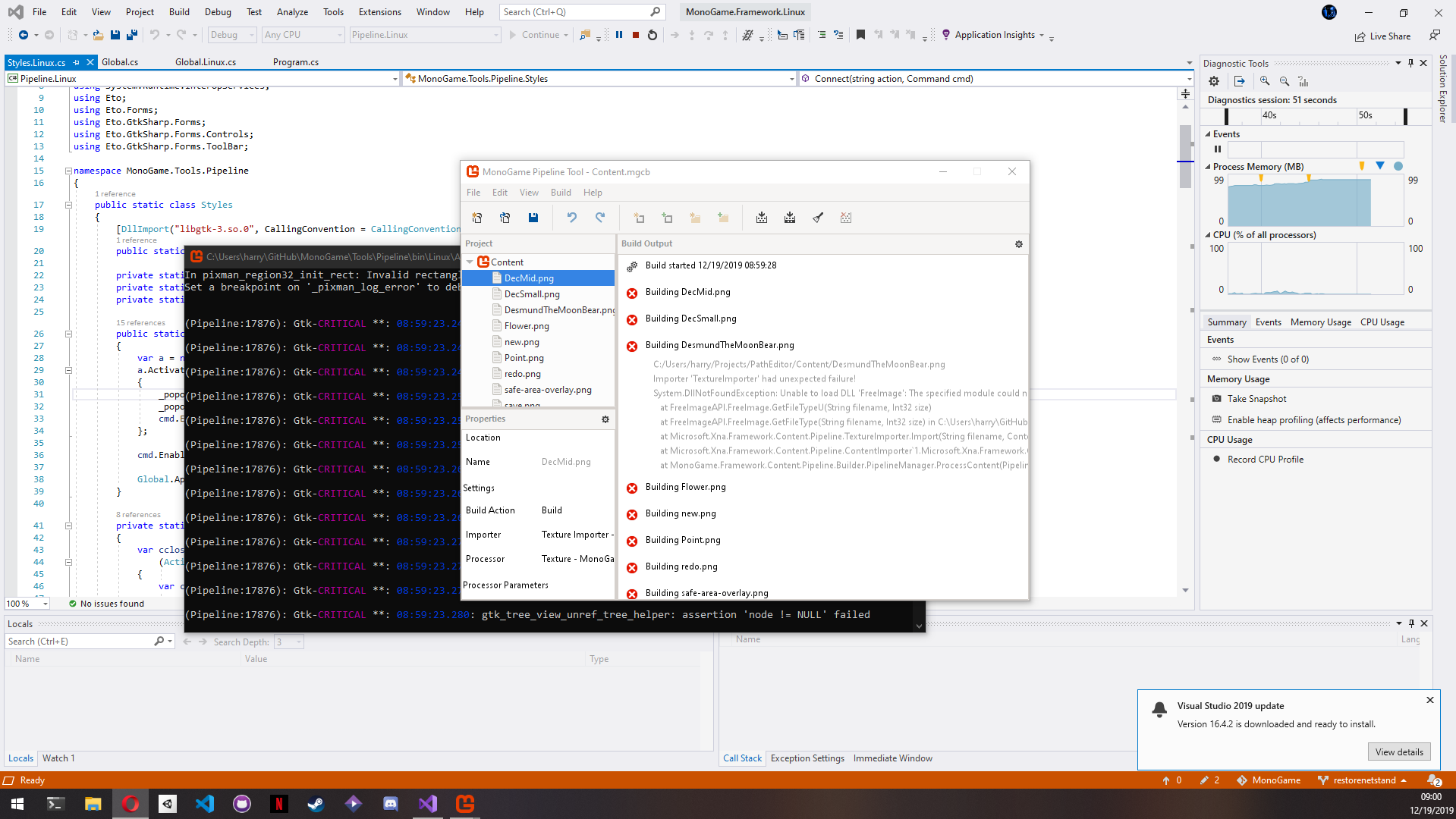
Random side note, mini modifications, and replaced Eto and GtkSharp nugets, and vala:
harry-cpp
on 19 Dec 2019
That helped! Now it's still failing with ArgumentOutOfRangeException when resolving .AppleSystemUIFont to .SF NS Text. The comment clearly states it only works for Gtk2 -- does Eto.Gtk not work with Gtk3 on Macs?
Also pretty cool with Windows!
jnoyola
on 19 Dec 2019
Try asking for a specific font instead of Default, I'm kind of interested in knowing what happens.
harry-cpp
on 19 Dec 2019
I’ll try that tomorrow. I imagine it will work though, since I saw the fonts were loaded. It seemed like it was just an issue with this one being absent. If so, the default in Eto.Gtk should probably map to a different font, right? I wonder why a non-standard one was chosen in the first place.
EDIT: @cra0zy Yes it works if I use a different font. This isn't even a fix we can apply within MG code though. The following throws a null ref exception when trying to resolve the font family only on Mac, so I think Mac just needs a different default font mapped in Eto.
var label = new Label();
var controlFamily = label.Font.ControlObject.Family; // returns ".AppleSystemUIFont"
var family = label.Font.Family; // <-- throws null ref
I opened this issue on the Eto side to see if there are any recommendations or traction, although it's possible cra0zy would be the one with the most context from that side too 😛
https://github.com/picoe/Eto/issues/1539
jnoyola
on 20 Dec 2019
Still stuck on this Mac issue. I'll try to work on file association for Linux in the meantime.
jnoyola
on 22 Jan 2020
harry-cpp
on 22 Feb 2020
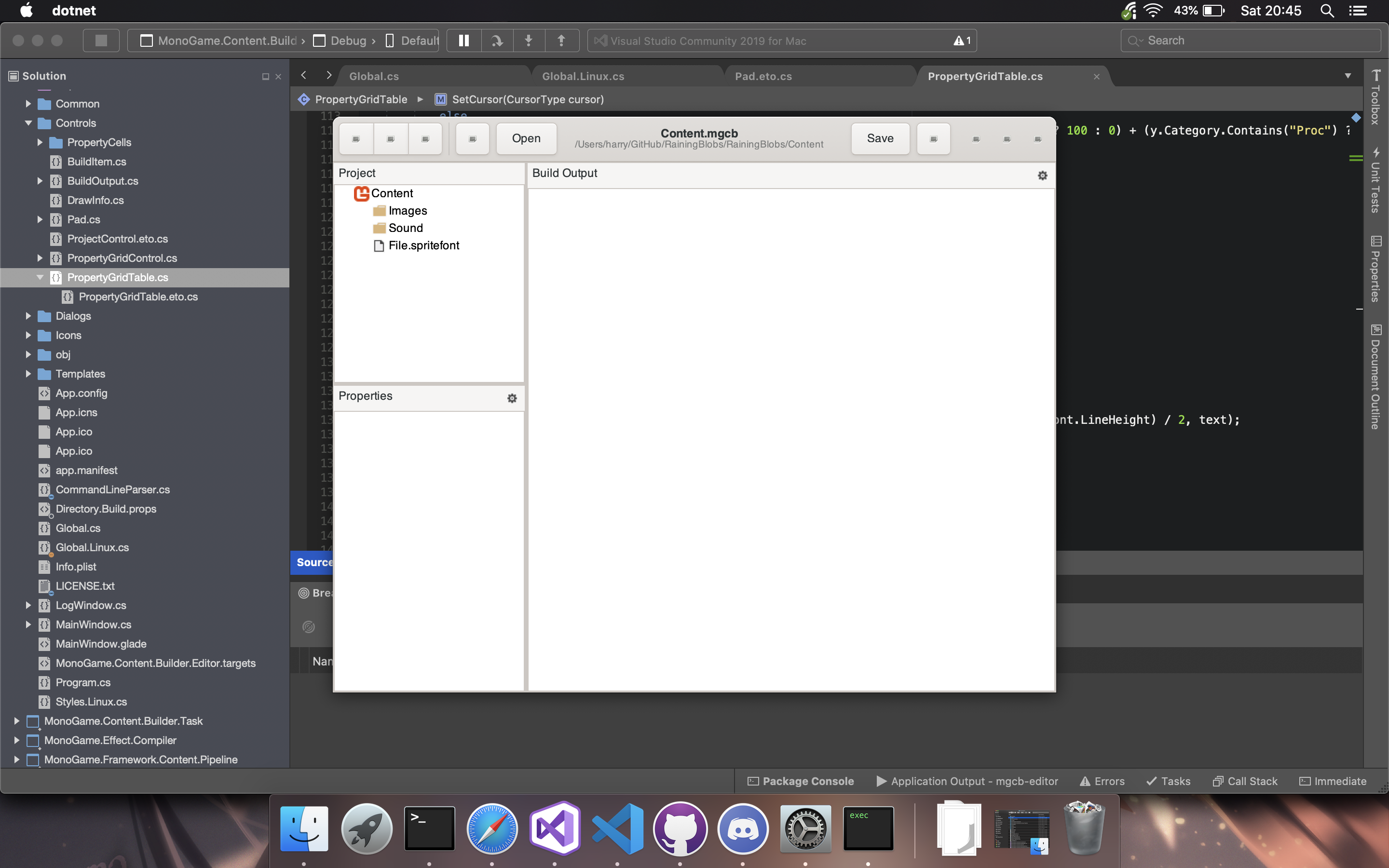
That's awesome! Did you have to deal with the same Mac font issue?
Do you want to share your changes, or for me to share mine with you? We could start a shared feature branch. Much of my effort so far was put into
- upgrading the projects
- Windows file association by porting the .nsi registry commands to a CLI --register command
- setting up a platform-agnostic dotnet global tool launcher that builds and launches the platform projects without inheriting the WindowsDesktop SDK props (primarily with use of
ReferenceOutputAssembly="false"andContentWithTargetPath, but it would make more sense in full context)
jnoyola
on 24 Feb 2020
So, tldr. we can use native Mac version with .NET Core so I would rather we use that.
The projects are available at: https://github.com/MonoGame/MonoGame/tree/cake/Tools/MonoGame.Content.Builder.Editor been working on getting protobuild killed off for good, just some minor changes left which should be done in the next few days.
harry-cpp
on 24 Feb 2020
Oh that's awesome! Do you still want some of the changes I made, mentioned above, or do you have it covered? It looks like you'll still need a common launcher so the same dotnet global tool can wrap any implementation.
My code is here: https://dev.azure.com/hollow-games/MonoGame/_git/MonoGame?version=GBmgcb_editor
jnoyola
on 25 Feb 2020
I've only made .csproj files that run on .NET Core, I haven't touched anything in regards to making it a dotnet tool so any work you did will be very useful.
harry-cpp
on 25 Feb 2020
Got it. Ok, I’ll pull in your changes. Thanks!
jnoyola
on 25 Feb 2020
The PR is up, it will be merged in the next couple of days.
harry-cpp
on 25 Feb 2020
I finished merging the current state of things back into my code, doing a _ton_ of cleanup (of my new code) along the way. Regarding VS file association, it looks like the registry edits that the installer makes don't seem to work for VS2017 or VS2019. Do they work for anyone? From what I can tell, we'd have to do something like this.
Hopefully I can finish up the remaining registration tasks and get a PR up in the next week or so.
EDIT: the installers are no longer in the repo, so I pasted the registry edits below for easy reference.
!macro VS_ASSOCIATE_EDITOR TOOLNAME VSVERSION EXT TOOLPATH
  WriteRegStr   HKCU 'Software\Microsoft\VisualStudio\${VSVERSION}\Default Editors\${EXT}' 'Custom' '${TOOLNAME}'
  WriteRegDWORD HKCU 'Software\Microsoft\VisualStudio\${VSVERSION}\Default Editors\${EXT}' 'Type' 0x00000002
  WriteRegStr   HKCU 'Software\Microsoft\VisualStudio\${VSVERSION}\Default Editors\${EXT}\${TOOLNAME}' '' '${TOOLPATH}'
  WriteRegStr   HKCU 'Software\Microsoft\VisualStudio\${VSVERSION}\Default Editors\${EXT}\${TOOLNAME}' 'Arguments' ''
!macroend
; Associate .mgcb files open in the Pipeline tool.
!insertmacro VS_ASSOCIATE_EDITOR 'MonoGame Pipeline' '10.0' 'mgcb' '${MSBuildInstallDir}\Tools\Pipeline.exe'
!insertmacro VS_ASSOCIATE_EDITOR 'MonoGame Pipeline' '11.0' 'mgcb' '${MSBuildInstallDir}\Tools\Pipeline.exe'
!insertmacro VS_ASSOCIATE_EDITOR 'MonoGame Pipeline' '12.0' 'mgcb' '${MSBuildInstallDir}\Tools\Pipeline.exe'
!insertmacro VS_ASSOCIATE_EDITOR 'MonoGame Pipeline' '14.0' 'mgcb' '${MSBuildInstallDir}\Tools\Pipeline.exe'
!insertmacro VS_ASSOCIATE_EDITOR 'MonoGame Pipeline' '15.0' 'mgcb' '${MSBuildInstallDir}\Tools\Pipeline.exe'
Wuhu!
harry-cpp
on 24 Mar 2020
There was a question in my last post btw 😛 Not sure if it was overlooked or if you just don't know.
Finished and tested Linux registration and unregistration. All that's left is Mac.
jnoyola
on 28 Mar 2020
You should skip installer part for VS side of things.
harry-cpp
on 28 Mar 2020
To be more precise, we just need registration to associate file explorer .mgcb files and launcher, nothing more.
harry-cpp
on 28 Mar 2020
The Mac association is proving to be more difficult than I expected. Even after I lsregister as the old installer did, opening a file fails with
The document "Content.mgcb" coudl not be opened. MGCB Editor cannot open files in the "MGCB" format.
because we don't set the NSApplication OpenFile delegate. I tried setting it, but it still didn't work. People are saying you have to use a document-based app. It looks like this is a thing in Xamarin and MonoMac. Does Eto surface this?
jnoyola
on 3 Apr 2020
Not sure, you can skip it for now and I'll help with it once the PR is up.
harry-cpp
on 3 Apr 2020
It's finally here! #7090
jnoyola
on 3 Apr 2020
PR is merged. I think this can be closed now and hopefully it will be publicly available soon!
P.S. if anyone's looking at this and wants help getting it early via your own Azure DevOps cloud build, or is curious about how to turn your Content Pipeline Extensions project into a console app that pops open the MGCB Editor automatically, let me know!
jnoyola
on 11 Apr 2020
Related issues
tomspilman
·
4Comments
 ryancheung
·
4Comments
ryancheung
·
4Comments
 Halofreak1990
·
4Comments
Halofreak1990
·
4Comments
 Grabiobot
·
5Comments
Grabiobot
·
5Comments
 MichaelDePiazzi
·
4Comments
MichaelDePiazzi
·
4Comments
Most helpful comment
So, tldr. we can use native Mac version with .NET Core so I would rather we use that.
The projects are available at: https://github.com/MonoGame/MonoGame/tree/cake/Tools/MonoGame.Content.Builder.Editor been working on getting protobuild killed off for good, just some minor changes left which should be done in the next few days.