Monogame: [Todo list] Future-proofing MonoGame
Hey there!
Many efforts have been started to future-proof MonoGame and make it a modern .Net framework but it seems that there is no comprehensive centralized point where to understand how things should move forward and their current state.
Hence, I'm trying to maintain this issue to keep track of the different tasks. Please feel free to point me to any untracked tasks or progress.
I guess that we will agree on the following main objective: making MonoGame fully .Net Standard 2.0 compliant in its entirety (all targets, all of its tools, and its build/test/package process), while maintaining a backward compatibility where it's relevant.
This would mean: being able to consume MonoGame as a dotnet (Core) framework, and as a full .Net framework.
So here comes the long list. @cra0zy @Jjagg @tomspilman please let me know if this list makes sense to you and if there's anything more to say about the current state of the repository.
Moving to .Net Standard 2.0 (and .Net Core compatibility):
- [x] Removing Protobuild & switching to SDK-style project format #6207 #6768 #4975 #6604
- [x] MonoGame.Framework
- [x] Windows DirectX
- [x] Windows UWP
- [x] DesktopGL
- [x] Android
- [x] iOS
- [x] Archive MonoGame.Framework.Net to a dedicated repo (#6900) -> https://github.com/MonoGame/MonoGame.Framework.Net
- [x] MonoGame.Framework.Content.Pipeline
- [x] Windows
- [x] macOS
- [x] Linux
- [x] Tools/2MGFX
- [x] Windows/macOS/Linux
- [x] Tools/MGCB
- [x] Windows/macOS/Linux
- [x] Tools/Pipeline
- [x] Windows/macOS/Linux
- [x] Remove Protobuild and any file/folder related to it
- [x] Making all tools Dotnet Tools and packaging them as nugets (and make the templates to use them)
- [x] MGCB #6905 #6930
- [x] 2MGFX #6930
- [x] Pipeline #6922
- [x] Making Core templates (that uses global tools) and publishing them as nuget for
dotnet new -i#6930
- [x] Windows DirectX
- [x] ~Windows UWP~ (not .net core compatible)
- [x] DesktopGL
- [x] ~Android~ (not .net core compatible)
- [x] ~iOS~ (not .net core compatible)
- [x] ~Making all targets
dotnet build/publishcompatible~ #5339 -> WindowsDX and DesktopGL supportdotnet build; others require full MSBuild so they can't be built with portable MSBuild that dotnet CLI uses.
Getting Team City continuous integration to work again:
- [x] Tests (content pipeline tests should be moved to dedicated test projects)
- [x] Windows DirectX #6957
- [x] DesktopGL #6957
- [x] Building and publishing all targets as nugets #6773
Keeping a compatibility toward full framework users:
- [x] Defining which backward compatibility target(s) make sense beside
netstandard2.0(net4? net45? net451?) =>net452that is - [x] ~Making traditional non-Core templates (that would be packaged as a VS extension along with the tools they would rely on?) for full framework users~ (not relevant anymore)
- [x] ~Allowing to install non-Core tools & templates to MSBuild when building from source (e.g. auto-deploy target at build time) for full framework users~ (not relevant anymore)
- [x] Packaging project templates into a Visual Studio Extension so that templates can be distributed without the need of an installer
Documentation:
- [x] Update the Getting Started documentation for setting up projects for all targets
- [x] Update the Publishing & Packaging documentation for distributing apps on all targets
- [x] Document how to build MonoGame from source code and debug it
Maintenance:
- [x] Removing the installer #6842
- [x] Dropping irrelevant targets
- [x] macOS (should be integrated into DesktopGL after VideoPlayer has been implemented there -> #6860)
- [x] Linux/WindowsGL (is equivalent to DesktopGL and should be renamed/removed) -> naming is because of Protobuild, the SDK-style project is named DesktopGL.
- [x] Windows Phone? (already dropped)
- [x] ~Web (not maintained)~
- [x] ~tvOS (not maintained)~
- [x] Remove obsolete IDE extensions
- [x] Remove obsolete nuget nuspec
- [x] Remove obsolete zip templates and build F# templates
- [x] Make the Cake script to output all nuget artifacts to the same folder (e.g.
./ouputor./buildonce protobuild is gone)
Bonus stage for console targets (which unfortunately can't be discussed publicly):
- [x] ~Keeping VS2015 and net45 non-SDK style projects while being compatible with the parent repository structure~ (deprecated)
- [x] Refactoring MGCB and Pipeline to find console targets
- [x] Enforce C# 5.0 language version
 mrhelmut
All 67 comments
Defining which backward compatibility target(s) make sense beside netstandard2.0 (net4? net45? net451?)
For users targeting Windows, it makes sense to keep net45 around for compatibility and because the runtime doesn't have to be shipped. So we should definitely keep a .NET Framework target. We should choose which one by looking at which OS versions of Windows we want to keep supporting.
MonoGame.Framework tvOS
Don't know how well this works or if it even runs at all.
MonoGame.Framework Web
We can break this for now since it was an experiment. Will be redone later with WASM.
MonoGame.Framework.Net
We should drop this. There's some functions we should salvage from it, but the whole GameServices and networking API's should be removed. They haven't been maintained in years.
Example of something we should salvage is showing on screen keyboard (from Guide).
MonoGame.Framework.Content.Pipeline
The SDK style project is just one project for all desktop platforms.
Tests
I ported them over, but some tests where still failing under .NET Core so we should fix those.
MGCB
There's a global tool project for it. Failing tests where largely because of MGCB dependency dll loading failure on .NET Core, so we should make sure those all work.
2MGFX
There's a global tool project for it.
@mrhelmut I edited your post with some updates :)
 Jjagg
on 11 Sep 2019
Jjagg
on 11 Sep 2019
We can break this for now since it was an experiment. Will be redone later with WASM.
On a related note I did start porting my Bridge.NET version to WASM. The current .Web project stuff were just stubs for JSIL, but no one ever made it work (I tried but failed, because its JSIL ¯_(ツ)_/¯).
 harry-cpp
on 11 Sep 2019
harry-cpp
on 11 Sep 2019
Removing both tvOS and Web makes sense to me.
We should maybe archive MonoGame.Framework.Net to another repo so that #6556 effort is not put to waste.
mrhelmut
on 11 Sep 2019
We should maybe archive MonoGame.Framework.Net to another repo so that #6556 effort is not put to waste.
I think that's a good idea. @tomspilman Could you create a repo for it and give me and cra0zy merge access? (we don't have the rights to create repos)
I think we only need to move the ShowKeyboard stuff from Guide into the MonoGame.Framework assembly.
Jjagg
on 11 Sep 2019
Allowing to install global tools & templates to dotnet when building from source (e.g. auto-deploy target at build time)
We should do this with a command line argument in the CAKE script.
Jjagg
on 11 Sep 2019
Could you create a repo for it and give me and cra0zy merge access?
Done.
https://github.com/MonoGame/MonoGame.Framework.Net
You both have full admin access to the repo.
I think we only need to move the ShowKeyboard stuff from Guide into the MonoGame.Framework
We added a totally new keyboard API to replace that: KeyboardInput.Show. It is implemented on all the consoles and mobile.
http://www.monogame.net/documentation/?page=T_Microsoft_Xna_Framework_Input_KeyboardInput
I don't know if anything in Guide needs to be brought back.
 tomspilman
on 11 Sep 2019
tomspilman
on 11 Sep 2019
Oh, great. Then I'm pretty sure we don't need to pull anything from Net into MonoGame.Framework.
Jjagg
on 11 Sep 2019
I'm working on C# stuff for some net core and standard stuff, I've reworked SharpDX here https://github.com/amerkoleci/Vortice.Windows and have WIP next gen rendering backends in my Vortice framework.
@Jjagg do you plan to work on OpenWindow?
 amerkoleci
on 11 Sep 2019
amerkoleci
on 11 Sep 2019
For now we can stick with the latest SharpDX, we're ways of from implementing next gen graphics stuff. (isn't it current gen by now?)
I won't work on OpenWindow in the coming weeks at least, but it's always on my todo list :) I wish it was mature enough to accept contributions. That's completely unrelated to MG though, we most likely won't ever be using it here.
Jjagg
on 11 Sep 2019
Regarding the targets, Steam has a baseline for net452 (which has a min req of Win7 SP1). Consoles have a target of net45 but this can be addressed with non SDK style projects.
I would however like to suggest a netstandard2.0;net45 target so that we make sure that consoles are compatible while also be fine with Steam installers.
mrhelmut
on 11 Sep 2019
Consoles and WinDX/DGL are completely separate, we don't need the same targets for them. I'd go with netstandard2.0 and net452 for DesktopGL, netcoreapp3.0 and net452 for WindowsDX and net45 or whatever is necessary for console projects.
Jjagg
on 12 Sep 2019
I guess the framework doesn't make much difference, the main concern is to be able to detect contributions that would break consoles (e.g. using C# 6.0+ syntax), but I guess we have no mean to detect that without forcing the build bot to use the VS2015 toolchain (which is basically what we're trying to move away from).
We'll have to be careful about code reviews.
Let's shoot for net452 then.
mrhelmut
on 12 Sep 2019
the main concern is to be able to detect contributions that would break consoles
What we can do is add a special build step just for this that builds under VS2015 and/or sets this...
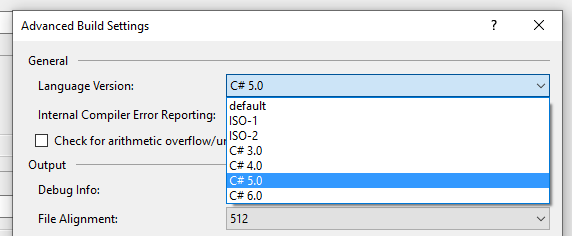
Which we can use to detect issues.
The other thing to do is setup a build server specifically to build our console versions, but we would have to do it in a way that doesn't expose NDA'd information.
tomspilman
on 12 Sep 2019
There is also the -langversion C# compiler option now...
https://docs.microsoft.com/en-us/dotnet/csharp/language-reference/configure-language-version#configure-multiple-projects
tomspilman
on 12 Sep 2019
Yeah, setting LangVersion is an easy fix, we should have done that years ago tbh.
Jjagg
on 12 Sep 2019
sticking to .net framework 4.5 isn't future proofing monogame
work on getting console to support .net core and start from there is the way to go
mono is moving to .net core too and plan to support consoles and web with wasm
 RUSshy
on 27 Sep 2019
RUSshy
on 27 Sep 2019
Wasm for consoles? I haven't heard of that! Got any links for that @RUSshy?
cc @tomspilman
Jjagg
on 27 Sep 2019
i never said wasm for console, i said support for console, and support for web with wasm
RUSshy
on 27 Sep 2019
plan to support consoles
What do you mean by this then? AOT?
Jjagg
on 27 Sep 2019
Honestly, if MonoGame got that netstandard2.0 love, it would be a huge step forward.
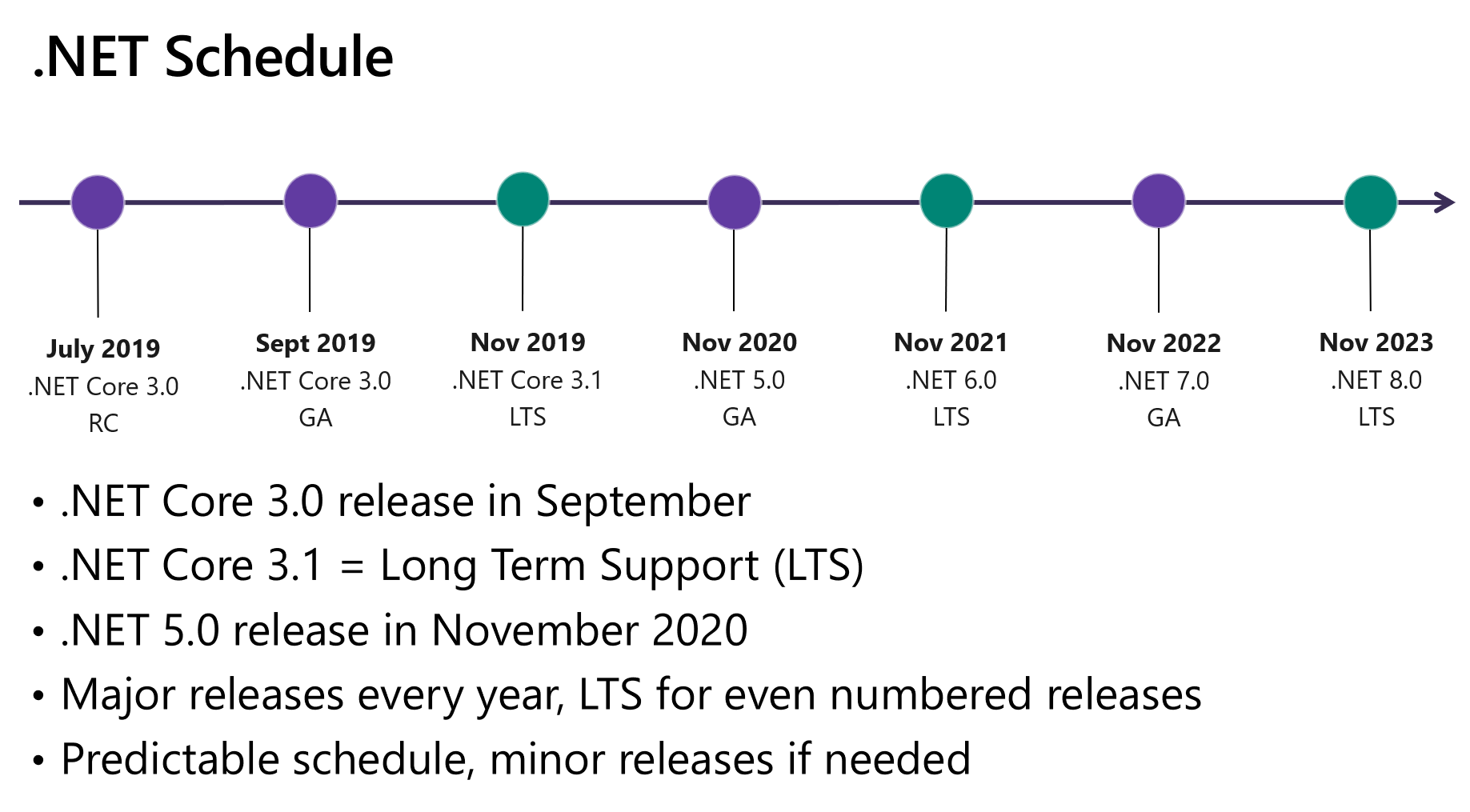
The development (except security patches) on the .Net _Framework_ will soon stop and .Net Core will practically become it's feature-enriched predecessor, becoming the new .Net 5 which can utilize either the Mono or .NET Core runtime, meaning that it will be supported based on the runtime's platforms.
MonoGame + .Net5 would be a dream from cross-platform development :smiley:
 TechnologicalPizza
on 27 Sep 2019
TechnologicalPizza
on 27 Sep 2019
The DesktopGL SDK-styld project targets netstandard2.0 and we'll add netcoreapp3.0 as a target for WindowsDX. The .NET targets we can support depend on the target platform, so we can't target netstandard across the board.
Jjagg
on 27 Sep 2019
Then the question stands: is there any platform that wouldn't support .Net 5 🤔
TechnologicalPizza
on 27 Sep 2019
We currently cannot use C# 7 because the AOT compiler that's used for consoles does not support some of the IL that newer language versions generate. We stick with .net 4.5.1 for users that want to support old Windows machines.
Jjagg
on 27 Sep 2019
We currently cannot use C# 7 because the AOT compiler that's used for consoles does not support some of the IL that newer language versions generate.
We're working on that issue currently and hope to resolve it in the coming months.
tomspilman
on 27 Sep 2019
https://devblogs.microsoft.com/dotnet/introducing-net-5/
CTRL+F console
RUSshy
on 28 Sep 2019
https://devblogs.microsoft.com/dotnet/introducing-net-5/
CTRL+F console
From what we know, it'll most likely only support the application side of Win10 powered consoles (the same way UWP is working on Xbox One). That is: Xbox One limited mode, and maybe the limited mode of the next Xbox?
Which means that from gaming perspective, .Net 5 will not run on the game partition of Win10 consoles (and most obviously no other consoles).
There's still a big need for the console AOT compiler that Sickhead is maintaining, though if they manage to get it C#7 compliant, it shouldn't be much of a concern to move MonoGame forward.
mrhelmut
on 9 Oct 2019
Quoting the .Net5 introduction blog:
Taken together, the .NET Core and Mono runtimes have a lot of similarities (they are both .NET runtimes after all) but also valuable unique capabilities. It makes sense to make it possible to pick the runtime experience you want. We’re in the process of making CoreCLR and Mono drop-in replacements for one another. We will make it as simple as a build switch to choose between the different runtime options.
The following sections describe the primary pivots we are planning for .NET 5. They provide a clear view on how we plan to evolve the two runtimes individually, and also together.
So yeah, I'm pretty sure that .Net5 will at least run anywhere where Mono does.
Unless that console AOT compiler only does native code magic which doesn't involve Mono at all.
C#7 support would already be a great step though 😃
TechnologicalPizza
on 9 Oct 2019
Mono doesn't run on consoles (besides a PS4 version). That's the whole purpose of MG console AOT, which doesn't use Mono (it transpiles the IL code into C++ linked to a garbage collector).
The things is: it only understands IL code produced by the VS2015 C# compiler, for now (Tom has plans to move it further). Hence the present C#5/.Net 4.5 backward compatibility requirement.
Even if we imagine a future with Mono on all consoles (unlikely), MG console AOT still has some great benefits which are making it the way to go on consoles: it allows to achieve up to 10x Mono AOT's performances; and it is more likely to be available sooner than Mono upon new consoles' launch.
And yeah, Tom and the team have done some fantastic work on this console tech!
mrhelmut
on 9 Oct 2019
Ah, Mono console support is limited to PS4 and XboxOne. The AOT compiler will probably be required for quite some time then.
Ok, just gotta wait for that sweet C#7 support and hope that Mono gets support for the popular consoles over time :smile:
TechnologicalPizza
on 9 Oct 2019
From what we know, it'll most likely only support the application side of Win10 powered consoles (the same way UWP is working on Xbox One). That is: Xbox One limited mode, and maybe the limited mode of the next Xbox?
Which means that from gaming perspective, .Net 5 will not run on the game partition of Win10 consoles (and most obviously no other consoles).
There's still a big need for the console AOT compiler that Sickhead is maintaining, though if they manage to get it C#7 compliant, it shouldn't be much of a concern to move MonoGame forward.
Why don't they open source it, better why they don't try to get in touch with Microsoft to help make .net available on more consoles directly?
The current way of doing things is counter productive, stuck on old C# and .net and not generally available probably because lack of manpower and time
The things is: it only understands IL code produced by the VS2015 C# compiler, for now (Tom has plans to move it further). Hence the present C#5/.Net 4.5 backward compatibility requirement.
this is exactly what i'm talking about, not a good way to be future proof
RUSshy
on 9 Oct 2019
Why don't they open source it, better why they don't try to get in touch with Microsoft to help make .net available on more consoles directly?
It's actually open source but can't be made public for a reason: console NDAs (there's a lot of platform code).
Microsoft and Xamarin are well aware of what's happening here, and they somehow acknowledged this tool to be the way to go on consoles.
To my knowledge, Microsoft has no plan to bring .Net on consoles beside the Win10 partition of the Xbox.
The fact that Mono has a PS4 port predates the acquisition of Xamarin and we are yet to be aware of any continuation to this plan (indications tend to unlikely).
It's not about saying "we must stick to C#5", but "we need to move forward, but there's a dependency which can't move as fast as the main repo (but it moves!)".
mrhelmut
on 10 Oct 2019
It's actually open source but can't be made public for a reason: console NDAs (there's a lot of platform code).
I guess it's not possible to abstract the code so part of it can be published...
Microsoft and Xamarin are well aware of what's happening here, and they somehow acknowledged this tool to be the way to go on consoles.
I understand Unity follows the same path?
I believe Net Core can be compiled AOT too, could this benefit console AOT compilation in some way? is there any console CPU not covered by Net Core? (x86,x64,Arm)
 vpenades
on 10 Oct 2019
vpenades
on 10 Oct 2019
There is CoreRT around, but it's not an official part of the .Net Framework and there is no plan for it (ref https://github.com/dotnet/corert/issues/7200). It's more an experiment than an official product, so it's hard to bet the future on it.
Though I guess it would make sense that Net Core will have its own universal AOT runtime at some point (Mono does that already), but apparently it's not going to happen before .Net 6.
The key limit here, is that despite AOT compilation, there is still a need for a runtime to be ported (garbage collector, reflector, etc.) on the target platform, with a proper packager.
Next-gen is coming next year and console developers need day-0 support. That's why Unity maintains its own IL2CPP and runtime, and why MG maintains its own too.
I guess it's not possible to abstract the code so part of it can be published...
I believe there are plans for that but the maintainers are quite busy on various projects (e.g. supporting net core, porting games, etc.) that it'd be a very fuzzy ETA.
mrhelmut
on 10 Oct 2019
The key limit here, is that despite AOT compilation, there is still a need for a runtime to be ported (garbage collector, reflector, etc.) on the target platform, with a proper packager.
That's what I mean, I thought in order to compile a single native Exe, the way CoreRT is supposed to do, it means it must also include all the runtime bits... but yes, reading the status of CoreRT is quite discouraging...
It's also discouraging to see the poor support that consoles give to other languages besides C++
vpenades
on 11 Oct 2019
I can only agree.
mrhelmut
on 13 Oct 2019
Making all targets dotnet build/publish compatible
This works for desktop, but mobile and UWP require full msbuild so it's not possible to support dotnet build for those. I'll scratch this item off the list.
Jjagg
on 24 Oct 2019
Yeah, as long as they are switched to the SDK-style project format, I think we're good with them.
mrhelmut
on 24 Oct 2019
Here's a recap of the on-going progress:
- #6905 makes MGCB as a dotnet tool, which makes project templates stand on their own
- #6922 discusses the same for the Pipeline tool but is waiting decisions
- #6930 updates the templates to be consume by dotnet properly
- #6900 archives the net namespace
Once these are validated, the next major work is to upload all those nugets, and make the tests to work again. Then we should be good! (it'll be only about maintenance work and backward compat from this point)
mrhelmut
on 5 Nov 2019
@mrhelmut @cra0zy @Jjagg
One thing not in our list above but gravely needed is some sort of basic "getting started" on how to use MonoGame with dotnet core. For example I for one know nothing about to use any of this work you've done so far.
It shouldn't teach all of XNA/MG ... just focused on the first few steps of creating a new project. Basically a new version of this:
http://www.monogame.net/documentation/?page=creating_a_new_project_vs
We should add it soon and put a note on what versions of MG it works with and that it is WIP docs.
tomspilman
on 5 Nov 2019
I'm adding this to the to do list.
I think that MG deserve a good documentation refresh, we should probably schedule this as the next big maintenance project.
mrhelmut
on 5 Nov 2019
I think that MG deserve a good documentation refresh, we should probably schedule this as the next big maintenance project.
Agreed.
harry-cpp
on 5 Nov 2019
Alright, with #6905 and #6934 merged, we now have a good base to move forward! Good job everyone.
Next step would be to make the tests to work again, and then update Team City scripts to get the continuous integration back and publish the now netstandard nugets.
And then documentation and cleaning up.
mrhelmut
on 7 Nov 2019
I've started to work on getting the tests back on track #6961.
Regarding the remaining work:
- @jnoyola is working on a nuget to setup the Pipeline tool #6922
- Pipeline tool needs a SDK-Style
csprojand has to be packed in the Cake script and added to the solution files
Once these works are done, we'll be able to plug Cake to Team City and have everything published to nuget.org.
And after that, removing Protobuild & the installer, and starting to write some shiny new documentations!
Bonus stage: having a VS extension to install the templates to VS (for users who are not into dotnet new).
We're getting really close to having the repository back in shape. Every inputs are welcome.
mrhelmut
on 8 Dec 2019
I slowed down on the Pipeline tool a bit, but I'm making progress again. Just to clarify the bullet points, my changes should cover updating it to SDK-style csproj, converting to .NET Core, and packing it as a nuget (dotnet global tool).
 jnoyola
on 9 Dec 2019
jnoyola
on 9 Dec 2019
@jnoyola Cheers! Let me know if I can be of any assistance.
@cra0zy Would it be possible to transfer the ownership of these packages to the MonoGame organization so that the build bot can publish the new artifacts by itself? (they share the same package Id)
https://www.nuget.org/packages/MonoGame.Content.Builder/
https://www.nuget.org/packages/MonoGame.Templates.CSharp/
mrhelmut
on 9 Dec 2019
Yes, of course.
harry-cpp
on 9 Dec 2019
I believe we should update the templates to have a net452 target, and not just .Net Core.
Following a discussion on the CoreRT repository (https://github.com/dotnet/corert/issues/7200), I tested all runtime and noticed that .Net Core 3.1 is extremely prone to stuttering while no other runtime is.
This makes .Net Core a critically bad runtime for games. (EDIT: please read the next few comments, there are ways to mitigate that at the cost of startup time)
As of now, it is not advisable to even ship MonoGame with .Net Core as the default target framework.
We tested in production Mono 5, .Net 4.5.2-4.8, CoreRT, and .Net Core 3.1.
They all perform jitter-free, expect .Net Core (even with Ready2Run images).
This is because the .Net Core JIT compiler has pretty bad realtime performances for high performance scenarios.
I would greatly advise to change the TargetFramework of the DesktopGL and WindowsDX templates target to net452.
.Net Core targets are advisable only when used in combination with CoreRT, and since CoreRT is not an official product (and may never be), I am not in favor of documenting its usage (I mean, officially. It's still very relevant and there are games using it in production successfully).
mrhelmut
on 18 Dec 2019
@mrhelmut But isn’t .NET Framework now deprecated and going to be phased out entirely, leaving .NET Core our only option? If that happens, the only way to run MonoGame (officially) will be in a runtime that wasn’t made for games.
 JoaoBaptMG
on 18 Dec 2019
JoaoBaptMG
on 18 Dec 2019
@mrhelmut Maybe TieredCompilation related?
http://jaliyaudagedara.blogspot.com/2019/10/net-core-tiered-compilation.html
harry-cpp
on 18 Dec 2019
Suffices to somehow inspect the assembly and throw a warning/exception if TieredCompilation is set to true?
JoaoBaptMG
on 18 Dec 2019
@JoaoBaptMG Doing our best to make the .Net team aware of this issue. It's a regression over other runtimes, so hopes are that it is not going to be ignored.
Also doing our best so that CoreRT end up being an official product in some way (current hints are that the next-gen .Net Core compiler will support full AOT scenarios with bits of CoreRT in).
It may very well be related to TieredCompilation. I'm going to run some tests without it over the next few days.
mrhelmut
on 18 Dec 2019
Yea, CoreRT is really needed. I would kill for some proper ARM support with it.
harry-cpp
on 18 Dec 2019
Yea, CoreRT is really needed. I would kill for some proper ARM support with it.
The only reason I am still wary of using MonoGame and C# for everything is the .NET issues with VM, garbage collection and JIT that can impact the game performance in nontrivial ways.
JoaoBaptMG
on 18 Dec 2019
Yes, cross-compilation AOT for all targets would be so wonderful.
mrhelmut
on 18 Dec 2019
So after giving this some thorough tests, TieredCompilation and Ready2Run are the culprits. Disabling them makes .Net Core as smooth as other runtimes.
We'll have to make sure that these are in the templates:
    <PublishReadyToRun>false</PublishReadyToRun>
    <TieredCompilation>false</TieredCompilation>
The misleading part here is that disabling tiered compilation makes the JIT to generate Tier1 code, which is the slowest to generate but since most of the generation happens at the startup, it runs way smoother because tiered compilation is not around anymore to promote Tier0 code to Tier1 at random times.
Using Ready2Run is even more misleading, because the AOT parts of it are actually Tier0 code, even if tiered compilation is disabled. Which means that the JIT still tries to generate Tier1 code instead. So better not using Ready2Run to avoid the extra bits.
mrhelmut
on 18 Dec 2019
I would add those to the templates and use that by default.
harry-cpp
on 18 Dec 2019
When this work is complete, will we be able to publish as "Produce single file"?
Secondarily, what's the status of the development NuGet packages? Are they targeting .NET Core?
 bhickenbottom
on 16 Feb 2020
bhickenbottom
on 16 Feb 2020
Yes, you'll be able to publish to a single file. That's a .NET Core thing, not a MG thing.
The new nugets target .NET Standard. So you can create your games targeting .NET Core.
Jjagg
on 16 Feb 2020
MonoGame perfectly works with .NET Core (as per its current develop branch, the nugets are not quite public yet).
From a personal perspective, I would not recommend single file output (as of .Net Core 3.1). It is not designed for games or large apps in mind (it is designed for small apps with little to no performance incentive). Be aware that it is not a magical "all in one" package, it is in fact a self-extracting zip archive in disguise.
There are 2 major downsides to this:
- the bigger your game, the bigger its first startup will be (and depending on the host computer and game size, that can be several seconds/minutes of absolutely nothing happening before starting; also, if the temp files get cleaned up, the invisible "installation" will occur again);
- on computers with low disk space or insufficient user privileges, it may just not work.
mrhelmut
on 16 Feb 2020
Thank you for the additional info. In this specific instance, it's a very very small game that's designed to be shared by hand, and thus the desire to package it as a single file. I'll need to see if the unpacking performance is worth it.
When attempting to access the NuGet packages on the develop feed, I receive the following error:
The feed 'MonoGame Development [http://teamcity.monogame.net/guestAuth/app/nuget/v1/FeedService.svc/]' lists package 'MonoGame.Framework.Portable.3.8.0.748-develop' but multiple attempts to download the nupkg have failed. The feed is either invalid or required packages were removed while the current operation was in progress. Verify the package exists on the feed and try again.
Unable to find package 'MonoGame.Framework.Portable.3.8.0.748-develop'.
When you say the packages are not yet public, do you mean through this feed as well?
bhickenbottom
on 16 Feb 2020
Yes. If you'd like to use the latest nugets, you'll have to build them and reference them locally while teamcity is being updated to support/distribute them.
Maybe @harry-cpp has some of them online as a temp workaround?
mrhelmut
on 16 Feb 2020
@harry-cpp wrote a tutorial here: https://github.com/harry-cpp/MonoGame/blob/newprojdocs/Documentation/setting_up_project/setting_up_project.md
It uses the latest templates.
 Apostolique
on 17 Feb 2020
Apostolique
on 17 Feb 2020
@harry-cpp wrote a tutorial here: https://github.com/harry-cpp/MonoGame/blob/newprojdocs/Documentation/setting_up_project/setting_up_project.md
It uses the latest templates.
I tried to follow the tutorial and it's possible that something is wrong with the current templates, because the sample simply does not start for me now (the template worked fine three weeks ago):
Application: Pong.DesktopGL.exe
CoreCLR Version: 4.700.19.60701
.NET Core Version: 3.1.1
Description: The process was terminated due to an unhandled exception.
Exception Info: Microsoft.Xna.Framework.Graphics.NoSuitableGraphicsDeviceException: Failed to create graphics device!
 ---> System.NullReferenceException: Object reference not set to an instance of an object.
   at Microsoft.Xna.Framework.SdlGameWindow.CreateWindow()
   at Microsoft.Xna.Framework.GraphicsDeviceManager.Initialize()
   at Microsoft.Xna.Framework.GraphicsDeviceManager.CreateDevice()
   --- End of inner exception stack trace ---
   at Microsoft.Xna.Framework.GraphicsDeviceManager.CreateDevice()
   at Microsoft.Xna.Framework.Game.DoInitialize()
   at Microsoft.Xna.Framework.Game.Run(GameRunBehavior runBehavior)
   at Pong.DesktopGL.Program.Main() in *****\Pong\Pong.DesktopGL\Program.cs:line 11
 quixoticaxis
on 22 Feb 2020
quixoticaxis
on 22 Feb 2020
Thanks to everyone's effort lately, especially harry-cpp and tomspilman, MonoGame is getting super close to a new release embracing the new distribution model.
All that is left to do is making the Content Builder Editor (previously named Pipeline tool) a global dotnet tool, and updating MonoGame's website to reflect the new distribution model with some documentation (and ideally a VSIX extension to provide project templates for non CLI users).
mrhelmut
on 1 Mar 2020
I'm closing this issue since everything is done!
The team is wrapping up a few remaining works that will lead to a 3.8 release (soon, but no ETA).
mrhelmut
on 20 May 2020
.NET 5 has just been released, is there going to be a similar push towards migrating MonoGame towards .NET 5 as it is the future of .NET
 Zintom
on 11 Nov 2020
Zintom
on 11 Nov 2020
tomspilman said somewhere that an improved compiler for proprietary platforms (i.e. consoles) is in the works to support NET Core and such, so it's hard to tell. Things will probably get more interesting with NET6 where we get the Android and iOS SDKs.
TechnologicalPizza
on 11 Nov 2020
Related issues
tomspilman
·
4Comments
 Ellesent
·
5Comments
Ellesent
·
5Comments
 bjornenalfa
·
5Comments
bjornenalfa
·
5Comments
 dazinator
·
5Comments
dazinator
·
5Comments
 NET-D3v3l0p3r
·
3Comments
NET-D3v3l0p3r
·
3Comments
Most helpful comment
Thanks to everyone's effort lately, especially harry-cpp and tomspilman, MonoGame is getting super close to a new release embracing the new distribution model.
All that is left to do is making the Content Builder Editor (previously named Pipeline tool) a global dotnet tool, and updating MonoGame's website to reflect the new distribution model with some documentation (and ideally a VSIX extension to provide project templates for non CLI users).