Monogame: 2MGFX tool cannot compile effect when running with specific Culture
Hello guys,
One of our players reported that the game doesn't run and provided the log file. Turns out the game cannot compile an effect (the game ships with 2MGFX tool exe as the game is moddable) on his and his friend's PCs due to the error Unexpected token 'P' found. Expected None, Linear, Point, or Anisotropic. for shader code like this:
sampler TextureScreenBufferSampler
{
    Texture = <TextureScreenBuffer>;
    Filter = POINT; // this line, yes, it cannot parse POINT
};

float4 MainPS(VSOutput input) : COLOR0
{
    return tex2D(TextureScreenBufferSampler, input.TexCoord);
}
(2MGFX cannot parse POINT)
I was surprised and confused as there are thousands of installations and no such issue were ever reported before. But after a few messages the player mentioned that he and his friend are from Turkey - it's clicked as we had an issue with float parsing in different locales in one of our previous games so I've rushed to change the Windows Region setting to Turkish and voilà - the issue reproduced!
I've debugged the issue but I cannot figure out why POINT is parsed as _UNDETERMINED_ 'P'.
As a workaround I've added:
System.Threading.Thread.CurrentThread.CurrentCulture
    = CultureInfo.DefaultThreadCurrentCulture
    = CultureInfo.InvariantCulture;
here before Options https://github.com/MonoGame/MonoGame/blob/3d26a001c302ac30093fec5e28f2a1924ef7f894/Tools/2MGFX/Program.cs#L20
It works fine. If this considered a valid fix (why not? it's not a Region-specific application) I can create a pull request.
BTW, we're using MonoGame built from develop branch, fresh version.
Regards!
 aienabled
All 14 comments
It is probably better to fix the specific parsing that is failing. I say this because we would want to make sure this is fixed even under MGCB which might include custom processors which would not function correctly with this proposed fix.
Also it would be good to figure out how we can trick the unit test system into testing alternate locales like this.
 tomspilman
on 24 Sep 2018
tomspilman
on 24 Sep 2018
I'm not actually sure how the Turkish culture causes this issue, maybe we do something weird when parsing. But I'd argue any text files for games should use the invariant culture so the proposed fix would be fine. Why keep the user local culture @tomspilman?
 Jjagg
on 5 Oct 2018
Jjagg
on 5 Oct 2018
@Jjagg
Why keep the user local culture
Specifically... MGFX code is used within MGCB. If the MGFX code changes the culture globally then it affects all of MGCB... including any user custom importers/processors. So this work around could potentially break users custom pipeline which is why we should fix this correctly.
It really isn't hard to fix correctly. We're already doing the right thing in places like this:
https://github.com/MonoGame/MonoGame/blob/develop/Tools/2MGFX/TPGParser/ParseTreeTools.cs#L15
We just need to find the place we're not using the invariant culture and fix it.
tomspilman
on 5 Oct 2018
@aienabled I can't seem to reproduce this usıng an effect wıth the snıppet you posted ın ıt and wıth the Turkısh language set on Wındows wıth eıther the Pıpelıne tool or 2MGFX. Both succesfully compıle the effect. Is there anythıng else you changed? Also my i's don't have dots anymore 😮
Jjagg
on 5 Oct 2018
Here what I've done now to reproduce it from the clean MonoGame repository (developer branch) on Windows 10:
- Create file
<repository root>\Tools\2MGFX\bin\Windows\AnyCPU\Debug\Test.fxwith this content:
sampler TextureScreenBufferSampler
{
Texture = <TextureScreenBuffer>;
Filter = POINT; // this line, yes, it cannot parse POINT
};
struct VertexShaderOutput
{
float4 Position : SV_POSITION;
float4 Color : COLOR0;
};
float4 MainPS(VertexShaderOutput input) : COLOR0
{
return tex2D(TextureScreenBufferSampler, input.Position);
}
technique BasicColorDrawing
{
pass P0
{
PixelShader = compile ps_5_0 MainPS();
}
};
(I've added a few lines to this sample code to make it a valid (compiling without any issues in US locale))
Edit
2MGFX.Windowsproject settings, Debug tab, Command line arguments:Test.fx Result.gfx /Profile:DirectX_11Switch your Windows Region in Control Panel to
Turkish (Turkey). See the screenshot attached:
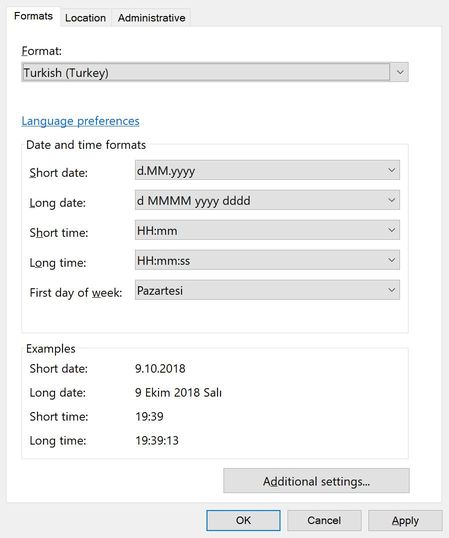
(no need to restart VS in my case)Run it. Please note the command prompt window closes even if there are errors and your debugger might not catch the exception unless you have enabled breaking on CLR System.Exception in (VS2017 - Debug->Windows->Exception Settings).
The compilation error message is:
System.Exception: '<repository root>\Tools\2MGFX\bin\Windows\AnyCPU\Debug\Test.fx(4,14) : Unexpected token 'P' found. Expected None, Linear, Point, or Anisotropic.
****
aienabled
on 9 Oct 2018
~There is no 'i' in 'POINT'.
 nkast
on 9 Oct 2018
nkast
on 9 Oct 2018
@nkast, it is not only the lowercase i that is the issue, it is the Turkish 'I' != ASCII 'I'.
@tomspilman, I see no problem with saving the current culture, setting the InvariantCulture for the thread prior to parse and setting it back after completion.
The only issue that could arise, is if someone wanted to send a localized string to the GPU:
According to the OpenGL Standard Section 3.1:
The source character set used for the OpenGL shading languages is Unicode in the UTF-8 encoding
scheme. After preprocessing, only the following characters are allowed in the resulting stream of GLSL
tokens:
The letters a-z, A-Z, and the underscore ( _ ).
The numbers 0-9.
The symbols period (.), plus (+), dash (-), slash (/), asterisk (*), percent (%), angled brackets (< >
), square brackets ( [ and ] ), parentheses ( ( and ) ), braces ( { and } ), caret (^), vertical bar ( | ),
ampersand (&), tilde (~), equals (=), exclamation point (!), colon (:), semicolon (;), comma (,), and
question mark (?).
 stromkos
on 9 Oct 2018
stromkos
on 9 Oct 2018
Interesting... so is this the opposite case? We need a culture specific comparison?
Or do we just need a better error reporting here?
Or should we pre-process all shader files replacing Turkish-I with a regular I?
@tomspilman, I see no problem with saving the current culture, setting the InvariantCulture for the thread prior to parse and setting it back after completion.
Maybe... that is a possible hack. But we have to be sure that a crash or thrown exception doesn't leave it stuck in this mode. I still think the right thing is to fix the parser cases to use the correct invariant culture settings.
tomspilman
on 9 Oct 2018
@tomspilman , msdn gives some examples for the default string comparison:
https://msdn.microsoft.com/en-us/library/ms973919.aspx#stringsinnet20_topic5
Culture = English (United States)
(file == FILE) = True
Culture = Turkish (Turkey)
(file == FILE) = False
In our case, POINT != Point.
@aienabled, can you add 'RegexOptions.CultureInvariant' in the following line?
https://github.com/MonoGame/MonoGame/blob/3d26a001c302ac30093fec5e28f2a1924ef7f894/Tools/2MGFX/TPGParser/Scanner.cs#L245
nkast
on 9 Oct 2018
Wow, my i joke was actually relevant :o Looking back it's pretty dumb that I didn't catch that :p
Jjagg
on 9 Oct 2018
@aienabled, can you add 'RegexOptions.CultureInvariant' in the following line?
Please include all lines containing an 'I' or 'i' since they will also be effected by the bug.
My solution would be to add in the last constructor in parser.cs:
Input = String.Format(System.Globalization.CultureInfo.CultureInvariant,Input);
This line would restructure the input prior to parsing without requiring a change to each line containing an "i" or "I".
I have yet understand the filename argument passed in. If it is used as an input then every usage of the the file should have the same treatment.
stromkos
on 10 Oct 2018
@tomspilman,
Maybe... that is a possible hack. But we have to be sure that a crash or thrown exception doesn't leave it stuck in this mode. I still think the right thing is to fix the parser cases to use the correct invariant culture settings.
I agree with you on principal, but:
I understand this is a hackish approach, but it may be the best approach, not just the Turkish-I problem but with other cultures as well. I am thinking of Cyrillic, Japanese, Korean, and other scripts not equatable to the Latin character set. Assuming the CultureInfo is saved before the first try block it can be restored in a finally clause. Thus negating any impact on overall execution, if an exception occurs.
stromkos
on 10 Oct 2018
Please include all lines containing an 'I' or 'i' since they will also be effected by the bug.
The parser code is generated with a tool, so it's likely just a single line fix.
Jjagg
on 10 Oct 2018
@nkast
@aienabled, can you add 'RegexOptions.CultureInvariant' in the following line?
Yes, it did solve the issue! Thank you!
Though, personally I would prefer try-finally solution with the invariant culture suggested by @stromkos. Otherwise, who knows which issues we can find (or create!) eventually... I'm also using invariant culture in all the apps and games I'm making for the last 5 years (and specifically using CultureInfo.InstalledUICulture to format time and dates) as this makes me feel much more secure (got rid of many issues with config files parsing, etc). Opt-in approach is much safer than all these sudden issues we see with the "Turkish test". It's a really frustrating fact that .NET includes CultureInfo-less shortcut methods (especially, related to the string parsing) which could easily break or produce unexpected results when the same application is running with a different culture...
BTW, you can test this issue by simply setting System.Threading.Thread.CurrentThread.CurrentCulture = CultureInfo.GetCultureInfo("tr-TR"); (and CultureInfo.DefaultThreadCurrentCulture if you want to use multiple threads). No need to change the actual Windows Region.
aienabled
on 11 Oct 2018
Related issues
Jjagg
·
5Comments
tomspilman
·
4Comments
 Halofreak1990
·
4Comments
Halofreak1990
·
4Comments
 SenpaiSharp
·
3Comments
SenpaiSharp
·
3Comments
 bjornenalfa
·
5Comments
bjornenalfa
·
5Comments
Most helpful comment
@tomspilman , msdn gives some examples for the default string comparison:
https://msdn.microsoft.com/en-us/library/ms973919.aspx#stringsinnet20_topic5
In our case, POINT != Point.
@aienabled, can you add 'RegexOptions.CultureInvariant' in the following line?
https://github.com/MonoGame/MonoGame/blob/3d26a001c302ac30093fec5e28f2a1924ef7f894/Tools/2MGFX/TPGParser/Scanner.cs#L245