Monogame: Each keystroke produces some garbage
Symptoms:
Each keystroke produces garbage. If you hold the key, the garbage will seem to be generated each time a repeated keystroke is reported by the OS.
How to reproduce:
Download the attached .NET Core 2.1 project that contains some diagnostic code: https://phobia.games/experiments/Game1Core.zip
- Run the project.
- It should report no allocations per frame.
- Press (and hold) any alphanumeric key, the program should report some allocations.
Possible cause:
That line creates an object each time a system's key stroke event is handled, regardless of whether the programmer actually utilizes the Window.TextInput event or not.
What version of MonoGame does the bug occur on:
- MonoGame 3.7
What operating system are you using:
- Windows 10
What MonoGame platform are you using:
- DesktopGL
 s-m-k
s-m-k
All 32 comments
That is pretty strange and bad. @cra0zy @dellis1972 ?
 tomspilman
on 4 Jul 2018
tomspilman
on 4 Jul 2018
I can't repro it on Linux, I've tried holding it, I've tried pressing it like @cra0zy, nothing works :|
Also don't see any obvious suspects, tho we are doing some funky stuff with TextInput in SdlGamePlatform (and Window as well).
 harry-cpp
on 4 Jul 2018
harry-cpp
on 4 Jul 2018
Oh wait, not a memory leak, just garbage, nevermind, PR will be up in a moment.
harry-cpp
on 4 Jul 2018
Well maybe we should talk about breaking change and making TextInputEventArgs not a class?
tomspilman
on 5 Jul 2018
I have an even better solution... give me a moment I'm gonna cook up something.
harry-cpp
on 5 Jul 2018
PS. Microsofts C# "guidelines" for making events basically tells you to do pointless allocation: https://docs.microsoft.com/en-us/dotnet/standard/design-guidelines/event
harry-cpp
on 5 Jul 2018
It does say "CONSIDER using a subclass of EventArgs as the event argument" not YOU MUST or YOU SHOULD. I think that means we can also consider not making it a class at all.
tomspilman
on 5 Jul 2018
scroll down:
✓ DO use System.EventArgs or its subclass as the type of the second parameter of the event handler, and call it e.
The point is we are not the typical .NET application. If we can use struct we should regardless of design guidelines written 10 years ago.
tomspilman
on 5 Jul 2018
Right now I'm playing around with the idea of adding TextInput as an extra field to the KeyboardState.
harry-cpp
on 5 Jul 2018
adding TextInput as an extra field to the KeyboardState.
Not sure about that path... but ok.
tomspilman
on 5 Jul 2018
Its equally as bad as making TextInputEventArgs a struct, isn't it?
harry-cpp
on 5 Jul 2018
Wouldn't it be better to refactor the code to only create a TextInputEventArgs object when the event is actually used? Instead of a TextInputEventArgs object, pass the Char and Key to OnTextInput and let the base class handle the creation of the TextInputEventArgs for the event.
 Halofreak1990
on 6 Jul 2018
Halofreak1990
on 6 Jul 2018
Its equally as bad as making TextInputEventArgs a struct, isn't it?
No i don't think that at all. To me KeyboardState has nothing to do with TextInputEventArgs... it just doesn't make sense to me to merge them.
tomspilman
on 9 Jul 2018
Oh, I see, I was only thinking about performance wise.
harry-cpp
on 9 Jul 2018
@cra0zy could you explain why a struct type would be bad? If it is like tha CancelEventArgs I would understand it. Is there any technical issue I don't get?
 EnemyArea
on 10 Jul 2018
EnemyArea
on 10 Jul 2018
@cra0zy could you explain why a struct type would be bad? If it is like tha CancelEventArgs I would understand it. Is there any technical issue I don't get?
Because C# should have an object of type EventArgs as an argument for an event. Look at MS C# guidelines above.
harry-cpp
on 10 Jul 2018
I thought you guys might be interested in seeing that even Microsoft struggled with this question.
https://blogs.msdn.microsoft.com/kcwalina/2005/09/21/value-type-eventargs/
If you look at EventHandler
https://referencesource.microsoft.com/#mscorlib/system/eventhandler.cs,96ed969784b9d510
 gsfreema
on 11 Jul 2018
gsfreema
on 11 Jul 2018
This might be of use as well.
https://docs.microsoft.com/en-us/dotnet/csharp/modern-events
gsfreema
on 11 Jul 2018
Hi @tomspilman, I'm new here but have been porting over my fantasy console from Unity to MonoGame. I've been struggling with capturing text input. Currently, my engine relies on Unity's Input.inputString (https://docs.unity3d.com/ScriptReference/Input-inputString.html). This captures the current keyboard input text for that frame and is easy to access.
I agree with @cra0zy that TextInput should be part of the Keyboard state. I think it's strange Window.TextInput is an event when all other input in MonoGame is polling based. My 2 Cents is that I should be able to ask the Keyboard state what the char values of the inputted text for that frame are. I've lost 2 days to this since there is no clear solution online anywhere and this one change would make capturing text input on each frame a lot easier.
 jessefreeman
on 1 Aug 2018
jessefreeman
on 1 Aug 2018
I think it's strange Window.TextInput is an event when all other input in MonoGame is polling based.
It is the same as why Windows has both GetKeyboardState and the WM_CHAR window message. SDL is designed the same way with events and state methods (likely because it was designed around Windows).
Sometimes you just need to get the current state of the keyboard regardless of when a key was pressed.
Sometimes you need ordered events, key repetitions, and the key translated to a character one would expect when typing words. For example if you are entering Japanese text... you want the single katakana character and not the 3 or 4 keys typed to get that one character.
How i see it one is intended to be used for controller state and the other is intended for input of language.
I've lost 2 days to this since there is no clear solution online anywhere and this one change would make capturing text input on each frame a lot easier.
Can you elaborate what is your problem capturing text input on each frame? Events for text input are not threaded... they come in during a frame. What is the difficulty in gathering them?
tomspilman
on 1 Aug 2018
Well, the number one struggle I've had is the lack of documentation and direction as to how text input should be handled. The keyboard state stuff is rather straightforward so that was easy to wire up a controller but capturing text input became a little more tedious. I've had to try several different approaches with no direction as to which is the best one. Coming from Unity where Input.inputString was already provided was like taking a big step backward. So something that could have taken me a few minutes to implement required me to create an entire solution around capturing this input text.
Since my fantasy console engine isn't event-based, I was going back and forth over how to approach capturing the text input. I was able to collect it on a frame, then read it on the next frame but I was having issues with lag and knowing when to clear the buffered text. My concern was that if the game dropped frames, would I be able to correctly clear the buffer. Also, the event does not have a time delay to it, so it fires for raw input as it happens so I was getting a lot of duplicated characters.
I agree with your points about needing to know the key order and that Windows supports two ways of capturing this but I think MonoGame could stand to use a little convenience for developers, especially if they are coming over from Unity. The fact that a simple google search for "how to capture text input in MonoGame" doesn't offer much help and even dates back to XNA leads me to believe this is an area that could use a little improvement. I haven't had many roadblocks in my port from Unity to MonoGame but I wasn't expecting to get stuck on capturing text input.
I would expect the game engine I use to consolidate all input into a single easy to access way and text captured during the frame should be part of that. If the developer doesn't want to use it, they can ignore it but for a large percentage of developers looking to just add a simple text input for a name or setting, this would save them writing out additional logic and open up easier ways to tie input field components into the existing controller input polling paradigm.
jessefreeman
on 1 Aug 2018
lack of documentation
That has always been an issue with MG since the beginning. We're working on it, but frankly no one helps with this.
It is my fault i allowed GameWindow.TextInput to be merged without better reference documentation.
What we have is barely passable:
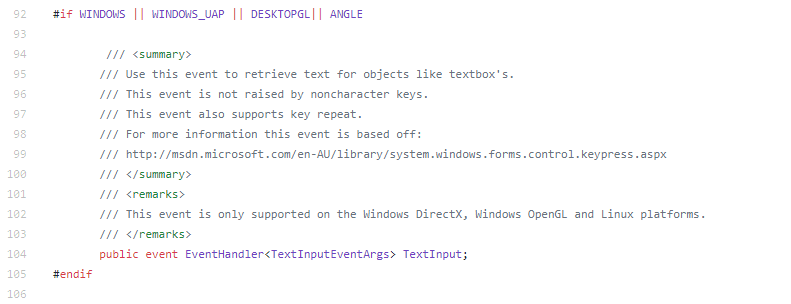
https://github.com/MonoGame/MonoGame/blob/develop/MonoGame.Framework/GameWindow.cs#L104
I was able to collect it on a frame, then read it on the next frame but I was having issues with lag and knowing when to clear the buffered text.
This sounds like something we should fix or at least make consistent. I guess because the loop looks something like this:
while (running)
{
   ProcessEvents();
   while (timeElapsed > tickTime)
     update();
   draw();
}
So you might get one event and then 3 or 4 updates. Maybe this should be fixed to be more like this?
while (running)
{
   ProcessEvents();
   var processEvents = false;
   while (timeElapsed > tickTime)
   {
      if(processEvents)
         ProcessEvents();
     update();
     processEvents = true;
   }
   draw();
}
This ensures you get events before each update knowing you can throw away character data at the end of each frame.
even dates back to XNA
Yeah GameWindow.TextInput was our attempt to make the issue better on desktop. Looks like we have more we can do to improve it.
consolidate all input into a single easy to access way and text captured during the frame should be part of that.
I understand the sentiment here, but have concerns with the technical issues involved. Mainly returning character input requires memory allocations that not everyone wants/needs.
To me GameWindow.TextInput is separate because it is something different from KeyboardState and one keypress does not equal one character.
tomspilman
on 1 Aug 2018
This all makes sense. My only request is to have the input string available as a property and not an event. But maybe if you fix the event I can capture it at the beginning of the update?
Looking forward to seeing what you come up with!
jessefreeman
on 1 Aug 2018
I tried to replicate the issue above without success.
I think is precipitated to assume there is an issue with how TextInput works. It is pretty straightforward.
GameWindow also looks like the right place for it to be.
Anyway thanks for all the work on Monogame!
 D4v1ks
on 6 Aug 2018
D4v1ks
on 6 Aug 2018
I tried to replicate the issue above without success.
Its not a memory leak, its just pointless allocation and deletion of memory.
harry-cpp
on 6 Aug 2018
I noticed holding down a key (with no keyboard input involved in code) would cause jitter as once every few frames the game loop takes a tiny bit time more than my monitor's refresh rate and eventually have to update physics twice in a single Update() after it accumulates, this issue looks like the culprit.
 tamkcr
on 31 Oct 2018
tamkcr
on 31 Oct 2018
I can 100% confirm this issue. It happens even on totally empty projects (not using any keyboard API).
I can also confirm that it is not entirely related to this (but this surely has an impact here as well):
https://github.com/MonoGame/MonoGame/blob/b1a49e4ae60eaf62169d08c791d4f9a913b495b3/MonoGame.Framework/SDL/SDLGameWindow.cs#L302
new TextInputEventArgs sure generates some garbage, but the runtime pooling prevents it to be a real issue. The problem is elsewhere.
From my tests, when keys are pressed, it builds about 8KB of garbage per second (this is framerate independent, the garbage depends on the repeating key settings in the OS).
I can see situations where this could be a problem and trigger unwanted garbage collections.
I have found the source of the garbage, it is this string marshalling:
https://github.com/MonoGame/MonoGame/blob/b1a49e4ae60eaf62169d08c791d4f9a913b495b3/MonoGame.Framework/SDL/SDLGamePlatform.cs#L160
Not sure if we can do much about it, but what could be cool to mitigate this, is to skip on handling Sdl.EventType.TextInput pumped events when there is no event handler attached to Game.TextInput.
 mrhelmut
on 7 Feb 2019
mrhelmut
on 7 Feb 2019
Good find. Well, I see that the string in question is only used to generate a series of XNA events, so it would be possible to avoid C# string marshaling completely and generate single chars per XNA event as we read the input buffer. Since String.Length tells us about the count of chars, we probably need to know about only at most 2 bytes per XNA event to make it compliant with the old, wasteful solution.
Of course, we shouldn't trigger the event handler at all if there's no need to do that, since it will also save some CPU resources as well (plus the tiny amount of garbage generated by creating the object).
s-m-k
on 7 Feb 2019
it would be possible to avoid C# string marshaling completely and generate single
chars per XNA event as we read the input buffer
I'm 100% for this. We'll only have to check how many UTF8 bytes there is, convert them back to individual char while directly throwing CallTextInput.
mrhelmut
on 7 Feb 2019
Nice find, good work.
Yep right off the bat there is a explicit new in the method block at 165 and a implicit new string at 159 also declared in the block.
 willmotil
on 11 Feb 2019
willmotil
on 11 Feb 2019
FYI, I've setup'd #6664 which should greatly help here.
mrhelmut
on 16 Feb 2019
Related issues
 Ellesent
·
5Comments
Ellesent
·
5Comments
 monsieurmax
·
5Comments
monsieurmax
·
5Comments
 rds1983
·
5Comments
rds1983
·
5Comments
 bjornenalfa
·
5Comments
tomspilman
·
4Comments
bjornenalfa
·
5Comments
tomspilman
·
4Comments
Most helpful comment
The point is we are not the typical .NET application. If we can use
structwe should regardless of design guidelines written 10 years ago.