Monogame: Incorrect resolution values being returned on my new 4K monitor
OK, so this is a fun mysterious one. I bought a new 4K monitor and am having very weird results as far as what XNA says my resolution is.
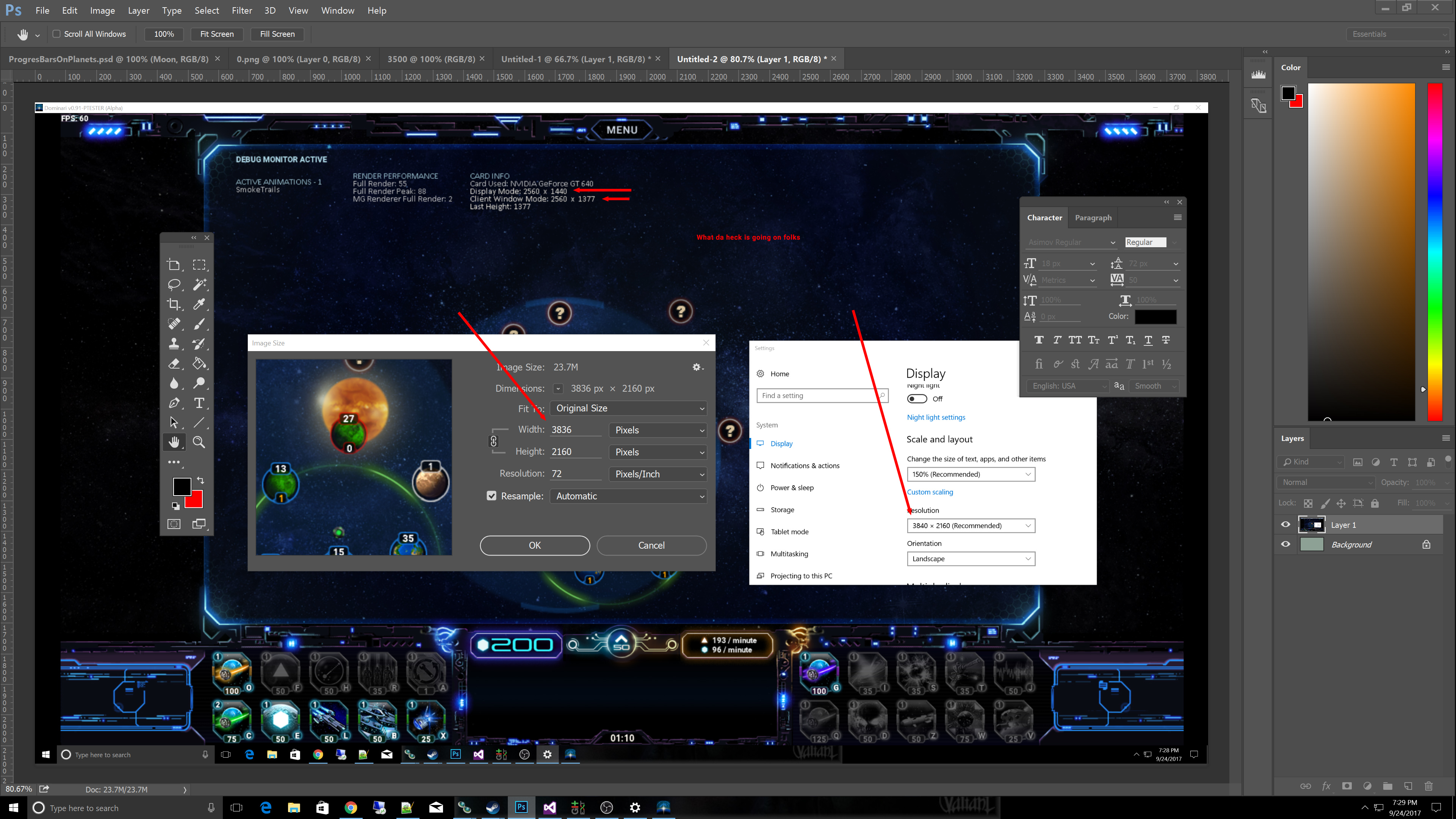
In Windowed Mode:
Windows OS says my display resolution is 3840 x 2160
Our game, however, says my OS resolution is 2560x1440!
The game says the client window is 2560x1377
A screenshot taken of the windowed mode game comes out at 3840x2160
I am using these two values to get the information from in the code:
game.Window.ClientBounds.Height
GraphicsAdapter.DefaultAdapter.CurrentDisplayMode.Height
I've shared a screenshot containing all of the windows in question and the resolutions. The interesting thing is my co-developer has a 4K monitor as well, same resolution, but does not have this issue in windowed mode. It all comes out correct. To top it off, if you go into full screen mode, the values are all exactly right.
 AgisisTheCoder
All 20 comments
Even this is giving me the wrong resolution.
System.Windows.Forms.Screen.PrimaryScreen.Bounds;
Something wacky is afoot. I don't think it's monogame so not sure if this is even appropriate now.
AgisisTheCoder
on 25 Sep 2017
Something wacky is afoot.
By default MG and XNA titles are not "dpi aware". You have to opt in by a Win32 call and/or the app manifest:
https://msdn.microsoft.com/en-us/library/windows/desktop/aa374191(v=vs.85).aspx
@KonajuGames @dellis1972 @Jjagg @cra0zy - Should we just force MG to always be DPI aware? 4k systems are becoming more common and likely games just need to deal with it.
 tomspilman
on 25 Sep 2017
tomspilman
on 25 Sep 2017
IMO the manifest in the templates is enough.
 Jjagg
on 25 Sep 2017
Jjagg
on 25 Sep 2017
The manifest should be enough, but I'm going to give this some test anyway.
I've been using the manifest in the template to work with DPI awareness and it worked quite well so far. But recently we started to received reports of DPI awareness being broken on Windows 10 while we didn't update the game (and it previously worked on Win10). I don't know if it's a problem specific to Windows 10 Creator Update (or a more recent update) or a problem on the user side. I need to investigate.
EDIT: bingo, latest Win10 versions (post 1703) require additional manifest entries. See section dpiAware and dpiAwereness in the manifest documentation.
This should be changed in manifests (I can't setup a PR for now):
<asmv3:application>
  <asmv3:windowsSettings>
    <dpiAware xmlns="http://schemas.microsoft.com/SMI/2005/WindowsSettings">true/pm</dpiAware> <!-- legacy -->
    <dpiAwareness xmlns="http://schemas.microsoft.com/SMI/2016/WindowsSettings">permonitorv2,permonitor</dpiAwareness> <!-- falls back to pm if pmv2 is not available -->
  </asmv3:windowsSettings>
</asmv3:application>
 mrhelmut
on 25 Sep 2017
mrhelmut
on 25 Sep 2017
Thanks for jumping on this. I'll see how this helps out! If MonoGame did have it built in without manifest tweaking, that would certainly resolve what I suspect might eventually become a constant issue as more 4k monitors roll out as the norm instead of the exception. In the meantime, I'll see if this helps resolve that issue.
AgisisTheCoder
on 26 Sep 2017
IMO the manifest in the templates is enough.
I'm just concerned it is easy to miss... if we want to support it by default then maybe forcing it in code is best.
EDIT: bingo, latest Win10 versions (post 1703) require additional manifest entries.
@mrhelmut - Should we just make MG on Windows always be dpi aware by calling the Win32 APIs that enable it? The manifest seems easy to forget or not notice.
tomspilman
on 27 Sep 2017
@mrhelmut - Should we just make MG on Windows always be dpi aware by calling the Win32 APIs that enable it? The manifest seems easy to forget or not notice.
Another option is to include it in nuget package and add .targets file to import it into the project in case it does not already exist.
 harry-cpp
on 27 Sep 2017
harry-cpp
on 27 Sep 2017
I created the manifest and the manifest already had the DPI awareness set to true. It did not change the outcome. I verified the manifest was deploy in the same folder. The biggest thing I am noticing is this:
        DisplayModeCollection o = GraphicsAdapter.DefaultAdapter.SupportedDisplayModes;
        DisplayMode dm = GraphicsAdapter.DefaultAdapter.CurrentDisplayMode;
When I compare my current display mode to the list of available ones, my current display mode does not exist in the collection. My new monitor is magical.
AgisisTheCoder
on 27 Sep 2017
@AgisisTheCoder - Is this Win10? Did you also set the second <dpiAwareness> setting which is required on the latest versions of Win10? Look at the post by @mrhelmut above.
tomspilman
on 27 Sep 2017
@mrhelmut - Should we just make MG on Windows always be dpi aware by calling the Win32 APIs that enable it? The manifest seems easy to forget or not notice.
I think that the manifest is convenient to allow developers to control the DPI awareness, though I never saw a game not being DPI aware.
mrhelmut
on 27 Sep 2017
Good News: It's working now. Somehow when it moved the manifest over to the debug folder, it had left that section commented out and I didn't notice it. I just recreated it anew and it wasn't commented out this time. It worked perfectly, completely solving the issue. Thanks so much guys. As always, you are top notch in responding!
AgisisTheCoder
on 27 Sep 2017
I'd also like to add that I had a different problem on a crappy laptop with a weird resolution. In full screen mode, it would stretch. This DPIAware/DPIAwareness setting completely resolved that issue too. Did I mention that the game also looks crisper? Thanks again!
AgisisTheCoder
on 27 Sep 2017
@AgisisTheCoder - Thanks for reporting back your results. Good to know that solves it.
@mrhelmut - I think maybe we should just take the option away from the developer here. MG games should always be DPI aware no matter what... they are games after all and resolution matters.
tomspilman
on 28 Sep 2017
@tomspilman I believe that you are right, and doing it with the Win32 API is most probably more future proof than a manifest if Microsoft breaks again backward compatibility.
mrhelmut
on 28 Sep 2017
@mrhelmut thank you for the updated manifest!
For current manifest solution, it would be very helpful if this was described in MG documentation. Maybe under Platform-Specific Notes? Especially since new Windows builds can require manifest updates.
 Jure-BB
on 28 Sep 2017
Jure-BB
on 28 Sep 2017
@mrhelmut @tomspilman will this affect DesktopGL too?
 dellis1972
on 29 Sep 2017
dellis1972
on 29 Sep 2017
Yes, both the manifest or the Win32 API call works on DesktopGL.
mrhelmut
on 30 Sep 2017
Maybe Monogame could, in debug mode only, to inform the developer that it is running at a screen resolution that would require to set up the DPI configuration, and let the developer choose the best way to do it, either by manifest or win32 call
 vpenades
on 2 Oct 2017
vpenades
on 2 Oct 2017
I would say that MonoGame must always be DPI-aware from now on. There is no correct situation where an application should refuse to be DPI-aware these days, even when running on "normal" resolutions. External manifests are more for adding these new features to existing applications that don't use the correct APIs, and results in one more file to deploy and one more file to potentially go missing and then bad things happen. We should use the Windows API to enable DPI support.
 KonajuGames
on 2 Oct 2017
KonajuGames
on 2 Oct 2017
How exactly is DPI-awareness surfaced to the game developer? I am using the preview version of 3.8, the manifest is there, yet Window.ClientBounds and GraphicsAdapter.DefaultAdapter.CurrentDisplayMode still report the scaled resolution, not the native resolution of the display in both DesktopGL and WindowsDX.
 orthoxerox
on 15 Jun 2020
orthoxerox
on 15 Jun 2020
Related issues
Jjagg
·
5Comments
 MontyHimself
·
5Comments
harry-cpp
·
5Comments
MontyHimself
·
5Comments
harry-cpp
·
5Comments
 monsieurmax
·
5Comments
tomspilman
·
4Comments
monsieurmax
·
5Comments
tomspilman
·
4Comments
Most helpful comment
I would say that MonoGame must always be DPI-aware from now on. There is no correct situation where an application should refuse to be DPI-aware these days, even when running on "normal" resolutions. External manifests are more for adding these new features to existing applications that don't use the correct APIs, and results in one more file to deploy and one more file to potentially go missing and then bad things happen. We should use the Windows API to enable DPI support.