Monogame: Add Template for Visual Studio Mac
After installation, there are no templates in Visual Studio Mac.
I seems VS Mac will take over Xamarin Studio, because it has all functionality of XS.
 Majirefy
All 20 comments
How can i add the Bot Framework Template in Visual Studio for MAC?
https://docs.botframework.com/en-us/downloads/
 ghost
on 15 Apr 2017
ghost
on 15 Apr 2017
@lenin-interware
You mean we can just install it from NuGet?
Create an empty C# project and then install it from NuGet?
Majirefy
on 22 Apr 2017
VS for Mac is released today.
I had tried to copy the content from /Users/shine/Library/Application\ Support/XamarinStudio-6.0/LocalInstall/Addins to /Users/shine/Library/Application\ Support/VisualStudio/7.0/LocalInstall/Addins. It doesn't works well.
The Extension Manager shows:
The Following dependencies required by this extension package are not available:
Required: MonoDevelop.Core v6.0, found v7.0
Required: MonoDevelop.Ide v6.0, found v7.0

MonoGame Addin for MonoDevelop
 ShineSmile
on 11 May 2017
ShineSmile
on 11 May 2017
As a new user I'm stuck at this point as Visual Studio was installed for me.
 gingerbeardman
on 10 Oct 2017
gingerbeardman
on 10 Oct 2017
I just found the solution...
- File > Extensions... > Gallery > Manage Repositories > (tick to enable Alpha channel)
- IDE extensions > MonoDevelop.MonoGame.Templates > Install...
- good luck!
ref: http://community.monogame.net/t/add-templates-for-visual-studio-mac/9027/2
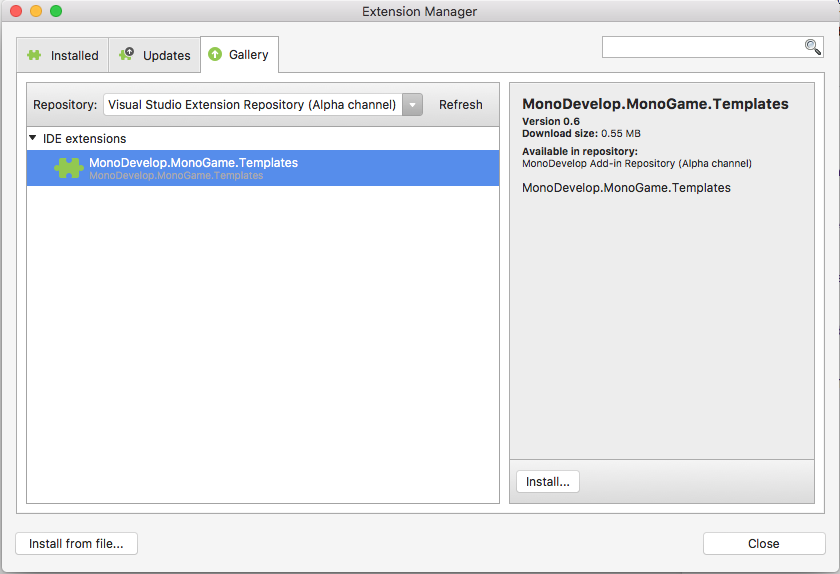
gingerbeardman
on 10 Oct 2017
 harry-cpp
on 10 Oct 2017
harry-cpp
on 10 Oct 2017
@cra0zy I posted that link in my comment directly above yours?
gingerbeardman
on 10 Oct 2017
Ah, must have not seen it, sorry.
harry-cpp
on 10 Oct 2017
The template seems to not be available anymore.

At least one other is having the same problem:
http://community.monogame.net/t/add-templates-for-visual-studio-mac/9027/22
 eli-crow
on 11 Nov 2017
eli-crow
on 11 Nov 2017
My advice is to stick with the last version of Xamarin Studio.
gingerbeardman
on 11 Nov 2017
It seems that MonoGame maintainers do not care about this problem.
 iSynth
on 8 Jan 2018
iSynth
on 8 Jan 2018
Thank Microsoft
gingerbeardman
on 8 Jan 2018
I found a workaround.
I installed MonoGame and VS on a virtual machine with Windows guest. All the necessary templates appeared in VS. Then I create a new cross-platform version of MonoGame project and saved to disk. Then I transferred the entire project folder to the Mac and opened it in VS for Mac.
iSynth
on 8 Jan 2018
It'd be great if we could hear something back about this... was gonna check monogame out, as a mac user I followed the instructions on their documentation for setup, and nada no templates... Guess i'll have to try that workaround, unless anyone else knows a way to easily manually build the project without a template, haven't used VS in ages myself. >.>
 ColdHam
on 20 Jan 2018
ColdHam
on 20 Jan 2018
I'm having this problem as well. I could setup monogame with VS on my windows desktop at home, but I'm having trouble setting it up on my macbook.
 p-brighenti
on 29 Jan 2018
p-brighenti
on 29 Jan 2018
The workaround is to also install xamarin studio alongside of vs for mac and create an empty project from xamarin studio (monogame templates install fine in xs). Then open the created project in vs for mac and away you go. That is the only way I know of.
 kurtcz
on 31 Jan 2018
kurtcz
on 31 Jan 2018
I’m not sure if people are struggling to find the templates or not?
It appears now that the templates have moved to Game Development and no longer requires the alpha repositories to be turned on.


 itsa-sh
on 4 Jul 2018
itsa-sh
on 4 Jul 2018
@itsash-- seems to have been the case only since 9th Feb 2018 (so after the comment that precedes yours) http://addins.monodevelop.com/Project/Index/47
Good spot, though!
gingerbeardman
on 4 Jul 2018
Duplicate of https://github.com/MonoGame/MonoGame/issues/6695
harry-cpp
on 26 Mar 2020
@harry-cpp surely #6695 (2 Apr 2019) is a duplicate of this issue, number #5647 (7 Apr 2017) ?
gingerbeardman
on 26 Mar 2020
Related issues
harry-cpp
·
5Comments
 MontyHimself
·
5Comments
MontyHimself
·
5Comments
 NET-D3v3l0p3r
·
3Comments
NET-D3v3l0p3r
·
3Comments
 tomspilman
·
4Comments
tomspilman
·
4Comments
 SenpaiSharp
·
3Comments
SenpaiSharp
·
3Comments
Most helpful comment
It seems that MonoGame maintainers do not care about this problem.