Monogame: Custom app icons are overridden by MonoGame icon
Since I upgraded to dev code I have noticed the application icon for my game is now the orange monogame logo. Before I had it set to a custom icon. Checking the commit history I found a commit that was supposed to fix this issue by checking if a custom icon was used before overriding with the monogame icon. This issue seems to be a regression caused by the change from OpenTK.
The commit ref was 6aae06b841ee896e7c4dbb9e69a3e8b169cfec7c
 KrytenCoder
All 21 comments
Set your embedded resource name to Icon.bmp and make sure that the icon is in .bmp format and it will work.
 harry-cpp
on 14 Jan 2017
harry-cpp
on 14 Jan 2017
A bitmap would be ok for a simple icon design, but a more complicated design needs to be an icon. The bitmap would have to be stretched or squashed depending on the size of the original and the context it is displayed. I use an icon so i can have a clear large image for the file system and a slightly simplified version for the smaller one used on the task bar. Using a bit map would result it down-scaling to a smudge.
KrytenCoder
on 14 Jan 2017
Icon.bmp is only used for the taskbar.
harry-cpp
on 14 Jan 2017
I have noticed related behaviour in Visual Studio 2016. I have a monogame project and have changed the icon for the exe to my custom bitmap. This has been partially successful.
When I cycle through the different view options in File Explorer in the exe folder, the custom bitmap only shows for view options: Small, List, Details and Content.
The default monogame icon shows for view options: Extra Large, Large, Medium and Tiles.
 jonathanmccarthy
on 22 Jan 2017
jonathanmccarthy
on 22 Jan 2017
Use .ico icon for .exe file, use .bmp icon for the window/taskbar icon...
harry-cpp
on 22 Jan 2017
bmp or ico doesn't make any difference.
What's interesting though is that the problem only occurs in the Release build.
The custom icon appears correctly for all views in the Debug build exe folder.
jonathanmccarthy
on 22 Jan 2017
Setting .exe icon is not a MonoGame thing, it's a C# thing, it's set in project properties and if you are having issues with .exe icon than you are doing something wrong non related to MonoGame.
That being said thumbnail cache can cause trouble from time to time where you are not seeing the new set image even tho it's already set.
harry-cpp
on 22 Jan 2017
People expect to set an ICO and that's that. Removing the monogame icon is some thing everyone will want to do at some point, Having to google for these rather obscure instructions is an irritation. Include two files for an icon?? Why cant MG just check for ANY file of the ICO type, why a specific name and why bmp? Its not good for a underlying library to hijack branding in such a way.
 AliciaRaven
on 23 Jan 2017
AliciaRaven
on 23 Jan 2017
People expect to set an ICO and that's that.
ICO files are only native to Windows.
Removing the monogame icon is some thing everyone will want to do at some point, Having to google for these rather obscure instructions is an irritation. Include two files for an icon??
If you are distributing your game for Mac / Linux you will need two icon files regardless. Mac / Linux executables don't have an icon.
Why cant MG just check for ANY file of the ICO type,
There is no way to check .exe file icon since Icon.ExtractAssociatedIcon is not implemented under mono: https://github.com/mono/mono/blob/master/mcs/class/System.Drawing/System.Drawing/Icon.cs#L302
why a specific name
It's there for PCL.. If someone wants to submit a PR to add a property or a method for loading a custom named icons, I think that it should be fine.
and why bmp?
SDL does not offer a direct way of loading .ico files, the only direct thing was .bmp.
That being said loading .ico files would be possible with System.Drawing and some converting, but using System.Drawing on non Windows systems is something that should be absolutely avoided (yes, MonoGame 3.5 is using System.Drawing, this is because of OpenTK which has been replaced by SDL).
harry-cpp
on 23 Jan 2017
Annoying but necessary then, I do want to target linux but I'm only familiar with command line over ssh not desktop. Thanks for the info @cra0zy
AliciaRaven
on 23 Jan 2017
@cra0zy (Harry LOL). Thanks also from me for the info.
It looks like my problem was to do with the thumbnail cache.
I decided to do a cleanup of my C: drive which among other things clears the thumbnail cache.
The PC is six years old and unfortunately, the cleanup completely corrupted windows (C: and D: drives got switched and all sort of other nastiness).
I spent the last few days recovering it, eventually I had to backup all data and reinstall windows 7.
This is now complete and I no longer have the 'mixed' icon problem I described above.
Thanks again and I hope this helps anyone else who googles to here.
jonathanmccarthy
on 25 Jan 2017
Hi,
I'm having a lot of trouble using a custom app icon on MacOS.
The game launches with the icon I designed but switches back to the generic MonoGame icon in about 1 second.
I understand the instructions above. I have included a BMP version of the icon in my project (in the root directory), and set its Build Action to EmbeddedResource. But the above behavior still persists, and my icon isn't being used in the MacOS Dock.
When I use the "Show Package Contents" function on my built app, I don't see an Icon.bmp anywhere in there, so I'm assuming that I'm doing something wrong. But what?
Are there requirements on the BMP file's parameters? A maximum file size? Maximum number of colors? etc. Or does it need to be in a different location? What else could I be doing wrong? Any ideas?
Thanks in advance for any assistance that can be provided.
 yyr57695
on 30 Sep 2018
yyr57695
on 30 Sep 2018
You are doing things right, but on Mac OS you also have to package your game within a .app bundle with Mac ICNS icon in the package. It is possible that the icon will only be correct in a release bundle and may not show up while debugging.
Also, it is normal for the bmp icon to not be in the output files because it gets embedded within the .exe (it's the purpose of the EmbeddedResource build action).
 mrhelmut
on 30 Sep 2018
mrhelmut
on 30 Sep 2018
So I'm currently using the Release configuration, and the building process does produce a .app bundle. When I use "Show Package Contents" to see what's inside, I see a "Contents" folder, which contains a "Resources" folder, which in turn contains "AppIcon-1.icns", an ICNS icon bundle that includes my custom icons.
Is this the correct location, or...?
yyr57695
on 30 Sep 2018
That's correct. :)
I believe that the .icns should be named after your .app bundle (e.g. if it is MyGame.app the .icns should be MyGame.icns in the MyGame.app/Contents/Resources folder).
mrhelmut
on 1 Oct 2018
I'm gonna close this as the original issue was solved, feel free to continue discussions.
harry-cpp
on 1 Oct 2018
OK, so originally the name differed, but now I've named the icon bundle the same thing as my game.
The game is called "Falling Plus.app"
And inside the package, inside the Contents/Resources folder, I now have "Falling Plus.icns"
But the behavior still persists. I run the game, first the game's icon appears in the Dock, then it's replaced by the MonoGame icon.
Anything else I could be doing wrong...?
yyr57695
on 3 Oct 2018
Check that you have both an Icon.bmp and an Icon.ico set to Embedded Resource build action at the root of your project and that your project has the .ico set as its default icon in the project properties. A full rebuild might help.
If it persists, test your .app on other Macs, it may be an issue with Mac caching old icons on yours.
mrhelmut
on 3 Oct 2018
I added an Icon.ico (it previously had not been there), set the Build Action to EmbeddedResource, and did a full rebuild. Behavior didn't change.
In Project Options > General, I set "Win32 Icon:" as my Icon.ico, and did another full rebuild. Behavior still didn't change...is there anywhere else to set a default icon?
I'm trying to find a way to clear the icon cache that works.
If you have any other suggestions I'm certainly listening. Thanks for the suggestions up to this point.
yyr57695
on 6 Oct 2018
@yyr57695 try to make sure your resource ids are correctly set?
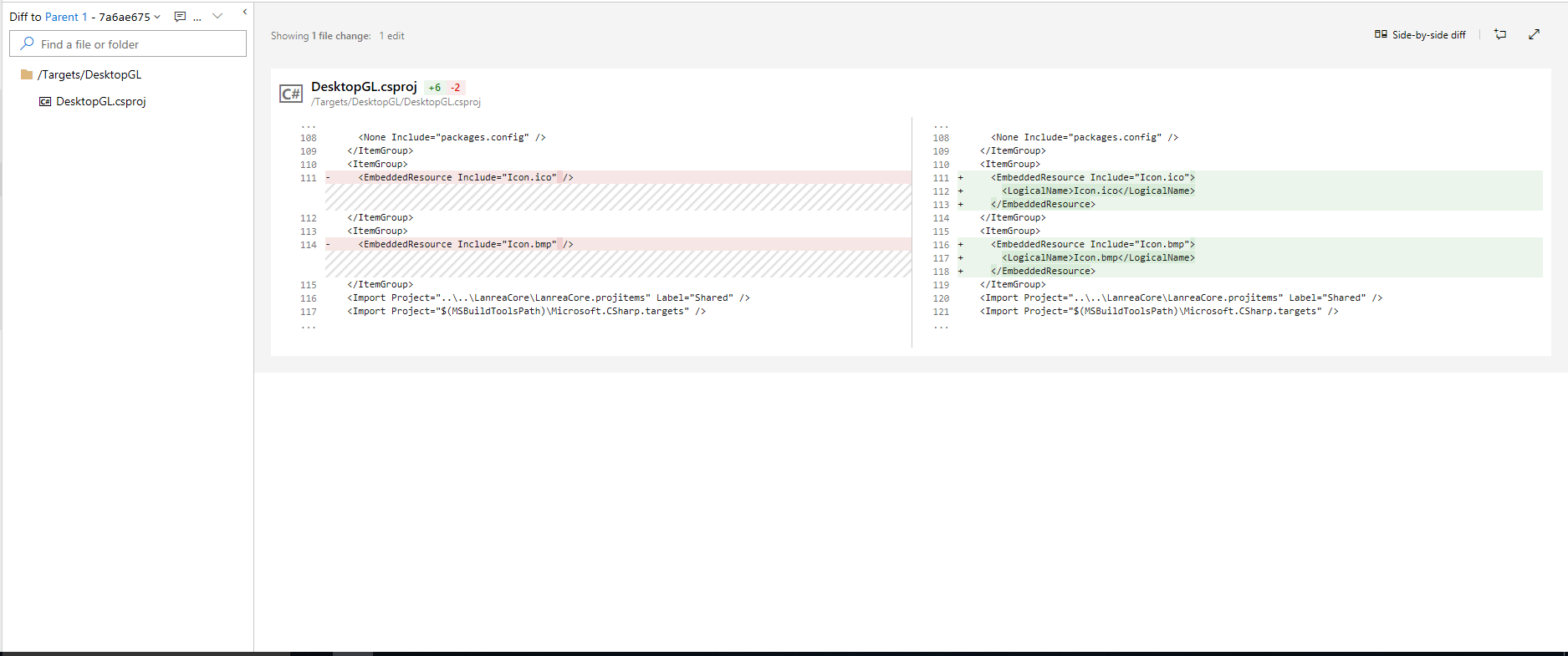
 Timothy-Ji
on 17 Oct 2018
Timothy-Ji
on 17 Oct 2018
For macOS project I already have it set on Info.plist:
The icon loads correctly but after a while it is overwritten by the MonoGame icon.
The icon comes back to my custom icon when I close the game.
Can I make MonoGame not to load any icon?
I'm on macOS 10.14.4, Visual Studio for Mac 8.0.4 build 9, MonoGame 3.8.0.362
I have no Icon.ico or Icon.bmp file set.
 PabloHenri91
on 13 May 2019
PabloHenri91
on 13 May 2019
Related issues
 tomspilman
·
4Comments
tomspilman
·
4Comments
 Jjagg
·
5Comments
Jjagg
·
5Comments
 SenpaiSharp
·
3Comments
SenpaiSharp
·
3Comments
 MichaelDePiazzi
·
4Comments
MichaelDePiazzi
·
4Comments
 willmotil
·
5Comments
willmotil
·
5Comments
Most helpful comment
ICO files are only native to Windows.
If you are distributing your game for Mac / Linux you will need two icon files regardless. Mac / Linux executables don't have an icon.
There is no way to check .exe file icon since Icon.ExtractAssociatedIcon is not implemented under mono: https://github.com/mono/mono/blob/master/mcs/class/System.Drawing/System.Drawing/Icon.cs#L302
It's there for PCL.. If someone wants to submit a PR to add a property or a method for loading a custom named icons, I think that it should be fine.
SDL does not offer a direct way of loading .ico files, the only direct thing was .bmp.
That being said loading .ico files would be possible with System.Drawing and some converting, but using System.Drawing on non Windows systems is something that should be absolutely avoided (yes, MonoGame 3.5 is using System.Drawing, this is because of OpenTK which has been replaced by SDL).