Monogame: Pipeline fails to generate spritefont on OsX
Just setup a new project. Pipeline fails to generate spritefont from font file. It is a standart spritefont file(xml) for Arial.
Try to change CharacterRegions but no luck. It is a systems default Arial and also tried with other fonts. What did I wrong?
Using:
- Mac
- Xamarin 6.1 + MonoGame Addin v3.6.0.906
- Pipeline 3.3 (Build on 30.03.2016)
From system:
/Users/selimanac/Development/MonoGame/MacMonoGameTest/Content/Fonts/Arial-12.spritefont
Building Font /Library/Fonts/Arial.ttf
System.NullReferenceException: Object reference not set to an instance of an object
at (wrapper unknown) SharpFont.Internal.GlyphSlotRec:PtrToStructure (intptr,object)
at (wrapper managed-to-native) System.Runtime.InteropServices.Marshal:PtrToStructure (intptr,System.Type)
at SharpFont.PInvokeHelper.PtrToStructureT <0x10af7dc70 + 0x00032> in
at SharpFont.GlyphSlot.set_Reference (IntPtr value) <0x10af7fe50 + 0x0002d> in
at SharpFont.GlyphSlot..ctor (IntPtr reference, SharpFont.Face parentFace, SharpFont.Library parentLibrary) <0x10af7fd80 + 0x0002c> in
at SharpFont.Face.get_Glyph () <0x10af7fc80 + 0x0006e> in
at Microsoft.Xna.Framework.Content.Pipeline.Graphics.SharpFontImporter.ImportGlyph (Char character, SharpFont.Face face) <0x10af7ec30 + 0x00094> in
at Microsoft.Xna.Framework.Content.Pipeline.Graphics.SharpFontImporter.Import (Microsoft.Xna.Framework.Content.Pipeline.Graphics.FontDescription options, System.String fontName) <0x10af7ca10 + 0x00161> in
at Microsoft.Xna.Framework.Content.Pipeline.Processors.FontDescriptionProcessor.ImportFont (Microsoft.Xna.Framework.Content.Pipeline.Graphics.FontDescription options, System.Single& lineSpacing, System.Int32& yOffsetMin, Microsoft.Xna.Framework.Content.Pipeline.ContentProcessorContext context, System.String fontName) <0x10af7c3b0 + 0x001ce> in
at Microsoft.Xna.Framework.Content.Pipeline.Processors.FontDescriptionProcessor.Process (Microsoft.Xna.Framework.Content.Pipeline.Graphics.FontDescription input, Microsoft.Xna.Framework.Content.Pipeline.ContentProcessorContext context) <0x10af7ab20 + 0x004ea> in
/Users/selimanac/Development/MonoGame/MacMonoGameTest/Content/Fonts/Arial-12.spritefont: error: Index was out of range. Must be non-negative and less than the size of the collection.
Parameter name: index
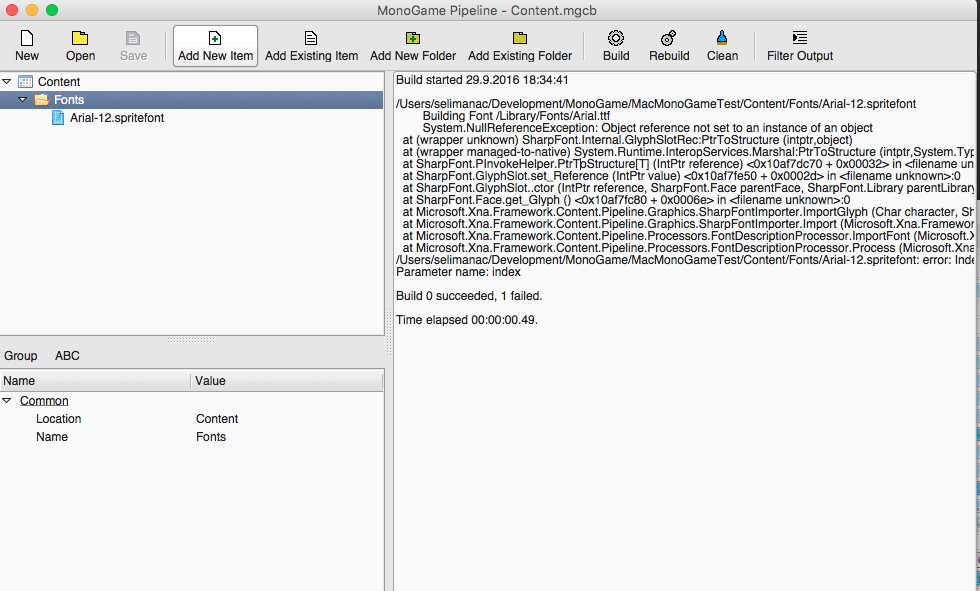
From folder (Content/Fonts/Arial.ttf):
/Users/selimanac/Development/MonoGame/MacMonoGameTest/Content/Fonts/Arial-12.spritefont
Building Font /Users/selimanac/Development/MonoGame/MacMonoGameTest/Content/Fonts/Arial.ttf
System.NullReferenceException: Object reference not set to an instance of an object
at (wrapper unknown) SharpFont.Internal.GlyphSlotRec:PtrToStructure (intptr,object)
at (wrapper managed-to-native) System.Runtime.InteropServices.Marshal:PtrToStructure (intptr,System.Type)
at SharpFont.PInvokeHelper.PtrToStructureT <0x1066e3c70 + 0x00032> in
at SharpFont.GlyphSlot.set_Reference (IntPtr value) <0x1066e5e50 + 0x0002d> in
at SharpFont.GlyphSlot..ctor (IntPtr reference, SharpFont.Face parentFace, SharpFont.Library parentLibrary) <0x1066e5d80 + 0x0002c> in
at SharpFont.Face.get_Glyph () <0x1066e5c80 + 0x0006e> in
at Microsoft.Xna.Framework.Content.Pipeline.Graphics.SharpFontImporter.ImportGlyph (Char character, SharpFont.Face face) <0x1066e4c30 + 0x00094> in
at Microsoft.Xna.Framework.Content.Pipeline.Graphics.SharpFontImporter.Import (Microsoft.Xna.Framework.Content.Pipeline.Graphics.FontDescription options, System.String fontName) <0x1066e2a10 + 0x00161> in
at Microsoft.Xna.Framework.Content.Pipeline.Processors.FontDescriptionProcessor.ImportFont (Microsoft.Xna.Framework.Content.Pipeline.Graphics.FontDescription options, System.Single& lineSpacing, System.Int32& yOffsetMin, Microsoft.Xna.Framework.Content.Pipeline.ContentProcessorContext context, System.String fontName) <0x1066e23b0 + 0x001ce> in
at Microsoft.Xna.Framework.Content.Pipeline.Processors.FontDescriptionProcessor.Process (Microsoft.Xna.Framework.Content.Pipeline.Graphics.FontDescription input, Microsoft.Xna.Framework.Content.Pipeline.ContentProcessorContext context) <0x1066e0b20 + 0x004ea> in
/Users/selimanac/Development/MonoGame/MacMonoGameTest/Content/Fonts/Arial-12.spritefont: error: Index was out of range. Must be non-negative and less than the size of the collection.
Parameter name: index

 selimanac
All 11 comments
In my experience in the past, this was usually due to the Font not being accessible or installed. However this may not be the reason here.
My next article / tutorial is on Fonts and the Content Pipeline, so I'll spin up my Mac host when I get a sec and test.
It would be a nice extension to the Font importer, to fall back to looking in the Content Folder for the TTF file for the font and not just depend on it being installed in the host.
 SimonDarksideJ
on 13 Oct 2016
SimonDarksideJ
on 13 Oct 2016
It would be a nice extension to the Font importer, to fall back to looking in the Content Folder for the TTF file for the font and not just depend on it being installed in the host.
I agree, that would make projects portable and easier to fork/setup. I've been using bitmap fonts to work around this.
 mrhelmut
on 13 Oct 2016
mrhelmut
on 13 Oct 2016
to fall back to looking in the Content Folder for the TTF file for the font and not just depend on it being installed in the host.
I thought we had that implemented at some point. If we don't we should.
 tomspilman
on 13 Oct 2016
tomspilman
on 13 Oct 2016
I'll give it a test on Windows once I've finished uploading this video
SimonDarksideJ
on 14 Oct 2016
Just confirmed, the same error occurs given
- OSX
- 3.5 redistributable's mgcb.exe
- Arial.ttf inside the spritefont's folder
- Spritefont configured with
Arial
I did not debug the source - but I read it, and we fail in the get of Glyph in Font.Glyph, in ImportGlyph in
https://github.com/MonoGame/MonoGame/blob/develop/MonoGame.Framework.Content.Pipeline/Graphics/Font/SharpFontImporter.cs
There's marshalling going on which lead me to believe that the problem was in the library we use.
Inside SharpFont.dll.config we map
<dllmap dll="freetype6.dll">
    <dllentry os="osx" dll="libfreetype.6.dylib" />
</dllmap>
I tried recompiling libfreetype from source to make sure it's built for x64, and used that dylib instead, but to no avail.
I think debugging our source is the option that remains. Before forking etc, does anyone have this setup on mac?
I'd appreciate any tips on how to debug - what IDE to use and how to attach the debugger to the mgcb process if I run that as an external program (if that's the way to roll - maybe there's a better way?).
Thanks!
Really want this fixed, feels like an integral part! ;D
 martingronlund
on 9 Nov 2016
martingronlund
on 9 Nov 2016
Related to #4620
 louisgv
on 11 Nov 2016
louisgv
on 11 Nov 2016
@louisgv glad to see you're on this!
Give me a shoutout if I can assist you in anyway, or if you need some rubberducking.
martingronlund
on 11 Nov 2016
I ran into this issue running on macos as well. I wanted to see if I could try and diagnose what is happening so I pulled the latest (aac29ca3b) from the develop branch. The oddity is that building from develop _works_ when running directly from Xamarin Studio. Running the program from the terminal however continues to fail. Is there anything I can do to help?
For additional details check out my gist for things like version / stack trace / etc.
Tangential - this works just fine running on the linux version.
 joncloud
on 2 Feb 2017
joncloud
on 2 Feb 2017
After further diagnosis and a reboot I was able to get MGCB.exe to compile without experiencing the exception. I did have Mono 4.0, and used brew upgrade to get to 4.6. The reboot seemed to correct the issue.
joncloud
on 2 Feb 2017
I discovered that for custom fonts I have to copy past the font file to /Library/Fonts/ for the content pipeline to compile it correctly. OSX install custom fonts on ~/Library/Fonts/ and this path is not included by the pipeline.
 PabloHenri91
on 7 Apr 2017
PabloHenri91
on 7 Apr 2017
PabloHenri91's solution worked for me. Moving the .ttf files from ~/Library/Fonts/ to /Library/Fonts/ let me load custom spritefonts into my project.
 AsymptoticGames
on 26 Apr 2017
AsymptoticGames
on 26 Apr 2017
Related issues
tomspilman
·
4Comments
 ryancheung
·
4Comments
ryancheung
·
4Comments
 MichaelDePiazzi
·
4Comments
MichaelDePiazzi
·
4Comments
 harry-cpp
·
5Comments
tomspilman
·
4Comments
harry-cpp
·
5Comments
tomspilman
·
4Comments
Most helpful comment
I discovered that for custom fonts I have to copy past the font file to /Library/Fonts/ for the content pipeline to compile it correctly. OSX install custom fonts on ~/Library/Fonts/ and this path is not included by the pipeline.