Issue moved from dotnet/aspnetcore#22569
- Please respond to @srudin.
_From @srudin on Friday, June 5, 2020 9:18:30 AM_
Describe the bug
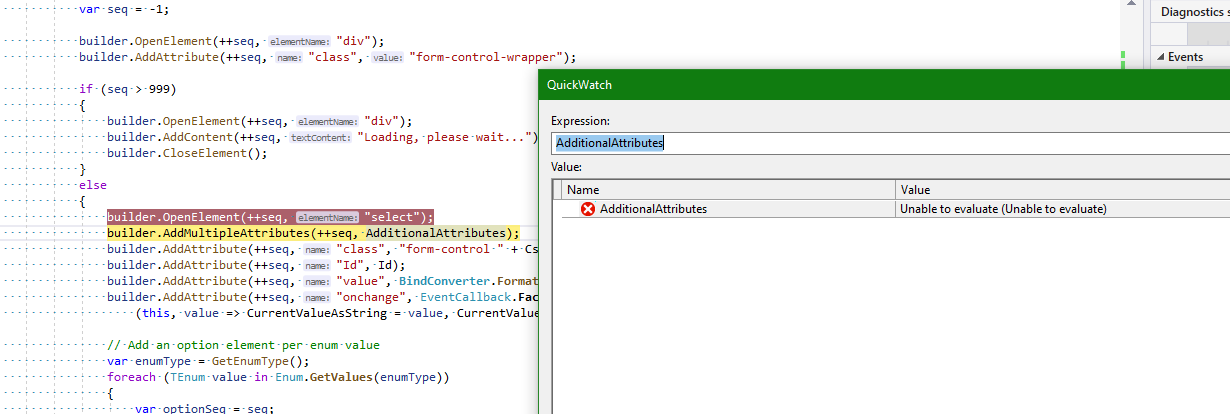
Debugging generally works, my breakpoints are hit. However sometimes I cannot display all or some of the variables: The locals window, quick watch etc. simply display "Unable to evaluate" for all variables, objects etc. Therefore expanding an object (by clicking on the +) also doesn't work. Debugging without seeing any values is of course not very helpful...
I am using the newest releases of both VS2019 (16.6.1) and the .NET SDK (3.1.300). Is there something else I need to do?
To Reproduce
Create a new client side Blazor app, set a breakpoint, debug.
@guardrex
 mkArtakMSFT
All 27 comments
Issue moved from dotnet/aspnetcore#22569
- Please respond to @mkArtakMSFT.
_From @mkArtakMSFT on Tuesday, June 9, 2020 4:56:55 PM_
Thanks for contacting us.
If you would have to categorize, which are the most common things / expressions you'd expect to be evaluated which currently don't?
mkArtakMSFT
on 9 Jun 2020
Hey @mkArtakMSFT
Why is this closed?
I am finding that if I change the counter example to have a separate view model derived from ComponentBase (using @inherits in razor) the break point is hit but the currentCount cannot be evaluated by the debugger. BTW using VS 16.6.2
More info: If i instead simply create a view model (not derived from ComponentBase) in the @code section of the razor page the breakpoints and evaluation work as expected.
 dave-schneider-ila
on 10 Jun 2020
dave-schneider-ila
on 10 Jun 2020
It's not closed ... just moved to this repo.
 guardrex
on 10 Jun 2020
guardrex
on 10 Jun 2020
@srudin Could you please record a screencast to show the issue?
 radical
on 11 Jun 2020
radical
on 11 Jun 2020
I'm having the exact same issue as @dave-schneider-ila. When inheriting the razor view from a modal derived from ComponentBase it is impossible to see the values of any variable while debugging (Unable to evaluate).
@radical : I believe this explanation is good enough to investigate without screencast.
 dme-development
on 25 Jun 2020
dme-development
on 25 Jun 2020
@srudin @dme-development I haven't been able to reproduce this. Could you share a simple project which hits this issue? And please mention the versions of VS, and Blazor that you are using now.
radical
on 14 Jul 2020
@radical : I get "Children could not be evaluated"

Is this related or should I open a separate issue?
 Postlagerkarte
on 10 Aug 2020
Postlagerkarte
on 10 Aug 2020
I Have this problem too
 ehsangfl
on 12 Aug 2020
ehsangfl
on 12 Aug 2020
@Postlagerkarte yes, please could you open a separate issue for this? thanks!
radical
on 12 Aug 2020
@srudin @dme-development Are you still seeing this issue, with preview8? You won't be able to see inherited members on object yet.
radical
on 27 Aug 2020
@Postlagerkarte https://github.com/dotnet/runtime/pull/41559
radical
on 30 Aug 2020
Hey @radical I am running into the same error when calling a Web API using httpClient.GetAsync("serverUrl") in a Blazor web assembly app. I am using VS 16.7.2, TargetFramework netstandard2.1, RazorLangVersion 3.0. I have performed the following steps to pinpoint the issue:
- The backend API behaves normally when calling from PostMan.
- I create a brand new aspnet core web app, just to call the API, works fine.
So I suspect the issue comes from the Blazor web assembly app part. Does this deserve a new Issue? I will try the preview version of the visual studio and dotnet 5 to see if the same problem will occur.
 JeffreyYeTHU
on 2 Sep 2020
JeffreyYeTHU
on 2 Sep 2020
Tried dotnet 5 with visual studio 16.8.0 preview 2.1:
- Blazor server app calls web API ok
- Blazor wasm app calls web API with error:

JeffreyYeTHU
on 2 Sep 2020
@JeffreyYeTHU this issue is about the debugger not being able to show some values. You should file a separate issue for the webapi not working.
radical
on 2 Sep 2020
@radical Thanks for reply. I try another PC with windows using Blazor wasm (Net core 3.1, VS 16.7.2), API call works. So I am not sure about the exact issue. I will experiment more and if the issue is reproducible, I will file the issue.
JeffreyYeTHU
on 4 Sep 2020
@radical
I have the same issue: it hits breakpoints but cannot evaluate variables. It seems to occurs only when the code is in a separate class.
How to reproduce:
Create a new client side Blazor app
Create CounterBase class with Counter code
Debug CounterBase IncrementCount method
Result:

.NET core 3.1
VS 2019 16.7.3
 AoiMasa
on 10 Sep 2020
AoiMasa
on 10 Sep 2020
@AoiMasa could you please share that project?
radical
on 10 Sep 2020
@radical
Here you go
BlazorAppDummy.zip
AoiMasa
on 11 Sep 2020
I am seeing the same thing. Can hit breakpoints but no variables are evaluated. I am on .Net 5 RC1
 bfmsoft
on 4 Oct 2020
bfmsoft
on 4 Oct 2020
I'm also having the same issue, I'm already on .NET 5.0.0

 johannesmols
on 12 Nov 2020
johannesmols
on 12 Nov 2020
same here
 coeur85
on 18 Nov 2020
coeur85
on 18 Nov 2020
having same issues with blazor wasm. unable to evaluate in watch window, I have having to convert everything to json and put it out with a console.writeln to the dev tools for the browser to view information

version I am running in vs 2019
Microsoft Visual Studio Professional 2019
Version 16.7.7
VisualStudio.16.Release/16.7.7+30621.155
Microsoft .NET Framework
Version 4.8.04084
Installed Version: Professional
ASP.NET and Web Tools 2019 16.7.532.28833
ASP.NET and Web Tools 2019
ASP.NET Core Razor Language Services 16.1.0.2035807+72d099b977d3a85e65fa3b0614ca8cfc803fef02
Provides languages services for ASP.NET Core Razor.
ASP.NET Web Frameworks and Tools 2019 16.7.532.28833
For additional information, visit https://www.asp.net/
Azure App Service Tools v3.0.0 16.7.532.28833
Azure App Service Tools v3.0.0
Azure Functions and Web Jobs Tools 16.7.532.28833
Azure Functions and Web Jobs Tools
C# Tools 3.7.0-6.20514.1+600c0dadd199296df3ed07dfabdc014563a77f7c
C# components used in the IDE. Depending on your project type and settings, a different version of the compiler may be used.
Common Azure Tools 1.10
Provides common services for use by Azure Mobile Services and Microsoft Azure Tools.
Cookiecutter 16.7.20248.6
Provides tools for finding, instantiating and customizing templates in cookiecutter format.
IntelliCode Extension 1.0
IntelliCode Visual Studio Extension Detailed Info
Microsoft Azure Tools 2.9
Microsoft Azure Tools for Microsoft Visual Studio 2019 - v2.9.30701.1
Microsoft Continuous Delivery Tools for Visual Studio 0.4
Simplifying the configuration of Azure DevOps pipelines from within the Visual Studio IDE.
Microsoft JVM Debugger 1.0
Provides support for connecting the Visual Studio debugger to JDWP compatible Java Virtual Machines
Microsoft Library Manager 2.1.79+ge3567815aa.RR
Install client-side libraries easily to any web project
Microsoft MI-Based Debugger 1.0
Provides support for connecting Visual Studio to MI compatible debuggers
Microsoft Visual Studio Tools for Containers 1.1
Develop, run, validate your ASP.NET Core applications in the target environment. F5 your application directly into a container with debugging, or CTRL + F5 to edit & refresh your app without having to rebuild the container.
MySQL for Visual Studio 1.2.9
Data design and management tools for MySQL. Copyright (c) 2007, 2019, Oracle and/or its affiliates. All rights reserved.
Node.js Tools 1.5.20701.1 Commit Hash:b0da3724234b78593207434292d9f891440edea1
Adds support for developing and debugging Node.js apps in Visual Studio
NuGet Package Manager 5.7.0
NuGet Package Manager in Visual Studio. For more information about NuGet, visit https://docs.nuget.org/
ProjectServicesPackage Extension 1.0
ProjectServicesPackage Visual Studio Extension Detailed Info
Python 16.7.20248.6
Provides IntelliSense, projects, templates, debugging, interactive windows, and other support for Python developers.
Python - Conda support 16.7.20248.6
Conda support for Python projects.
Python - Django support 16.7.20248.6
Provides templates and integration for the Django web framework.
Python - IronPython support 16.7.20248.6
Provides templates and integration for IronPython-based projects.
Python - Profiling support 16.7.20248.6
Profiling support for Python projects.
SQL Server Data Tools 16.0.62008.03130
Microsoft SQL Server Data Tools
TypeScript Tools 16.0.20702.2001
TypeScript Tools for Microsoft Visual Studio
Visual Basic Tools 3.7.0-6.20514.1+600c0dadd199296df3ed07dfabdc014563a77f7c
Visual Basic components used in the IDE. Depending on your project type and settings, a different version of the compiler may be used.
Visual F# Tools 10.10.0.0 for F# 4.7 16.7.0-beta.20361.3+3ef6f0b514198c0bfa6c2c09fefe41a740b024d5
Microsoft Visual F# Tools 10.10.0.0 for F# 4.7
Visual Studio Code Debug Adapter Host Package 1.0
Interop layer for hosting Visual Studio Code debug adapters in Visual Studio
Visual Studio Container Tools Extensions (Preview) 1.0
View, manage, and diagnose containers within Visual Studio.
Visual Studio Tools for Containers 1.0
Visual Studio Tools for Containers
 angelalaweai
on 4 Dec 2020
angelalaweai
on 4 Dec 2020
More information is required to reproduce, and fix the issue. It would be useful to:
- ensure you are on the latest .net 5.x release
- open a separate issue with details of the code where you are seeing the issue. A small test project, if possible, to reproduce the issue would be extremely helpful.
This error message could represent different problems, so separate issues with details of the code would help.
radical
on 4 Dec 2020
I try to provide more description,
because this problem occures when we want to see value of variable from type of a class on other assembly of solution, based on a class from thrid party!!!
Class A => On assembly Model.dll
Class B => On third party assembly, referenced to Model.dll
Class C => a property of class A. type C defined on third party
Class D => has property of type A,
public class A : B
{
    public C property1 {get;set;}

   public A()
 {
     property1  = new property1();
 }

}
Usage of Class A on class D on assembly Views.dll
public class D
{
    public A property2 {get;set;}

private void TestFunctionForBreakPoint()
{
   this.Property2 = new A();
  var A =  A.Property1;
}

}
set breakpoint on var A = A.property1 and value of this property not shown.
I try to create sample project for you
BR
ehsangfl
on 4 Dec 2020
@ehsangfl I have opened a new issue - https://github.com/dotnet/runtime/issues/45595
radical
on 4 Dec 2020
@johannesmols @coeur85 Could you please file separate issues with more details about the code, and exactly what you are trying? "Unable to evaluate" is a generic message which just means that something failed. The reason for that, or the kinda code/variable/watch expression that might result in that can be completely different.
radical
on 4 Dec 2020
Same issue here.
 ig16022
on 24 Dec 2020
ig16022
on 24 Dec 2020
Related issues
 mkArtak
·
3Comments
mkArtak
·
3Comments
 zwcloud
·
3Comments
zwcloud
·
3Comments
 kdubau
·
3Comments
kdubau
·
3Comments
 decriptor
·
4Comments
decriptor
·
4Comments
 JoseTiagoCarvalho
·
3Comments
JoseTiagoCarvalho
·
3Comments
Most helpful comment
It's not closed ... just moved to this repo.