Mono: ASP.NET Core 2.0 with .NET Framework 4.6.1 can't not work on Mono
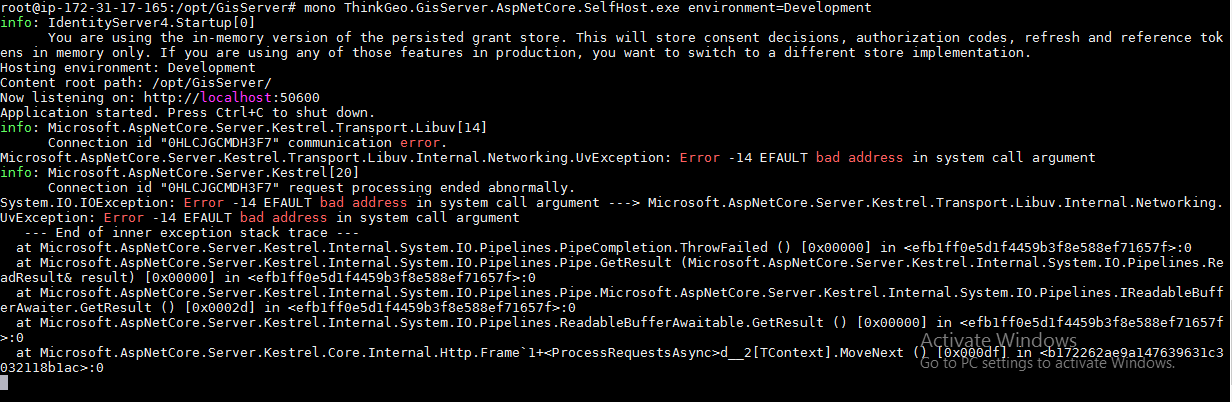
I have a ASP.NET Core 2.0 with .NET Framework 4.6.1 and run it on Linux 16.04 + Mono, and everything works well, but after I update Microsoft Visual Studio Community 2017 to the version 15.6.4 (I don't remember which the previous version is), and use it to rebuild the project and deploy the application to the Linux 16.04 again, the application is no longer working. It throws the exception:
Microsoft.AspNetCore.Server.Kestrel.Transport.Libuv[14] Connection id "0HLCKE8DCA20S" connection error. Microsoft.AspNetCore.Server.Kestrel.Transport.Libuv.Internal.Networking.UvException: Error -14 EFAULT bad address in system call argument.
I dig into the diffs between the output assembiles and my previous output assemblies and find this issue is caused by the assembly "System.Runtime.InteropServices.RuntimeInformation.dll" and "System.Net.Http.dll" which are from the MSBuild folder path "C:\Program Files (x86)\Microsoft Visual Studio\2017\Community\MSBuild\Microsoft\Microsoft.NET.Build.Extensions\net461\lib". The previous version is 4.6.25908.02(it works well on Mono), but the new version is 4.6.26011.01 which can't not work well on Mono.
Version Used:
Mono: 5.10.0.160
 peteryang023
All 5 comments
This may be due to mono not blacklisting the newer versions of those two libraries. Try removing them from the bin folder since mono ships its own.
 borgdylan
on 28 Mar 2018
borgdylan
on 28 Mar 2018
I'm experiencing the same issue since recently updating Visual Studio 2017, and can confirm that removing those two assemblies from the bin folder will restore the application's functionality under Mono.
@borgdylan I'm unfamiliar with how Mono blacklists libraries; is this something that will eventually be updated by the Mono team to take the new version of those assemblies into account? If so, will said update require an update to Mono packages on my Linux environment? I'm perfectly OK with that, just looking to understand how blacklist revisions are delivered. I'm running Mono 5.10.1.4 right now which I believe is the very latest stable build.
 bjr
on 28 Mar 2018
bjr
on 28 Mar 2018
Mono loads its own copy of libraries instead of verison it knows to be incompatible with it. If you are using bleading edge versions, it would not know about that. Mono might miss the knowledge on recent updates to those libraries. As a workaround I recommend having a mono specific configuration and using conditional steps in your msbuild file to get rid of those files after build.
borgdylan
on 28 Mar 2018
Always removing the two above mentioned files should not cause any harm. We try to keep the list of bad versions up to date but there is always a chance of using a version we don't have on the list
@radical could you check if there is easy way to see what VS bundles with 15.6.4
 marek-safar
on 28 Mar 2018
marek-safar
on 28 Mar 2018
@borgdylan Thanks! This workaround works for me. Hope it will be available in Mono blacklist soon.
peteryang023
on 29 Mar 2018
Related issues
 zwcloud
·
3Comments
zwcloud
·
3Comments
 alxchk
·
4Comments
alxchk
·
4Comments
 kumpera
·
3Comments
kumpera
·
3Comments
 EgorBo
·
3Comments
EgorBo
·
3Comments
 callmekohei
·
3Comments
callmekohei
·
3Comments
Most helpful comment
This may be due to mono not blacklisting the newer versions of those two libraries. Try removing them from the bin folder since mono ships its own.