MonitorControl not working on Apple Silicon Macs
Checklist
- [x] I have searched for existing issues
- [x] I have looked through the wiki
- [x] I have updated MonitorControl to the latest version
Describe the bug
Installing MonitorControl on a MacBook Air with Apple Silicon will show no monitors connected. I am using the same setup as I previously used with my intel-based system.
To Reproduce
Attempt normal use using a MacBook Air with an Apple M1 Processor
Expected behavior
Displays should register and allow for display controls
Environment Information (please complete the following information):
- macOS version: 11.0
- MonitorControl version: 2.1.0, Build 721
- Monitor(s): DELL S2319NX
 htmlarson
All 48 comments
+1 on this, was working before I updated to Big Sur. Seems to be more of a Big Sur problem, as I have an Intel Mac where it was working before.
 ameetmadan
on 18 Nov 2020
ameetmadan
on 18 Nov 2020
+1 with the M1 Mac mini. I have both USB-C to DisplayPort and HDMI monitors attached, neither shows in MonitorControl. May well be Big Sur problem, as my old Intel Mac is stuck at Catalina.
 alexclst
on 18 Nov 2020
alexclst
on 18 Nov 2020
When I updated my ‘16 MBP to Big Sur there was no issue, it might be no factor.
Sent from my iPhone
On Nov 18, 2020, at 2:16 PM, Alexander Celeste notifications@github.com wrote:
+1 with the M1 Mac mini. I have both USB-C to DisplayPort and HDMI monitors attached, neither shows in MonitorControl. May well be Big Sur problem, as my old Intel Mac is stuck at Catalina.—
You are receiving this because you authored the thread.
Reply to this email directly, view it on GitHub, or unsubscribe.
htmlarson
on 18 Nov 2020
I have MacOS Big Sur 11.0.1 (20B28), and its working fine for me (hackintosh). Thanks again for working on this lovely project.
 ben-xD
on 18 Nov 2020
ben-xD
on 18 Nov 2020
Working for me

 fredeil
on 19 Nov 2020
fredeil
on 19 Nov 2020
+1 with MacBook Air M1, 8-core GPU model. Replaced my 2020 13" Intel MacBook Pro, using the exact same setup (LG UltraWide USB-C Monitor), MonitorControl now just says "No supported display found"
Everything works 100% when connecting my Intel MacBook Pro, both on the latest released version of Big Sur, 11.0.1
Love this app, keep up the great work!! Thank you!
 cgaff91
on 19 Nov 2020
cgaff91
on 19 Nov 2020
+1 on this, was working before I updated to Big Sur. Seems to be more of a Big Sur problem, as I have an Intel Mac where it was working before.
- Working for me now, had an error with a different software (https://matthewpalmer.net/vanilla/) which was hiding the icon.
ameetmadan
on 19 Nov 2020
Yeah it's definitely an M1 issue, not Big Sur.
We haven't done any release officially supporting it yet either.
My guess is that Rosetta 2 either doesn't really work well on translating DDC.Swift or DDC.swift needs to get updated for it to work.
 JoniVR
on 19 Nov 2020
JoniVR
on 19 Nov 2020
Yes, I can confirm that is M1 issue – it's working on my Intel macbook with Big Sur but not with M1 macbook.
Today I tried to compile MonitorControl on M1 (with removing OSD.framework - not compatible with arm) and successfully run it natively (activity monitor shows "Apple" architecture, not "Intel"), but get same result as Intel version running under Rosseta 2: "No supported display found"
So I guess that's not a problem with Rosetta 2.
 davidkrmela
on 20 Nov 2020
davidkrmela
on 20 Nov 2020
Seems to be a bug in AppKit Framework on M1. NSScreenNumber is set to 1 instead of the actual id
Following program outputs
import AppKit
import Foundation
for screen in NSScreen.screens {
let name = screen.localizedName ?? NSLocalizedString("Unknown", comment: "Unknown display name")
print(name, screen.deviceDescription.description)
}
on M1:
on Intel:

NSScreenNumber is 1 on M1 thus DDC Framework will set Monitor to be Not DDC Compatible.

.
 baumhoto
on 21 Nov 2020
baumhoto
on 21 Nov 2020
@baumhoto, if this is indeed a bug in AppKit, and just testing the code on my M1 Mac gets the same output, you should report it to Apple using the Feedback Assistant app (where they want bug reports sent in these days). Attach a Playground that exhibits it for them. It seems this app will not be fixed until the OS itself gets that bug fixed. Indeed, the app isn't broken in all likelihood, just the API in AppKit is. Or if you're uncomfortable reporting it to Apple I could. But you're the one who pointed this out, so if you want to please do report it to Apple.
alexclst
on 21 Nov 2020
@alexclst just reported it to Apple using the Feedback assistant: FB8912103
Tried to avoid the issue by hardcoding my monitor values but the DCC Framework doesn't find my monitor even if I pass in the correct displayid. So there seems to be an issue with that as well.
baumhoto
on 22 Nov 2020
+1 for me, not to ignore that I love your app and normally everything works fine (on every other Big Sur system) !!!
 Flipsoo
on 22 Nov 2020
Flipsoo
on 22 Nov 2020
+1 for me MacBook Pro 12" M1 with USB-C Dell UW38 running 11.1b1
 hstriepe
on 23 Nov 2020
hstriepe
on 23 Nov 2020
Same issue here with the new MacBook Air running the M1 chip.
 whatstevedid
on 25 Nov 2020
whatstevedid
on 25 Nov 2020
I can reproduce it.
Works on my MBP13(10th Intel) BigSur 11.0.1
Does not work on MBP13 M1 Big Sur 11.0.1
Does it make sense to submit additional Bug Reports or is @baumhoto report enough?
 ZeroPie
on 25 Nov 2020
ZeroPie
on 25 Nov 2020
I think we’ve established the problem is legit and reproducible 😄 I suspect the most productive move would be to file dupes referencing FB8912103 to vote our issue up in Apple’s bug backlog.
 aednichols
on 25 Nov 2020
aednichols
on 25 Nov 2020
I agree with @aednichols, I'd also like to remind everyone to please avoid just "+1" comments, if you're going to add a comment, try to add value to the discussion so we don't all get spammed with "+1" comments, in that case just give a 👍 , I know everyone does this with the best intentions but it doesn't add much value to the discussion and actually makes it harder to find important information.
Personally I'm not planning on upgrading to an M1 machine soon (just bought a 16" a year ago) but I'd be happy to move the project forward through merging PRs and doing what I can to help.
JoniVR
on 25 Nov 2020
I just reported it: FB8917354. I attached to it the following playground that illustrates the problem:
M1MonitorBug.playground.zip. I also referenced @baumhoto feedback ID, as well as this issue.
alexclst
on 25 Nov 2020
I submitted another Feedback duping FB8912103.
@JoniVR I'm a developer with an M1 so if we hear from Apple about a fix I can test on my machine.
Thanks for the great app!
aednichols
on 26 Nov 2020
Is there a time frame for removing this issue?
 apparro
on 27 Nov 2020
apparro
on 27 Nov 2020
I just reported it: FB8917354. I attached to it the following playground that illustrates the problem:
[M1MonitorBug.playground.zip]
On 11.0.1 (20B29) with an M1 Mac mini, .localizedName isn't nil for me and returns the correct monitor string: "DELL U2718Q". That's what should be happening, right? The main project calls .displayName, which does return nil, because IOIteratorNext(servicePortIterator) doesn't return anything. That seems to be a problem, but I could live without the name being populated.. so then I tried to see if I can get a DDC object, but that always returns nil here.
That would be required to make this work, right? Does it make sense to file a separate issue for this, or are the name and the DDC object being nil related @alexclst?
 dschuler
on 30 Nov 2020
dschuler
on 30 Nov 2020
That would be required to make this work, right? Does it make sense to file a separate issue for this, or are the name and the DDC object being nil related @alexclst?
Honestly I don't know, @dschuler. I've never helped write this, or any other, app that handles monitors. I just ran into this problem as a user, and being a developer could test the possible AppKit bug in a Playground. So I'm not knowledgeable enough to answer your questions.
alexclst
on 2 Dec 2020
@dschuler it seems to me that the problem is with the numerical ID always returning 1. Rather than any of the strings, which are used cosmetically.
aednichols
on 2 Dec 2020
MBA M1, Big Sur 11.0, LG27UL550 — not working. On an Intel MBP16 it's working.
 sergeyfilimonov
on 3 Dec 2020
sergeyfilimonov
on 3 Dec 2020
When I updated my ‘16 MBP to Big Sur there was no issue, it might be no factor.
…
Please fix M1 compatibility issues! Pease
 ATG1209
on 3 Dec 2020
ATG1209
on 3 Dec 2020
Also doesn't work on Mac Mini M1, Big Sur 11.0.1
 CyberTx95
on 3 Dec 2020
CyberTx95
on 3 Dec 2020
@sergeyfilimonov @ATG1209 @CyberTx95 please file Feedbacks with Apple referencing this comment and FB8912103.
If you had read the rest of the thread you would know the problem is in Apple’s court, not this app.
aednichols
on 3 Dec 2020
Thanks, sorry.
Done: FB8927087
sergeyfilimonov
on 3 Dec 2020
@sergeyfilimonov @ATG1209 @CyberTx95 please file Feedbacks with Apple referencing this comment and FB8912103.
If you had read the rest of the thread you would know the problem is in Apple’s court, not this app.
I just did it. Thanks. Meanwhile, do you know if there is another way to achieve controlling external displays? Another app or guide?
ATG1209
on 4 Dec 2020
I'm not sure if the virtual audio loopback device approach works, but it might be worth taking a look at those projects.
If I recall Soundflower (very outdated) is one, SoundSource might be another one. Not sure if they work though.
Obviously only works for volume.
JoniVR
on 4 Dec 2020
HI Guys,
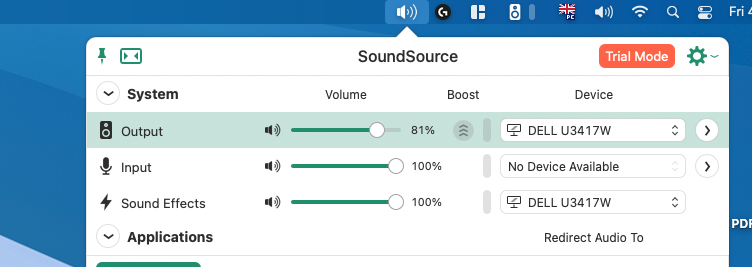
After days of looking to control my external monitor over my keyboard, finally I have managed to find it. The issue has been solved by Soundsource app, you should download beta version which is compatible with Apple Silicon, and need change some security settings. It is all working for me now. Please see for beta version https://rogueamoeba.com/tmp/betas/SoundSource_AppleSilicon_Beta.zip
apparro
on 4 Dec 2020
In case this helps anyone else who no longer has control of brightness for an external monitor, QuickShade partially works for my Phiilps 329P9H connected via USB C. I say partially because, at least for me, the slider only allows me to turn down the brightness from the default (which works for me because the default I am otherwise unable to change, even from the monitor itself, is too bright) but not up
 acousticbiker
on 4 Dec 2020
acousticbiker
on 4 Dec 2020
In case this helps anyone else who no longer has control of brightness for an external monitor, QuickShade partially works for my Phiilps 329P9H connected via USB C. I say partially because, at least for me, the slider only allows me to turn down the brightness from the default (which works for me because the default I am otherwise unable to change, even from the monitor itself, is too bright) but not up
Thanks! Works for me on my LG32UD89W (M1 macbook pro). No volume though 😏
 markhealey
on 4 Dec 2020
markhealey
on 4 Dec 2020
@acousticbiker @markhealey QuickShade is a good temporary solution
CyberTx95
on 5 Dec 2020
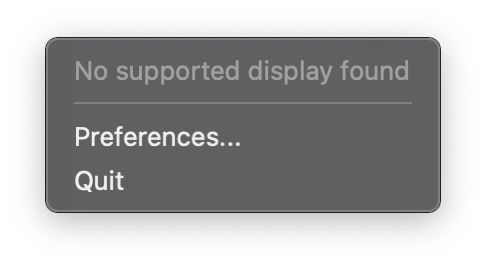
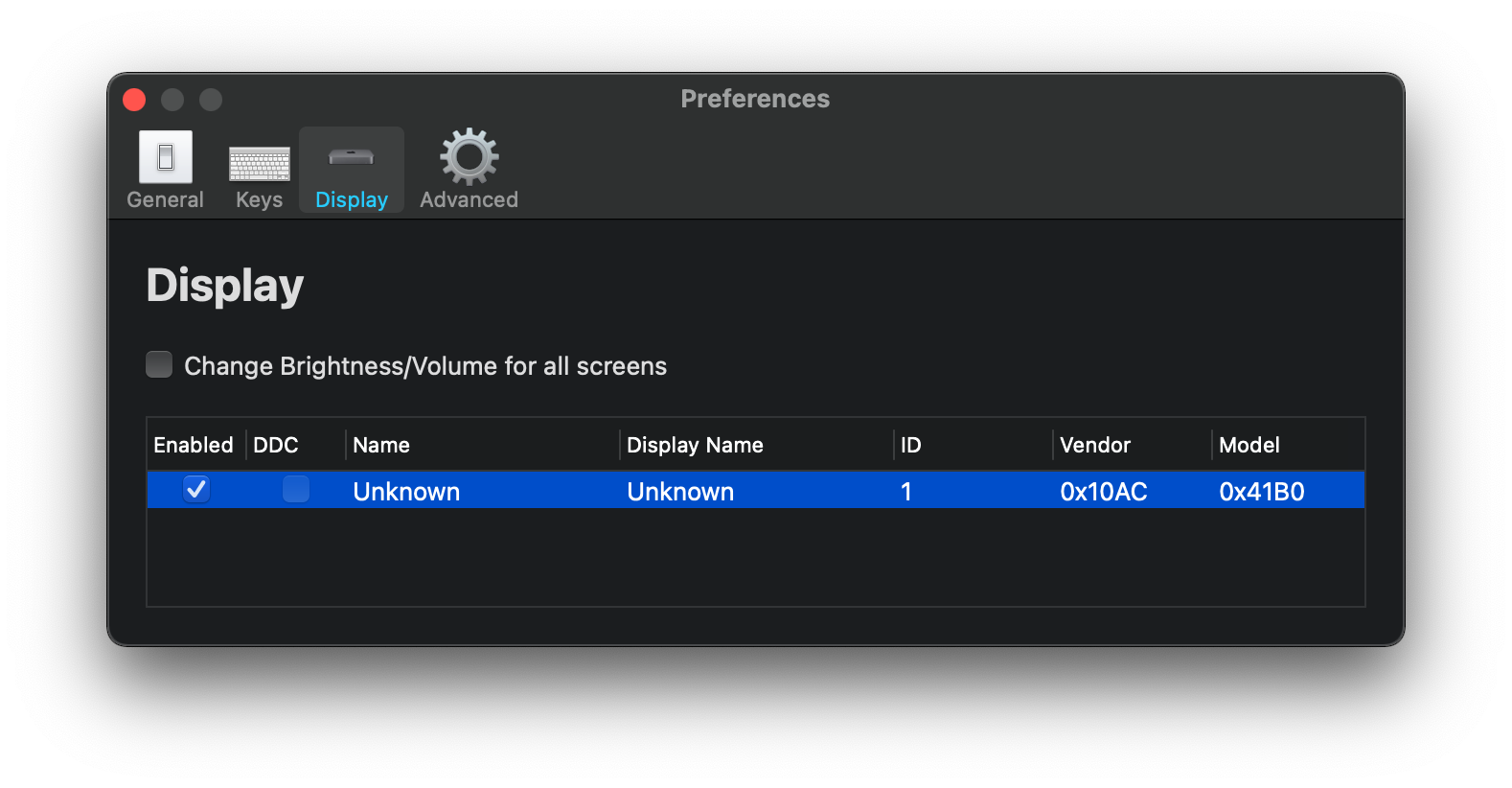
+1 for me. I have a Mac mini M1 running macOS 11.0.1 into Dell U2720Q 27" using HDMI. I'm using 2.1.0 of MonitorControl.
 lukestringer90
on 5 Dec 2020
lukestringer90
on 5 Dec 2020
@lukestringer90 Dell U2720Q 27 looks like a solid 4K monitor, how's it with your personal experience? I have the LG 27UL850-W
CyberTx95
on 5 Dec 2020
Can I please remind everyone to keep non-useful comments (general chatting, +1,...) to a minimum? I'd love to keep this issue open for important information related to finding a fix.
Everyone who is subscribed to this issue for important information/updates will get a notification for each comment.
Please move them to a more relevant discussion forum or open a different issue.
JoniVR
on 5 Dec 2020
Looks like no improvements made in today's public release of macOS 11.1 unfortunately.
cgaff91
on 14 Dec 2020
Before macOS 11.1, the Mac mini (M1) had some display bugs. The most annoying bug was with dual displays. After every boot or wake, you'd have to rearrange/reset your monitors, the settings would never save. I'm not sure if this had the same root cause as what is going on with this app, but I thought it might be helpful to know that they did fix some issues relating to displays.
 NotTheReindeer
on 15 Dec 2020
NotTheReindeer
on 15 Dec 2020
Are there any news regarding the m1 problem? I still have the issues, as told before, with macos 11.1. Do you think its fixable or an apple-side only problem?
 dariushaendel
on 21 Dec 2020
dariushaendel
on 21 Dec 2020
Got my M1 Mac Mini Yesterday. Connected to LG 27UK850 with HDMI and USB-C - Doesn't detect my display and says it's unknown.
I've been using MonitorControl since its inception. Kudos to the dev team, never had an issue on my macbook pro + USB-C. Using QuickShade for now. Looking forward to an update to MonitorControl. 👍

@sovon It's not working for all: https://github.com/MonitorControl/MonitorControl/issues/323#issuecomment-739081633
To fix this, you need to create an issue in Apple Feedback system: https://github.com/MonitorControl/MonitorControl/issues/323#issuecomment-731572780
sergeyfilimonov
on 25 Dec 2020
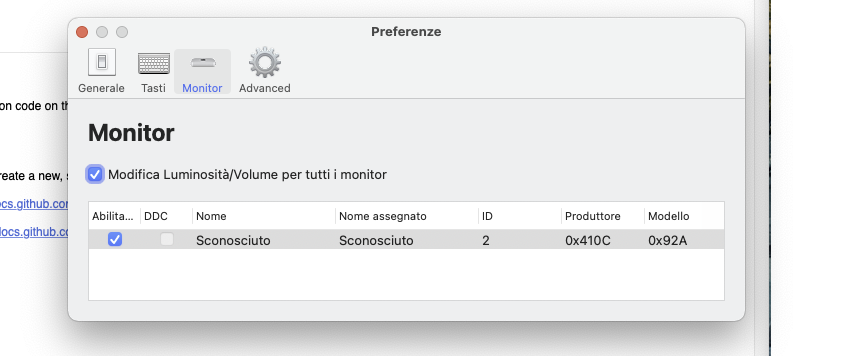
Same BUG no device find with Philips 499p9
Mac Mini M1 16b ram 1tb
Philips 499p9 adapter USB C to DP 1.4
( necessary to set 60hz and HDR , USBC to USBC only 30hz )
Also remember issues with wide and ultra wide monitor Big sur 11.0/1
Audio is working bug not control
Also in italian translate Advanced -> "Avanzate" ( seems not change it )
 asetyde
on 26 Dec 2020
asetyde
on 26 Dec 2020
I have the same problem on my M1 Mac Mini.
I'd love the team to fix this issue.
 m15079hn
on 27 Dec 2020
m15079hn
on 27 Dec 2020
+1 Macbook Air M1 -> USB-C -> LG Ergo 32UN880-B "no monitors connected"
 Netcortex
on 28 Dec 2020
Netcortex
on 28 Dec 2020
| ̄ ̄ ̄ ̄ ̄ ̄ ̄ ̄ ̄ ̄ ̄|
   Stop commenting
   that it doesn't
   work on M1.
   We know, it's
   up to Apple.
|___________|
      \ (•◡•) /
       \     /
         ---
        |   |
Can I please remind everyone to keep non-useful comments (general chatting, +1,...) to a minimum? I'd love to keep this issue open for important information related to finding a fix.
Everyone who is subscribed to this issue for important information/updates will get a notification for each comment.
Please move them to a more relevant discussion forum or open a different issue.
Please don't make me lock this thread.. I wish I could pin comments.
Read the thread if you want to know all the info and file Feedback with Apple if you want it fixed.
JoniVR
on 28 Dec 2020
macOS version: 11.1
MonitorControl version: 2.1.0, Build 721
Monitor(s): LG 27UL850-W 27
not work
 antonyRock
on 2 Jan 2021
antonyRock
on 2 Jan 2021
When compiling this as an Apple Silicon binary and running macOS Big Sur 11.1 on my M1 MacBook Air I get what I think (since it's not 1 as previously reported) is the right id from screen.deviceDescription[NSDeviceDescriptionKey(rawValue: "NSScreenNumber")]:
(lldb) p screen.deviceDescription.description
(String) $R4 = "[__C.NSDeviceDescriptionKey(_rawValue: NSDeviceResolution): NSSize: {144, 144}, __C.NSDeviceDescriptionKey(_rawValue: NSDeviceBitsPerSample): 8, __C.NSDeviceDescriptionKey(_rawValue: NSDeviceSize): NSSize: {2560, 1440}, __C.NSDeviceDescriptionKey(_rawValue: NSDeviceColorSpaceName): NSCalibratedRGBColorSpace, __C.NSDeviceDescriptionKey(_rawValue: NSScreenNumber): 2, __C.NSDeviceDescriptionKey(_rawValue: NSDeviceIsScreen): YES]"
However, I'm now stuck on getting the iterator to return a handle to the device:
IOServiceGetMatchingServices(kIOMasterPortDefault, IOServiceMatching(IOFRAMEBUFFER_CONFORMSTO), &portIterator)
It seems like this issue discusses the same/a similar problem: https://github.com/kfix/ddcctl/issues/86
This comment also makes it seem like this maybe isn't possible right now: https://github.com/alin23/Lunar/issues/210#issuecomment-752405561
I would recommend following those two issues to get updates...
 LinusU
on 12 Jan 2021
LinusU
on 12 Jan 2021
Related issues
 Amir-Hass
·
6Comments
Amir-Hass
·
6Comments
 the0neyouseek
·
6Comments
the0neyouseek
·
6Comments
 falcn
·
3Comments
falcn
·
3Comments
 kikiwora
·
6Comments
kikiwora
·
6Comments
 willerbee
·
6Comments
willerbee
·
6Comments
Most helpful comment
Reminder of my reminder:
Please don't make me lock this thread.. I wish I could pin comments.
Read the thread if you want to know all the info and file Feedback with Apple if you want it fixed.