Monica: Unable to add additional people to activities
Describe the bug
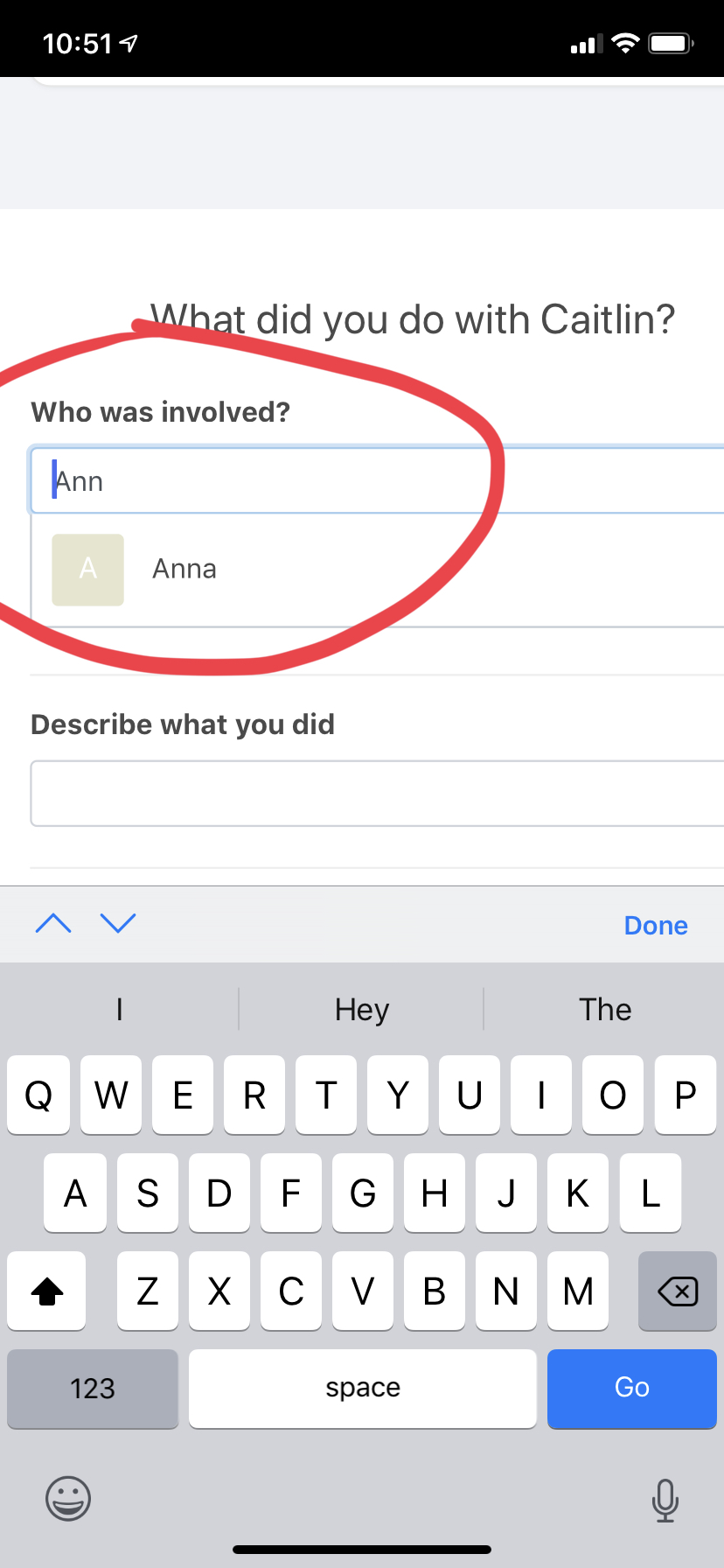
When adding or editing an Activity, I am unable to add an additional involved person from iOS Safari. I am able to add additional persons from desktop Firefox and desktop Safari.
Screenshots
Tapping on the name in the circled area has no effect.
Which version are you using:
- Self-hosted Monica v2.14.0 (Docker tagged)
- iOS 12.4, iPhone XR
Additional context
To reproduce:
- Add or edit an Activity.
- Begin typing in the "Who was involved?" text input to select a new person.
- Tap the person from the autocomplete list. The tap has no effect.
 reid
reid
All 5 comments
For what its worth, this is not a problem on my Pixel (Android P, Self hosted, v2.14.0), it is not a mobile-wide issue.
Its been awhile since I've used an iPhone, but is there a way to detect tap events? I suspect that the tap is being intercepted by something else. What happens when you:
- Close keyboard and tap
- Search from dashboard and tap
- Search from dashboard, close keyboard, and tap
Is its the same issue no matter what, its a problem with the drop down. If closing the keyboard first helps, then the tap is getting intercepted. If using the menu on the dashboard works but this one still doesn't, then I'm not really sure, but hopefully the additional information helps someone else debug the problem.
 tbirrell
on 21 Aug 2019
tbirrell
on 21 Aug 2019
Thanks! Closing the keyboard and tapping works the first time.
When I try to add another person, the trick does _not_ work again.
I can close the keyboard by pressing the iOS "Done" button right above the keyboard.
reid
on 21 Aug 2019
So to be clear, you can now get two people added to an activity? The original individual and one more. But then you can't add a third?
tbirrell
on 21 Aug 2019
Correct. I can use the close-keyboard trick to select the 2nd person. But I can't add anyone else.
reid
on 21 Aug 2019
I'm using Firefox 70.0 on Windows 10 and Monica 2.14.0 with YunoHost and I can't add anyone using that text field. No suggested people appear, be it the first, second or third person.
 visika
on 29 Oct 2019
visika
on 29 Oct 2019
Related issues
 bensbox
·
3Comments
bensbox
·
3Comments
 jbiswas
·
3Comments
jbiswas
·
3Comments
 jkbecker
·
3Comments
jkbecker
·
3Comments
 baisong
·
3Comments
baisong
·
3Comments
 djaiss
·
3Comments
djaiss
·
3Comments