Mongodb-memory-server: Can't get connection string on Windows
I can't get the connection string on Windows 10 use this function getConnectionString(). Everything work fine on Mac
 nguyenhoangvi000
All 5 comments
Please run following code on your machine:
import getos from 'getos';
import os from 'os';

getos((e, os) => {
  console.log(
     {
        platform: os.platform(),
        arch: os.arch(),
        version: '3.6.5',
        os,
      }
  );
});
Don't forget to install required packages:
npm install os getos
The problem somewhere in https://github.com/nodkz/mongodb-memory-server/blob/master/src/util/MongoBinaryDownloadUrl.js it does not understand params provided from the code above.
It quite simple to fix, just look at tests https://github.com/nodkz/mongodb-memory-server/blob/master/src/util/__tests__/MongoBinaryDownloadUrl-test.js and add your test case for Win 10. With your PR with broken test helps me to fix code.
PS. How I understand Win 10 uses should get such link 'http://downloads.mongodb.org/win32/mongodb-win32-x86_64-2008plus-ssl-3.6.5.zip'
 nodkz
on 30 May 2018
nodkz
on 30 May 2018
Sorry for my late reply. It work with this code:
import getos from 'getos';
import os from 'os';


console.log(
    {
    platform: os.platform(),
    arch: os.arch(),
    version: '3.6.5',
    os,
    }
);
And here is the result:
{ platform: 'win32',
  arch: 'x64',
  version: '3.6.5',
  os:
   { arch: { [Function: arch] [Symbol(Symbol.toPrimitive)]: [Function] },
     cpus: [Function: cpus],
     EOL: '\r\n',
     endianness: { [Function: endianness] [Symbol(Symbol.toPrimitive)]: [Function] },
     freemem: { [Function: getFreeMem] [Symbol(Symbol.toPrimitive)]: [Function] },
     homedir: { [Function: getHomeDirectory] [Symbol(Symbol.toPrimitive)]: [Function] },
     hostname: { [Function: getHostname] [Symbol(Symbol.toPrimitive)]: [Function] },
     loadavg: [Function: loadavg],
     networkInterfaces: [Function: networkInterfaces],
     platform: { [Function: platform] [Symbol(Symbol.toPrimitive)]: [Function] },
     release: { [Function: getOSRelease] [Symbol(Symbol.toPrimitive)]: [Function] },
     tmpdir: { [Function: tmpdir] [Symbol(Symbol.toPrimitive)]: [Function] },
     totalmem: { [Function: getTotalMem] [Symbol(Symbol.toPrimitive)]: [Function] },
     type: { [Function: getOSType] [Symbol(Symbol.toPrimitive)]: [Function] },
     userInfo: [Function: getUserInfo],
     uptime: { [Function: getUptime] [Symbol(Symbol.toPrimitive)]: [Function] },
     getNetworkInterfaces: [Function: deprecated],
     tmpDir: [Function: deprecated],
     constants: { UV_UDP_REUSEADDR: 4, errno: [Object], signals: [Object] } } }
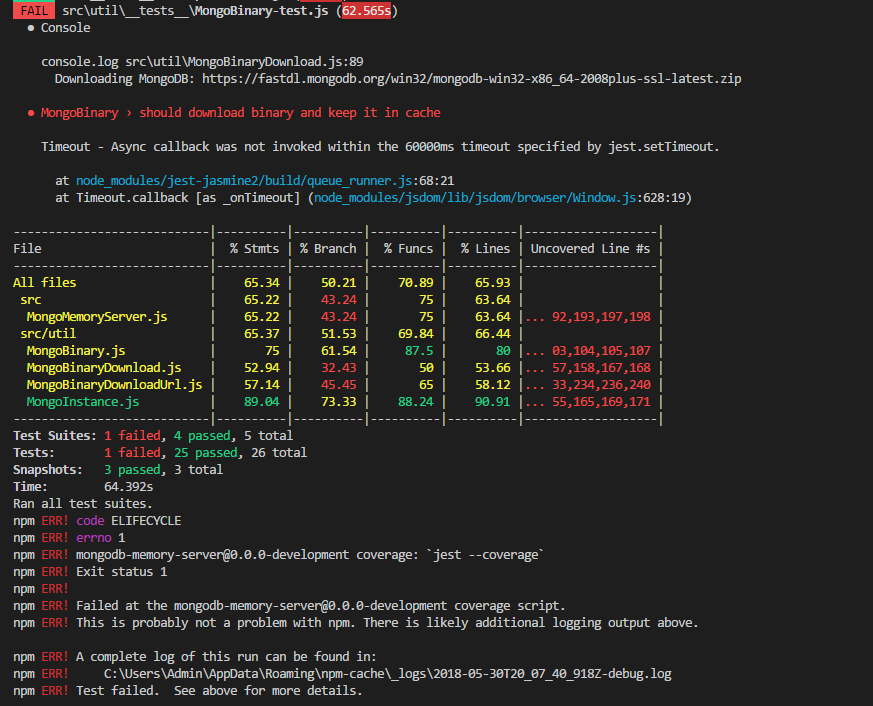
It failed on my machine when run the test.
nguyenhoangvi000
on 31 May 2018
It looks like you have weak internet connection speed.
Try to increase jasmine.DEFAULT_TIMEOUT_INTERVAL = 60000; timeout for the first binaries download.
nodkz
on 31 May 2018
Try new 1.8.0 version on your Win machine.
It will automatically download latest MongoDB version on package install.
I think that for the majority of users it will remove the timeout problem for the first test run.
nodkz
on 31 May 2018
Related issues
 kbychkov
·
3Comments
kbychkov
·
3Comments
 yavorski
·
6Comments
yavorski
·
6Comments
 hasezoey
·
7Comments
hasezoey
·
7Comments
 alexandrulesi
·
8Comments
alexandrulesi
·
8Comments
 baptLesta
·
7Comments
baptLesta
·
7Comments
Most helpful comment
Try new 1.8.0 version on your Win machine.
It will automatically download
latestMongoDB version on package install.I think that for the majority of users it will remove the timeout problem for the first test run.