Monaco-editor: Editor.layout() in 0.20.0 can crash the tab
monaco-editor version: 0.20.0
Browser: Chrome 81 (latest stable) & Chrome 69 (in Electron 4)
OS: At least Linux & Mac
Ok, I don't have a standalone reproduction for this issue. I've tried, but it's hard to do neatly.
I can easily reproduce it 100% reliably in my project though (https://github.com/httptoolkit/httptoolkit-ui), and I think from the details it's clearly a Monaco bug. The info I do have:
- Never happens in Monaco 0.19.3, but always happens in 0.20.0.
- Monaco seemingly runs
createLineBreaksFromPreviousLineBreaksinmonospaceLineBreaksComputer.jsconstantly, freezing the UI, using 100% of the CPU and more and more memory, until the tab crashes. - Only seems to happen when showing certain funky characters. I've been trying to narrow it down, the smallest example I can get is
[0x00, 0xef, 0xbf, 0xbd, 0x08, 0x2e, 0x09, 0xef, 0xbf, 0xbd, 0x11, 0x0c](as UTF8 hex codes). My app shows users live HTTP request data in Monaco, which may include binary like this - it normally renders fine, it's ok if it's a bit weird, it's not ok if the whole page implodes. - This is one example, but it seems to happen for many many similar binary examples - pretty much any time I render anything unusual.
- Only happens in an editor small enough that the given text is wrapped.
- The text initially renders fine, but when the editor size is expanded and I call
editor.layout()again, my whole app crashes.
Hope that's useful, maybe that'll spark some ideas of where the issue lies. I'll update this with more info once I find it, or when I successfully build a standalone reproduction. Happy to walk through the steps to help anybody reproduce in situ within my project, if that's of interest.
 pimterry
All 2 comments
I came across this as well, and here's how I can reproduce it on the playground:
- Monaco 0.20.0
- happens on Chrome (Version 84.0.4147.105) and FireFox (78.0.2)
- Go to https://microsoft.github.io/monaco-editor/playground.html
- Enter the code below in the JavaScript tab to the left
- Click
run - Enter the text below in the monaco editor to the right (note that tab stops)
- Open the browser dev tools
- Set
width: 80pxon the HTML element#containerwithin the monaco iframe (see screenshot) - Enter
E()in the JavaScript console and press enter (make sure you're running this code within the context of the editor iframe) - Chrome's task manager now show 100% CPU usage
If I replace the three \t tab stops with normal spaces, the problem goes away. So I'm assuming it's some issue with word wrap and special characters.
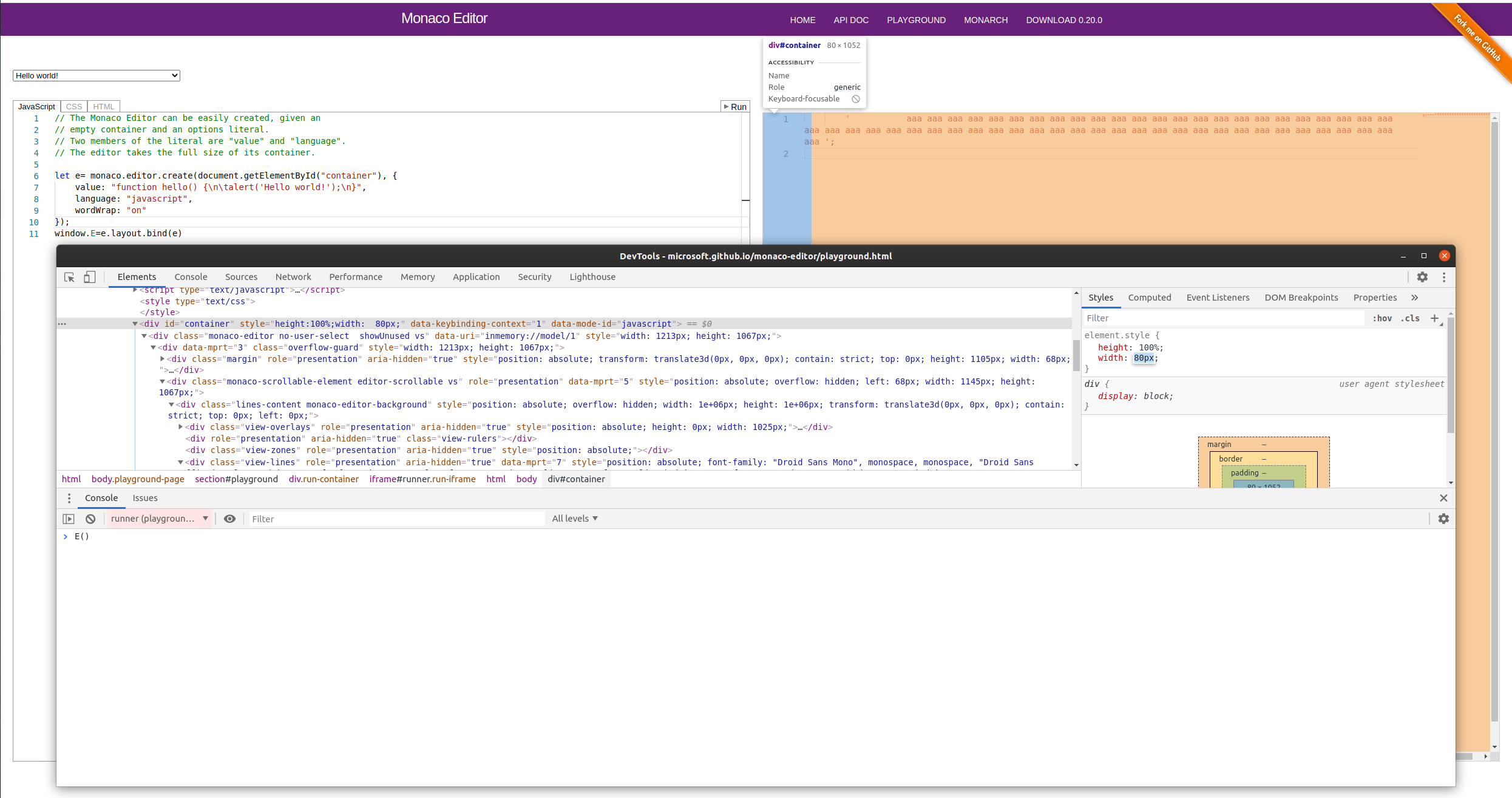
Code to enter in the JavaScript tab to the left
// The Monaco Editor can be easily created, given an
// empty container and an options literal.
// Two members of the literal are "value" and "language".
// The editor takes the full size of its container.

let e= monaco.editor.create(document.getElementById("container"), {
    value: "function hello() {\n\talert('Hello world!');\n}",
    language: "javascript",
    wordWrap: "on"
});
window.E=e.layout.bind(e)
Text to enter in the monaco editor to the right (note the 3 \t tab stops after the opening quote):
' aaa aaa aaa aaa aaa aaa aaa aaa aaa aaa aaa aaa aaa aaa aaa aaa aaa aaa aaa aaa aaa aaa aaa aaa aaa aaa aaa aaa aaa aaa aaa aaa aaa aaa aaa aaa aaa aaa aaa aaa aaa aaa aaa aaa aaa aaa aaa aaa aaa aaa aaa aaa aaa aaa ';
 blutorange
on 10 Aug 2020
blutorange
on 10 Aug 2020
I could reproduce and could verify that this is a duplicate of https://github.com/microsoft/vscode/issues/95686 .
 alexdima
on 18 Sep 2020
alexdima
on 18 Sep 2020
Related issues
 chengtie
·
3Comments
chengtie
·
3Comments
 hawkerm
·
3Comments
hawkerm
·
3Comments
 ststeiger
·
3Comments
ststeiger
·
3Comments
 andreymarchenko
·
3Comments
andreymarchenko
·
3Comments
 brandalorian
·
3Comments
brandalorian
·
3Comments
Most helpful comment
I came across this as well, and here's how I can reproduce it on the playground:
runwidth: 80pxon the HTML element#containerwithin the monaco iframe (see screenshot)E()in the JavaScript console and press enter (make sure you're running this code within the context of the editor iframe)If I replace the three \t tab stops with normal spaces, the problem goes away. So I'm assuming it's some issue with word wrap and special characters.
Code to enter in the JavaScript tab to the left
Text to enter in the monaco editor to the right (note the 3 \t tab stops after the opening quote):