Monaco-editor: Completion Suggestions are only available at start of a line.
monaco-editor version: 2.0.4
Browser: Chrome
OS: Windows 10
Steps or JS usage snippet reproducing the issue:
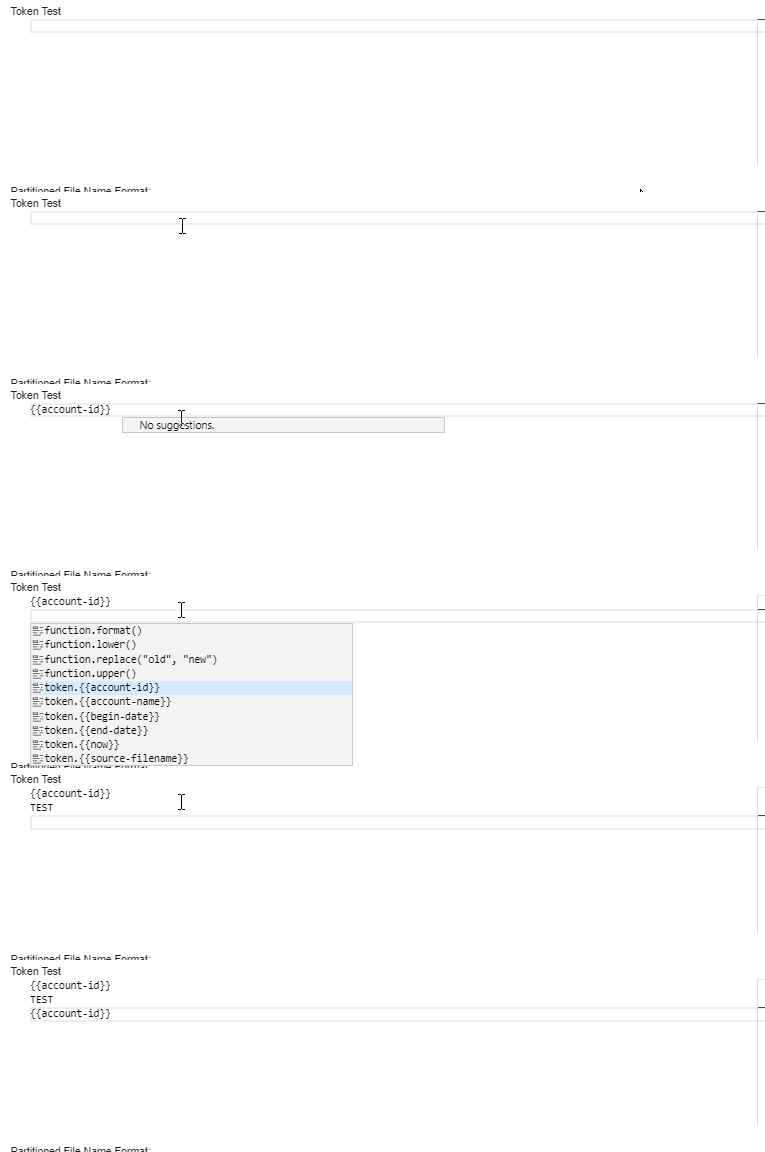
I register a custom language. I am able to select and complete suggestions by typing CTRL-SPACE. This only seems to work at start of line.
Sequence of events.
Type CTRL-SPACE -> list of suggestions is provided.
Type
Hopefully the provided GIF will help to illustrate what I'm seeing
 derau2
All 14 comments
@derau2 We can't help you without seeing your code. Is your code in a public repository somewhere?
 rcjsuen
on 15 Jul 2019
rcjsuen
on 15 Jul 2019
@rcjsuen Thank you. I'm working on a scaled down project to reproduce this issue and hope to have it pushed to github by days end. I'll tag you in a comment when it's ready. Thanks for your help.
Don
derau2
on 16 Jul 2019
@rcjsuen here is the project to created this issue. https://github.com/derau2/public
If you press CTRL-S at start of line intellisense works. If you type something prior to CTRL-S., such as "test "
and then press CTRL-S you should receive "No suggestions" as in animated gif above
derau2
on 16 Jul 2019
@derau2 I can't npm install your project.
11577 verbose stack Error: 404 Not Found - GET https://registry.npmjs.org/@am%2fag-grid - Not found
11577 verbose stack     at res.buffer.catch.then.body (/usr/lib/node_modules/npm/node_modules/npm-registry-fetch/check-response.js:104:15)
11577 verbose stack     at process._tickCallback (internal/process/next_tick.js:68:7)
11578 verbose statusCode 404
11579 verbose pkgid @am/[email protected]
11580 verbose cwd /home/remy/code/github/public
11581 verbose Linux 4.18.0-25-generic
11582 verbose argv "/usr/bin/node" "/usr/bin/npm" "install"
11583 verbose node v10.16.0
11584 verbose npm  v6.9.0
11585 error code E404
11586 error 404 Not Found - GET https://registry.npmjs.org/@am%2fag-grid - Not found
11587 error 404
11588 error 404 '@am/[email protected]' is not in the npm registry.
11589 error 404 You should bug the author to publish it (or use the name yourself!)
11590 error 404 It was specified as a dependency of 'public'
11591 error 404 Note that you can also install from a
11592 error 404 tarball, folder, http url, or git url.
11593 verbose exit [ 1, true ]
@rcjsuen
My apologies. I had an unnecessary dependency on an internal component. It's been removed and pushed to repo. I've also scanned packaging to ensure no others exist.
Hopefully it will build for you now.
Thanks,
Don
derau2
on 17 Jul 2019
@derau2 Where does this registerLanguage(*) function come from? I don't see it in Monaco's API.
rcjsuen
on 17 Jul 2019
@rcjsuen
I'm using the covalent code-editor
Here is a link
derau2
on 17 Jul 2019
@derau2 I could not find anything obviously wrong with your code. It must be related to how @covalent/code-editor does things internally. I used the code below in the Monaco Editor Playground and it worked just fine.
function createProposals() {
    return [
          {
            label: 'foobar1',
            kind: monaco.languages.CompletionItemKind.Snippet,
            insertText: '{{account-id}}',
            insertTextRules: monaco.languages.CompletionItemInsertTextRule.InsertAsSnippet
          },
          {
            label: 'foobar2',
            kind: monaco.languages.CompletionItemKind.Keyword,
            insertText: '{{account-id}}',
            insertTextRules: monaco.languages.CompletionItemInsertTextRule.InsertAsSnippet
          },
          {
            label: 'foobar3',
            kind: monaco.languages.CompletionItemKind.Text,
            insertText: '{{account-id}}',
            insertTextRules: monaco.languages.CompletionItemInsertTextRule.InsertAsSnippet
          }
    ];
}

monaco.languages.register({
    'id': 'BosTokensLanguage'
})

monaco.languages.registerCompletionItemProvider('BosTokensLanguage', {
    provideCompletionItems: function(model, position) {
        var suggestions = createProposals();
        return {
            suggestions: suggestions
        };
    }
});

monaco.editor.create(document.getElementById("container"), {
    value: "",
    language: "BosTokensLanguage"
});
@rcjsuen Thanks, I developed it initially in the playground. Thanks for investigating.
derau2
on 19 Jul 2019
@derau2 Hey there, I was having the same issue on v0.17.0. until I changed
// completion-provider.js to be imported
function createProposals (monaco) {
  return [{
    label: 'html',
    kind: monaco.languages.CompletionItemKind.Function,
    insertText: '<html>$1</html>',
    detail: '<html></html>',
    insertTextRules: monaco.languages.CompletionItemInsertTextRule.InsertAsSnippet
  }]
}

export const completionItemProvider = (monaco) => {
  const suggestions = createProposals(monaco)

  return {
    provideCompletionItems (model, position) {
      return {
        suggestions
      }
    }
  }
}
into this
export const completionItemProvider = (monaco) => {
  return {
    provideCompletionItems (model, position) {
      return {
        suggestions: [{
          label: 'html',
          kind: monaco.languages.CompletionItemKind.Function,
          insertText: '<html>$1</html>',
          detail: '<html></html>',
          insertTextRules: monaco.languages.CompletionItemInsertTextRule.InsertAsSnippet
        }]
      }
    }
  }
}
// main.js
import { completionItemProvider } from './completion-provider'
import { id } from './config'

monaco.languages.registerCompletionItemProvider(id, completionItemProvider(monaco, id))
and the suggestion was able to be triggered elsewhere.
@rcjsuen Any idea why it works this way?
 DMXL
on 22 Jul 2019
DMXL
on 22 Jul 2019
@DMXL Not sure. It could be the difference between being dynamic or not I suppose.
rcjsuen
on 22 Jul 2019
@DMXL Not sure. It could be the difference between being dynamic or not I suppose.
Yeah. I think provideCompletionItems() should return a new set of suggestions (with reference to a new object) every time it's called.
DMXL
on 22 Jul 2019
@jrieken Can you please confirm? If that is the case, could we please document in JSDoc that we always expect fresh objects to come from provideCompletionItems().
 alexdima
on 9 Dec 2019
alexdima
on 9 Dec 2019
Thanks @DMXL!!
Didn't know why didn't work until I changed my code to recreate objects.
 aldrinmartoq
on 12 Apr 2020
aldrinmartoq
on 12 Apr 2020
Related issues
 inf9144
·
3Comments
inf9144
·
3Comments
 Panhaiwei
·
3Comments
Panhaiwei
·
3Comments
 PinkyJie
·
3Comments
PinkyJie
·
3Comments
 aarinsmith
·
3Comments
aarinsmith
·
3Comments
 zeegin
·
3Comments
zeegin
·
3Comments
Most helpful comment
@jrieken Can you please confirm? If that is the case, could we please document in JSDoc that we always expect fresh objects to come from
provideCompletionItems().