Monaco-editor: Support showing the native context menu (with copy/paste)
monaco-editor version: 0.12.0
Browser: Google Chrome
OS: macOS
Steps or JS usage snippet reproducing the issue:
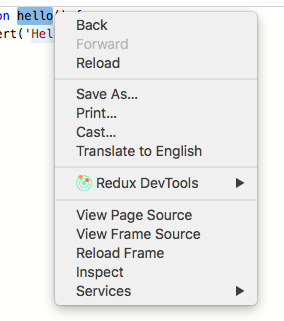
When disabling context menu (contextmenu: false), highlighting a text and right clicking it will open context menu with missing actions (Cut/Paste/Copy/Select All)

 tombenezra
All 8 comments
Hi I would like to take a look into this, could you assign this to me?
 kokris92
on 8 Oct 2018
kokris92
on 8 Oct 2018
So just to clarify the missing actions (Cut/Paste/Copy/Select All), would still be available when (contextmenu: false)--is that correct?
kokris92
on 8 Oct 2018
When setting contextmenu: false text actions (copy, paste, etc..) are not available at all (even when highlighting a text)
this screenshot clarifies the issue better (reproduced on playground):
tombenezra
on 8 Oct 2018
I don't want to use the custom Monaco menu so i set contextmenu: false. But i want the native browser menu to still be able to copy paste. Is this possible?
 neptunian
on 29 Nov 2018
neptunian
on 29 Nov 2018
Unfortunately not. The editor is not a native <input> or <textarea>, so the browsers, when you right click, do not offer any actions typical for those inputs.
 alexdima
on 3 Dec 2018
alexdima
on 3 Dec 2018
But ACE supports this.
 Menci
on 31 May 2019
Menci
on 31 May 2019
Setting contenteditable="true" on the <div class="monaco-editor"> seems to bring copy and paste back to the native context menu (Mac Chrome) while surprisingly not harming everything else.
 jeremyrsmith
on 8 Jul 2019
jeremyrsmith
on 8 Jul 2019
Setting
contenteditable="true"on the<div class="monaco-editor">seems to bring copy and paste back to the native context menu (Mac Chrome) while surprisingly not harming everything else.
Unfortunately in WebKit / Safari, this does allow editing the content of tooltips too (e.g. error messages, hover tooltips).
However, If (like me) you're only interested in WebKit (e.g. embedding in a native app), I can recommend adding a CSS rule:
.monaco-editor .view-line {
    -webkit-user-modify: read-write-plaintext-only;
}
This will set contentEditable on every view-line individually (which contains only the syntax highlighted text, not the tooltips, etc). It's not perfect; the class names may change in the future. Just make sure to check if it's still working every time you update to a newer version of monaco.
It also seems compatible with Chrome (tested), Edge and Opera (both untested).
 elslooo
on 29 Nov 2019
elslooo
on 29 Nov 2019
Related issues
 aarinsmith
·
3Comments
aarinsmith
·
3Comments
 andreymarchenko
·
3Comments
andreymarchenko
·
3Comments
 akosyakov
·
3Comments
akosyakov
·
3Comments
 Panhaiwei
·
3Comments
Panhaiwei
·
3Comments
 poloten4uk
·
3Comments
poloten4uk
·
3Comments
Most helpful comment
I don't want to use the custom Monaco menu so i set contextmenu: false. But i want the native browser menu to still be able to copy paste. Is this possible?