Monaco-editor: Editor view-line has width of 100% causing problems
In version 0.14.3 of monaco editor, I see the following when I load an any code into the editor:

I have to add in this line to my css in order to get the lines to correctly start at the beginning of the line:
.view-line{
  width:auto !important;
}
Does anybody else have this? Is there a fix?
 renegadeandy
All 4 comments
@renegadeandy I believe you might have some CSS on your page which interacts with the editor's CSS.
 alexdima
on 29 Aug 2018
alexdima
on 29 Aug 2018
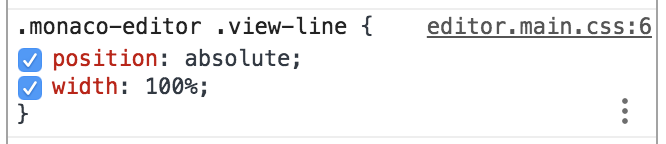
I would agree, yet it seems that it is the editor.main.css which has the rule:
renegadeandy
on 29 Aug 2018
That rule is correct. There must be some other CSS on your page that changes this or some other parent element's styling.
I think it is a coincidence that your removal of width: 100% helps in any way.
alexdima
on 29 Aug 2018
I'm having the same issue, the 100% width on .view-line is causing the line contents to be displayed in the horizontal center of the line. Removing/setting the width to auto for .view-line fixes this.
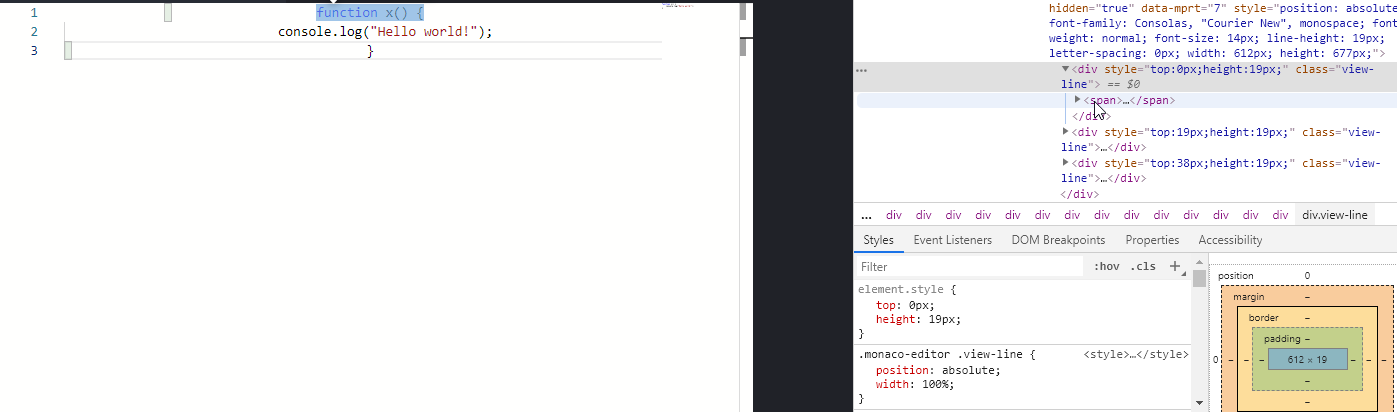
This is in a brand new web app with almost no styling beyond colors, I tried removing all styles from the webapp and the problem persisted so I'm pretty sure it's not a parent element's styling causing it.
EDIT:
Turns out some of the boilerplate code for my app (Vue CLI 3 generator) added a text-align: center in my main app component which was causing this issue. It might be a good idea to have the editor set the text-align for .view-line to prevent this happening.
 xkisu
on 10 May 2019
xkisu
on 10 May 2019
Related issues
 AchimKO
·
20Comments
AchimKO
·
20Comments
 gynet
·
22Comments
gynet
·
22Comments
 oldrich-s
·
26Comments
oldrich-s
·
26Comments
 tylerlong
·
17Comments
tylerlong
·
17Comments
 sinaa
·
26Comments
sinaa
·
26Comments
Most helpful comment
I'm having the same issue, the 100% width on
.view-lineis causing the line contents to be displayed in the horizontal center of the line. Removing/setting thewidthtoautofor.view-linefixes this.This is in a brand new web app with almost no styling beyond colors, I tried removing all styles from the webapp and the problem persisted so I'm pretty sure it's not a parent element's styling causing it.
EDIT:
Turns out some of the boilerplate code for my app (Vue CLI 3 generator) added a
text-align: centerin my main app component which was causing this issue. It might be a good idea to have the editor set thetext-alignfor.view-lineto prevent this happening.