Monaco-editor: how can i always activate find-widget?
monaco-editor version: 0.12.0
Browser: chrome
OS: ubuntu 18.04
when browser create monaco-editor object how can i activate find-widget always?
 baekya884
All 5 comments
You could execute a command, e.g. editor.trigger('actions.find')
reference:
https://github.com/Microsoft/vscode/blob/12134ce9978b156d6521bea84bce28a70fe90352/src/vs/editor/contrib/find/findModel.ts#L56:L75
 alexdima
on 4 May 2018
alexdima
on 4 May 2018
thank you!
baekya884
on 4 May 2018
@alexandrudima @baekya884 Note: I might be doing something wrong, so correct me if i do so.
This doesn´t seam to work on monaco version 0.15.5, or i was unable to make it work using trigger, but i was able to manually open it by calling the action directly: editor.getAction("actions.find").run()
Though i was unable to close it again.
(I used the dev version)
Content:
<!DOCTYPE html>
<html lang="en">
<head>
    <meta charset="UTF-8">
    <title>Title</title>
    <style>
        html, body {
            overflow: hidden;
            margin: 0;
            background-color: #1e1e1e;
        }
        #container {
            height: 100vh;
            width: 100vw;
        }
    </style>
</head>
<body>
<div id="container"></div>
<script src="lib/vs/loader.js" type="application/javascript"></script>

<script type="application/javascript">
    require.config({paths: {'vs': 'lib/vs'}});
    require(['vs/editor/editor.main'], function () {

       editor =  monaco.editor.create(document.getElementById("container"), {
    value: "function hello() {\n\talert('Hello world!');\n}",
    language: "javascript"
});

    });
</script>
</body>
</html>
Result:
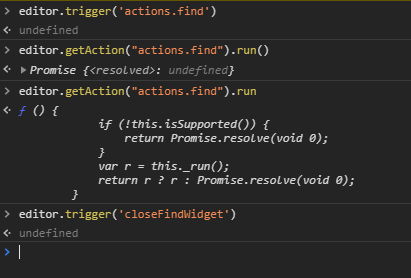
Any idea what i might be doing wrong
 liz3
on 18 Nov 2018
liz3
on 18 Nov 2018
Yes, the first argument of trigger is the source. You can use api or any other string. We expose the source argument to be able to sometimes distinguish between keyboard and mouse.
i.e. editor.trigger('blabla', 'actions.find')
alexdima
on 19 Nov 2018
@alexandrudima worked! Thanks for the very fast answer.
liz3
on 20 Nov 2018
Related issues
 andreymarchenko
·
3Comments
andreymarchenko
·
3Comments
 fabiospampinato
·
3Comments
fabiospampinato
·
3Comments
 SoftTimur
·
3Comments
SoftTimur
·
3Comments
 Panhaiwei
·
3Comments
Panhaiwei
·
3Comments
 brandalorian
·
3Comments
brandalorian
·
3Comments
Most helpful comment
Yes, the first argument of
triggeris thesource. You can useapior any other string. We expose thesourceargument to be able to sometimes distinguish betweenkeyboardandmouse.i.e.
editor.trigger('blabla', 'actions.find')