Monaco-editor: is there a method or api to control search/replace widget show or hide ?
monaco-editor version: 0.10.1
Browser: chrome 65.0.3325.181
OS: Windows 7
Steps or JS usage snippet reproducing the issue:
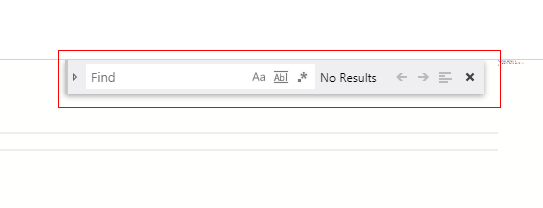
I want to hide this widget after user save there content ,is there a method or api to control search/replace widget show or hide ?
 liyann
All 2 comments
You could execute a command, e.g. editor.trigger('closeFindWidget') or reach into the find controller and close it e.g. editor.getContribution('editor.contrib.findController').closeFindWidget()
ref:
https://github.com/Microsoft/vscode/blob/f2edfdc20b43602df8bbb155c988f50c0cd5ba5a/src/vs/editor/contrib/find/findController.ts#L196
https://github.com/Microsoft/vscode/blob/f2edfdc20b43602df8bbb155c988f50c0cd5ba5a/src/vs/editor/contrib/find/findController.ts#L708
 alexdima
on 10 Apr 2018
alexdima
on 10 Apr 2018
thanks,I use editor.trigger('keyboard','closeFindWidget') close it
liyann
on 11 Apr 2018
Related issues
 spahnke
·
26Comments
spahnke
·
26Comments
 fdeitelhoff
·
24Comments
fdeitelhoff
·
24Comments
 tylerlong
·
17Comments
tylerlong
·
17Comments
 ascoders
·
22Comments
ascoders
·
22Comments
 meyer
·
33Comments
meyer
·
33Comments
Most helpful comment
You could execute a command, e.g.
editor.trigger('closeFindWidget')or reach into the find controller and close it e.g.editor.getContribution('editor.contrib.findController').closeFindWidget()ref:
https://github.com/Microsoft/vscode/blob/f2edfdc20b43602df8bbb155c988f50c0cd5ba5a/src/vs/editor/contrib/find/findController.ts#L196
https://github.com/Microsoft/vscode/blob/f2edfdc20b43602df8bbb155c988f50c0cd5ba5a/src/vs/editor/contrib/find/findController.ts#L708