Monaco-editor: deltaDecorations loss when editor executeEdits
Monaco:0.8.3
Browser:chrome
OS: mac
Hi
there are some deltaDecorations among those modified lines,here is my code:
 editor.executeEdits('danding', [
     { identifier: 'modify' , range: new monaco.Range(
                         component2.loc.start.line, component2.loc.start.column+1,
                         component2.loc.end.line, component2.loc.end.column+1),
                         text:line1, forceMoveMarkers: false }
      ]);
However,deltaDecorations get into a mess,how can i fix this.
Thanks for your time.
 dandingol03
All 8 comments
I'm not sure what you mean that deltaDecorations gets into a mess.
Any decorations that you create will be "live tracked". i.e. they will flow with the text. So, for example if you create a decoration on line 10, and then the user (or you, programatically, via executeEdits) modify the buffer, to e.g. insert a new line on line 2, then the decorations will move to line 11.
 alexdima
on 7 Jun 2017
alexdima
on 7 Jun 2017
Hi @alexandrudima, I'm not sure if what I experience are the same issues as @dandingol03 has, but I'm also struggling with the way deltaDecorations are being handled by the editor. Let's assume you start with the following setup (one decoration added in line 3):
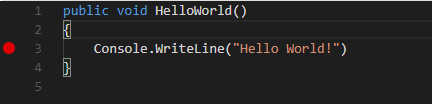
When you now place the cursor on line 2 and hit enter, the result will be as expected:
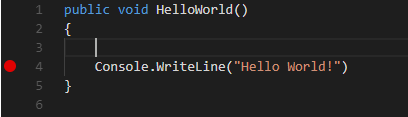
The issues are with hitting enter while the cursor is on line 3 however:
Issue 1: Decoration not moved when cursor is not in column 1 when hitting enter
When you place the cursor right in front of Console... and hit enter the result will be:
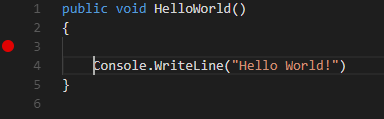
i.e. the decoration did not move alongside with the code.
Issue 2: Decoration duplicated when cursor is on column 1 when hitting enter
In contrast, when you place the cursor on column 1 in line 3 the decoration will be duplicated?!
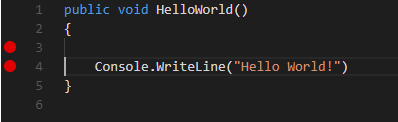
In my code I'm only handling the deltaDecorations within the mouse down event of the editor. So the shown behavior seems to be within the editor itself (however within VS-Code I cannot reproduce this behavior).
But in fact, the same behavior can be seen within the demo of the playground at Rendering glyphs in the margin
Any advice how to handle this issue?
 TobiasBreuer
on 11 Jan 2018
TobiasBreuer
on 11 Jan 2018
@TobiasBreuer you should configure decoration stickiness, e.g. stickiness: monaco.editor.TrackedRangeStickiness.NeverGrowsWhenTypingAtEdges
 akosyakov
on 11 Jan 2018
akosyakov
on 11 Jan 2018
@akosyakov Thanks for the quick reply. This indeed solves issues number 2. Now only issue number 1 remains to be a problem. The breakpoint is now not duplicated any more but it simply remains on line 3.
EDIT One update. If you press enter like described in issue 2, the breakpoint is not moved in the beginning. However, when you place the cursor in front of console, then hit backspace to delete the tab, press tab again and then hit enter while the cursor is in front of console, it works as expected... So it seems to be a problem with text that was set to the value property in the very beginning.
EDIT 2 Okay, it is not an issue with setting the value property. It also appears with automatic indentation. If you write a method, enter the curly braces and hit enter, the editor will automatically indent the body of the method. When you now write code into the body, set the breakpoint and hit enter, having the cursor placed right in front of the code, the breakpoint will not move. Deleting and adding the automatically inserted tab will fix it.
TobiasBreuer
on 11 Jan 2018
@TobiasBreuer try the following in the playground:
const column = editor.getModel().getLineFirstNonWhitespaceColumn(3);
var decorations = editor.deltaDecorations([], [
    {
        range: new monaco.Range(3, column, 3, column + 1),
        options: {
            isWholeLine: true,
            className: 'myContentClass',
            glyphMarginClassName: 'myGlyphMarginClass',
            stickiness: monaco.editor.TrackedRangeStickiness.NeverGrowsWhenTypingAtEdges
        }
    }
]);
It should behave exactly as in VS code.
akosyakov
on 11 Jan 2018
:bulb: Now I got it.
My problem was in fact, that I didn't realize that the column parameter of the range property is actually important also for setting breakpoints. As the glyph margin when clicked always reveals a value of 1 for the column in the targets location property of the event, I ignored it completely and always set the range to have a start and end-column of 1.
When using the getLineFirstNonWhitespaceColumn method to determine the column correctly it now works as expected.
Old code (broken):
newDecorations.push({
    range: new monaco.Range(line, 1, line, 1),
    options: this.breakpointDecorationOptions
});
New code (working):
const column = this.editor.getModel().getLineFirstNonWhitespaceColumn(line);
newDecorations.push({
    range: new monaco.Range(line, column, line, column),
    options: this.breakpointDecorationOptions
});
Thank you very much @akosyakov for your help!
TobiasBreuer
on 11 Jan 2018
@akosyakov does not work.
steps to reproduce:
- goto https://microsoft.github.io/monaco-editor/playground.html#interacting-with-the-editor-rendering-glyphs-in-the-margin
- replace decorations with your example
- click run
- delete "if (age) {" (do not just overwrite it)
- type something new
- press return
expected result: breakpoint does not move
actual result: breakpoint moves :(
visual studio code does not show this behavior.
any ideas?
 neoncom
on 5 Mar 2018
neoncom
on 5 Mar 2018
The good news is that vscode is open source and the sources can be used as reference. Here are the options used by breakpoints in VS Code: https://github.com/Microsoft/vscode/blob/93028e44ea7752bd53e2471051acbe6362e157e9/src/vs/workbench/parts/debug/browser/debugEditorModelManager.ts#L280
alexdima
on 13 Mar 2018
Related issues
 inf9144
·
3Comments
inf9144
·
3Comments
 chengtie
·
3Comments
chengtie
·
3Comments
 andreymarchenko
·
3Comments
andreymarchenko
·
3Comments
 poloten4uk
·
3Comments
poloten4uk
·
3Comments
 brandalorian
·
3Comments
brandalorian
·
3Comments
Most helpful comment
The good news is that vscode is open source and the sources can be used as reference. Here are the options used by breakpoints in VS Code: https://github.com/Microsoft/vscode/blob/93028e44ea7752bd53e2471051acbe6362e157e9/src/vs/workbench/parts/debug/browser/debugEditorModelManager.ts#L280