Monaco-editor: Question: How can I implement multiple cursors?
monaco-editor npm version: Latest
Is there an API to render multiple cursors?
I'd like these secondary cursors disconnected from keyboard input. They would be for display only.
 snadrus
>All comments
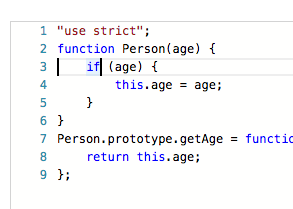
If you'd want to add something for display purposes only, you can use decorations. You can create decorations that look like cursors.
e.g.
You can run the following at https://microsoft.github.io/monaco-editor/playground.html#interacting-with-the-editor-line-and-inline-decorations by replacing the JS/CSS parts with:
var jsCode = [
    '"use strict";',
    'function Person(age) {',
    '   if (age) {',
    '       this.age = age;',
    '   }',
    '}',
    'Person.prototype.getAge = function () {',
    '   return this.age;',
    '};'
].join('\n');

var editor = monaco.editor.create(document.getElementById("container"), {
    value: jsCode,
    language: "javascript"
});

var decorations = editor.deltaDecorations([], [
    { range: new monaco.Range(3, 1, 3, 2), options: { className: 'my-cursor'} },
]);
.my-cursor {
    background: black;
    width: 2px !important;
}
The vertical line on line 3 is not a cursor:
 alexdima
on 8 Jun 2017
alexdima
on 8 Jun 2017
👍7
Was this page helpful?
0 / 5 - 0 ratings
Related issues
 akosyakov
·
3Comments
akosyakov
·
3Comments
 inf9144
·
3Comments
inf9144
·
3Comments
 Spongman
·
3Comments
Spongman
·
3Comments
 PinkyJie
·
3Comments
PinkyJie
·
3Comments
 galusben
·
3Comments
galusben
·
3Comments
Most helpful comment
If you'd want to add something for display purposes only, you can use decorations. You can create decorations that look like cursors.
e.g.
You can run the following at https://microsoft.github.io/monaco-editor/playground.html#interacting-with-the-editor-line-and-inline-decorations by replacing the JS/CSS parts with:
The vertical line on line 3 is not a cursor: