Moleculer: A way to destructure services into individual Docker images
Is your feature request related to a problem? Please describe.
Building Docker images is a problem. As of now, we have github repos for each service. So we can build docker images individually.
Describe the solution you'd like
However, we'd like a way for moleculer to be able to destructure the services folder into separate docker builds.
Describe alternatives you've considered
We're currently working on a repo/service structure, which is not very efficient.
 amroessam
All 22 comments
Tagging the team @kamilkamili @mohammed-ali-1
amroessam
on 21 Jul 2019
@icebob @AndreMaz @faeron @Nathan-Schwartz @shawnmcknight, I created a cli tool moldock that does that, please take a look and advice the way forward. It's currently not up on npm due to some issues with my account but should be resolved shortly.
You can clone the project and do and npm i -g . then use it as the doc sys.
amroessam
on 24 Jul 2019
Good job @amroessam! I will check it as soon as I can.
 icebob
on 24 Jul 2019
icebob
on 24 Jul 2019
@amroessam @icebob
That could be great when separating services to many projects. It can be easy and usefull when you're working in remote team and you want to keep other modules secret.
I have completed my project with another approach.
My Project information:
- More than 1 million USD budget.
- About billion of data using PostgreSQL cluster.
- More than 30 services.
- GraphQL
- Moleculer Framework.
- VueJS for client
Project Structure:
├── CHANGELOG.md
├── CONTRIBUTING.md
├── README.md
├── packages
│   ├── admin
│   ├── client
│   │   ├── src
│   │   ├── tsconfig.json
│   │   ├── tslint.json
│   │   ├── vue.config.js
│   │   └── yarn.lock
│   ├── docs
│   │   ├── Dockerfile
│   │   ├── package.json
│   │   ├── src
│   └── server
│       ├── Dockerfile
│       ├── dist
│       │   ├── moleculer.config.js
│       │   ├── package.json
│       │   ├── src
│       │   │   └── services
│       │   │       ├── ais
│       │   │       │   ├── cron.service.js
│       │   │       │   ├── graphile.service.js
│       │   │       ├── api
│       │   │       │   └── index.service.js
│       │   │       ├── authorizer
│       │   │       │   └── index.service.js
│       │   │       ├── user
│       │   │       │   ├── configUser.service.js
│       │   │       │   ├── graphile.service.js
│       │   │       │   ├── userTeam.service.js
│       │   │       │   └── userWatchList.service.js
│       │   │       └── xx-filter
│       │   │           ├── graphile.service.js
│       │   │           └── xx-filter.service.js
│       │   └── yarn.lock
│       ├── moleculer.config.ts
│       ├── package.json
│       ├── playground
│       ├── src
│       │   ├── @types
│       │   │   ├── sometype
│       │   │   │   └── index.d.ts
│       │   │   ├── common.d.ts
│       │   │   └── moleculer-graphql
│       │   │       └── index.d.ts
│       │   ├── core
│       │   │   ├── BaseService.ts
│       │   │   └── constans.ts
│       │   ├── graphql
│       │   │   └── fragment
│       │   │       └── vessel.graphql
│       │   ├── mail-template
│       │   │   ├── aor-notification.html
│       │   │   ├── demo.html
│       │   │   └── img
│       │   │       └── vts-logo.png
│       │   ├── mixins
│       │   │   ├── gql-query.mixin.ts
│       │   │   ├── graphql.mixin.ts
│       │   │   └── utils.ts
│       │   ├── register
│       │   │   └── graphql
│       │   │       └── index.js
│       │   ├── services
│       │   │   ├── api
│       │   │   │   ├── index.service.ts
│       │   │   │   └── utils.ts
│       │   │   ├── authorizer
│       │   │   │   └── index.service.ts
│       │   │   └── xx-filter
│       │   │       └── xx-filter.service.ts
│       │   └── tests
│       │       ├── some.spec.ts
│       ├── tsconfig.json
│       ├── tslint.json
│       ├── webpack.config.js
│       └── yarn.lock
├── provision
│   ├── swarmpit.yml
│   ├── swarmprom.yml
│   ├── traefik.toml
│   └── traefik.yml
└── XX
Service structure
We used TypeScript so it looks quite complicated. Anyway, the basic concept about services is:
- We located all services in
servicesfolder. - One
groupof service will be one folder. - One
groupcan contains only one service. Which named asindex.service.{ts|js}
Deployment
- We used docker swarm for our deployment.
- One service (or group of service) will be running in 1 or multiple containers.
- We have only one server images, not separated as many images. All service will be using one server image.
> First time, we though, one service should be one image but it quite difficult to manage. And it won't reduce the total size of images in registry. - We bundle the project by using
webpack bundler.
> After bundling: Thedistwill look like above project structure (indistpart) - The key point to run individual service is about choosing the service folder.
node -r dotenv/config node_modules/.bin/moleculer-runner services/service_folder_name - Our example
yamlfile of each service (this file will be generated automatically):
version: "3.5"
services:
  acl:
    image: asia.gcr.io/ltvcoffee/server:0.1.0
    command:
      - yarn
      - start:prod
      - services/acl
    environment:
      NODE_ENV: production
      NODE_ID: lc_node_acl
    secrets:
      - source: env
        target: /app/.env
    networks:
      - lc_postgres
      - lc_nats
      - lc_redis
    logging:
      driver: json-file
      options:
        max-size: 50m
    deploy:
      update_config:
        parallelism: 2
        delay: 0s
        order: start-first
networks:
  lc_postgres:
    external: true
  lc_nats:
    external: true
  lc_redis:
    external: true
secrets:
  env:
    name: lc_env
    external: true
- We deploy as a stack
docker stack deploy -c ./api-gateway.yml --with-registry-auth lc
docker stack deploy -c ./acl.yml --with-registry-auth lc
docker stack deploy -c ./authorizer.yml --with-registry-auth lc
- When we want to update individual service, only run
docker stack deploy -c ./acl.yml --with-registry-auth lc
- When we want to know which service should be updating
We wrote some shell script code to check which changes in the code to determine which service should be deployment.
TOBE Sharing
Above is only about small thing in our project and our team experience.
I hope to have time to share with all of you guys.
But, the best way to share is based on your questions.
 lucduong
on 24 Jul 2019
lucduong
on 24 Jul 2019
Here is about my webpack.config.js for javascript project
const path = require('path');
const fs = require('fs');
const CopyWebpackPlugin = require('copy-webpack-plugin');
const WebpackMoleculerServicePlugin = require('./plugins/webpack-moleculer-service-plugin');

function walkSync(dir, filelist = []) {
  fs.readdirSync(dir).forEach(file => {
    const dirFile = path.join(dir, file);
    try {
      filelist = walkSync(dirFile, filelist);
    } catch (err) {
      if (err.code === 'ENOTDIR' || err.code === 'EBUSY') filelist = [...filelist, dirFile];
      else throw err;
    }
  });
  return filelist;
}

function getEntries() {
  return walkSync('./services')
    .filter(file => file.match(/.*\.service\.js$/))
    .map(file => {
      return {
        name: file.substring(0, file.length - 3),
        path: `./${file}`,
      };
    })
    .reduce((memo, file) => {
      const outputFileName = file.name.replace('src/', '');
      memo[outputFileName] = file.path;
      return memo;
    }, {});
}

const nodeModules = {};
fs.readdirSync('node_modules')
  .filter(function (x) {
    return ['.bin'].indexOf(x) === -1;
  })
  .forEach(function (mod) {
    nodeModules[mod] = 'commonjs ' + mod;
  });

module.exports = {
  mode: 'production',
  target: 'node',
  node: {
    console: false,
    global: false,
    process: false,
    Buffer: false,
    __filename: true,
    __dirname: true,
  },
  externals: nodeModules,
  entry: {
    'moleculer.config': './moleculer.config.js',
    ...getEntries(),
  },
  module: {
    rules: [
      {
        test: /\.tsx?$/,
        use: 'ts-loader',
        exclude: /node_modules/,
      },
      {
        test: /\.(graphql|gql)$/,
        exclude: /node_modules/,
        loader: 'graphql-tag/loader',
      },
    ],
  },
  resolve: {
    extensions: ['.js'],
  },
  output: {
    filename: '[name].js',
    path: path.resolve(__dirname, 'dist'),
    library: '[name]',
    libraryTarget: 'commonjs2',
  },
  plugins: [
    new CopyWebpackPlugin(
      [
        {
          from: 'package.json',
          to: 'package.json',
          toType: 'file',
        },
      ]
    ),
    new WebpackMoleculerServicePlugin({
      entries: [
        {
          service: 'api',
          template: 'api',
          options: { domain: { Host: 'domain.com', Port: 3000 } },
        },
      ],
      output: path.resolve(__dirname, 'dist', 'deploy-stack'),
      image: 'asia.gcr.io/xxx/api:0.1',
      stack: 'projectName',
      // mask: '/services\/.*\/.*service\.js/'
    }),
  ],
};
That could be great when separating services to many projects. It can be easy and usefull when you're working in remote team and you want to keep other modules secret.
Thanks for your feedback @lucduong 👍🏽, we're currently using moleculer in my organisation and we love it. We're facing some issues due to how small the moleculer's community is. Might need to pick your brain a little because we have some interesting use cases. Please if you have any suggestions about moldock don't hesitate to share them.
amroessam
on 24 Jul 2019
I also have a separate development for cross datacenters, servers and containers of docker services of the molecular services.
This is an open source project and I am updating it with every commercial project.
It is based on a TCP transport based on a gossip protocol. The transport runs on top of tinc vpn based on the SPTPS protocol and full support mesh network.
VPN network is integrated with docker network macvlan and allows you to see brokers on different servers and containers.
So the autodiscovery & registry works for us, I try to stick to zero-configuration in everything. Also it's works fast and secure.
Separately, I decided to add multicast dns by integrating it into the api event docker - this will allow decentralized storing of dns and exchange them between all servers about the availability of services for automatic use of dns round robin balancing.
All of this will be inextricably linked with molecular and is in our team the main development stack.
Until the end of this year I am actively working to create a whitepaper and arrange repositories. We have done a lot of research on this work and use all the experience of our team in the development of decentralized applications and blockchains.
 intech
on 24 Jul 2019
intech
on 24 Jul 2019
- We located all services in
servicesfolder.- One
groupof service will be one folder.
We are doing the same with our moleculer project.
- One
groupcan contains only one service. Which named asindex.service.{ts|js}
This is an area where we have gone a different direction. While many of our services are running as one service in a group, we find that some services are very trivial and are semantically related to each other. Since our primary purpose of separating services into "groups" is for scalability, we end up putting more than one service into a group if they are semantically related and there isn't much to gain from a scalability perspective from separating it out.
Deployment
- We used docker swarm for our deployment.
We are deploying to Kubernetes (Azure Kubernetes Service) using helm charts to build our deployment definitions.
- One service (or group of service) will be running in 1 or multiple containers.
For resiliency we deploy every group of services as at least 2 Kubernetes pods. Some groups will end up with more than that because they are highly trafficked, but we will never have less than 2. This allows us to deal with maintenance of the Kubernetes cluster with no downtime (e.g. server reboots) or gracefully handle the loss of a server since the service will be running on another node.
- We have only one server images, not separated as many images. All service will be using one server image.
We are doing the same for this. We are also using Typescript, so our CD process will transpile from TS to JS and then build a single container image of the entire project. When we switched from to moleculer we also moved from having one source code repo for each group of services to a single repo for everything. A huge improvement has been realized by having a single repo and a single container image. In particular, as we move our deployments from dev to qa to staging to production, we can just carry the container image from the previous step forward and be guaranteed that the underlying software will be the same as existed in the previous step without having to worry about managing numerous images to accomplish that.
Each service group contains a helm chart that defines the configuration for that particular group (i.e. environment variables -- particularly the environment variable that moleculer-runner uses to determine which services to start). We have a script in our CD pipeline which traverses the services folder and individually deploys each helm chart. So effectively every time there is any change to the image, all services will get redeployed at the same time.
 shawnmcknight
on 24 Jul 2019
shawnmcknight
on 24 Jul 2019
@shawnmcknight @intech
Your implementations are very different from what I’m planning to do with moleculer, and I have to say it’s super interesting.
We currently have a poc working on moleculer, but reading what you guys said is making me rethink how I’d want to approach deployment of our system.
@icebob I would like to setup a repo on the different ways we can deploy a moleculer project. What do you think?
amroessam
on 24 Jul 2019
@amroessam could you explain what different way means?
icebob
on 24 Jul 2019
@lucduong Great stuff. Could you share with us the source of webpack-moleculer-service-plugin?
In a project I will have to bundle the whole server code (moleculer services) & make an executable with pkg.
icebob
on 24 Jul 2019
@icebob Sure. I'm not finished this module yet, but considering to build this as a package and would like to get more ideas.
https://gist.github.com/lucduong/837a23b6ae6393746f1420111dc013ce
This output will be:
├── deploy-stack
│   ├── acl.yml
│   ├── adm-usr-skl.yml
│   ├── api-gateway.yml
│   ├── authorizer.yml
│   ├── deploy.sh
│   └── user-roles.yml
├── moleculer.config.js
├── package.json
└── services
    ├── acl
    │   └── index.service.js
    ├── adm-usr-skl
    │   └── index.service.js
    ├── api-gateway
    │   └── index.service.js
    ├── authorizer
    │   └── index.service.js
    └── user-roles
        └── index.service.js
And the deploy.sh will look like:
docker stack deploy -c ./api-gateway.yml --with-registry-auth lc
docker stack deploy -c ./acl.yml --with-registry-auth lc
docker stack deploy -c ./authorizer.yml --with-registry-auth lc
For the deploy stack, I won't package into container image.
This really helpful for my CI/CD and reduce a lot of time for production delivery.
Also, I would like to share my CI/CD workflow.
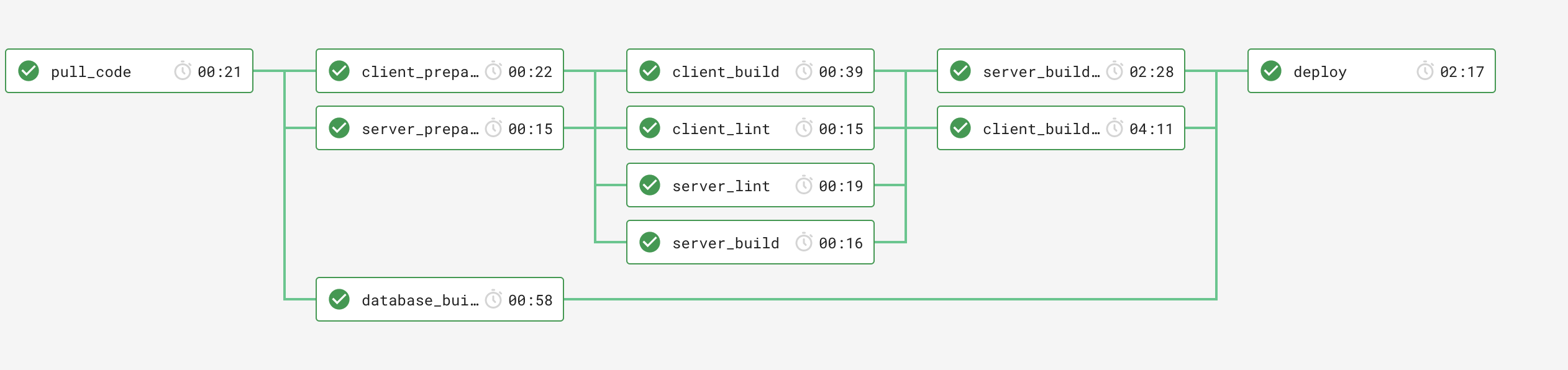
After building the server code with webpack, I will collect the deploy-stack and push to my dev server with configured SSH permission.
And also deploy to swarm with script as below.
#!/bin/bash

echo "Deploy App to Docker Swarm"
Color_Off='\033[0m'
Green='\033[0;32m'
BGreen='\033[1;32m'
BYellow='\033[1;33m'
BCyan='\033[1;36m'
BBlue='\033[1;34m'

H_USER=root
STACK_NAME=lcdev
STACK_DIR="/$H_USER/stacks/${STACK_NAME}"
SERVICES_DIR="$STACK_DIR/services"
NATS_SERVICE_NAME="${STACK_NAME}_nats"
REDIS_SERVICE_NAME="${STACK_NAME}_redis"
POSTGRES_SERVICE_NAME="${STACK_NAME}_postgres"
WITH_REGISTRY=--with-registry-auth

if [ -z "$1" ]; then
  ENV=development
else
  ENV=$1
fi

print_val() {
  label=$1
  value=$2
  echo -e $BBlue"$label: $Green$value$Color_Off"
}

print_info() {
  echo -e $BCyan"$1"$Color_Off
}

check_service_existed() {
  service_name=$1

  docker service ls -q --filter NAME=$service_name
}

deploy_service() {
  stack_name=$1
  service_name=$2
  with_registry=$3

  docker stack deploy -c $STACK_DIR/$service_name.yml $with_registry $stack_name
}

echo -e $BYellow"----------------------INFORMATION----------------------"$Color_Off
print_val "Stack             " $STACK_NAME
print_val "Stack Material    " $STACK_DIR
echo -e $BYellow"-------------------------------------------------------"$Color_Off

print_info "> Deploy NATS if existed"
res=$(check_service_existed $NATS_SERVICE_NAME)
if [ -z "$res" ]; then
  deploy_service $STACK_NAME nats $WITH_REGISTRY
else
  echo "NATS Service was deployed before."
fi

print_info "> Deploy REDIS if existed"
res=$(check_service_existed $REDIS_SERVICE_NAME)
if [ -z "$res" ]; then
  deploy_service $STACK_NAME redis
else
  echo "REDIS Service was deployed before"
fi

print_info "> Deploy POSTGRES if existed"
res=$(check_service_existed $POSTGRES_SERVICE_NAME)
if [ -z "$res" ]; then
  deploy_service $STACK_NAME postgres
else
  echo "POSTGRES Service was deployed before"
fi

print_info "> Deploy CLIENT"
deploy_service $STACK_NAME client $WITH_REGISTRY

print_info "> Deploy SERVICEs ($SERVICES_DIR)"
chmod +x $SERVICES_DIR/deploy.sh
cd $SERVICES_DIR && ./deploy.sh

echo -e $BGreen"Deployed!!"
Not sure the best way to do. Hope can get more idea from you and community
lucduong
on 24 Jul 2019
@amroessam could you explain what different way means?
@icebob so from my understanding, we can deploy with docker in multiple clustering options on multiple levels.
I want to be able to document all possible ways we can deploy moleculer. Here are some levels of deployment, you can mix and match the architecture clustering you'd like to deploy them in like docs say here
Level 1: All services are on the same box in the same docker container and communicate to each other in the same container over localhost
Box
+--------------------------------------+
|                                      |
|   Docker Container                   |
|   +------------------------------+   |
|   |                              |   |
|   |                              |   |
|   |       Moleculer Project      |   |
|   |        (All Services)        |   |
|   |                              |   |
|   |                              |   |
|   |                              |   |
|   |                              |   |
|   +------------------------------+   |
|                                      |
|                                      |
+--------------------------------------+
Level 2: All services are on the same box in the different docker containers and communicate to each other on the docker network
Box
+-------------------------------------------+
|                                           |
|   DC           DC           DC            |
|   +---------+  +---------+  +---------+   |
|   |         |  |         |  |         |   |
|   | Service |  | Service |  | Service |   |
|   |    1    |  |    2    |  |    3    |   |
|   |         |  |         |  |         |   |
|   +---------+  +---------+  +---------+   |
|                                           |
|                                           |
|                                           |
+-------------------------------------------+
Level 3: All services are on the different boxes in different docker containers and communicate to each other via TCP/IP whether it's internet or intranet (LAN)
Box                  Box                  Box
+-----------------+  +-----------------+  +-----------------+
|                 |  |                 |  |                 |
|   DC            |  |   DC            |  |   DC            |
|   +---------+   |  |   +---------+   |  |   +---------+   |
|   |         |   |  |   |         |   |  |   |         |   |
|   | Service |   |  |   | Service |   |  |   | Service |   |
|   |    1    |   |  |   |    2    |   |  |   |    3    |   |
|   |         |   |  |   |         |   |  |   |         |   |
|   +---------+   |  |   +---------+   |  |   +---------+   |
|                 |  |                 |  |                 |
+-----------------+  +-----------------+  +-----------------+
Level 4: All services are on the same box in different docker machines and are managed by a docker swarm manager on the same box
   Box
+------------------------------------------------------+
|   DM               DM              DM                |
|   +-------------+  +-------------+ +-------------+   |
|   | DC          |  | DC          | | DC          |   |
|   | +---------+ |  | ----------+ | | ----------+ |   |
|   | |         | |  | |         | | | |         | |   |
|   | | Service | |  | | Service | | | | Service | |   |
|   | |    1    | |  | |    2    | | | |    3    | |   |
|   | |         | |  | |         | | | |         | |   |
|   | +---------+ |  | ----------+ | | ----------+ |   |
|   |             |  |             | |             |   |
|   +-------------+  +-------------+ +-------------+   |
|                                                      |
|                    DM                                |
|                    +-------------+                   |
|                    |             |                   |
|                    | +---------+ |                   |
|                    | |         | |                   |
|                    | |  Swarm  | |                   |
|                    | | Manager | |                   |
|                    | |         | |                   |
|                    | +---------+ |                   |
|                    |             |                   |
|                    +-------------+                   |
|                                                      |
+------------------------------------------------------+
Level 5: All services are on different box in docker machines and are managed by a docker swarm manager on the same a different box
Box                       Box                       Box
+-------------------+     +-------------------+     +-------------------+
|  DM               |     |  DM               |     |  DM               |
|  +-------------+  |     |  +-------------+  |     |  +-------------+  |
|  | DC          |  |     |  | DC          |  |     |  | DC          |  |
|  | +---------+ |  |     |  | ----------+ |  |     |  | ----------+ |  |
|  | |         | |  |     |  | |         | |  |     |  | |         | |  |
|  | | Service | |  |     |  | | Service | |  |     |  | | Service | |  |
|  | |    1    | |  |     |  | |    2    | |  |     |  | |    3    | |  |
|  | |         | |  |     |  | |         | |  |     |  | |         | |  |
|  | +---------+ |  |     |  | ----------+ |  |     |  | ----------+ |  |
|  |             |  |     |  |             |  |     |  |             |  |
|  +-------------+  |     |  +-------------+  |     |  +-------------+  |
|                   |     |                   |     |                   |
+-------------------+     +-------------------+     +-------------------+

                          Box
                          +-------------------+
                          |  DM               |
                          |  +-------------+  |
                          |  |             |  |
                          |  | +---------+ |  |
                          |  | |         | |  |
                          |  | |  Swarm  | |  |
                          |  | | Manager | |  |
                          |  | |         | |  |
                          |  | +---------+ |  |
                          |  |             |  |
                          |  +-------------+  |
                          |                   |
                          +-------------------+
Also quick note, moldock is now on npm and ready to use, please leave feedback. Thanks 😁😁
amroessam
on 25 Jul 2019
Yes, you are right. Would be to add these deploying modes to the docs, as well. Somebody can create a PR with this information?
icebob
on 25 Jul 2019
I don't have enough experience in DevOps, I'm basically a potato. Maybe someone else more experienced can assist: @lucduong @intech @shawnmcknight
amroessam
on 25 Jul 2019
@amroessam I will not have so much time now. I suggest you transfer your message as a structure in the first commit, and we will supplement it as our knowledge in this PR with our commits.
intech
on 25 Jul 2019
I built another way of fixing this problem.
Basically all services are in service folder like the starter project, but I have a task that runs before committing code that generates different package.json for each service with only the required modules that service needs.
Then my CI/CD receives the call from git saying that x files were changed and I build the images based on files changed.
Also we use K8s, so my CI will be able to deploy the images separated and faster
 lehno
on 25 Jul 2019
lehno
on 25 Jul 2019
@lenho can you shed some more light, cause we're trying to implement something similar at my org. Maybe share how your pipeline is set up.
amroessam
on 25 Jul 2019
@lucduong your approach sounds very interesting. Would you be able to share a version of the blog or conduit example using this approach?
 robodude666
on 26 Jul 2019
robodude666
on 26 Jul 2019
@robodude666 sure. Let me apply on those examples
lucduong
on 27 Jul 2019
@lucduong any updates on the examples?
amroessam
on 6 Aug 2019
Related issues
 slinkardbrandon
·
4Comments
slinkardbrandon
·
4Comments
 molobala
·
3Comments
molobala
·
3Comments
 ngraef
·
3Comments
icebob
·
3Comments
ngraef
·
3Comments
icebob
·
3Comments
 thatisuday
·
3Comments
thatisuday
·
3Comments
Most helpful comment
I built another way of fixing this problem.
Basically all services are in service folder like the starter project, but I have a task that runs before committing code that generates different package.json for each service with only the required modules that service needs.
Then my CI/CD receives the call from git saying that x files were changed and I build the images based on files changed.
Also we use K8s, so my CI will be able to deploy the images separated and faster