Modernization: [BUG] Modernization Scanner: throws "Value cannot be null" error.
Thank you for reporting a bug. We appreciate your feedback - to help the team to understand your needs, please complete the below template to ensure we have the necessary details to assist you. Thanks!
Problem Area
[ ] Page Transformation: Error during the use of page transformation from PnP PowerShell
[ ] Page Transformation: Error during the use of page transformation from .Net
[ ] Page Transformation: Page is not looking correct after transformation
[*] Modernization Scanner: something went wrong...
Expected or Desired Behavior
Customer is running MS (Modernization Scanner) and they see an error in their staging environment. MS works fine in their prod and dev environment.
Observed Behavior
Screenshot, they run into this error after they successfully enter the credentials and starting a scan.

Error text:
Launching Wizard...
Scanning is starting... 8/31/2020 8:26:09 AM
Error executing scan:
Value cannot be null.
Parameter name: value
Press any key to continue
Steps to Reproduce
- Enter user name and password in the tool
- Choose classic workflow detailed option
- start the scan
- application immediately returns an error.
I can get the logs that you need, please let me know.
 nibubt
All 21 comments
How did you enter the tenant name? When you do a scan for full tenant then you only need to add the domain part, so if the tenant is named https://contoso.sharepoint.com you would enter contoso in the scanner as the https:// and .sharepoint.com parts are automatically added.
What kind of machine are you running the scanner from? I've seen similar issues when folks tried to run the scanner from older OS's (like Vista). Please try to run from a Win 10 machine and see if that works.
 jansenbe
on 2 Sep 2020
jansenbe
on 2 Sep 2020
Hi Bert,
Thank you.
- They're entering just the domain name.
- I'll confirm the OS part and get back to you.
(I'll forward this thread to the customer as well so he can reply directly in here. )
nibubt
on 2 Sep 2020
Hi Bret,
Earlier I was trying from Windows 2012 Server and today I tried from Win10 and it is the same issue.
 grsandeep
on 2 Sep 2020
grsandeep
on 2 Sep 2020
Hi @grsandeep ,
Please take screenshots from all the screens you enter in the wizard and send them to me via [email protected].
jansenbe
on 2 Sep 2020
@jansenbe @grsandeep
Were you both able to make progress? Please keep this thread updated. Thanks.
nibubt
on 4 Sep 2020
I've seen no updates....can I close this issue @nibubt / @grsandeep ?
jansenbe
on 8 Sep 2020
@nibubt - You have the video that was captured while i was doing, can u please share it with Bert?
grsandeep
on 8 Sep 2020
@jansenbe I am working with @grsandeep to figure out a way to get to you the session recording. I emailed sandeep today (you're in 'cc) morning and IM'ed as well. Please leave this open.
nibubt
on 8 Sep 2020
I am also seeing this in the modernization scanner version 2.17.0.0
I am running on Windows 10.
I'm using Username and Password auth.
 bcameron1231
on 10 Sep 2020
bcameron1231
on 10 Sep 2020
@jansenbe I've downloaded the source so I could get some information on the stacktrace. Here is where the error is.
   at Newtonsoft.Json.Utilities.ValidationUtils.ArgumentNotNull(Object value, String parameterName)
   at Newtonsoft.Json.Linq.Extensions.Value[T,U](IEnumerable`1 value)
   at Newtonsoft.Json.Linq.Extensions.Value[U](IEnumerable`1 value)
   at OfficeDevPnP.Core.AuthenticationManager.<AcquireTokenAsync>d__44.MoveNext()
--- End of stack trace from previous location where exception was thrown ---
   at System.Runtime.ExceptionServices.ExceptionDispatchInfo.Throw()
   at System.Runtime.CompilerServices.TaskAwaiter.HandleNonSuccessAndDebuggerNotification(Task task)
   at System.Runtime.CompilerServices.TaskAwaiter`1.GetResult()
   at OfficeDevPnP.Core.AuthenticationManager.<AcquireTokenAsync>d__43.MoveNext()
--- End of stack trace from previous location where exception was thrown ---
   at System.Runtime.ExceptionServices.ExceptionDispatchInfo.Throw()
   at System.Runtime.CompilerServices.TaskAwaiter.HandleNonSuccessAndDebuggerNotification(Task task)
   at System.Runtime.CompilerServices.TaskAwaiter`1.GetResult()
   at OfficeDevPnP.Core.AuthenticationManager.EnsureAzureADCredentialsToken(String resourceUri, String userPrincipalName, String userPassword, AzureEnvironment environment, KnownClientId clientId)
   at OfficeDevPnP.Core.AuthenticationManager.<>c__DisplayClass42_0.<GetAzureADCredentialsContext>b__0(Object sender, WebRequestEventArgs args)
   at System.EventHandler`1.Invoke(Object sender, TEventArgs e)
   at Microsoft.SharePoint.Client.ClientRuntimeContext.OnExecutingWebRequest(WebRequestEventArgs args)
   at Microsoft.SharePoint.Client.ClientContext.FireExecutingWebRequestEventInternal(WebRequestEventArgs args)
   at Microsoft.SharePoint.Client.ClientContext.GetWebRequestExecutor()
   at Microsoft.SharePoint.Client.ClientContext.<GetFormDigestInfoPrivateAsync>d__b.MoveNext()
--- End of stack trace from previous location where exception was thrown ---
   at System.Runtime.ExceptionServices.ExceptionDispatchInfo.Throw()
   at System.Runtime.CompilerServices.TaskAwaiter.HandleNonSuccessAndDebuggerNotification(Task task)
   at System.Runtime.CompilerServices.TaskAwaiter`1.GetResult()
   at Microsoft.SharePoint.Client.ClientContext.<EnsureFormDigestAsync>d__8.MoveNext()
--- End of stack trace from previous location where exception was thrown ---
   at System.Runtime.ExceptionServices.ExceptionDispatchInfo.Throw()
   at System.Runtime.CompilerServices.TaskAwaiter.HandleNonSuccessAndDebuggerNotification(Task task)
   at System.Runtime.CompilerServices.TaskAwaiter.GetResult()
   at Microsoft.SharePoint.Client.ClientContext.<ExecuteQueryAsync>d__4.MoveNext()
--- End of stack trace from previous location where exception was thrown ---
   at System.Runtime.ExceptionServices.ExceptionDispatchInfo.Throw()
   at System.Runtime.CompilerServices.TaskAwaiter.HandleNonSuccessAndDebuggerNotification(Task task)
   at System.Runtime.CompilerServices.TaskAwaiter.GetResult()
   at Microsoft.SharePoint.Client.ClientContextExtensions.<ExecuteQueryImplementation>d__7.MoveNext()
--- End of stack trace from previous location where exception was thrown ---
   at System.Runtime.ExceptionServices.ExceptionDispatchInfo.Throw()
   at System.Runtime.CompilerServices.TaskAwaiter.HandleNonSuccessAndDebuggerNotification(Task task)
   at System.Runtime.CompilerServices.TaskAwaiter.GetResult()
   at Microsoft.SharePoint.Client.ClientContextExtensions.ExecuteQueryRetry(ClientRuntimeContext clientContext, Int32 retryCount, Int32 delay, String userAgent)
   at Microsoft.SharePoint.Client.TenantExtensions.GetSiteCollections(Tenant tenant, Int32 startIndex, Int32 endIndex, Boolean includeDetail, Boolean includeOD4BSites)
   at OfficeDevPnP.Core.Framework.TimerJobs.Utilities.SiteEnumeration.FillSitesViaTenantAPI(Tenant tenant, Boolean excludeOD4B)
   at OfficeDevPnP.Core.Framework.TimerJobs.Utilities.SiteEnumeration.ResolveSite(Tenant tenant, String siteWildCard, List`1 resolvedSites, Boolean excludeOD4B)
   at OfficeDevPnP.Core.Framework.TimerJobs.TimerJob.ResolveSite(String site, List`1 resolvedSites)
   at OfficeDevPnP.Core.Framework.TimerJobs.TimerJob.ResolveAddedSites(List`1 addedSites)
   at SharePoint.Modernization.Scanner.Core.ModernizationScanJob.ResolveAddedSites(List`1 addedSites) in C:\Users\BeauCameron\sp-dev-modernization-master\Tools\SharePoint.Modernization\SharePointPnP.Modernization.Scanner.Core\ModernizationScanJob.cs:line 376
   at OfficeDevPnP.Core.Framework.TimerJobs.TimerJob.Run()
   at SharePoint.Modernization.Scanner.Core.ScanJob.Execute() in C:\Users\BeauCameron\sp-dev-modernization-master\Tools\SharePoint.Modernization\SharePointPnP.Modernization.Scanner.Core\ScanJob.cs:line 228
   at SharePoint.Modernization.Scanner.Core.ModernizationScanJob.Execute() in C:\Users\BeauCameron\sp-dev-modernization-master\Tools\SharePoint.Modernization\SharePointPnP.Modernization.Scanner.Core\ModernizationScanJob.cs:line 525
   at SharePoint.Modernization.Scanner.Program.Main(String[] args) in C:\Users\BeauCameron\sp-dev-modernization-master\Tools\SharePoint.Modernization\SharePointPnP.Modernization.Scanner\Program.cs:line 163
@grsandeep , authentication is the issue.
If your account has MFA enabled, use the MFA option to log in and that should resolve your issue.
 regalchidi
on 10 Sep 2020
regalchidi
on 10 Sep 2020
It's indeed the OAuth password flow not working (do a Fiddler and you'll notice the error). Please try the MFA option for scanning just a few sites (as the received token expires after 1h). For the actual full tenant scan the recommendation is to use Azure AD App-only
jansenbe
on 10 Sep 2020
Just curious, is this a change on the PnPCore side? This worked previously on the older version of the scanner w/ username&password.
Thanks for the help! 👍
bcameron1231
on 10 Sep 2020
Hmm, I've not refreshed pnp sites core for a while, so that should not be the case. Can you confirm the MFA option works? I'll do some troubleshooting from my side as well, I typically test with app-only so might have missed a backend change that causes user/pwd to fail
jansenbe
on 10 Sep 2020
To be fair, the older version is pretty old. lol I have a version of 2.12 on my machine that works fine with Username & Password.
Yes, I can confirm MFA works when selecting sites to scan. No errors from my end.
bcameron1231
on 10 Sep 2020
I'm not yet able to repro this issue from my side. @bcameron1231 / @regalchidi : when you saw the issues were you testing with a tenant admin account or just a basic site collection admin for a given site collection?
Might also be good to check if you still have legacy auth enabled or not. From tenant admin:
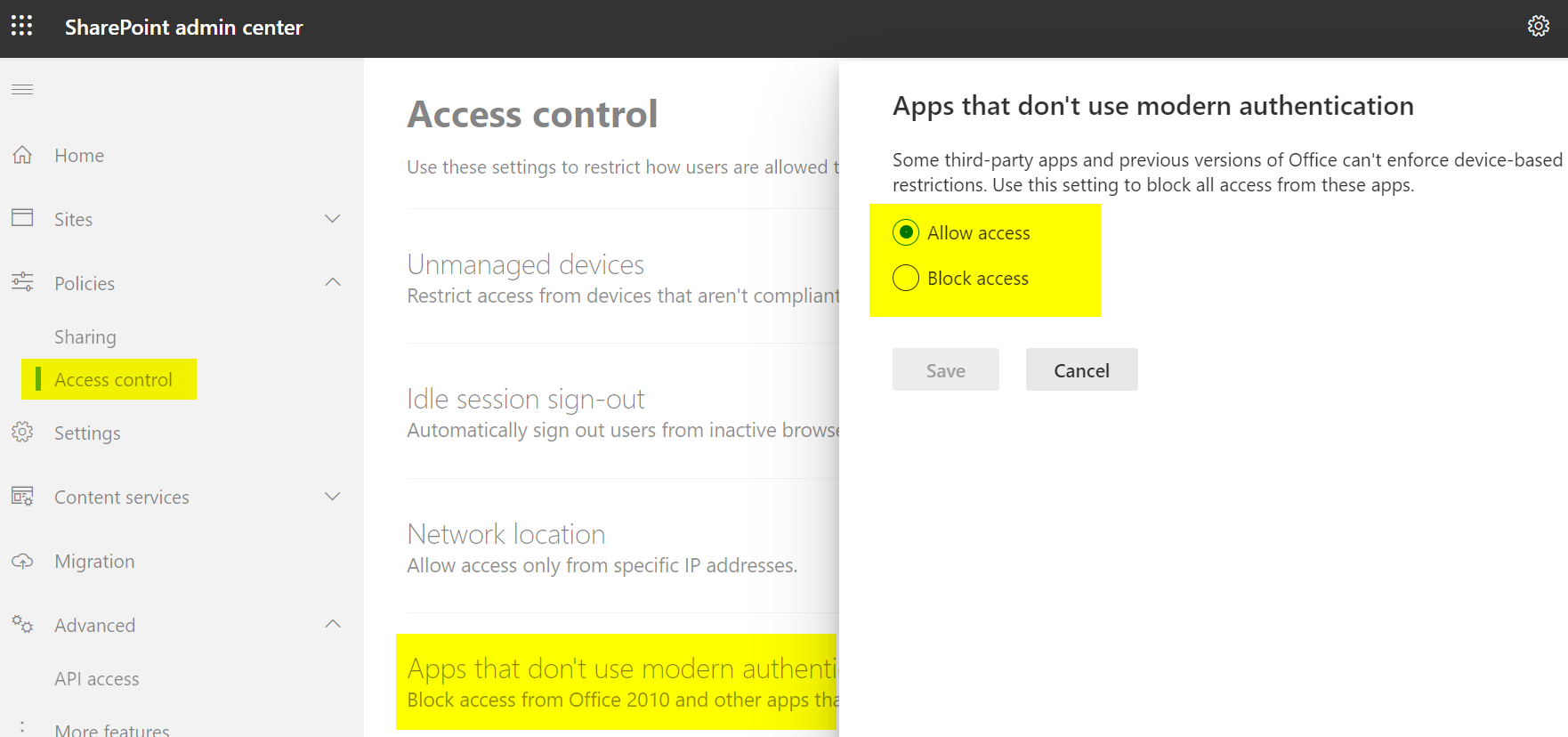
From SPO PowerShell (check for the value of LegacyAuthProtocolsEnabled):
Connect-SPOService -url https://contoso-admin.sharepoint.com
Get-SPOTenant
Yes it is enabled.
The value is "True"
grsandeep
on 14 Sep 2020
Hmm, so same setup as my tenant...and username+pwd works for me but fails for some others...The thing that fails is the OAuth authentication request in the case of you @grsandeep. @bcameron1231 / @regalchidi : would it be possible to open Fiddler and trigger a scan with username+pwd and see if you get an auth error as well?
jansenbe
on 14 Sep 2020
To confirm - The tenant this isn't working on is set to "Allow Access" for apps that don't use modern authentication. Double checking the O365 admin center, the user has Global Admin and SharePoint Admin roles. Been trying to get a fiddler scan, but there's something wrong from a previous configuring, it's not capturing traffic correctly. I'll see if I can get that working on my end.
bcameron1231
on 15 Sep 2020
@grsandeep , @bcameron1231 , @regalchidi : do you still have this problem or can I close this issue?
jansenbe
on 15 Oct 2020
You can close this issue.
On Thu, Oct 15, 2020 at 7:17 PM Bert Jansen notifications@github.com
wrote:
@grsandeep https://github.com/grsandeep , @bcameron1231
https://github.com/bcameron1231 , @regalchidi
https://github.com/regalchidi : do you still have this problem or can I
close this issue?—
You are receiving this because you were mentioned.
Reply to this email directly, view it on GitHub
https://github.com/pnp/sp-dev-modernization/issues/524#issuecomment-709336553,
or unsubscribe
https://github.com/notifications/unsubscribe-auth/AG3HKP5UQLFJXAUU7XLPY6TSK34PZANCNFSM4QSIAUZQ
.
--
Regards,
Sandeep.G.R.
grsandeep
on 15 Oct 2020
Related issues
 gautamdsheth
·
7Comments
gautamdsheth
·
7Comments
 nicolas6969
·
3Comments
nicolas6969
·
3Comments
 KHaranadh
·
7Comments
KHaranadh
·
7Comments
 rudfoss
·
4Comments
rudfoss
·
4Comments
 yumoraby
·
5Comments
yumoraby
·
5Comments