Modernization: [BUG] Workflow action counts are 0 and actions empty
Thank you for reporting a bug. We appreciate your feedback - to help the team to understand your needs, please complete the below template to ensure we have the necessary details to assist you. Thanks!
Problem Area
[ ] Page Transformation: Error during the use of page transformation from PnP PowerShell
[ ] Page Transformation: Error during the use of page transformation from .Net
[ ] Page Transformation: Page is not looking correct after transformation
[x] Modernization Scanner: something went wrong...
Expected or Desired Behavior
According to the documentation, the output for classic workflows should list information about the workflow configuration, such as how many and which actions are used as well as their compatibility with flow. We would like to see this info to get a clearer picture of the complexity involved in replacing the 2010 workflows that will stop working in November.
Observed Behavior
When I run the scanner (version 2.12.0.0), it seems the fields related to actions are always 0 or empty, resulting in -1 as the value for Flow upgradability. See example below from my sandbox tenant that has only one OOB 2010 workflow. The result is the same for all workflows identified in our production tenant as well, though, regardless of whether or not they are OOB. Is this a known error or am I missing something?

Steps to Reproduce
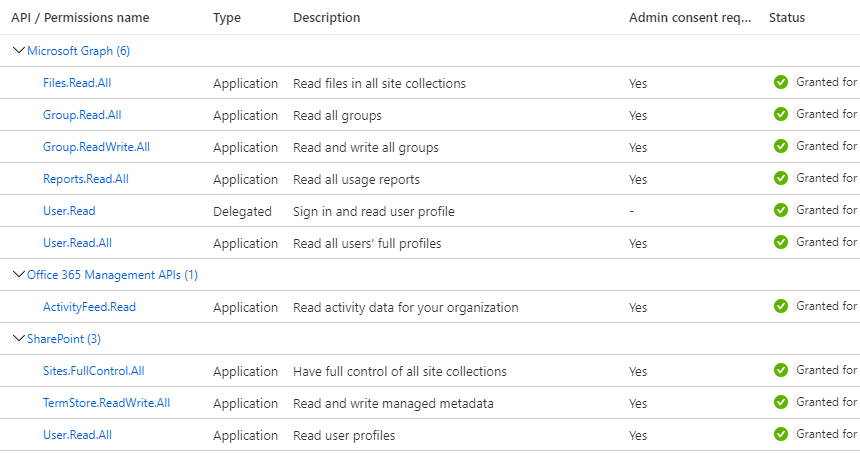
Run the tool using an AAD app principal having the following permissions assigned. Scan the full tenant, select Classic Workflow Usage and keep everything else as default.
 ekdegerman
All 11 comments
@ekdegerman : the fact that you see the workflow listed means the permissions should be sufficient. Is this a custom workflow or an OOB one? OOB workflows are not analyzed for performance reasons but they're migratable to flow
 jansenbe
on 16 Jul 2020
jansenbe
on 16 Jul 2020
Thanks for the clarification @jansenbe! I think that pretty much answers my question. The example above was an OOB one that I set up just to see if I could repeat it across tenants. I didn't see any documented difference between the two, so I figured I could just use one of the ones already installed and not have to bother with SP Designer. We had just three workflows listed as not being OOB in our tenant, of which only two had any subscription. Those also don't list any actions, though. The google translation of two of the names make them sound suspiciously like they could be the same collect feedback and collect signatures workflows that are available out of the box, though they differ in the last three digits of the GUID. The third one is definitely custom, but just set up as a test and not something we will have to migrate. For your info, its setup is shown in the second screen shot below.


ekdegerman
on 17 Jul 2020
@ekdegerman :
I'm prepping a new scanner version that will be able to analyze additional workflows: the ones living the root site's wfpub library can now also be scanned whereas previously only workflow files living in the workflow library were scanned. That hopefully will give you some better results.
jansenbe
on 17 Jul 2020
@ekdegerman : can you try scanner version 2.14 and see if that fixes things for you?
jansenbe
on 22 Jul 2020
Thanks! I've started the detailed version now. I'll let you know once it completes.
ekdegerman
on 23 Jul 2020
With the 2.14 scanner I'm getting custom workflows that are showing 0 Action Count and -1 Flow upgradibility. With the 2.12 scanner they showed correctly.

A week ago with the 2.12 I got this:

I haven't changed the workflows between the two scans. But scans were run with the same command line arguements.
 ToddKlindt
on 23 Jul 2020
ToddKlindt
on 23 Jul 2020
@ToddKlindt : version 2.14 introduced a new mode "WorkflowWithDetailsOnly", the previous "WorkflowOnly" mode now does not do any analysis at all. This is done for large customers to speed up a first inventory of workflows. With that inventory one can make a CSV file and feed the scanner with a list of workflow sites to scan in detail via the "WorkflowWithDetailsOnly" option.
jansenbe
on 24 Jul 2020
Thanks, Bert. Sorry for not RTFMing. I'll try it with that new switch.
ToddKlindt
on 24 Jul 2020
Hmmm, my detailed run from the GUI still has the same result on 2.14...
ekdegerman
on 24 Jul 2020
@ekdegerman : catching up on things after my vacation. Is this still a concern for you or can I close this issue?
jansenbe
on 17 Aug 2020
I'll be closing this issue, just released version 2.16 which does have an improved 2010 XOML file analyzer. If you're still not able to get the needed workflow actions listed and the workflow is not marked as OOB workflow then please open a new issue.
jansenbe
on 19 Aug 2020
Related issues
 colonelclaypoo
·
5Comments
colonelclaypoo
·
5Comments
 rudfoss
·
4Comments
rudfoss
·
4Comments
 adamtoad
·
8Comments
adamtoad
·
8Comments
 gabrielbray
·
4Comments
rudfoss
·
4Comments
gabrielbray
·
4Comments
rudfoss
·
4Comments
Most helpful comment
@ToddKlindt : version 2.14 introduced a new mode "WorkflowWithDetailsOnly", the previous "WorkflowOnly" mode now does not do any analysis at all. This is done for large customers to speed up a first inventory of workflows. With that inventory one can make a CSV file and feed the scanner with a list of workflow sites to scan in detail via the "WorkflowWithDetailsOnly" option.