Modernization: ModernizationScanner never finishes scanning large amounts of sites and writes NO logfiles
Thank you for reporting an issue or suggesting an enhancement. We appreciate your feedback - to help the team to understand your needs, please complete the below template to ensure we have the necessary details to assist you. Thanks!
Category
[X] Bug
[ ] Enhancement
Problem Area
[ ] Page Transformation: Error during the setup/use of the Page Transformation UI solution (did you check our troubleshooting guide?)
[ ] Page Transformation: Error during the use of page transformation from PnP PowerShell
[ ] Page Transformation: Error during the use of page transformation from .Net
[ ] Page Transformation: Page is not looking correct after transformation
[X] Modernization Scanner: something went wrong...
Expected or Desired Behavior
- Successful scanning of large tenants with > 10'000 sites should be possible
- Log file should be written "on the go" and not only when successfully finished
_If you are reporting a bug, please describe the expected behavior. If you are suggesting an enhancement please
describe thoroughly the enhancement, how it can be achieved, and expected benefit._
Observed Behavior
SharePoint Modernization Scanner Version 2.12.0.0 configured to run with AAD app registration never finishes scanning large amounts of sites on a tenant (>10'000 Sites) and even worse, as the log file is written only at the end after running for several hours NO log files are available...
Scan was to find only SharePoint designer workflows
After running several hours (once approx 7 or 8 hours and once over 18 hours, first try with 10 threads, second try with 30 threads) it reached once 98% and then looped endless with the message "Retrieving a batch of up to 500 search results"
As the log file is unfortunately ONLY written when it ends successfully NO logfiles are available...
_If you are reporting a bug, please describe the behavior you expected to occur when performing the action. If you are making a suggestion, you can delete this section._
Steps to Reproduce
Scan tenant with > 10'000 sites, scan only for SharePoint Designer Workflows
_If you are reporting a bug please describe the steps to reproduce the bug in sufficient detail to allow testing. Only way to fix things properly, is to have sufficient details to reproduce it. If you are making a suggestion, you can delete this section._
Submission Guidelines
_Delete this section after reading_
The PnP PowerShell version. Run
get-module -Name SharePointPnPPowerShellOnlineand copy the version info3.22.2006.2
The exact error message you get
no error message (except looping and never finishing with "Retrieving a batch of up to 500 search results")
I recognized I would have some *dmp files where I don't know what they contain

The version of the SharePointPnP.Modernization.Framework.dll assembly
1.0.2006.0
Thanks for your contribution! Sharing is caring.
 fs366e2spm
All 10 comments
Hi @fs366e2spm ,
Scanning 10K+ site collections can take days to finish. Some tips to speed up the scanning can be found here: https://docs.microsoft.com/en-us/sharepoint/dev/transform/modernize-scanner-faq#whats-the-impact-of-running-a-scan-and-how-do-i-get-the-best-performance
Can you ensure you're only scanning for workflows (using the "Classic Workflow usage" option) and limit the scope of sites to scan (e.g. by applying a wildcard filter or by providing a CSV input file like shown here https://docs.microsoft.com/en-us/sharepoint/dev/transform/modernize-scanner#scan-a-defined-list-of-site-collections).
The fact that the scan gets in a loop is weird, splitting across multiple scans will help to isolate that issue. You can also launch multiple scans in parallel, ideally from a VM which is close the location of your production tenant.
 jansenbe
on 14 Jul 2020
jansenbe
on 14 Jul 2020
Hi Bert / @jansenbe
Thanks for your answer and tips.
In the first try I of course just tried to run it with the least possible effort, scan whole tenant. Experienced, this is not working as expected.
Main problem is, that there is no log file for the already processed sites... If I would have the logfile for the 98% processed sites, then it would already be a start for the Workflow Designer 2010 analysis.
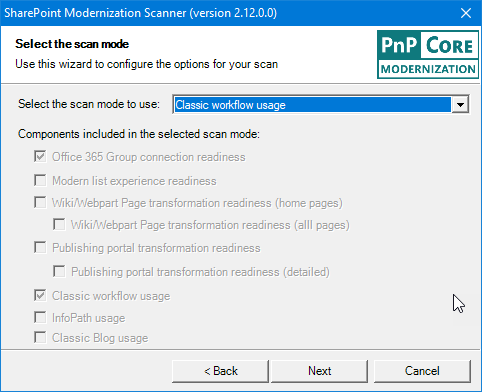
Yes, I can ensure I used the setting to scan only for "Classic Workflow usage":
As scanning the whole tenant didn't work, I now created the site inventory and do step by step, at the moment is the first job scanning the 3000 sites running:

If that works, I run it over the next 3000 sites.
launch multiple scans in parallel
How is the logfile then created/named? Hopefully an existing file won't be overwritten?
Could we run into throttling issues when running it in parallel or with more threads or both (more threads and parallel running)?
Would be just great, if the logfile could be created on the fly, so we would already see some workflow details in the log.
Regards,
Stefan
fs366e2spm
on 14 Jul 2020
Scans results are dumped into separate folders per scan, so no risk of overwrites here. The scanner respects throttling and will backup and retry. About the log file: problem is that for some reports there's post processing happening on the gathered logs hence the writing happens at the end. But I also do understand your concern and it would be good if the tool could persist logs on the fly...I'll see what I can do for that.
jansenbe
on 14 Jul 2020
@fs366e2spm : created #498 to track the ask for continuous log persisting
jansenbe
on 14 Jul 2020
Scanning 3000 sites (via csv file) finished and created the log files. Started now the next batch of 3000 sites.
fs366e2spm
on 15 Jul 2020
Hi @jansenbe
Process got stuck again, it processes the same sites again and again (or at least it prints it). Don't know if the task is throttled but I guess it shouldn't take that long.
(used to run with 30 threads)
Thread: 34. Processed 2856 of 3000 site collections (95%). Process running for 1 days, 8 hours, 18 minutes and 19 seconds.
Restarted it now with "only" 2000 sites in the csv.
fs366e2spm
on 16 Jul 2020
@fs366e2spm
hmm...would it be possible to launch Fiddler next time it's stuck and send me the captured log ([email protected]). Fiddler should clarify if there's throttling going on or if the same site is stuck in a loop (which would be unexpected). Throttling however can happen.
jansenbe
on 16 Jul 2020
Hi @jansenbe
Seems it's heavily throttling... the number of used threads doesn't matter (even with default 10 value).
It's not really usable.
Site collections scanned,Webs scanned,List scanned,Scan duration,Scanner version
"2000,47810,0,3 days - 2 hours - 29 minutes and 17 seconds,2.12.0.0"
At the moment I technically can't provide a Fiddler trace. Will do when I can (if I still use the scanner then)
fs366e2spm
on 20 Jul 2020
@fs366e2spm : that's indeed taking a long time to complete :-( The throttling quota is linked to the Azure AD app id, so using multiple apps might help improve speed.
jansenbe
on 20 Jul 2020
@fs366e2spm : version 2.14 writes log files each minute, closing this issue now.
jansenbe
on 24 Jul 2020
Related issues
 colonelclaypoo
·
5Comments
colonelclaypoo
·
5Comments
 yumoraby
·
5Comments
yumoraby
·
5Comments
 adamtoad
·
8Comments
adamtoad
·
8Comments
 gabrielbray
·
4Comments
gabrielbray
·
4Comments
 gautamdsheth
·
7Comments
gautamdsheth
·
7Comments