Modernization: Custom webparts not detected on wiki pages
Category
[x] Bug
[ ] Enhancement
Problem Area
[ ] Page Transformation: Error during the setup/use of the Page Transformation UI solution (did you check our troubleshooting guide?)
[x] Page Transformation: Error during the use of page transformation from PnP PowerShell
[ ] Page Transformation: Error during the use of page transformation from .Net
[ ] Page Transformation: Page is not looking correct after transformation
[ ] Modernization Scanner: something went wrong...
Expected or Desired Behavior
Convert a wiki type page with several webparts (OOTB and custom) The webparts will be modernized following the established in the webparts mapping configuration file
Observed Behavior
When converting a wiki page, the framework only detects OOTB webparts, omitting and removing custom webparts.
Steps to Reproduce
Source environment: SharePoint 2010
Target environment: SharePoint Online
Create a wiki page. Insert an OOTB webpart and a custom webpart. After executing the following sentences:
$result = ConvertTo-PnPClientSidePage -Identity $page.Id -WebPartMappingFile "C:\temp\webpartmapping.xml" -PageLayoutMapping "C:\temp\custompagelayoutmapping.xml" -Overwrite -ClearCache -TargetConnection $dest -LogSkipFlush -LogVerbose -LogType File -LogFolder "C:\temp\" -KeepPageCreationModificationInformation -CopyPageMetadata
Save-PnPClientSidePageConversionLog
The OOTB webpart has been modernized, the custom webpart does not appear or be detected in the logs.
Attached page layout mapping file, webpart mapping file, log file and a capture of the page content with the 3 webparts
custompagelayoutmapping.txt
webpartmapping.txt
Page-Transformation-Report-06-Jul-20-12-53-06.md.txt
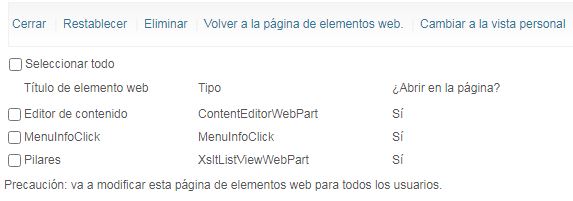
It has been tested from a publishing page with the same parameters and has worked without any problems.
Another point:
Is there a way to edit the framework solution to make custom modifications, insert more logs, etc? I downloaded the solution and when I replaced the dll and launched the sentence in PS it indicated an error that it was not found because the publickeytoken of the new dll did not match.
 albegut
All 10 comments
If you download the modernisation repo and open it in Visual studio, there are around 180+ unit tests that are more like asp.net for modernisation, the is a folder for on-premises tests, you could modify one and feed in the same settings that you provide in the PnP PowerShell cmdlet. It is likely that any fault is in the WebPartPageOnPremises.cs class. If you find the fault, you could either submit the details of your findings or submit a PR is you are happy to do so.
It will take a while to set up a test rig with this scenario, so if you can provide any pointers that would be great.
 pkbullock
on 9 Jul 2020
pkbullock
on 9 Jul 2020
Thanks for the help @pkbullock . @albegut : did you manage to get unblocked?
 jansenbe
on 14 Jul 2020
jansenbe
on 14 Jul 2020
Yes! thanks to @pkbullock I have been able to debug the solution and find the bugs to my problems. I haven't focused on this problem because I found 2 others that were blocking me more. I will update this issue when I have more information and create the other issues with the new problems (don't hate me)
albegut
on 14 Jul 2020
Please submit a PR if you find a fix for your issue or alternatively let us know via this issue what you've changed. Logging issues is the only way to make this tool better, so thanks for doing that!
jansenbe
on 14 Jul 2020
I have founded the problem. It's related with the new issue #502. The method GetWebPartPage of the service /_vti_bin/WebPartPages.asmx does not return the property ZoneId from the custom webparts. In Wiki pages there is a Regex expresion to obtain that property and the controlId needed for a future check. Because of that missing property, the webpart doesn't get a match with the webparts that the webpart manager get and it is not modernized
The code with the regex expresion in the sln:
// Since we did not get the zone id for v3 web parts we'll need to retrieve the page and parse that to find the zone id
var webpartPage = ExtractWebPartPageViaWebServicesFromPage(pageUrl);

if (!string.IsNullOrEmpty(webpartPage)) {
    // Get the string that contains the zoneId for this web part
    Regex zoneIdStringRegex = new Regex($ "ZoneID=\"(.*?)\".*?{wsWebPartPropertiesEntity.Id.ToString()}", RegexOptions.IgnoreCase);
    var match = zoneIdStringRegex.Match(webpartPage);

    if (match != null && match.Success) {
        // Use regex to extract the zoneId value from the string
        var zoneIdMatch = ZoneIdRegex.Match(match.Value);
        if (zoneIdMatch != null && zoneIdMatch.Success) {
            // Returned value = ZoneID="MiddleColumn"

            // Set zoneId property
            wsWebPartPropertiesEntity.ZoneId = zoneIdMatch.Value.Replace("ZoneID=\"", "", StringComparison.InvariantCultureIgnoreCase).Replace("\"", "");
        }

        // Use regex to extract the controlId value from the string
        var controlIdMatch = ControlIdRegex.Match(match.Value);
        if (controlIdMatch != null && controlIdMatch.Success) {
            // returned value = ID="g_2b71545a_4278_4714_a26b_713b5365f44d"

            // set ControlId property
            wsWebPartPropertiesEntity.ControlId = controlIdMatch.Value.Replace("ID=\"", "", StringComparison.InvariantCultureIgnoreCase).Replace("\"", "");
        }
    }
}
I am searching for an alternative way to get the ZoneID property in custom webparts
albegut
on 16 Jul 2020
The problem is partialy fixed with the #502 solution -> The SharePoint 2010 webparts must inherit from Microsoft.SharePoint.WebPartPages.WebPart. But not all webparts are returned and modernized.
The problem is that the service /_vti_bin/WebPartPages.asmx not returns the properties ID and ZoneID in the order that the regex expression need it. The current source code only gets the ID if the service returns the data after the ZoneId, but I found cases that the service returns the ID before the ZoneID
I added the code to search again the ID property by a regex expression. It's probably not the best way to do it but it works for me
// Since we did not get the zone id for v3 web parts we'll need to retrieve the page and parse that to find the zone id
var webpartPage = ExtractWebPartPageViaWebServicesFromPage(pageUrl);

if (!string.IsNullOrEmpty(webpartPage)) {
    // Get the string that contains the zoneId for this web part
    Regex zoneIdStringRegex = new Regex($ "ZoneID=\"(.*?)\".*?{wsWebPartPropertiesEntity.Id.ToString()}", RegexOptions.IgnoreCase);
    var match = zoneIdStringRegex.Match(webpartPage);

    if (match != null && match.Success) {
        // Use regex to extract the zoneId value from the string
        var zoneIdMatch = ZoneIdRegex.Match(match.Value);
        if (zoneIdMatch != null && zoneIdMatch.Success) {
            // Returned value = ZoneID="MiddleColumn"

            // Set zoneId property
            wsWebPartPropertiesEntity.ZoneId = zoneIdMatch.Value.Replace("ZoneID=\"", "", StringComparison.InvariantCultureIgnoreCase).Replace("\"", "");
        }

        // Use regex to extract the controlId value from the string
        Regex controlIdStringRegex = new Regex($ "ID=\"(.*?)\".*?{wsWebPartPropertiesEntity.Id.ToString()}", RegexOptions.IgnoreCase);
        var controlIdStringMatch = controlIdStringRegex.Match(webpartPage);
        //
        if (controlIdStringMatch != null && controlIdStringMatch.Success) {
            var controlIdMatch = ControlIdRegex.Match(controlIdStringMatch.Value);
            if (controlIdMatch != null && controlIdMatch.Success) {
                // returned value = ID="g_2b71545a_4278_4714_a26b_713b5365f44d"

                // set ControlId property
                wsWebPartPropertiesEntity.ControlId = controlIdMatch.Value.Replace("ID=\"", "", StringComparison.InvariantCultureIgnoreCase).Replace("\"", "");
            }
        }
    }
}
This is good stuff, against are you able to submit a PR for this solution? We have limited test rigs for SharePoint 2010 and your scenarios could pave the way for improving the features.
pkbullock
on 28 Jul 2020
@albegut : would be great if you could share your enhancements via a PR like also mentioned by @pkbullock .
jansenbe
on 17 Aug 2020
Done in PR #517!
albegut
on 17 Aug 2020
Awesome @albegut ! I'll close this issue and will merge #517.
jansenbe
on 18 Aug 2020
Related issues
 rudfoss
·
4Comments
rudfoss
·
4Comments
 abhishektyagi9
·
4Comments
abhishektyagi9
·
4Comments
 yumoraby
·
5Comments
rudfoss
·
4Comments
pkbullock
·
7Comments
yumoraby
·
5Comments
rudfoss
·
4Comments
pkbullock
·
7Comments
Most helpful comment
Yes! thanks to @pkbullock I have been able to debug the solution and find the bugs to my problems. I haven't focused on this problem because I found 2 others that were blocking me more. I will update this issue when I have more information and create the other issues with the new problems (don't hate me)