Modernization: Issue with Pagelayout-The page content and xml viewer webparts not showing on modern page after transformation
Hi,
I am transforming wiki pages from On-prem environment to SharePoint online. After running the PNP script it is creating a modern page without page content and other web parts. we would like to transfer pages from Enterprise Wiki site to Team site. I have generated page layout mapping by using below PNP command
Export-PnPClientSidePageMapping -BuiltInPageLayoutMapping -CustomPageLayoutMapping -Folder c:\PageLayOutsManual
Transformation script to Communication site:
$target = Connect-PnPOnline -url https://test.sharepoint.com/sites/sandbox/ -useweblogin -ReturnConnection
Connect-PnPOnline "https://testOnPrem/sites/cme" -CurrentCredentials
ConvertTo-PnPClientSidePage -Identity "Agency-Contact-and-Outreach-Setup" -PublishingPage -TargetConnection $target -Overwrite -PageLayoutMapping C:\PageLayOutsManual\pagelayoutmapping.xml -CopyPageMetadata -LogVerbose -LogType File -LogFolder c:\temp\Log
I have tried with .net code and result is same. Could you please help me with resolution to transform complete page. please find attached page layout mapping files and Page Transformation Report.
Page-Transformation-Report-4-15-2020-1-30-19-PM.txt
custompagelayoutmapping-aaa0fd4a-a4ce-43f0-8d18-241527151941-txt.txt
pagelayoutmapping-txt.txt
 sreeks1677
All 15 comments
Hi @sreeks1677 looking initially at this, and the Wiki Pages do not use page layouts, this feature is only for the publishing portals.
Here is a sample script for wiki pages that may give you a direction to follow: https://github.com/pnp/sp-dev-modernization/blob/master/Scripts/PageTransformation/Convert-WikiAndWebPartPages.ps1
I need validate something with Enterprise Wiki Pages and get back to you soon.
Happy to help with further queries.
Paul
 pkbullock
on 16 Apr 2020
pkbullock
on 16 Apr 2020
Thanks Paul. I have made change for pagelayout name with "CTCMEnterpriseWiki" in pagelayoutmapping file and content got transformed. I have trouble with XML viewer webpart which need to be transformed as part of transformation. please share your thoughts and inputs after your validation.
sreeks1677
on 17 Apr 2020
Didn't realize you can use the publishing page route for Enterprise Wiki. Cool. Means my above script link is not appropriate for this transform.
When you mention XML viewer web part, is this embedded within a page layout for the site, or within the WIKI content? Is this connected to a list or library?
Can you share your new mapping file, it hopefully would include the exact type of web part?
I am trying to ascertain if the web part is one of the supported types: https://docs.microsoft.com/en-us/sharepoint/dev/transform/modernize-userinterface-site-pages-webparts#web-part-transformation-list-updated-for-september-2019-release
pkbullock
on 20 Apr 2020
Hi @sreeks1677 , @pkbullock ,
The Xml Viewer web part (Microsoft.SharePoint.WebPartPages.XmlWebPart) does not have a mapping as there's no OOB modern equivalent for this web part. You can build your own replacement (a 3rd party custom XML web part) and use that in transformation if having this web part is critical for your migration.
 jansenbe
on 20 Apr 2020
jansenbe
on 20 Apr 2020
Thank you Paul and Bert Jansen. I am able to transform page content but we are having trouble with right column content. We are having one content type which will have all the page properties.
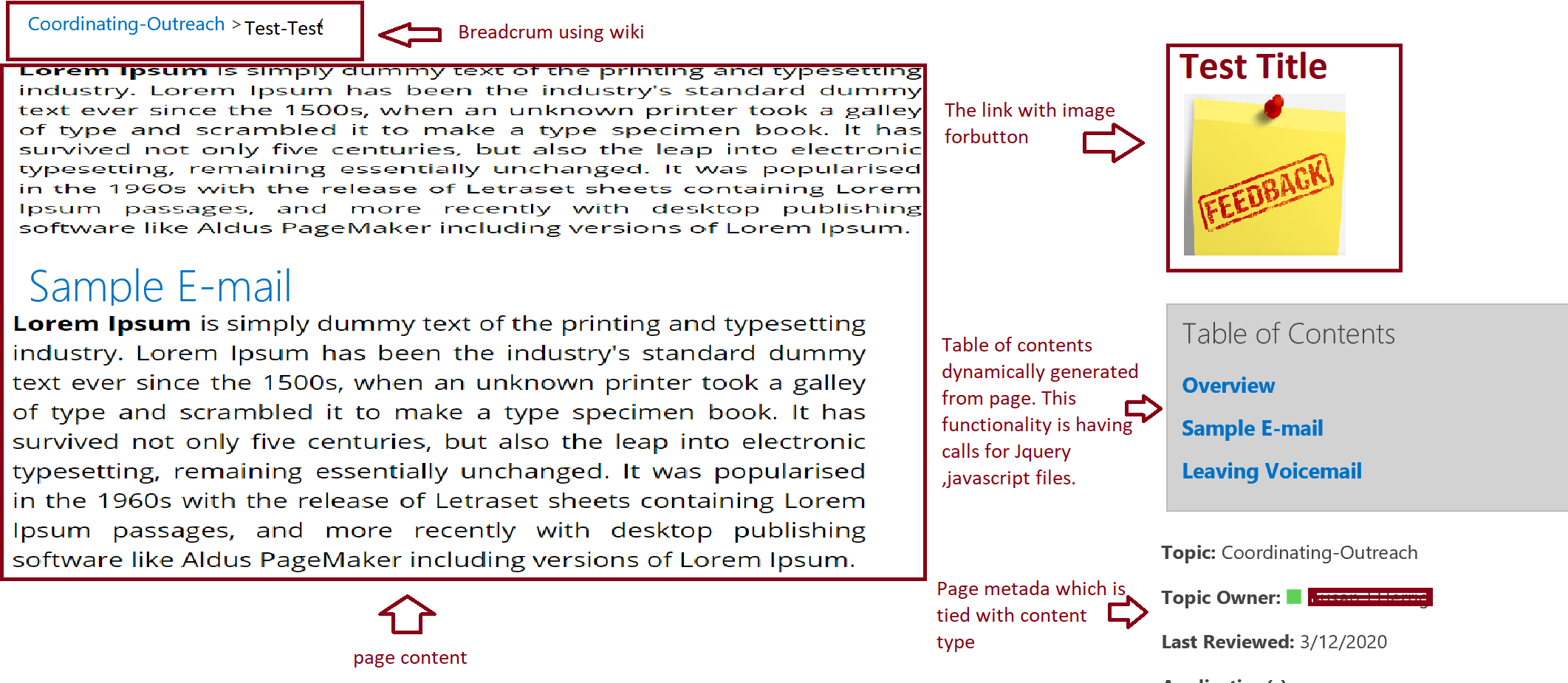
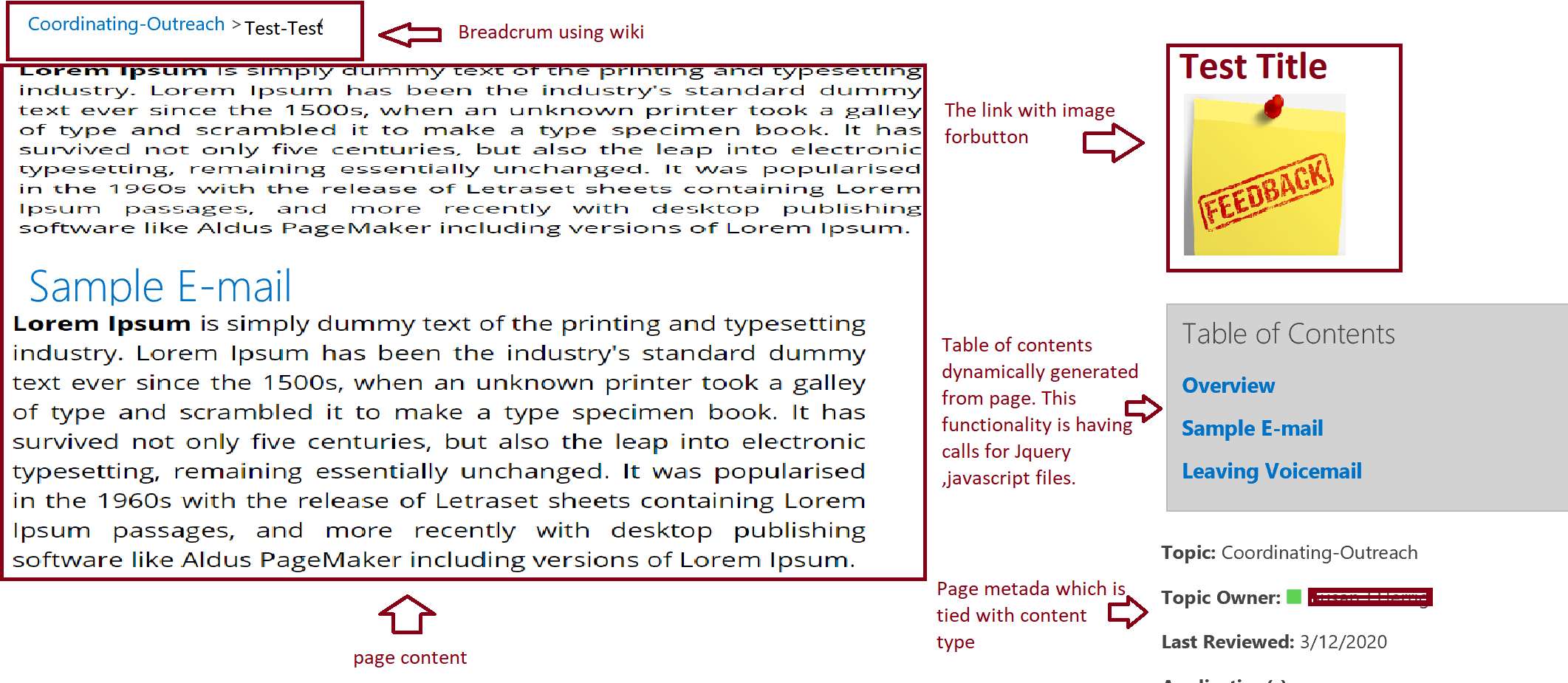
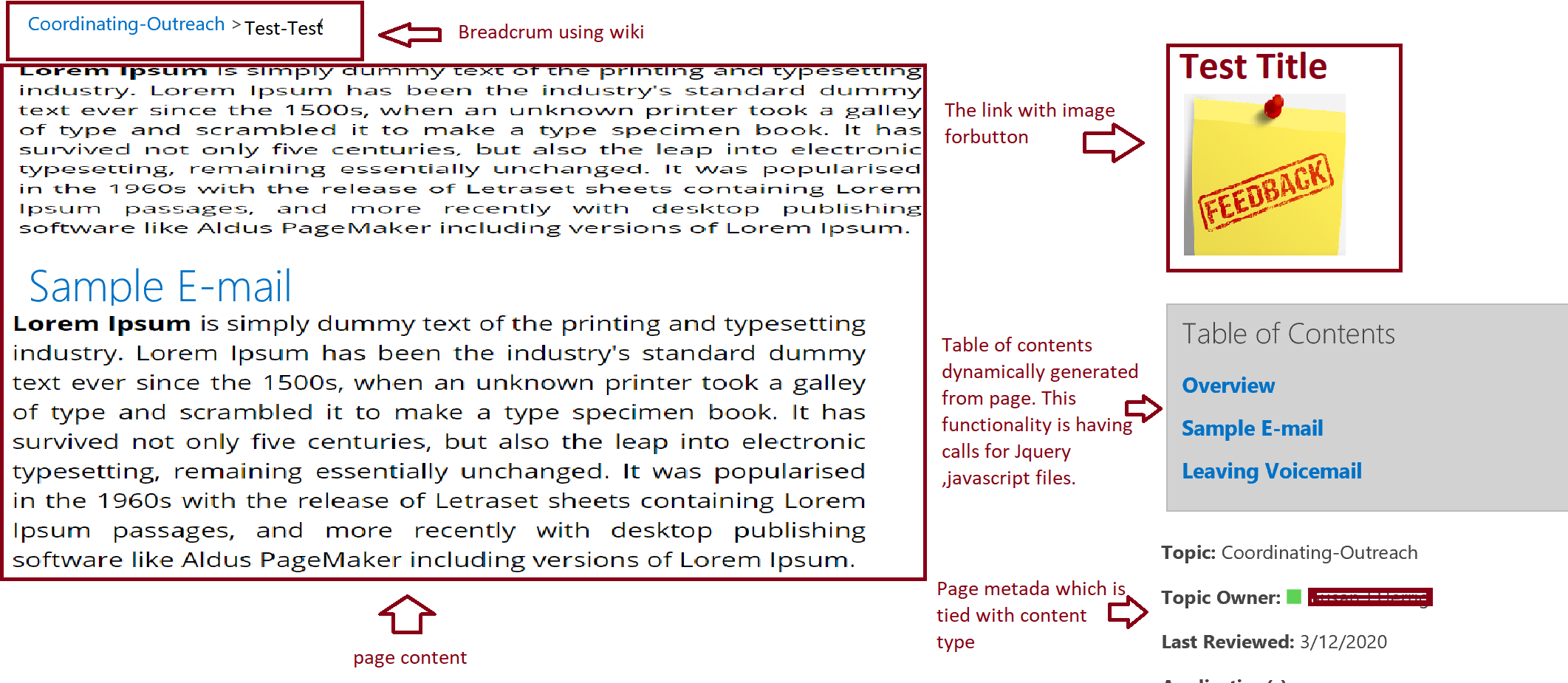
The page layout will include 4 parts, 1. Page content 2. Image with link button 3. Dynamically generated Table of contents 4. Page Metadata which will display on page.
After transformation I am able to see page metadata columns in communication site where as in team site these properties are not available. I have done initial site migration to team site by using Sharegate and content type and other lists are viable in the site. On the other hand I haven’t migrated on-prem site to communication site.
I am attaching my page structure and page layout mapping file along with this email.Could you please help me to transform right column content. I would also like to know how we need to transform by setting new page templates.
Page-Transformation-Report-4-20-2020-12-10-23-PM.txt
Thanks & Regards,
Srikanth Chelumuri
On Monday, April 20, 2020, 01:07:22 AM CDT, Bert Jansen <[email protected]> wrote:
Hi @sreeks1677 , @pkbullock ,
The Xml Viewer web part (Microsoft.SharePoint.WebPartPages.XmlWebPart) does not have a mapping as there's no OOB modern equivalent for this web part. You can build your own replacement (a 3rd party custom XML web part) and use that in transformation if having this web part is critical for your migration.
—
You are receiving this because you were mentioned.
Reply to this email directly, view it on GitHub, or unsubscribe.
sreeks1677
on 20 Apr 2020
Custom metadata properties are not populating after page transformation. I tried transformation of page after attaching content type association to site pages library but still it is not showing custom metadata properties in both teams site and communication site. please find my new page layout mapping file after adding metadata columns.
pagelayoutmappingN.txt
sreeks1677
on 20 Apr 2020
Hi @sreeks1677 ,
The reason you're not seeing metadata is because you've not filled the TargetFieldName in the page layout mapping file. It's not clear which page layout you're testing with, but all the templates in the shared mapping file have the same issue.
You have this:
      <MetaData>
        <Field Name="Title" TargetFieldName="" Functions="" />
        <Field Name="ArticleStartDate" TargetFieldName="" Functions="" />
      </MetaData>
Whereas we expect something like this:
      <MetaData>
         <!-- Assume there's a title column on the target sitepages library -->
        <Field Name="Title" TargetFieldName="Title" Functions="" />
         <!-- Just making up that you want to copy this field to a custom column in your content type named ArticleDate -->
        <Field Name="ArticleStartDate" TargetFieldName="ArticleDate" Functions="" />
      </MetaData>
If you don't need a field you can simply remove it from the metadata tag.
jansenbe
on 22 Apr 2020
Thank you Bert Jansen. It helped me to transform couple of custom properties from source to target. I am not able to transform "people or group" column values. The PNP page layout mapping file generation is not taking all the content type columns while I am generating mapping file. I have included manually some of the fields like below but value transformation is not successful.
I need help with ""people or group" columns" column transformation.please help me with steps to include all the content type columns to include at source while I am generating page layout mapping file.
Thanks & Regards,Srikanth Chelumuri
On Wednesday, April 22, 2020, 04:20:39 AM CDT, Bert Jansen notifications@github.com wrote:
Hi @sreeks1677 ,
The reason you're not seeing metadata is because you've not filled the TargetFieldName in the page layout mapping file. It's not clear which page layout you're testing with, but all the templates in the shared mapping file have the same issue.
You have this:
Whereas we expect something like this:
If you don't need a field you can simply remove it from the metadata tag.
—
You are receiving this because you were mentioned.
Reply to this email directly, view it on GitHub, or unsubscribe.
sreeks1677
on 23 Apr 2020
People/Group columns can be mapped as well, but might require you to configure account mapping if you're transforming from on-premises SharePoint. See https://docs.microsoft.com/en-us/sharepoint/dev/transform/modernize-userinterface-site-pages-usermapping to understand more on how that works. If you're transforming within the same SPO tenant things should just work without account mapping.
jansenbe
on 23 Apr 2020
@sreeks1677 how are you getting on? did @jansenbe comment manage to resolve your issue?
pkbullock
on 27 Apr 2020
Thank you Paul and Bert Jansen. Sorry for the delay in my response. I have given a try by placing -LDAPConnectionString into PNP transformation command but it is not successful. The user details haven't transferred to target. I am planning to try with mapping file, I will provide my update once I execute with mapping file.
Thanks & Regards,Srikanth Chelumuri
On Monday, April 27, 2020, 03:31:00 PM CDT, Paul Bullock notifications@github.com wrote:
@sreeks1677 how are you getting on? did @jansenbe comment manage to resolve your issue?
—
You are receiving this because you were mentioned.
Reply to this email directly, view it on GitHub, or unsubscribe.
sreeks1677
on 28 Apr 2020
Hi @sreeks1677 - check out this resource for working with user mapping: https://www.youtube.com/watch?v=B9KFzeUN0AY i demoed this feature to PnP that you might find userful.
pkbullock
on 28 Apr 2020
Thank you Paul. I will try with User mapping file by following your video.
Thanks & Regards,Srikanth Chelumuri On Tuesday, April 28, 2020, 10:19:11 AM CDT, Paul Bullock notifications@github.com wrote:
Hi @sreeks1677 - check out this resource for working with user mapping: https://www.youtube.com/watch?v=B9KFzeUN0AY i demoed this feature to PnP that you might find userful.
—
You are receiving this because you were mentioned.
Reply to this email directly, view it on GitHub, or unsubscribe.
sreeks1677
on 30 Apr 2020
@sreeks1677 : wanted to check whether this issue can be closed or not? Did you manage to get things working?
jansenbe
on 16 May 2020
Thank you Bert Jansen. I have tried with .net page transformation and it has transformed user information along with page content. Yes we can close this issue. Thank you for all the help.
Thanks & Regards,Srikanth Chelumuri
On Saturday, May 16, 2020, 09:45:48 AM CDT, Bert Jansen notifications@github.com wrote:
@sreeks1677 : wanted to check whether this issue can be closed or not? Did you manage to get things working?
—
You are receiving this because you were mentioned.
Reply to this email directly, view it on GitHub, or unsubscribe.
sreeks1677
on 18 May 2020
Related issues
 mbice
·
6Comments
mbice
·
6Comments
 abhishektyagi9
·
4Comments
abhishektyagi9
·
4Comments
 berryst2
·
6Comments
berryst2
·
6Comments
 yumoraby
·
5Comments
yumoraby
·
5Comments
 gabrielbray
·
4Comments
gabrielbray
·
4Comments