Modernization: SP2013 to SPO ConvertTo-PnPClientSidePage Error - "ExportMode" does not exist
Category
[ X ] Bug
[ ] Enhancement
Problem Area
[ X ] Page Transformation: Error during the use of page transformation from PnP PowerShell
Expected or Desired Behavior
Expecting to get modernised page in target SPO site.
Observed Behavior
Migrating SP2013 team sites to SPO and getting errors when trying to modernise the pages. Seems the same as Issue #251
Steps to Reproduce
$modPage = ConvertTo-PnPClientSidePage -Identity $pageName -Overwrite -TargetConnection $global:destPnPConnection -LogVerbose -LogType File -LogFolder $mLogFolder -SkipItemLevelPermissionCopyToClientSidePage -CopyPageMetadata -KeepPageCreationModificationInformation -Folder $folder;
Submission Guidelines
Page-Transformation-Report-14-02-2020-10-21-40-AM.txt
- If you checked the "Page Transformation: Error during the use of page transformation from PnP PowerShell" checkbox then please provide:
- The output you see in your PowerShell session - verbose output attached
- The output generated by calling
Get-PnPException- none - The PnP PowerShell version. Run
get-module -Name SharePointPnPPowerShellOnlineand copy the version info
Major Minor Build Revision
3 18 2002 0
Thanks for your contribution! Sharing is caring.
 paylord
All 16 comments
If relevant, this does have web parts embedded in content - not in web part zones.
Also noticed that the -KeepPageCreationModificationInformation seems to be working for the dates but not the users.
paylord
on 14 Feb 2020
Hey @paylord ,
Thanks for using page transformation and providing feedback. I'll try to repro the issue you're seeing with the exportmode property.
Regarding the KeepPageCreationModificationInformation: when you do a transformation from on-prem to online we'll try to automatically translate user id's as the way user's are defined in on-prem SharePoint is different than in SPO. The automatic mapping however does not always give correct results and in those cases you do have the option to use a custom user mapping file. Can you check https://docs.microsoft.com/en-us/sharepoint/dev/transform/modernize-userinterface-site-pages-usermapping and see if that helps.
Also note that if you publish or post the created modern page this again will reset the user modified, this is by design. The dates and user created however should stay the same.
 jansenbe
on 14 Feb 2020
jansenbe
on 14 Feb 2020
Hey @paylord ,
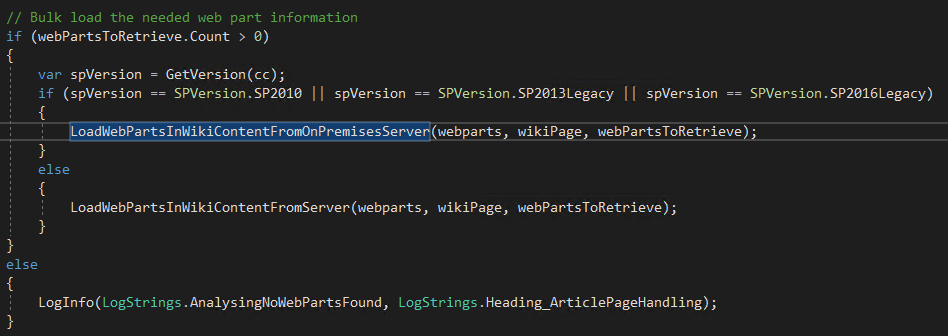
I've been looking at the code that failed in your stacktrace and noticed it's calling LoadWebPartsInWikiContentFromServer whereas it should be calling LoadWebPartsInWikiContentFromOnPremisesServer. This makes me believe you're mixing up source and target contexts while running your script. Can you share the migration script you're using?
Alternatively you can look at below sample script for on-prem to SPO migration:
# Target Tenant Connection - must be SPO and modern site
$target = Connect-PnPOnline https://contoso.sharepoint.com/sites/pagetransformationdemotarget -SPOManagementShell -ClearTokenCache -ReturnConnection -Verbose

# Source SP2013 connection
Connect-PnPOnline https://portal2013.pnp.com/sites/sourcesite -CurrentCredentials -Verbose

# Convert a page
ConvertTo-PnPClientSidePage -Identity "sp2013onprempage.aspx" -TargetConnection $target -Overwrite  -LogType Console -LogVerbose
jansenbe
on 14 Feb 2020
@jansenbe @paylord sorry to interject, i noticed the Source version is the logs is being recognized as SharePoint Online mistakenly and not calling the fallback services for older versions. are you able to also feedback the out from this address? http://site/teams/businesscontinuitymanagement/_vti_pvt/service.cnf (adjust URL for your ENV)
Paul
 pkbullock
on 14 Feb 2020
pkbullock
on 14 Feb 2020
Hello @jansenbe and @pkbullock
I am setting the source context at the start of this section and then using -TargetConnection as part of the command:
region Modernise pages to the modern site
    Set-PnPContext $global:srcPnPCtx;
    $pages = Get-PnPListItem -List SitePages;
    $list = Get-PnPList "Site Pages";
    $listRootUrl = $list.RootFolder.ServerRelativeUrl;

    foreach ($page in $pages) {
        $pageName = $page.FieldValues["FileLeafRef"];
        # Create a modern version of this page
        Write-Host "Modernising $pageName";
        addOutput -alias $siteDetails.Alias -spoUrl $siteDetails.SPOUrl -notes "Modernising page $($pageName)";
        # Prevent folders themselves being transformed
        try {
            if ($page.FieldValues["FSObjType"] -eq 0) {
                $folder = $page.FieldValues["FileDirRef"].replace($listRootUrl, "");
                if ($folder -ne "/") {
                    $folder = $folder.TrimStart([char]'/'); # If folder, then trim starting /
                }
                $modPage = ConvertTo-PnPClientSidePage -Identity $pageName -Overwrite -TargetConnection $global:destPnPConnection -LogVerbose -LogType File -LogFolder $mLogFolder -SkipItemLevelPermissionCopyToClientSidePage -CopyPageMetadata -KeepPageCreationModificationInformation -Folder $folder;
                Write-Output "Page converted $modPage";
                addOutput -alias $siteDetails.Alias -spoUrl $siteDetails.SPOUrl -notes "Modernised page $($modPage)";
            }
        } catch {
            Write-Host "Failed to convert page $pageName : $_";
            logIt -alias $siteDetails.Alias -region 'Modernizer' -status 'Failed to modernize page' -errorMessage $_;
            continue;
        }
    }
endregion
@pkbullock - I tried the URL you suggested, adjusted of course, but just get 404.
I am really hoping it is me doing something wrong as that means a quick fix :)
Thanks
Dave
paylord
on 14 Feb 2020
@paylord - my bad, its just the base address e.g. http://siteorserver/_vti_pvt/service.cnf please try that?
pkbullock
on 14 Feb 2020
@pkbullock - hey Paul, I get an Access Denied message. Not sure if it is relevant but the site collection at the root of the web app was the intranet and has already been migrated to SPO. We are now working on migrating the team sites which are in the same web app under a managed path. An IIS redirect is in place to forward anything to SPO but with an exception for anything under /teams/.
I have a central admin user policy granting me site collection admin on everything in the web app - just in case that was the next question :)
Thanks
Dave
paylord
on 14 Feb 2020
Sorry - should have added that I am actually using a server address for the migration so not actually getting hit by the redirect. This is also what I tested above to get the Access Denied message.
paylord
on 14 Feb 2020
The good thing is that we've found the problem: the detection of the SharePoint version fails in your case resulting in the version being defaulted to SPO...which triggers the wrong code path and as such you get the error.
Next step is checking if we can get this resolved while using the current release... We use below code to build the URL we're hitting, so can you cross check access to that URL whereas you start from the address of your root SharePoint site collection.
https://teamsites.company.com/_vti_pvt/service.cnf should work
http://servername/_vti_pvt/service.cnf will give a 404
HttpWebRequest request = (HttpWebRequest)WebRequest.Create($"{urlUri.Scheme}://{urlUri.DnsSafeHost}:{urlUri.Port}/_vti_pvt/service.cnf");
@jansenbe - Hey Bert, there is no SSL connection set up on this web app. As mentioned above, an IIS redirect is in place for the usual URL so I am using a server name with a port number to avoid the redirect. I have tried with a full domain name prior to the port number but get a correlation error. If I use http://servername/_vti_pvt/service.cnf I get an Access Denied message.
Dave
paylord
on 14 Feb 2020
Please do not interpret my lack of response as lack of interest but it is getting late here in Australia - I will check to see if you need anything more from me first thing in the morning :)
paylord
on 14 Feb 2020
@paylord no worries- I'm UK based anyhow, there isn't an SLA just best effort where possible as its community driven support.
I think I might have an idea for a workaround involving a few lines of PowerShell to trick the transformation tool by manipulation of its caching mechanism by injecting in the SP version but need to do some testing etc. Unless @jansenbe has a better idea.
Might get back to you perhaps over the weekend, or next week.
Ideally, Id like to know what permissions you are missing to find the root cause, it would be a good one for the FAQs or docs.
pkbullock
on 14 Feb 2020
Upfront adding the requested value to cache should indeed do the trick. You'll need to call the public void SetSharePointVersion(Uri site, SPVersion version) method of the CacheManager class.
The easiest approach is the following:
- To ensure all the needed binaries are loaded in the PS session run a
ConvertTo-PnPClientSidePagecmdlet (e.g. transform a classic page in an SPO Online site) - Run
Disconnect-PnPOnlineto clear the connection - Use below sample code to mark your on-prem site as SP2013 in the cache
- Once that's done try to convert a page from your SP2013 site that you've marked as SP2013Legacy
$cacheManager = [SharePointPnP.Modernization.Framework.Cache.CacheManager]::Inst
ance

# Update to match your site url
$siteUri=[System.Uri]'http://teams.contoso.com'

# Tell the page transformation this site is of type SP2013Legacy (= 5)
$cacheManager.SetSharePointVersion($siteUri, 5)

# Cross check that things were set correctly
$cacheManager.GetSharePointVersion($siteUri)
@pkbullock @jansenbe
I understand the support approach which is why I appreciate you guys jumping on it so quickly - and why I wanted to explain I was going quiet for a while :)
Thinking about it overnight I do have another potential thing to try but will have to wait until Monday now. I believe the client has a 3rd WFE that is not part of their standard load balancing and therefore does not have the IIS redirect applied. If I can amend my local hosts file to force connection to this WFE then that may resolve the issue.
However, the concept you guys describe above certainly sounds like a winner. While I am not a .NET developer I am guessing it is using the service.cnf call to get the spVersion - if that call fails then the IF statement is never true and so is defaulting to SPO. Your suggestion above is to alter the code slightly to use a cached value of spVersion which then gives me the ability to adjust it with PowerShell - very nice!
paylord
on 14 Feb 2020
Using the hosts file entry to force me onto the WFE with no redirects means I get a response to the /vti_pvt/service.cnf endpoint and also pages with web parts get modernized - whoohooo.
In case you are interested, I got one of the farm admins to try the endpoint using the server:port combo and they also got no access message - including from a server and using a service account.
Once again, really appreciate you guys quickly responding and helping me to understand where the problem was. I guess not everyone will have the luxury of a separate WFE so the workaround suggested still sounds like a good idea to me - though luckily in my case I am not in a hurry for it :)
If there is anything I can do to assist further with your understanding of the circumstances please let me know.
Thank you and keep up the great work!
Dave
paylord
on 17 Feb 2020
Thanks for the feedback @paylord , good to see you're unblocked. Will close this issue, but obviously it will stay here for future reference in case someone else bumps into the same issue.
jansenbe
on 17 Feb 2020
Related issues
 colonelclaypoo
·
5Comments
colonelclaypoo
·
5Comments
 schnito
·
4Comments
schnito
·
4Comments
 yumoraby
·
5Comments
yumoraby
·
5Comments
 KHaranadh
·
7Comments
KHaranadh
·
7Comments
 samtrion
·
4Comments
samtrion
·
4Comments