Modernization: Issues when mapping to destination page layouts
Category
[ ] Bug
[ ] Enhancement
Problem Area
[ ] Page Transformation: Error during the setup/use of the Page Transformation UI solution (did you check our troubleshooting guide?)
[ ] Page Transformation: Error during the use of page transformation from PnP PowerShell
[ ] Page Transformation: Error during the use of page transformation from .Net
[x] Page Transformation: Page is not looking correct after transformation
[ ] Modernization Scanner: something went wrong...
Expected or Desired Behavior
We have picked custom (layout) web part page and created a mapping file but not been able to recreate this in the destination communication site.
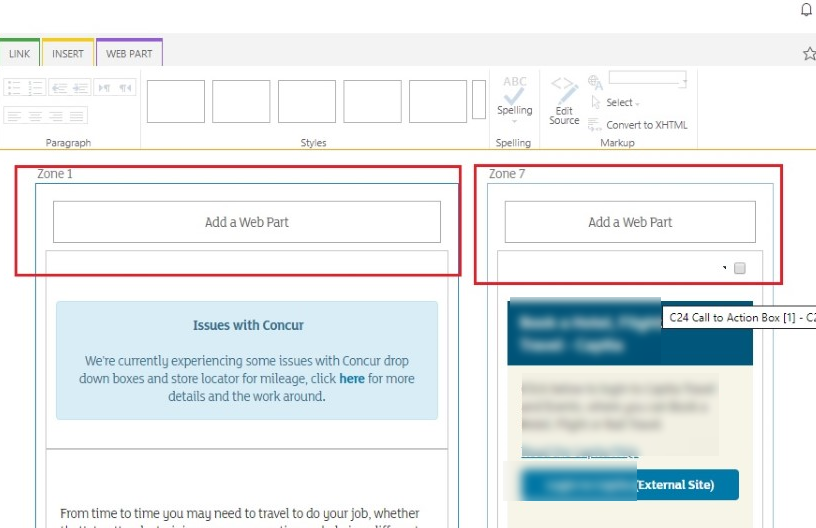
Observed Behavior
As above.
Steps to Reproduce
(pnpCommandlet ver: 3.14.1910)
Export the Custom/Built in page layouts used in Live site pages.
Export-PnPClientSidePageMapping -BuiltInPageLayoutMapping -CustomPageLayoutMapping PublishingPage "Business-Travel-and-Expenses-Policy.aspx"
Create the page in Target site by mentioning the downloaded mapping file
ConvertTo-PnPClientSidePage -PublishingPage -Business-Travel-and-Expenses-Policy.aspx -Overwrite -PageLayoutMapping C:\user\Client\Docs\ModernizationExp\custompagelayoutmapping.xml
Related Queries
Do we need to move the Custom page layouts used from Source site to Target site before the page transformation? This is for getting correct zone/section layout as like the source page.
Is it possible to map a custom page layout to an OOB page layout using –PageLayoutMapping file, to avoid the customizations in Modern site?
How do we keep the custom styles from Source page to Target site page? What are the options available? We lost the styles after the migration.
How would we convert the Script editor web part/CEWP with script tags to the Modern site page? Is SPFx the available option? Note, we've deployed the Modern Search solution in our test tenant so this might be an option going
Is the preferred alternate to Content Query/Content Search web part say one of the Modern Search Results web parts
The publishing pages will migrate to a separate site collection only. So the Library/List view web parts in a page will migrate, if a list/library with the same name exists in the target site. How we can avoid to recreate the backend lists/libraries in target site. What be the approach on it?
Submission Guidelines
Thanks for your contribution! Sharing is caring.
 westerdaled
All 9 comments
Hi @westerdaled ,
When you transform publishing pages you typically need to customize the generated page layout mapping file. When we generate a mapping file it's meant as as starting basis, typical customizations that folks do are:
- Remove metadata fields that are not taken over
- Update source content type
- Fill the row/col attributes to tell the transformation engine in which section column a piece of content needs to be put
So looking at your command line I assume you want to transform a publishing page (we can do web part pages as well) and your publishing page has 2 web part zones, among other content parts. So in the generated page layout file you should see Zone1 and Zone2 being listed in the WebPartZones node: if you update the Zone1 WebPartZone element to be at row 1 and column 1 and the Zone2 WebPartZone element to be at row 1 and column 2 you'll see the web parts in these zones being position in a 2 column section. See https://docs.microsoft.com/en-us/sharepoint/dev/transform/modernize-userinterface-site-pages-model-publishing for more details on the page layout mapping model.
About your other questions:
- No need to copy over the custom page layouts to the target site
- Yes, you can also place mappings for OOB page layouts in your mapping file and then these mappings will override our default mappings. See https://github.com/SharePoint/sp-dev-modernization/blob/dev/Tools/SharePoint.Modernization/SharePointPnP.Modernization.Framework/Publishing/pagelayoutmapping.xml for our default mappings...copy the one you need and add to your mapping file after you've customized it
- Custom styles is not something we support today, but it's good feedback. I'll add a separate issue to do some research on having a custom style mapping model
- By default Script Editor/Content editor web parts with script in them are not converted. Two options:
- Build SPFX alternatives and deploy and configure these on the sites that need them
- Install the community script editor and enabled page transformation to use it. See https://docs.microsoft.com/en-us/sharepoint/dev/transform/modernize-userinterface-site-pages-webparts#enabling-the-use-of-the-community-script-editor-web-part-to-be-used-during-transformation for instructions on how to do that
- Current mappings use the modern high lighted content web part, but nothing stops you from updating the default mapping and build something that can use the modern search web parts. Having that option would be a nice community contribution :-)
- When the same lists with the same view exists in the target site collection we indeed try to match up the lists, if there's no match the mapping is cancelled. Do you want to insert "unconfigured" modern list/library/events web parts when we don't find the needed list/library?
 jansenbe
on 22 Oct 2019
jansenbe
on 22 Oct 2019
Hi @jansenbe
Thanks for the level of detail you have provided. The team and I have been attempting implement your recommendations.
- Stripping back our custom layout just so we can provision the Web Part zone. Please see:
custLayout2.xml.txt
es?
ConvertTo-PnPClientSidePage -PublishingPage –Identity “BusinessPolicy.aspx” -Overwrite -TargetWebUrl “https://tenant.sharepoint.com/” -PageLayoutMapping "C:\user\client\Docs\ModernizationExp\custLayout.xml"
- The created page in our destination comm site did not contain the web part sections/zones
- Is there sample page layout mapping file with custom page layout , you can share.
When the same lists with the same view exists in the target site collection we indeed try to match up the lists, if there's no match the mapping is cancelled. Do you want to insert "unconfigured" modern list/library/events web parts when we don't find the needed list/library?
We found the Current classic site publishing page contains a library/list web part. During page conversion the page will create in a separate site collection. If the library/lists are not present in the target site, the web part is not migrated. In this case it was a simple .pdf file held in a library
- Hence is the recommendation to recreate the list/library before running the transformation script
Finally, like the idea of the community contribution. Happy to have a go before or after the "David Warner community contribution / Git pull request master class" 😀
westerdaled
on 23 Oct 2019
Hi @westerdaled ,
About the getting the zones right in the page layout template:
- This is a complex sample I use for testing: https://github.com/SharePoint/sp-dev-modernization/blob/dev/Tools/SharePoint.Modernization/SharePointPnP.Modernization.Framework.Tests/Transform/Publishing/custompagelayoutmapping.xml. You don't need the WebPartOccurrence nodes as they're meant to control the positioning of webparts inside the zone...in your case you want the same as you have today in the publishing page layout
- I assume the zone id's are coming from the
Export-PnPClientSidePageMappingcmdlet...if not you can runExport-PnPClientSidePageMapping -BuiltInPageLayoutMapping -CustomPageLayoutMapping -Folder c:\temp -Overwriteand compare the generated mapping with yours. Also please share the custom page layout file (the .aspx file) if you're unable to resolve this - Another issue might be that page transformation is not picking up your custom page layout mapping: can you do a run with logging enabled (add
-LogType File -LogVerbose -LogFolder c:\tempto your cmdlet run) and provide the logs. The logs will tell which mapping was selected
About the missing library:
- Lists and libraries are shown via the XSLTListView web part on classic pages. When you transform we try to match libraries and views...if the library is not present there will be no web part on the modern page
- It's indeed recommended to first create the same libraries (with their content) and then transform the pages. You can use ISV migration tools for that or use the new site template export capabilities (we now extract contents) to extract the lists and data to a pnp site template and then apply the template to the target site
jansenbe
on 23 Oct 2019
Hi @jansenbe
I think you have alluded as where our issue is
Export-PnPClientSidePageMapping -BuiltInWebPartMapping -PublishingPage $sourcePublishingPage -BuiltInPageLayoutMapping -CustomPageLayoutMapping -Overwrite -Folder $workingFolder -Logging
[Page Layout Analyser] Generating mapping for
Two Zone Header–One Sidebar Zonelayout
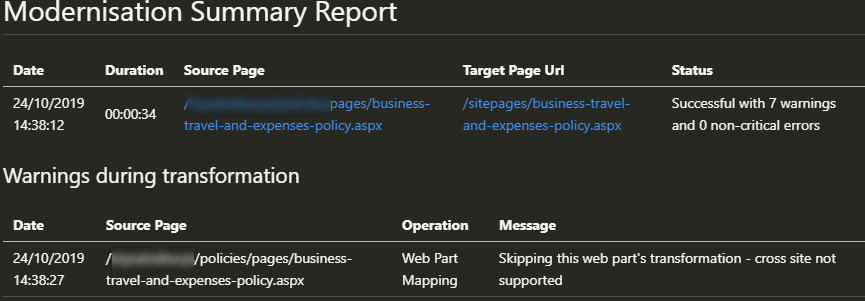
The generated customapagelayoutmapping-testpage.xml, doesn't have the web part zones and ids which have in your test file. Btw I have a colleague in India who is also trying these commands against our live intranet site so that we rule out any platform issues. please see attached custompagelayout (.asxpx saved as .txt)
Two Zone Header–One Sidebar Zone.txt
Whist we wait your thoughts we're going test out other articles with different custom page layouts.
westerdaled
on 24 Oct 2019
Hi @westerdaled ,
In the page layout you've shared the webpart zone names are 9d0a4d08e9ad42c3a8b3063a06451806, x5a37f6775a2f40509c87954de3686063, xc9893e9f4d734cc9ad8846c0cd8075d1,...
So in your web part mapping file you'll need to use these names to identify the zones. You would have for example something like this:
<WebPartZones>
    <WebPartZone Row="1" Column="1" ZoneId="9d0a4d08e9ad42c3a8b3063a06451806" ZoneIndex="0" />
    <WebPartZone Row="1" Column="2" Order="1" ZoneId="x5a37f6775a2f40509c87954de3686063" ZoneIndex="0" />
    <WebPartZone Row="1" Column="2" Order="2" ZoneId="xc9893e9f4d734cc9ad8846c0cd8075d1" ZoneIndex="0" />
  </WebPartZones>
If you're still stuck after this then send me a note on [email protected] to setup a troubleshooting meeting.
jansenbe
on 24 Oct 2019
Hi @jansenbe You have confused me a bit when you mentioned the web part mapping file.
I have added the web part zones to the generated custom layout but it is not being accepted as a parameter - we had this same issue earlier today
ConvertTo-PnPClientSidePage -PublishingPage -Identity $sourcePublishingPage -PageLayoutMapping .\custompagelayoutmapping-260d45e9-6139-4c59-9640-afc736a62e93-business-travel-and-expenses-policy.xml -WebPartMappingFile .\webpartmapping.xml -Overwrite -TargetWebUrl $targetModernSite -LogType File -LogVerbose -LogFolder $workingFolder
ConvertTo-PnPClientSidePage : Provided pagelayout mapping file .\custompagelayoutmapping-260d45e9-6139-4c59-9640-afc736a62e93-business-travel-and-expenses-policy.xml does not exist
At line:1 char:1
- ConvertTo-PnPClientSidePage -PublishingPage -Identity $sourcePublishi ..
it does of course and I even use intellisense to pick it as argument . The debug session looks like the way , thanks for the offer.
westerdaled
on 24 Oct 2019
Hi @westerdaled,
My bad, I indeed meant page layout mapping file instead of web part mapping file. Please specify a full path to both XML files, that should work.
jansenbe
on 24 Oct 2019
@jansenbe
A bit of a progress update. My wily colleague spotted an error in the logs regarding not detecting the layout:
So the layout name
<PageLayout Name="Two Zone Header–One Sidebar Zone" AssociatedContentType="" PageLayoutTemplate="AutoDetect" PageHeader="Custom">
.... needs to be changed to
<PageLayout Name="Two%20Zone%20Header–One%20Sidebar%20Zone" AssociatedContentType="" PageLayoutTemplate="AutoDetect" PageHeader="Custom">
Then we get the two zones in our target communication site page.
The focus is now
- mapping the source CQWP to either the community Search Refiner: Search Results Web Part or the OOTB highlighted content
- As you suggested, use PnP provisioning to locate content and move this to our destination site - ours is a bit more complicated due to info architecture we have adopted.
westerdaled
on 25 Oct 2019
Let's then close this issue as the original question has been answered. Feel free to open a new issue if you encounter other issues.
jansenbe
on 25 Oct 2019
Related issues
 pkbullock
·
8Comments
pkbullock
·
8Comments
 rudfoss
·
4Comments
rudfoss
·
4Comments
 schnito
·
4Comments
schnito
·
4Comments
 mbice
·
6Comments
pkbullock
·
7Comments
mbice
·
6Comments
pkbullock
·
7Comments