Modernization: Content is empty in random cases in Classic page(Eg Previous_PageName) when -TakeSourcePageName switchparameter is used
Category
[x] Bug
[ ] Enhancement
Problem Area
[ ] Page Transformation: Error during the setup/use of the Page Transformation UI solution (did you check our troubleshooting guide?)
[ ] Page Transformation: Error during the use of page transformation from PnP PowerShell
[ ] Page Transformation: Error during the use of page transformation from .Net
[x] Page Transformation: Page is not looking correct after transformation
[ ] Modernization Scanner: something went wrong...
Expected or Desired Behavior
Classic page's content has to be retained after conversion using ConvertTo-PnPClientSidePage -Identity "page.aspx" -AddPageAcceptBanner -TakeSourcePageName
Observed Behavior
Classic page is not retaining any data
Steps to Reproduce
It is randomly occuring in homepages
 PriyankaDevi510
All 23 comments
@PriyankaDevi510 : we need more details to understand what goes wrong:
- Do you get errors in the logs when this happens?
- Does your script terminate with an error?
- Anything special about the home pages where this fails (e.g. checkin/checkout status?)
- Is this for a wiki page or a web part page?
 jansenbe
on 17 Sep 2019
jansenbe
on 17 Sep 2019
Hey @jansenbe
The script is neither showing error nor terminated while running. I tried using Get-PnPException -All. No exception was thrown. It is a wiki page, and it is checked in. During page transformation, log file was created using -LogFolder "D:\" and –LogVerbose and attached the same.
Previous_home-content missing- Page-Transformation-Report-9-17-2019-12-08-58-PM.txt
PriyankaDevi510
on 17 Sep 2019
Hey @jansenbe
Any update on this issue?
PriyankaDevi510
on 23 Sep 2019
@PriyankaDevi510 I have some questions, if that's ok:
- Is this for SharePoint Online or On-premises conversions?
- Does the source page contain any closed web parts?
- Is the page created from a previous migration e.g. 2010 that you know of?
- Is there any custom code on the page or customization e.g SharePoint Designer?
- Do you have check in/check out enabled?
Sorry for the barrage of questions.
 pkbullock
on 23 Sep 2019
pkbullock
on 23 Sep 2019
Thx @pkbullock .
@PriyankaDevi510 : The shared log is not providing enough information to reproduce this, so we need to try to understand where the difference is between a working home page and one having this issue. Since we're using OOB API's to handle the page rename this seems to be more of a platform issue versus an issue in page transformation...but without a clean repro it's really hard to fix this.
On how many of the home pages do you see this?
Can you reproduce it somehow?
jansenbe
on 23 Sep 2019
Hey,
The home page has Checkin/checkout enabled. And they dont have any custom code or closed webparts. They just have basic XSLT /newsfeed webparts. We are able to reproduce this issue and also we find another previous_home.aspx with the original content in recycle bin. This issue is persisiting frequently in most of the home pages.
PriyankaDevi510
on 24 Sep 2019
Hi @jansenbe
Any update on this issue
PriyankaDevi510
on 26 Sep 2019
Hi @PriyankaDevi510 ,
Sorry for the delays in this, I'm currently travelling and have limited time to dig into this. Should back in "normal" mode next week. It's good that you can repro this, are you willing to have a (Teams) meeting where we jointly can debug this?
jansenbe
on 26 Sep 2019
Hi @PriyankaDevi510 ,
I've been looking into this based upon the information in this thread...and for now I do not immediately see where it goes wrong. The log that you showed previously shows that the steps in the swappages routine are processed without error. The following logic is applied.
- Copy Home.aspx to Previous_Home.aspx
- Copy permissions from Home.aspx to Previous_Home.aspx
- Update nav links that point to Home.aspx to point to Previous_Home.aspx
- Copy Migrated_Home.aspx to Home.aspx (overwrites the original Home.aspx)
- Copy permissions from Previous_Home.aspx to Home.aspx
- Update nav links that point to Previous_Home.aspx to point to Home.aspx
- Delete Migrated_Home.aspx
As you see we're not deleting Previous_Home.aspx, so I'm a little bit puzzled here. I'll prep a team site for testing, with checkin/checkout and see if I can repro. If I'm not able to repro then other options can be:
- Doing a joint debug session (requires you to have VS2019 installed)
- You create a test account in your tenant and share that with me, provide the test account the needed permissions on a site that can be used to repro the problem
jansenbe
on 30 Sep 2019
Hi @PriyankaDevi510 ,
I've been testing this and when the page is checked out by the person running the page transformation then things are working fine. If however the page was checked out then swap pages is not able to fully finalize...but still it's keeping the content. This is what I get as output:
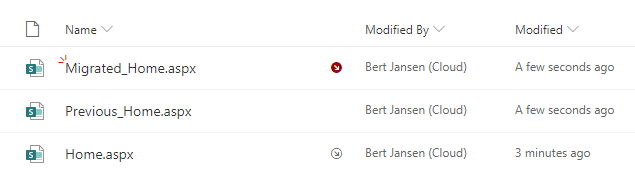
Can you confirm that the home pages that failed were checked out?
Are you by any chance running the transformation using app-only versus user credentials?
jansenbe
on 2 Oct 2019
Hey @jansenbe
The pages are not checked out
PriyankaDevi510
on 3 Oct 2019
Transformation is done using user-credentials
PriyankaDevi510
on 3 Oct 2019
Hey @jansenbe
We would like to do a joint debug session. Kindly let us know your availability..
PriyankaDevi510
on 9 Oct 2019
Hey @PriyankaDevi510,
Please drop me a mail on [email protected] so we can setup a meeting.
jansenbe
on 9 Oct 2019
Hi @PriyankaDevi510 ,
The root cause of this is because programmatically created wiki pages loose their webparts on a copy operation. This is due to remote API's not being able to use the web part storage key, see https://github.com/SharePoint/PnP-Sites-Core/issues/2052 for more details.
The solve this issue I'm rewriting the swap pages logic to use the Move operation instead of the Copy operation. This fix will be included in the next release.
jansenbe
on 20 Oct 2019
Fix committed.
jansenbe
on 20 Oct 2019
@jansenbe awesome find. Nice one.
pkbullock
on 20 Oct 2019
Hey Bert,
Thanks much for the quick turnaround! Just curious to know about the navigation links' behavior when Moveto operation is used
PriyankaDevi510
on 20 Oct 2019
When I originally developed the swap pages logic these links were dropped, but now they're renamed by the move operation...and I just rename the links back. So links are retained with the new swap pages logic. I also did some work to ensure that when we move the original source page to "previous_page" we keep the page author/editor/modified/created information.
jansenbe
on 20 Oct 2019
That sounds great! Thanks Bert. Closing the issue
PriyankaDevi510
on 20 Oct 2019
FYI: the next PnP PowerShell version (3.14.1910.1) will be available today. This should solve your issue, if not please open a new issue so can further work on this.
jansenbe
on 22 Oct 2019
jansenbe
on 22 Oct 2019
tagging @PriyankaDevi510 so this pops up
jansenbe
on 22 Oct 2019
Related issues
pkbullock
·
8Comments
 adamtoad
·
8Comments
adamtoad
·
8Comments
 schnito
·
4Comments
schnito
·
4Comments
 rudfoss
·
6Comments
pkbullock
·
7Comments
rudfoss
·
6Comments
pkbullock
·
7Comments
Most helpful comment
Fix committed.