Modernization: On-Premises Support to modernize to SP Online
Category
[ ] Bug
[X] Enhancement
Expected or Desired Behavior
I would like the option to transform directly to SPO without needing to hop with a 3rd party migration tool to SharePoint Online. This applies to publishing portals.
Approach 1
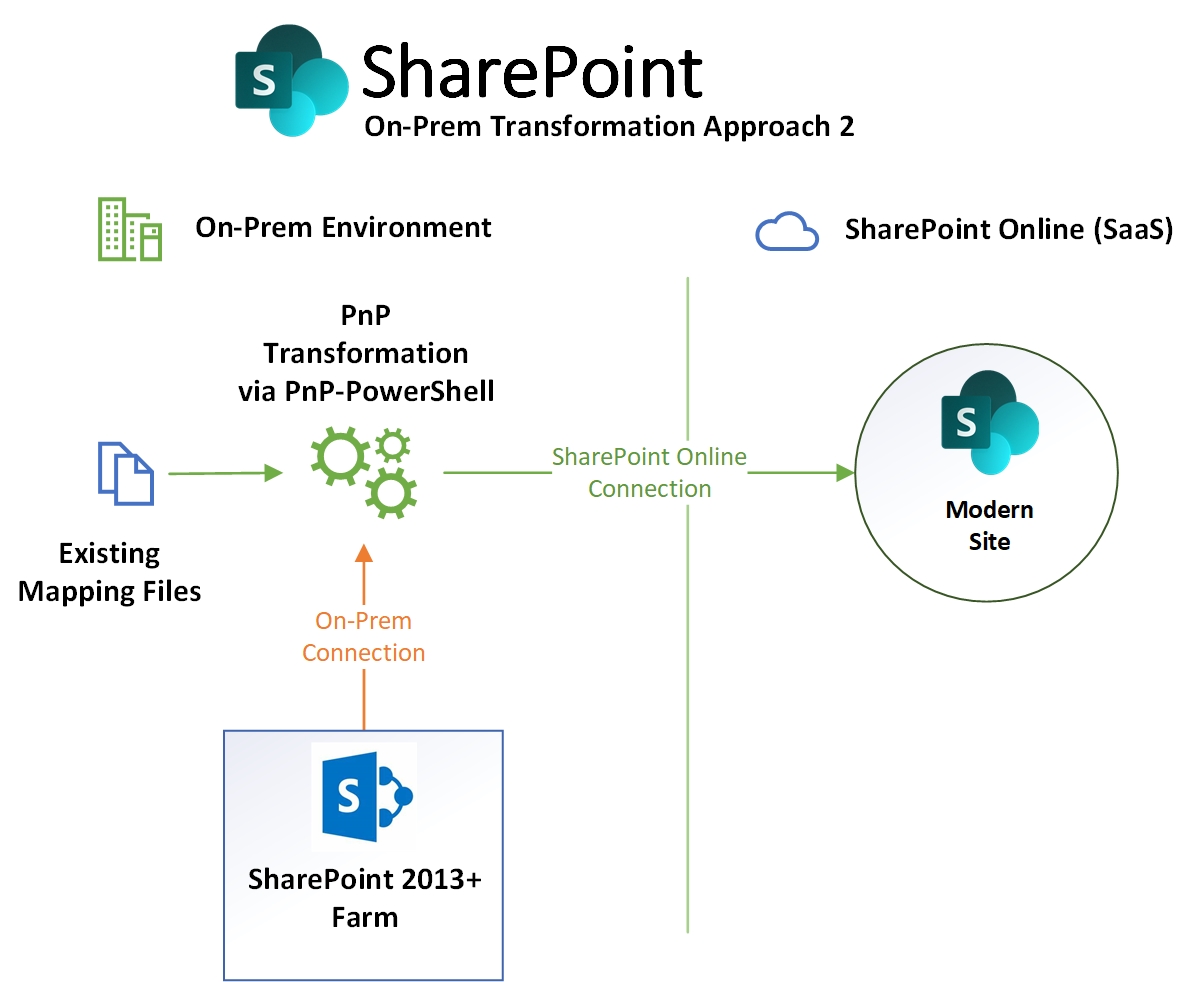
Idea
- Adapt PnP-PowerShell ConvertTo cmdlets to work with both on-premises and sharepoint online connections in the source target
- Simplier approach that requires smaller modification that Approach 2
- Avoids major refactoring in the modernization core + it can avoid issues with the built-in functions that get data from both source and target.
Challenges
- Testing would require multiple farms, which could be a reasonable amount of work to setup including test publishing portals
- We would need to refactor PnP PowerShell or create new cmdlets to accept On-Premises and Online connections
Opportunities
- Significantly quicker transformation for those moving from on-prem to online, not necessary to do the double hop to get on-prem pages modernized as mentioned as previous issues. Using 3rd party tools to copy the site up, can take weeks (full copy) to get online.
- The double hop migration appears to be a common approach in client engagements to going modern from on-premises
- In theory the same script could work on 2013-2019 farms with the same support range as PnP-PowerShell
Approach 2
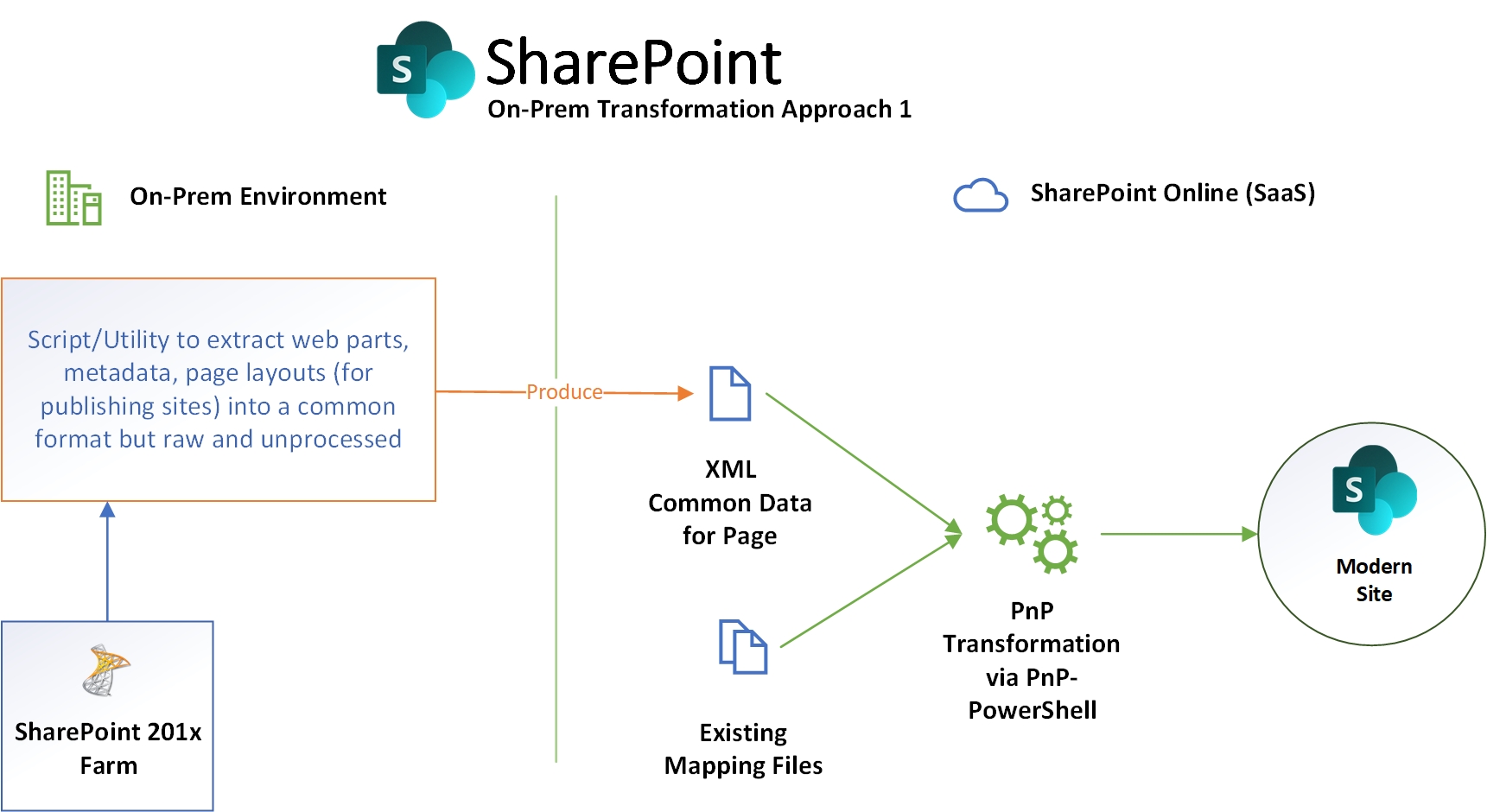
Idea
- Consider writing a PowerShell script (preferably) for on-premises using standard SharePoint PowerShell to create a Xml file containing all the data required for the transformation to run
- There are well publicised scripts to perform an inventory on client farms to produce CSV files - something similar could be used to target a page and extract all the metadata, web part content and config then supply transformation tool with all the data to convert to modern.
- The source transformation could be XML or SPO pages, but the Target would remain as existing.
Challenges
- Testing would require multiple farms, which could be a reasonable amount of work to setup including test publishing portals
- We would need to refactor the transformation framework to abstract the inputs so it can process either SPO or XML input, if we can do this all the remaining aspects of the engine should still operate as expected
- We would need to make it clear that for any built In functions that need extra input from SP needs to be gathered ahead of time.
- Doing this move makes you handle possible incompatible customizations that are used by the on-premises portal
Opportunities
- Significantly quicker transformation for those moving from on-prem to online, not necessary to do the double hop to get on-prem pages modernized as mentioned as previous issues. Using 3rd party tools to copy the site up, can take weeks (full copy) to get online.
- The double hop migration appears to be a common approach in client engagements to going modern from on-premises
- Improved unit testing, one we have a set of XML files the dependency on the farms is lowered.
- In theory the same script could work on 2010-2019 farms.
Discussion Points
Def further investigation or POC needed to validate this approaches
Moving the classic portal from on-prem to online does have its advantages to:
- Can serve as read-only copy
- If the SharePoint Migration tool is introducing support for 2010 should we mirror that support range?
@jansenbe I've encorproated your feedback from discussion around the topic.
 pkbullock
All 11 comments
I've got some time Monday and Friday to looking into this in more detail. I'll see if i can list out the code changes or impact to any re-write to get this working.
To note from the recent community call in your demo @jansenbe , Vesa mentioned a WSP solution that could be used to install to provide a way to connect to server side for the transform, logging here for further consideration. The code adjustment could be similar Approach 2.
pkbullock
on 19 May 2019
Approach 1 is an option - managed to perform a SP2013 to SharePoint Online modernization in a quick test with a small number of tweaks to the ConvertTo-PnPClientSidePage PnP cmdlet - by essentially just adding a second connection param for target, instead of Target URL, then install the cmdlets compiled for Online on the On-Prem box. There are some caveats, we can discuss after the conferences.

Approach 2 will def be a major change. Again we discuss later.
Thought id update on progress :)
pkbullock
on 21 May 2019
very cool!
On Tue, May 21, 2019 at 3:40 AM Paul Bullock notifications@github.com
wrote:
Approach 1 is an option - managed to perform a SP2013 to SharePoint Online
modernization in a quick test with a small number of tweaks to the
ConvertTo-PnPClientSidePage PnP cmdlet - by essentially just adding a
second connection param for target, instead of Target URL, then install the
cmdlets compiled for Online on the On-Prem box. There are some caveats, we
can discuss after the conferences.[image: Conversion-test-2019-05-21_08-33-54]
https://user-images.githubusercontent.com/8781041/58076971-79829f00-7ba3-11e9-94c3-0e93e909ac6c.jpgApproach 2 will def be a major change. Again we discuss later.
Thought id update on progress :)
—
You are receiving this because you are subscribed to this thread.
Reply to this email directly, view it on GitHub
https://github.com/SharePoint/sp-dev-modernization/issues/154?email_source=notifications&email_token=AASNDHE4W7PU5NCTRZITEX3PWORQJA5CNFSM4HMWVPI2YY3PNVWWK3TUL52HS4DFVREXG43VMVBW63LNMVXHJKTDN5WW2ZLOORPWSZGODV3BEJY#issuecomment-494277159,
or mute the thread
https://github.com/notifications/unsubscribe-auth/AASNDHHIUHYVDPWC3L5ROLLPWORQJANCNFSM4HMWVPIQ
.
 russgove
on 21 May 2019
russgove
on 21 May 2019
That's indeed very exciting! Let's see to get option 1 available for our next release, even if it's just a 'preview' as that will enable more folks to test this
 jansenbe
on 22 May 2019
jansenbe
on 22 May 2019
@jansenbe the trick is to connect an SharePoint Online PnP PowerShell release to the on-premises servers because the transformation tool depends on client page object which in PnP-sites-core is not included in 2013/2016 releases. This is only used when using the target connection.
Does that break any PnP rules for use in this way?
I can provide sample script to get going and a submission to PnP-PowerShell, where would be the best place for the sample script?
pkbullock
on 22 May 2019
The minor code change to PnP also enabled cross-tenant transformation e.g. Source Publishing Site in Tenant A with target communication site in Tenant B. I remember someone mentioned whether this is possible in a community call.
pkbullock
on 22 May 2019
Sample script:
# This sample runs direct from a SharePoint 2013 box with a basic publishing site and a page with an image - asset transfers work.
# Target Tenant Connection - must be SPO and modern site
$target = Connect-PnPOnline https://<target-tenant>.sharepoint.com/sites/targetsite -Credentials CaPaDevTest -ReturnConnection

# Source Connection
Connect-PnPOnline http://portal2013 -CurrentCredentials

Get-PnPWeb

# Must have SkipItemLevelPermissionCopyToClientSidePage as two environments may not have knowledge of each others users.
ConvertTo-PnPClientSidePage -Identity "article.aspx" -PublishingPage -TargetConnection $target -SkipItemLevelPermissionCopyToClientSidePage -LogVerbose -LogType File -LogFolder c:\temp
Quick Update,
- I have built SP2010/2013/2016/2019 test farms - needed to do this anyway for client scenario testing.
- I have been doing more testing (ASP.NET) - had to rewrite TestCommon for dual contexts so should support on-premises, and try and keep existing tests working (ish).
- The layout analyser doesn't work because of a API call to Web.GetListItem to the layout page loading isn't working on SP2013 (strange, docs show this is supported - this may be a pitfall for this approach using CSOM SP Online against CSOM SP On-Premises). This however should be straight forward to work around.
- Fixed some minor bugs around paths for root sites
- So far OOB transforms are working ok - need to fix layout analyser to test custom layouts capability
Enjoy Collab Summit :)
pkbullock
on 26 May 2019
I do have SP2013/2016/2019 up and running as well, once the Collab Summit is over I'll have some more time for this. But looking really promising :-)
jansenbe
on 27 May 2019
Ok I have fixed some core issues blocking transform e.g. custom layouts, analyser and folders so can now do early PR, I have done some testing on existing transform scenarios which in my setup, work.
pkbullock
on 28 May 2019
Closing this issue now @pkbullock as the key bits and pieces are checked in. I've added some new on-premises related issues for further tracking. Feel free to add more issues if there's something you would still need for on-premises support.
jansenbe
on 4 Jun 2019
Related issues
 schnito
·
4Comments
schnito
·
4Comments
 rudfoss
·
4Comments
rudfoss
·
4Comments
 adamtoad
·
8Comments
adamtoad
·
8Comments
 samtrion
·
4Comments
samtrion
·
4Comments
 gautamdsheth
·
7Comments
gautamdsheth
·
7Comments