Modernization: Add support for publishing pages
Support publishing page transformation. Ideas:
- Use 'pagelayout' mapping template to determine which fields become content and which will be metadata and what layout to be used
- Generate mapping template based upon analyzing a page layout
- Provide 'built-in' mappings for OOB page layouts
- Provide capability to create target page into another site collection (what about depending assets in this case?)
 jansenbe
All 16 comments
Hi @jansenbe ,
Do you have an estimated release date for this update?
Thanks.
 BenJ74
on 14 Jan 2019
BenJ74
on 14 Jan 2019
Hi @BenJ74 ,
This feature currently is on hold as more investigation is needed on the feasibility and usefulness of this capability
jansenbe
on 25 Jan 2019
Hi Bert,
I have a use for this, trying at the moment to run this against a publishing site for a project to switch to communication sites. At the moment, I am exporting/importing web parts from publishing pages to Web Part Pages in the Site Pages library then running this tool, which looks promising as a workaround.
For the project, I am on, its a SharePoint 2010 publishing portal, then I've uploaded to SPO using a 3rd Party migration tool, then planning on running this tool to convert to multiple communication sites (flattening). The Intranet project has 5K+ pages or more to convert.
Ideally, I would love to be able to process a subsite in a publishing site, then choose a target Communication site URL to send the converted pages to.
I would have thought there must be lots of use for this, for organisations that had to go and build using publishing portals prior to communication sites arrival.
Paul
 pkbullock
on 8 Feb 2019
pkbullock
on 8 Feb 2019
Hi @pkbullock ,
Thanks for the feedback. Our primary concern is first making the core page transformation as good as can be, once that's done adding support for publishing pages most likely will be added.
jansenbe
on 19 Feb 2019
Hi Bert,
Did this make it into the latest release?
Russell
 russgove
on 1 Apr 2019
russgove
on 1 Apr 2019
Hi Russel,
It's the plan to have a preview in the April release, which will come out latest on April 8th. If you would grab the latest PnP PS source and build PnP PS yourselves you can already give this a try.
Would love to get some testing feedback on either the current dev version or on the April release. From a feature point of view, there's one piece remaining and that setting the target page content type and copying metadata from the source page.
jansenbe
on 1 Apr 2019
Thanks Bert,
I grabbed the dev versions and have been testing it all day. Works Great!
Are there any plans to enable us to update publishing pages within the
current site (i.e. not having to copy pages to a new site collection).
Are there any plans to enable us to set the heading type on the pages?
I'm getting below error on a couple of pages. I'll dig up the details and
send them to you:
ConvertTo-PnPClientSidePage : Index was out of range. Must be non-negative
and less than the size of the collection.
Parameter name: index
At C:Userstrwg1OneDrive - TronoxPowershellO365ModernizePage.ps1:31
char:27
- ... odernPage = ConvertTo-PnPClientSidePage -Identity $page.FieldValues["
... ~~~~~~~~~~~~~
- CategoryInfo : WriteError: (:)
[ConvertTo-PnPClientSidePage], ArgumentOutOfRangeException - FullyQualifiedErrorId :
EXCEPTION,SharePointPnP.PowerShell.Commands.ClientSidePages.ConvertToClientSidePage
- CategoryInfo : WriteError: (:)
On Mon, Apr 1, 2019 at 11:49 AM Bert Jansen notifications@github.com
wrote:
Hi Russel,
It's the plan to have a preview in the April release, which will come out
latest on April 8th. If you would grab the latest PnP PS source and build
PnP PS yourselves you can already give this a try.Would love to get some testing feedback on either the current dev version
or on the April release. From a feature point of view, there's one piece
remaining and that setting the target page content type and copying
metadata from the source page.—
You are receiving this because you commented.
Reply to this email directly, view it on GitHub
https://github.com/SharePoint/sp-dev-modernization/issues/6#issuecomment-478635308,
or mute the thread
https://github.com/notifications/unsubscribe-auth/ACTRnIvLNKq4vdX4e_Ho5pWabMOGPVIKks5vciptgaJpZM4ZPdPo
.
russgove
on 1 Apr 2019
Hi,
The Index was out of range issue happens when I try to migrate a page with 3 columns and the middle column is empty:
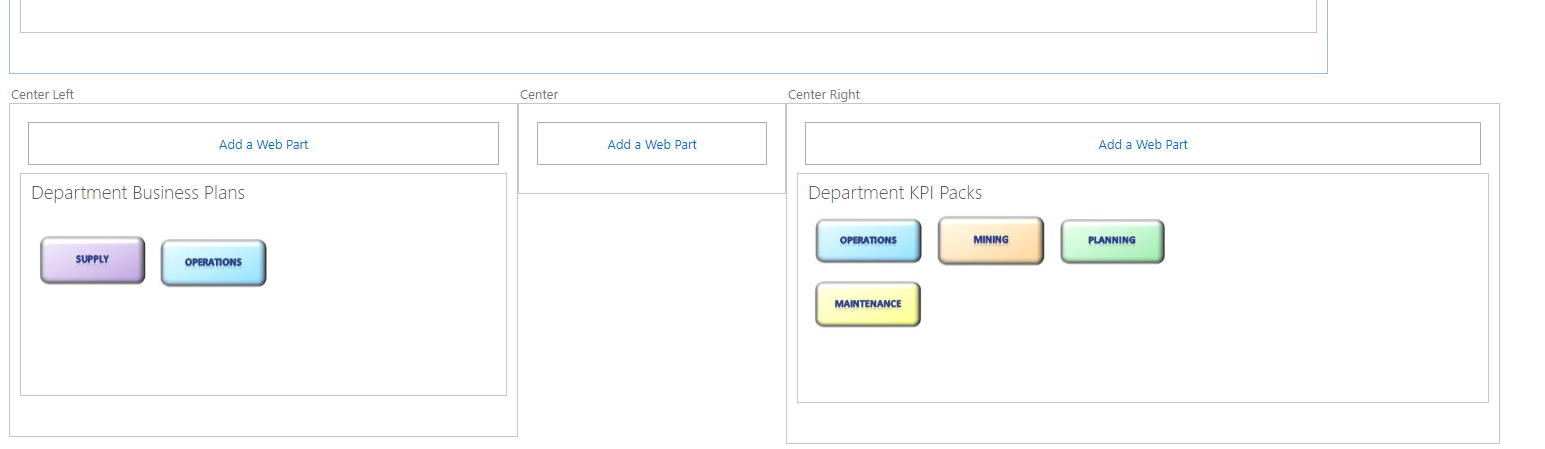
The error occurs in private Int32 LastColumnOrder(int row, int col)
The method is being called with a col value of 2, but the pages collection only has two columns (0 & 1)
russgove
on 1 Apr 2019
Hi,
Also, If i have an image tag in a CEWP pointing to an image on the source site, it gets converted like this:

It adds the link labeled *Image placeholder for source.... ,
and the image itself still points to the old site.
russgove
on 1 Apr 2019
@russgove : I've managed to repro the index out of range issue and will have a look into it. Thanks for reporting this.
Update: issue fixed. See https://github.com/SharePoint/sp-dev-modernization/commit/f2193072ca9705683f16688606f151f2f9e176d6
jansenbe
on 2 Apr 2019
@russgove : answering your other questions.
_"Are there any plans to enable us to update publishing pages within the current site (i.e. not having to copy pages to a new site collection)."_ ==> we currently do not have plans for that, mixing the publishing pages with modern pages is not supported
_Are there any plans to enable us to set the heading type on the pages?_ ==> this can already be done today by updating the pagelayout mapping. For OOB page layouts there's a builtin mapping which defines the page header. When the page is based upon a custom page layout we generate a default page layoutmapping on the fly and use that, but you do have the option to provide a custom one. You can use the Export-PnPClientSidePageMapping -BuiltInPageLayoutMapping -CustomPageLayoutMapping -Folder c:\temp cmdlet to export both the default mapping plus have the page layouts in your site being analyzed. Take the custom page layout mapping file and drop all the page layouts that are either OOB or that you do not need, then adjust the header + adjust the row/column values to position the page content correctly in the target page.
Here's a default header definition:
    <PageLayout Name="WelcomeLinks" AssociatedContentType="" PageLayoutTemplate="AutoDetect" PageHeader="Custom">
      <Header Type="FullWidthImage" Alignment="Left" ShowPublishedDate="false">
        <Field Name="PublishingRollupImage" HeaderProperty="ImageServerRelativeUrl" Functions="ToImageUrl({PublishingRollupImage})" />
        <Field Name="ArticleByLine" HeaderProperty="TopicHeader" Functions="" />
        <Field Name="PublishingContact" HeaderProperty="Authors" Functions="ToAuthors({PublishingContact})" />
      </Header>
To update the header you can change the PageHeader attribute to None for no header or Default for the default modern page header. If you use custom you can still adjust some properties via the Header element + define which publishing page field get's used to build up the header.
Let me know how it goes...I'll try to write some docs on this before release time.
jansenbe
on 2 Apr 2019
@russgove : about _"CEWP pointing to an image"_ ==> currently we're running content editor web part content via our html cleanup routine, which does add this...ideally we should handle content editor web part as wiki content as that will then get you a separate image web part....will do some checking on what's a feasible option.
Update: was easier to integrate then I initially assumed...so it's done: https://github.com/SharePoint/sp-dev-modernization/commit/0c86671e4525a4f594b6172fd2938641bcc47bb5. Now the html content inside a content editor is handled in the same manner as regular wiki or publishing text content
jansenbe
on 2 Apr 2019
Thanks for the update on the page headings. I'll give that a try.
Regarding pdate publishing pages within the current site. My use case is
that I'm migrating an On Prem publishing site to an Office 365 site. Once I
have the contents on O365 I would use this tool to convert the old pages
in Site Pages to modern Pages. I would then turn delete the site pages and
Turn off publishing. You mentioned 'mixing the publishing pages with
modern pages is not supported'.. not sure what you meany, I currently have
a mix of publishing and modern pages on a site I'm working on-- A classic
site , with Modern pages.
On Tue, Apr 2, 2019 at 10:15 AM Bert Jansen notifications@github.com
wrote:
@russgove https://github.com/russgove : answering your other questions.
"Are there any plans to enable us to update publishing pages within the
current site (i.e. not having to copy pages to a new site collection)."
==> we currently do not have plans for that, mixing the publishing pages
with modern pages is not supportedAre there any plans to enable us to set the heading type on the pages?
==> this can already be done today by updating the pagelayout mapping. For
OOB page layouts there's a builtin mapping which defines the page header.
When the page is based upon a custom page layout we generate a default page
layoutmapping on the fly and use that, but you do have the option to
provide a custom one. You can use the Export-PnPClientSidePageMapping
-BuiltInPageLayoutMapping -CustomPageLayoutMapping -Folder c:temp cmdlet
to export both the default mapping plus have the page layouts in your site
being analyzed. Take the custom page layout mapping file and drop all the
page layouts that are either OOB or that you do not need, then adjust the
header + adjust the row/column values to position the page content
correctly in the target page.Here's a default header definition:
<PageLayout Name="WelcomeLinks" AssociatedContentType="" PageLayoutTemplate="AutoDetect" PageHeader="Custom">
  <Header Type="FullWidthImage" Alignment="Left" ShowPublishedDate="false">
    <Field Name="PublishingRollupImage" HeaderProperty="ImageServerRelativeUrl" Functions="ToImageUrl({PublishingRollupImage})" />
    <Field Name="ArticleByLine" HeaderProperty="TopicHeader" Functions="" />
    <Field Name="PublishingContact" HeaderProperty="Authors" Functions="ToAuthors({PublishingContact})" />
  </Header>
To update the header you can change the PageHeader attribute to None for
no header or Default for the default modern page header. If you use custom
you can still adjust some properties via the Header element + define which
publishing page field get's used to build up the header.Let me know how it goes...I'll try to write some docs on this before
release time.—
You are receiving this because you were mentioned.
Reply to this email directly, view it on GitHub
https://github.com/SharePoint/sp-dev-modernization/issues/6#issuecomment-479016329,
or mute the thread
https://github.com/notifications/unsubscribe-auth/ACTRnOThkdaEoyvVXS9wVWpRaeLsGp46ks5vc2YCgaJpZM4ZPdPo
.
russgove
on 3 Apr 2019
@russgove I am working on a migration very similar to yours where I am migrating an on-premises SharePoint (2010) to modern by migrating to classic publishing sites then using the transformation tool to modernise publishing pages into a target set of communication sites grouped with a hub site. For me, this way I separate modern away from the master page, page layout customisations, navigation is not managed metadata in modern and cleanse any old configuration.
Thanks for raising the above issues, I will look to test this in my scenarios.
pkbullock
on 3 Apr 2019
@russgove / @pkbullock: I've updated the dev branch of PnP PS with the latest changes, all above issues should now work fine when testing from PnP PS (assuming you grab latest and build it)
jansenbe
on 3 Apr 2019
I'm also marking this issue as done as it will appear in the April release. If you see new issues (for publishing pages, but also for wiki pages) then please open a new issue for those.
jansenbe
on 3 Apr 2019
Related issues
 abhishektyagi9
·
4Comments
abhishektyagi9
·
4Comments
 adamtoad
·
8Comments
adamtoad
·
8Comments
 nicolas6969
·
3Comments
nicolas6969
·
3Comments
 yumoraby
·
5Comments
yumoraby
·
5Comments
 rudfoss
·
4Comments
rudfoss
·
4Comments
Most helpful comment
Hi @pkbullock ,
Thanks for the feedback. Our primary concern is first making the core page transformation as good as can be, once that's done adding support for publishing pages most likely will be added.