Modernflyouts: Bug: Pinning flyout is not working
Describe the bug:
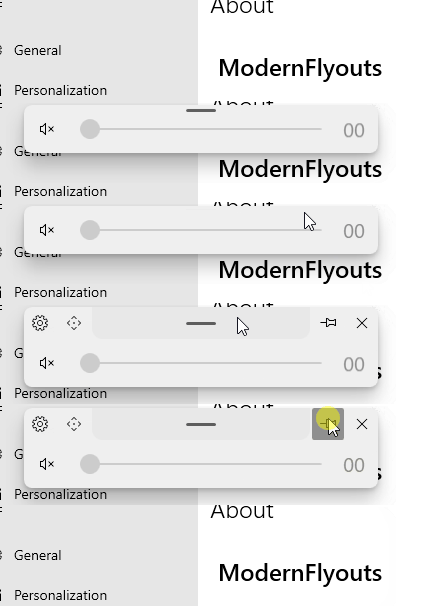
Pinning flyout is not working.
To Reproduce:
Steps to reproduce the behavior:
Screenshots:
OS Version:
- Windows 10 Version:
ModernFlyouts Version:
- Version:
 seriaati
All 5 comments
Hello friend. Sorry to say, but that is not how this feature works. To achieve what you are trying to get, open settings and change the flyout timeout.
 Cyberdroid1
on 17 Dec 2020
Cyberdroid1
on 17 Dec 2020
Oh!
That "Pin" button is just to pin or unpin the top bar not the flyout.
Sorry if it was confusing.
 ShankarBUS
on 17 Dec 2020
ShankarBUS
on 17 Dec 2020
👍1
@ShankarBUS
I think having an OOBE could prevent issues like this.
Cyberdroid1
on 17 Dec 2020
👍1
xd
ok
I'm sorry for that
well, it would also be really cool if we can pin the flyout
seriaati
on 17 Dec 2020
You can always change the flyout timeout to be a very big value. It will not hide then.
Or
You can keep your mouse on the flyout. Unless you move it, it will not disappear.
Cyberdroid1
on 17 Dec 2020
Was this page helpful?
0 / 5 - 0 ratings
Related issues
 Samuel12321
·
4Comments
Samuel12321
·
4Comments
 elenmerbau
·
5Comments
elenmerbau
·
5Comments
 Poopooracoocoo
·
4Comments
Poopooracoocoo
·
4Comments
 DanRotaru
·
3Comments
Cyberdroid1
·
4Comments
DanRotaru
·
3Comments
Cyberdroid1
·
4Comments