Modernflyouts: Cannot connect to Spotify
The media flyout cannot connect to the uwp version of Spotify , the media info is wrong and cannot adjust the progress bar.
 PIndividual
All 15 comments
Please see issue #29
 Cyberdroid1
on 9 Oct 2020
Cyberdroid1
on 9 Oct 2020
Do you mean the store version of Spotify?
By progress bar do you mean the volume control or the timeline infos?
The timeline info only shows the progress, seeking the time is currently not implemented.
Part of this issue belongs to #29 and other to #93
We're working on it and will fix these issues ASAP
@Samuel12321 Should this issue be made into a feature proposal - (Add support for seeking or changing the progress of the media playback)?
Thanks @Cyberdroid1 🤗
 ShankarBUS
on 9 Oct 2020
ShankarBUS
on 9 Oct 2020
We can make it a feature proposal, at the moment it would be super low priority
 Samuel12321
on 9 Oct 2020
Samuel12321
on 9 Oct 2020
Woah!
Made some slight changes and got some great improvements!
Spotify shows the icon and name now, clicking on them opens Spotify!
Spotify now completely compatible with ModernFlyouts (shuffle, repeat, stop & timeline infos.. all of them are working!)
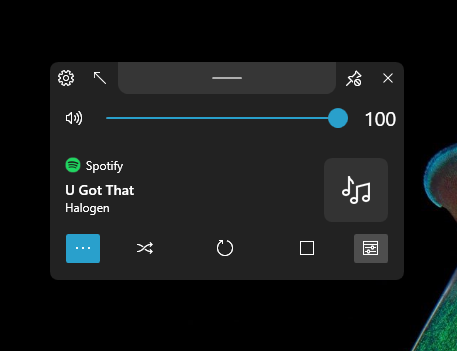

They should have updated the app. Anyway, we still have #29. #93 is being worked on.
ShankarBUS
on 11 Oct 2020
brilliant
Samuel12321
on 11 Oct 2020
Well I didn't do anything 🤷♂️. They must have added the SMTC support themselves.
This is how it previously was

Credits - @Dubzer in #6
ShankarBUS
on 11 Oct 2020
I had a shitty method to find the process name from the app id. That's what caused spotify's icon and name to be invisible.
var processName = AppId.Remove(AppId.Length - 5, 4);
This method returns Spotife when the app id is Spotify.exe (It removed "y.ex" instead of ".exe". Thus, ModernFlyouts couldn't fetch the name and icon of the app 🤦♂️).
But it worked for MS Edge & Chrome without any problems because it will return msedge because msedge.exe has "e" at the end and before the '.'
Changing it to "4" fixed the issue.
- var processName = AppId.Remove(AppId.Length - 5, 4);
+ var processName = AppId.Remove(AppId.Length - 4, 4);
Sorry for this silly mistake 😅
ShankarBUS
on 11 Oct 2020
Seems to be done
Samuel12321
on 24 Oct 2020
Changing it to "4" fixed the issue.
- var processName = AppId.Remove(AppId.Length - 5, 4);
+ var processName = AppId.Remove(AppId.Length - 4, 4);
Isn't it would be easier to just use?..
var processName = AppId[..^4];
 Dubzer
on 24 Oct 2020
Dubzer
on 24 Oct 2020
var processName = AppId[..^4];
What in the tarnation is this syntax?
Is this even C#?
JK, take a look at this
https://github.com/ShankarBUS/ModernFlyouts/issues/93#issuecomment-707484567
Is the new approach correct atleast?
ShankarBUS
on 24 Oct 2020
This is the range feature which was introduced in C# 8.0

Dubzer
on 24 Oct 2020
@Dubzer, woah!
That's cool. Forgot that this thing even existed 🤦♂️. My mind is stuck with C# 6 🤦♂️. Read that thing in the C# 8 blog post. But wasn't sure where to implement this 😅.
I will update this immediately. It looks cool.
ShankarBUS
on 24 Oct 2020
This is the range feature which was introduced in C# 8.0
To be honest, this is not the correct approach, since we rely on the length of the extension, when we shouldn't care about it at all. I think it's possible to use Path.GetFileNameWithoutExtension in this case.
 Vital7
on 24 Oct 2020
Vital7
on 24 Oct 2020
@Vital7,
I know another method that'll split the string with '.' as the delimiter, omit the final slice and return the process' name just the like method you suggested.
What you suggested is absolutely great!
But that would be unnecessary.
The length of the extension will never change. It will always be ".exe" (4 characters). So no problems with his approach✌️.
ShankarBUS
on 24 Oct 2020
@ShankarBUS, thanks, and I understand that it may be unnecessary in this case - Windows has basically one executable extension, almost all programs use it (there are some very rare exceptions when executable might have another extension) and I don't think this program would be ported to Linux/other OS, so it should be good 👍
Vital7
on 24 Oct 2020
Related issues
 Poopooracoocoo
·
4Comments
Poopooracoocoo
·
4Comments
 toineenzo
·
4Comments
Cyberdroid1
·
4Comments
toineenzo
·
4Comments
Cyberdroid1
·
4Comments
 privacyguy123
·
3Comments
privacyguy123
·
3Comments
 DanRotaru
·
3Comments
DanRotaru
·
3Comments
Most helpful comment
@ShankarBUS, thanks, and I understand that it may be unnecessary in this case - Windows has basically one executable extension, almost all programs use it (there are some very rare exceptions when executable might have another extension) and I don't think this program would be ported to Linux/other OS, so it should be good 👍