Modernflyouts: Show message when you turn on / off the Keyboard brightness
Show a message also when you turn on or off the Keyboard brightness
 Sav22999
All 22 comments
do you mean keyboard backlight brightness controlled by function keys (for keyboards that have a backlight)?
 Samuel12321
on 29 Sep 2020
Samuel12321
on 29 Sep 2020
if so there are some issues with this #57 due to most keyboards embedding this control in firmware.
Samuel12321
on 29 Sep 2020
@Samuel12321 Actually many keyboards (also mine) don't use Fn button for shortcuts, so you just need to press the relative button, without Fn.
But, anyway, if you got some issues, it's not a problem, it was a suggestion to improve this amazing project :smile:
Sav22999
on 29 Sep 2020
always looking for suggestions 😉.
just out of curiosity, what is the output when pressing that key while on this site http://keycode.info/ , it is possible if it is software controlled.
Samuel12321
on 29 Sep 2020
Nothing :confused:, but also Volume, Display Brightness don't return anything...
Sav22999
on 29 Sep 2020
But then how is it possible to be controlled in Bootcamp Windows on an Apple computer? There is even a software window popup for that. Maybe exclusive, I don't know.
 Cyberdroid1
on 29 Sep 2020
Cyberdroid1
on 29 Sep 2020
@Sav22999
Nothing 😕 , but also Volume, Display Brightness don't return anything...
That's how it works. This is the reason it is non-trivial to detect them. It's not possible for us to do anything regarding this
 ShankarBUS
on 29 Sep 2020
ShankarBUS
on 29 Sep 2020
@Cyberdroid1,
I don't understand. Can you elaborate your statement?
ShankarBUS
on 29 Sep 2020
When we run Windows on an Apple Computer like a Mac, we use a utility called BootCamp by Apple. It is like a special control panel that controls various Mac-only features. That software is able to detect Keyboard brightness keys and also shows a UI window for the same.
Cyberdroid1
on 29 Sep 2020
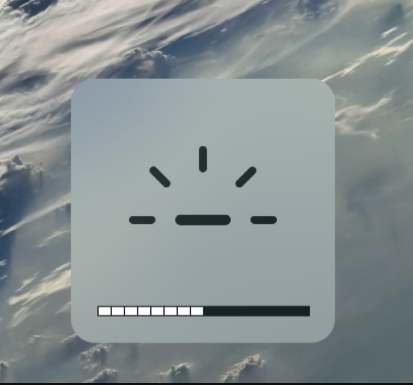
We get a UI like this in lower bottom
Cyberdroid1
on 29 Sep 2020
@Sav22999
Assuming you are on a laptop, this setting can be changed by going into the BIOS of your laptop and changing "Action Keys" or something related to Off.
Cyberdroid1
on 29 Sep 2020
Is BootCamp a VM? Or a boot manager/OS installer for other OSes on Mac?
If it's not a VM how could it show a UI from macOS over Windows?
Does that add some special tools (i.e drivers or softwares) to Windows while installing it?
ShankarBUS
on 29 Sep 2020
There are no concept of Brightness/Airplane mode/Fn keys on any OS. They are not passed as keys but as hardware signals (which the OEMs decide). That's the issue here. Any OS can receive those signals if they have the required driver. Even some Linux and Android distros can show brightness and airplane mode popups.
This is the hard part.
ShankarBUS
on 29 Sep 2020
Oh, I've understood. Thanks anyway
Sav22999
on 29 Sep 2020
Is BootCamp a VM? Or a boot manager/OS installer for other OSes on Mac?
If it's not a VM how could it show a UI from macOS over Windows?
BootCamp is utility software by Apple which allows running Windows on a Mac computer. It adds special software to create a link between both macOS and Windows.
Does that add some special tools (i.e drivers or softwares) to Windows while installing it?
Yes, it adds some special drivers to Windows
Cyberdroid1
on 30 Sep 2020
Closing this issue as it's invalid and literally impossible to implement.
ShankarBUS
on 9 Nov 2020
@Sav22999,
Does it look like this?
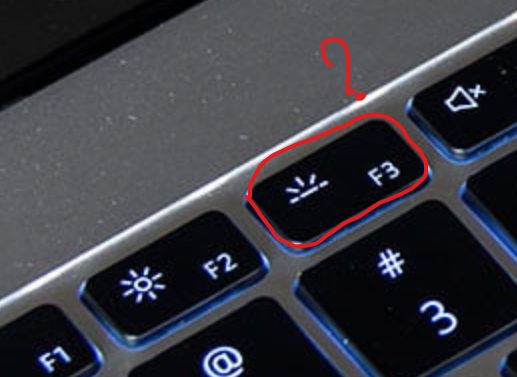
If you don't mind could you tell me what laptop you have or post photos of your laptop?
If you really want to see this implemented, I need to check if the message is actually received by Windows.
I need your help 😅😁🙏.
ShankarBUS
on 19 Nov 2020
Similar to it.

Sav22999
on 19 Nov 2020
What are the other keys? Could you post a pic of the whole Fn keys? (just for research purposes? 😅)
ShankarBUS
on 19 Nov 2020
Sure
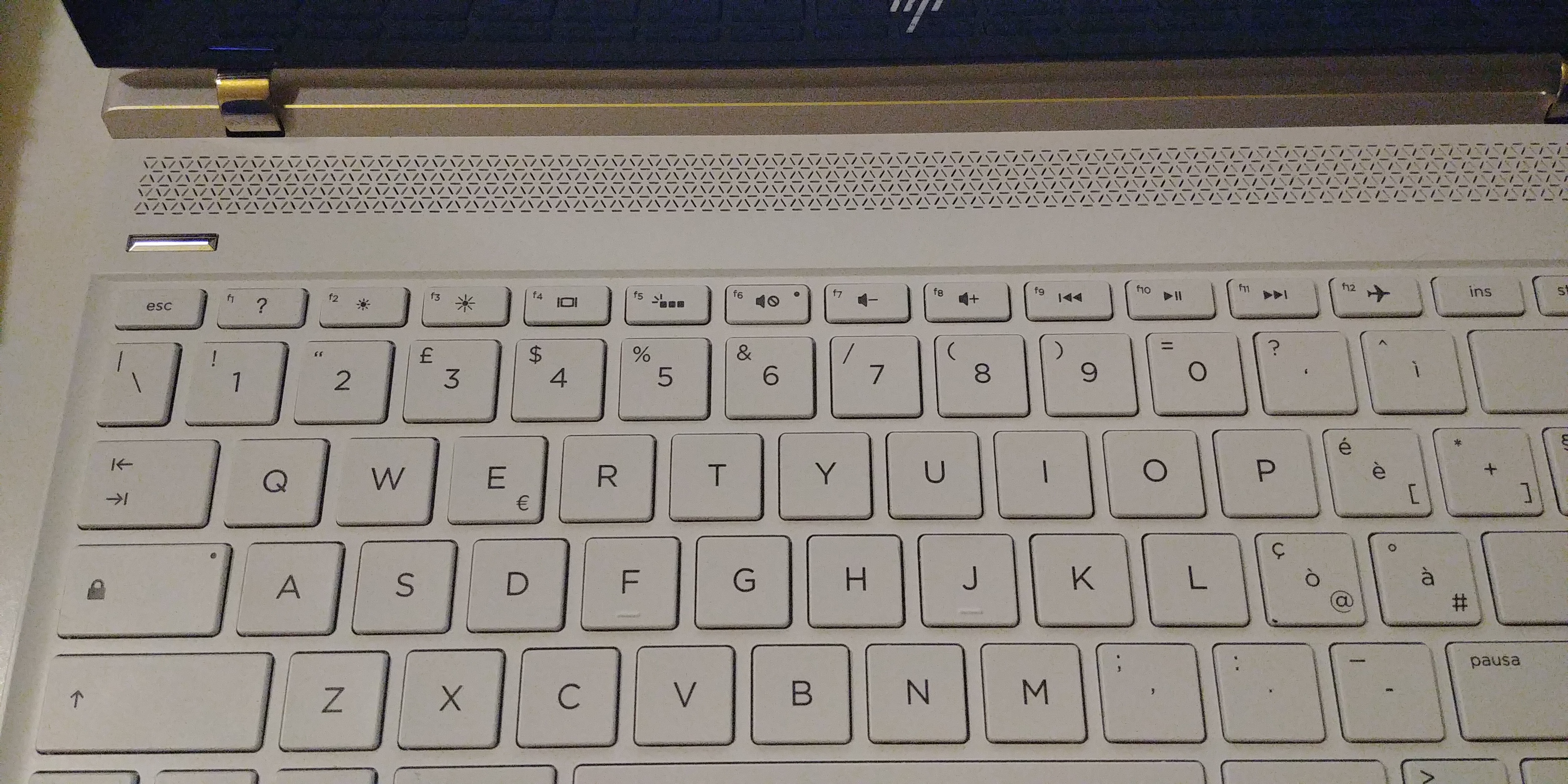
Sav22999
on 19 Nov 2020
Just a question from curiosity: for most plug-to-use keyboard, brightness adjustment command won't be responded on OS level but on keyboard firmware. How can that be supported then?
e.g.
My keyboard uses right Fn + ↑ or ↓. Windows does realize I press those keys but doesn't understand what they mean (unless any app register that combination).
But it is possible indeed to allow users to set customized combination and message, like:
Keyboard combination: right Fn + ↑, display message: keyboard brightness up.
 Riajyuu
on 24 Nov 2020
Riajyuu
on 24 Nov 2020
keyboards don't often actually send windows the FN key pressed command
Samuel12321
on 24 Nov 2020
Related issues
Cyberdroid1
·
4Comments
Samuel12321
·
4Comments
 privacyguy123
·
3Comments
Cyberdroid1
·
3Comments
Cyberdroid1
·
5Comments
privacyguy123
·
3Comments
Cyberdroid1
·
3Comments
Cyberdroid1
·
5Comments
Most helpful comment
@Samuel12321 Actually many keyboards (also mine) don't use
Fnbutton for shortcuts, so you just need to press the relative button, withoutFn.But, anyway, if you got some issues, it's not a problem, it was a suggestion to improve this amazing project :smile: