object_detection/protos/*.proto: No such file or directory.this error occured even after setting the whole path

i'm kinda new to this .I'll be really grateful if anyone solves my problem
 oja1
oja1
All 5 comments
First of all bro this doesn't seems like a compilation error. You need to specify the locations properly.
As given in the installation documentation:-
Protobuf Compilation:
The Tensorflow Object Detection API uses Protobufs to configure model and training parameters. Before the framework can be used, the Protobuf libraries must be compiled. This should be done by running the following command from the tensorflow/models/research/ directory:
# From tensorflow/models/research/
protoc object_detection/protos/*.proto --python_out=.
Replace the above command as follows:
<path-to-protoc> <path-to-tensorflow\models\research>\object_detection\protos\*.proto --python_out=.
Remember to use ' \ ' instead of ' / ' while typing the path on windows.
 KishoreKaushal
on 13 Mar 2018
KishoreKaushal
on 13 Mar 2018
If That doesn't work, Download the correct file: https://github.com/google/protobuf/releases/download/v3.3.0/protoc-3.3.0-win32.zip
Unzip it
Run the executable from the command line similar to my 2nd box above to compile the protobuf files for Python.
 saiharshanani
on 16 Mar 2018
saiharshanani
on 16 Mar 2018
I used protoc-3.3.0 instead of 3.5.1 and it worked.
 elhammoumi
on 20 Mar 2018
elhammoumi
on 20 Mar 2018
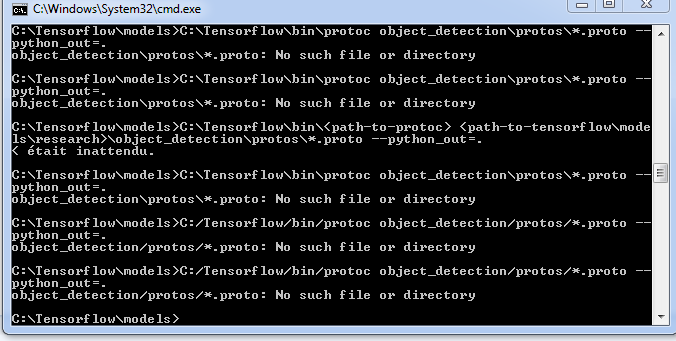
quelq'un peut m'aider mercii !!
 yousf95
on 22 Jul 2018
yousf95
on 22 Jul 2018
Closing since the issue has been resolved. Feel free to reopen if the problem still persists. Thanks!
 ymodak
on 30 Nov 2018
ymodak
on 30 Nov 2018
Related issues
 airmak
·
3Comments
airmak
·
3Comments
 atabakd
·
3Comments
atabakd
·
3Comments
 rakashi
·
3Comments
rakashi
·
3Comments
 amirjamez
·
3Comments
amirjamez
·
3Comments
 xbcReal
·
3Comments
xbcReal
·
3Comments
Most helpful comment
If That doesn't work, Download the correct file: https://github.com/google/protobuf/releases/download/v3.3.0/protoc-3.3.0-win32.zip
Unzip it
Run the executable from the command line similar to my 2nd box above to compile the protobuf files for Python.