Models: Tensorflow Object Detection API on Windows - error “ModuleNotFoundError: No module named 'utils'”
System information
What is the top-level directory of the model you are using:
models/research/object_detectionHave I written custom code (as opposed to using a stock example script provided in TensorFlow):
No custom code, using stock example in models/research/object_detectionOS Platform and Distribution (e.g., Linux Ubuntu 16.04):
Windows 10TensorFlow installed from (source or binary):
Binary via pip3, currently at Python 3.6TensorFlow version (use command below):
1.4Bazel version (if compiling from source):
N/ACUDA/cuDNN version:
Using CPU for the momentGPU model and memory:
Using CPU for the momentExact command to reproduce:
See Stack Overflow link below
Describe the problem
I'm not 100% sure at this point if this is a bug fix or a feature request. For any Python script I write that uses the libraries in /models/research/object_detection/utils, I can only run a script from models/research/object_detection. If I run from anywhere else I get the error:
ModuleNotFoundError: No module named 'utils'
I have a detailed Stack Overflow post where I've listed out the steps I've followed and the remedies I've tried to no avail:
For the sake of brevity I'd rather not repeat the entire post here, please see this link for the full details. To make a long story short, I've tried adding the following paths:
C:\Userscdahms\Documents\models
C:\Userscdahms\Documents\models\research
C:\Userscdahms\Documents\models\research\slim
C:\Userscdahms\Documents\models\research\object_detection\utils
directly into a script via sys.path.append(), and also to PYTHONPATH (and then added PYTHONPATH to PATH)
I'm not sure if this is a bug or if there is some setting possible to make the /models/research/object_detection/utils content recognizable from a directory other than /models/research/object_detection, please advise.
--- Edit ---
Upon further consideration who knows what may happen to the Stack Overflow link above, so I'll repeat the error and full steps to reproduce here:
I'm attempting to get the TensorFlow Object Detection API:
https://github.com/tensorflow/models/tree/master/research/object_detection
working on Windows by following the install instructions:
https://github.com/tensorflow/models/tree/master/research/object_detection
Which seem to be for Linux/Mac. I can only get this to work if I put a script in the directory I cloned the above repo too. If I put the script in any other directory I get this error:
ModuleNotFoundError: No module named 'utils'
I suspect that the cause is not properly doing the Windows equivalent of this command listed on the install instructions above:
export PYTHONPATH=$PYTHONPATH:pwd:pwd/slim
I'm using Windows 10, Python 3.6, and TensorFlow 1.4.0 if that matters. Any suggestions on how to resolve this?
Here are the steps I've done so far specifically:
1) Installed TensorFlow and related tools via pip3
2) From an administrative command prompt, run the following:
pip3 install pillow
pip3 install lxml
pip3 install jupyter
pip3 install matplotlib
3) Clone the TensorFlow "models" repository to my documents folder, in my case
C:\Users\cdahms\Documents\models
4) Downloaded Google Protobuf https://github.com/google/protobuf Windows v3.4.0 release "protoc-3.4.0-win32.zip" (I tried the most current 3.5.1 and got errors on the subsequent steps, so I tried 3.4.0 per this vid https://www.youtube.com/watch?v=COlbP62-B-U&list=PLQVvvaa0QuDcNK5GeCQnxYnSSaar2tpku&index=1 and the protobuf compile worked)
5) Extracted the Protobuf download to Program Files, specifically:
C:\Program Files\protoc-3.4.0-win32
6) CD into the models\research directory, specifically:
cd C:\Users\cdahms\Documents\models\research
7) Executed the protobuf compile, specifically:
“C:\Program Files\protoc-3.4.0-win32\bin\protoc.exe” object_detection/protos/*.proto --python_out=.
The compile was successful (no errors), and also I went to:
C:\Users\cdahms\Documents\models\research\object_detection\protos
and verified the .py files were created successfully as a result of the compile
8) cd to the object_detection directory, ex:
cd C:\Users\cdahms\Documents\models\research\object_detection
then start the object_detection_tutorial.ipynb Jupyter Notebook:
jupyter notebook
9) In the Jupyter Notebook, choose "object_detection_tutorial.ipynb" -> Cell -> Run all, the example runs within the notebook
10) In the Jupyter Notebook, choose “File” -> “Download As” -> “Python”, and save the .py version of the notebook to the same directory, i.e.
C:\Users\cdahms\Documents\models\research\object_detection\object_detection_tutorial.py
The script runs as expected.
11) Move the script to any other directory, then I get the error:
ModuleNotFoundError: No module named 'utils'
Clearly, the lines where this error is occurring are the imports for utils:
from utils import label_map_util
from utils import visualization_utils as vis_util
Here are some things I've tried to resolve the concern, none of which have worked:
1) Add these lines to the script, just before the 2 above imports
sys.path.append("C:\\Users\\cdahms\\Documents\\models")
sys.path.append("C:\\Users\\cdahms\\Documents\\models\\research")
sys.path.append("C:\\Users\\cdahms\\Documents\\models\\research\\slim")
sys.path.append("C:\\Users\\cdahms\\Documents\\models\\research\\object_detection\\utils")
2) Go to System -> Advanced system settings -> Environment Variables . . . -> New, added a variable with the name PYTHONPATH and these values:

3) Also under Environment Variables, edited PATH and added PYTHONPATH

4) Pulled up a command prompt and ran the command "set", verified PYTHONPATH was there and PYTHONPATH and PATH contained the values from the previous steps:

5) Rebooted, then ran the script from any directory other than
C:\Users\cdahms\Documents\models\research\object_detection
again, still get the
ModuleNotFoundError: No module named 'utils'
Suggestions as to how to get
C:\Users\cdahms\Documents\models\research\object_detection\utils
to be recognized by Python when the script is run from any location ??
 MicrocontrollersAndMore
All 7 comments
Sorry for posting a dumb question, as somebody on Stack Overflow just pointed out, all I had to do was to add
C:\Users\cdahms\Documents\models\research\object_detection
To PYTHONPATH in addition to the above locations and now everything works. Whoever administrator sees this next feel free to close this now.
 CDahmsTemp
on 14 Jan 2018
CDahmsTemp
on 14 Jan 2018
Please correct this to C:\Users\cdahms\Documents\models\research\object_detection as pointed out in the SO answer.
 monomon
on 14 Jan 2018
monomon
on 14 Jan 2018
On the Stack Overflow post I just accepted RecencyEffect's answer and updated my description applicably.
CDahmsTemp
on 14 Jan 2018
What I mean is that you once again put in the wrong path in your explanation :)
monomon
on 14 Jan 2018
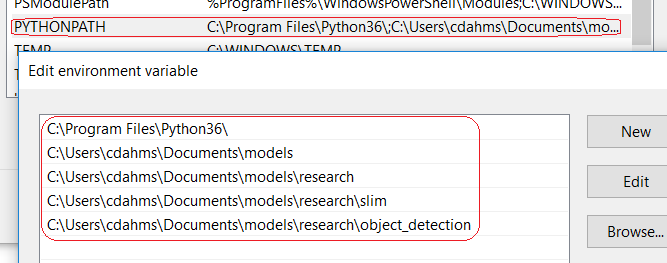
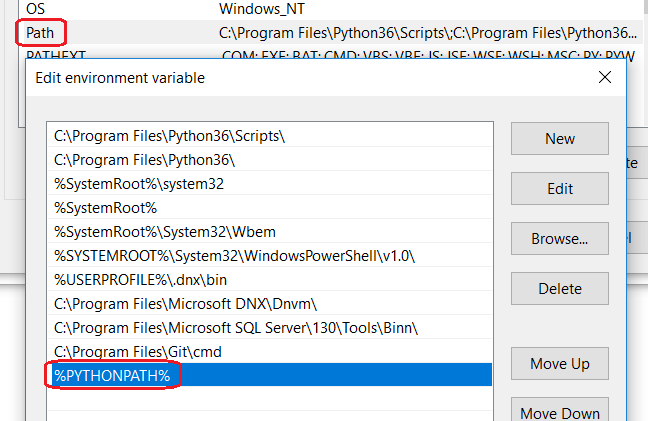
I just changed my previous answer here, also, to completely resolve any confusion, here are screenshots of the PYTHONPATH and PATH settings that made it all work in the end:
CDahmsTemp
on 14 Jan 2018
thanks! it was really helpful to me :)
 sooonwoo
on 26 Apr 2018
sooonwoo
on 26 Apr 2018
Out of context question, but i am getting the same error in ubuntu. Any idea?
 arun121cs
on 12 Mar 2019
arun121cs
on 12 Mar 2019
Related issues
 frankkloster
·
3Comments
frankkloster
·
3Comments
 airmak
·
3Comments
airmak
·
3Comments
 noumanriazkhan
·
3Comments
noumanriazkhan
·
3Comments
 XavDCtpz
·
3Comments
XavDCtpz
·
3Comments
 trungdn
·
3Comments
trungdn
·
3Comments
Most helpful comment
I just changed my previous answer here, also, to completely resolve any confusion, here are screenshots of the PYTHONPATH and PATH settings that made it all work in the end: