Models: Getting ImportError: No module named deployment on object_detection/train.py
I found a lot of problem about this, tried a bunch of proposed solution but didn't get it to work.
I'm following the guides found here to make a custom object detector with Tensorflow.
I already passed through the Installation guide, including the models/research and models/research/slim in the $PYTHONPATH variable. That is the most common suggestion to fix this error. But I still get the same error:
~/tensorflow/models/research$ echo $PYTHONPATH:
/home/cc/tensorflow/models/research:/home/cc/tensorflow/models/research/slim
~/tensorflow/models/research$ sudo python object_detection/train.py --logtostderr --pipeline_config_path=/home/cc/Documents/my-model-tensorflow/training/ssd_mobilenet_v1_person.config --train_dir=/home/cc/Documents/my-model-tensorflow/data
Traceback (most recent call last):
  File "object_detection/train.py", line 49, in <module>
    from object_detection import trainer
  File "build/bdist.linux-x86_64/egg/object_detection/trainer.py", line 33, in <module>
    from deployment import model_deploy
ImportError: No module named deployment
Any other solution?
 lucasharada
All 15 comments
I'm in a similar position, It seems like you solved the issue, how did you manage that?
Cheers.
 robin4690
on 25 Nov 2017
robin4690
on 25 Nov 2017
When I installed the object_detection module, I included the path in the
.bashrc file, but it didn't load automatically. All I needed to do is to
load the package manually everytime.
Em 25 de nov de 2017 1:24 AM, "robin4690" notifications@github.com
escreveu:
I'm in a similar position, It seems like you solved the issue, how did you
manage that?
Cheers.—
You are receiving this because you modified the open/close state.
Reply to this email directly, view it on GitHub
https://github.com/tensorflow/models/issues/2888#issuecomment-346917826,
or mute the thread
https://github.com/notifications/unsubscribe-auth/ARzfoRBwRqCLukDxsb7P0_AFjmDrbG8Tks5s55aNgaJpZM4Qp6Mj
.
lucasharada
on 25 Nov 2017
@lucasharada make sure that you cd .../models/research in .bashrc file
 macro-dadt
on 28 Nov 2017
macro-dadt
on 28 Nov 2017
@lucasharadacan you explain how you load the package manually? I don't get it.
I have the same problem, but I have my code inside object detection folder. export path ... does not solve the issue.
 MariamMohamedFawzy
on 28 Nov 2017
MariamMohamedFawzy
on 28 Nov 2017
Everytime I open a Terminal, I have to run the final step of the Installation guide. That is:
export PYTHONPATH=$PYTHONPATH:pwd:pwd/slim
lucasharada
on 28 Nov 2017
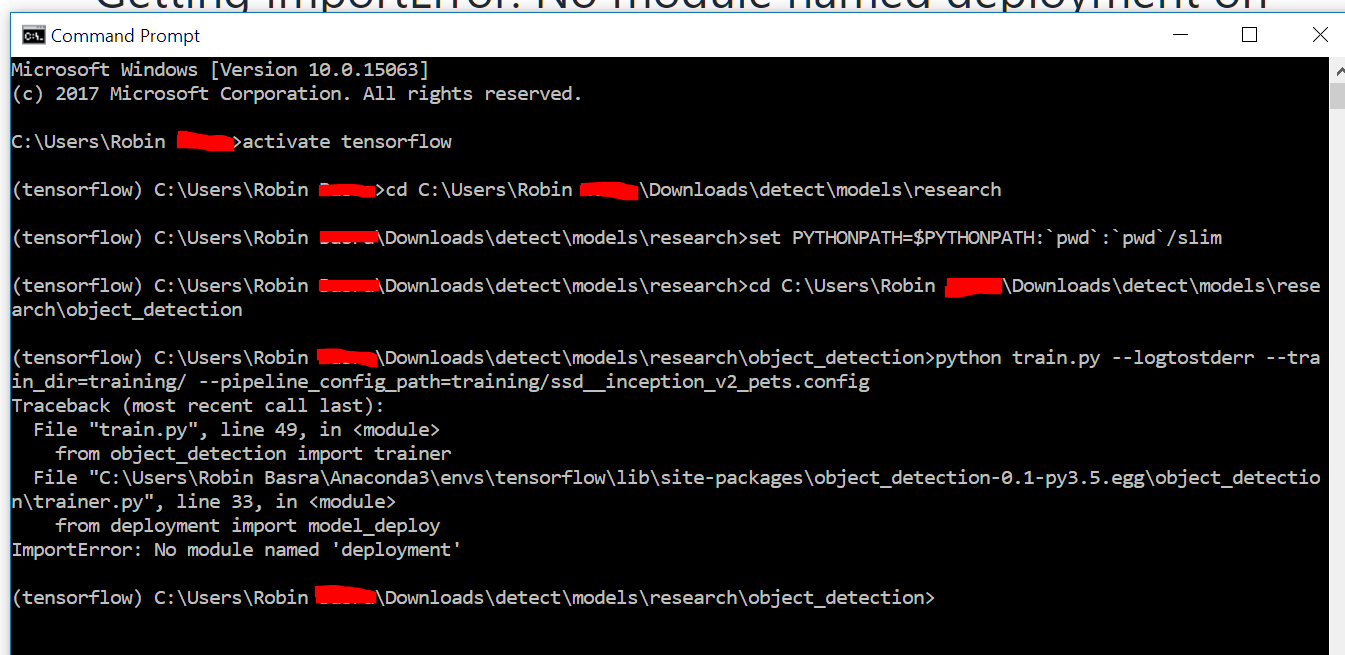
I'm still having issues. Have attached a screenshot below, any ideas? Running this on Windows 10 (Macbook Pro bootcamp).
robin4690
on 13 Dec 2017
I used to work on windows but now I try to learn my ssd model on windows and I also have the same problem?
robn4690 do you solve your problem?
 xav12358
on 20 Feb 2018
xav12358
on 20 Feb 2018
Same problem here....

 JackLaii
on 24 Feb 2018
JackLaii
on 24 Feb 2018
Same problem here. On Linux. Anyone else tried importing it from shell? That works, which seems to imply version problems, even though I can't find any actual conflict...
 npeirson
on 28 Feb 2018
npeirson
on 28 Feb 2018
If you are using windows, try to change 'pwd' to your actual path to models while setting PYTHONPATH.
i.e, 'pwd'---change to--->'\path to\tensorflow\models'
JackLaii
on 28 Feb 2018
It's a hacky fix, but I'm on a vm so I don't care: moved the dependencies (deployment and the others) to /usr/local/lib/python3.5/dist-packages/object_detection-0.1-py3.5.egg/
Messy, but works.
Also, don't forget that if you run into the new dct_method problem, you can follow @jqcorreia's fix here
updated 09 Apr. 18
Ran into this problem again on a VM, reset the machine to vanilla and re-installed packages fresh, and this problem disappeared.
Cool.
npeirson
on 28 Feb 2018
I got this from another site and solved the forementioned problem.
Try the following steps and according to the sequence strictly.
1-in folder /models/research
~/.../models/research$ python setup.py build
~/.../models/research$ python setup.py install
2-
set PYTHONPATH=c:\ tensorflow1\object_detection\; c:\ tensorflow1\object_detection\models\research; c:\ tensorflow1\object_detection\models; c:\tf_tutorial\object_detection\models\research\slim
C:\tensorflow1\models\research$ echo %PYTHONPATH%
3- in folder /models/research/object_detection:
~/.../models/research/object_detection$
python train.py --logtostderr --train_dir=training/ --pipeline_config_path=training/faster_rcnn_inception_v2_pets.config
Hope this works for you too!
 fionasoon1
on 10 Sep 2018
fionasoon1
on 10 Sep 2018
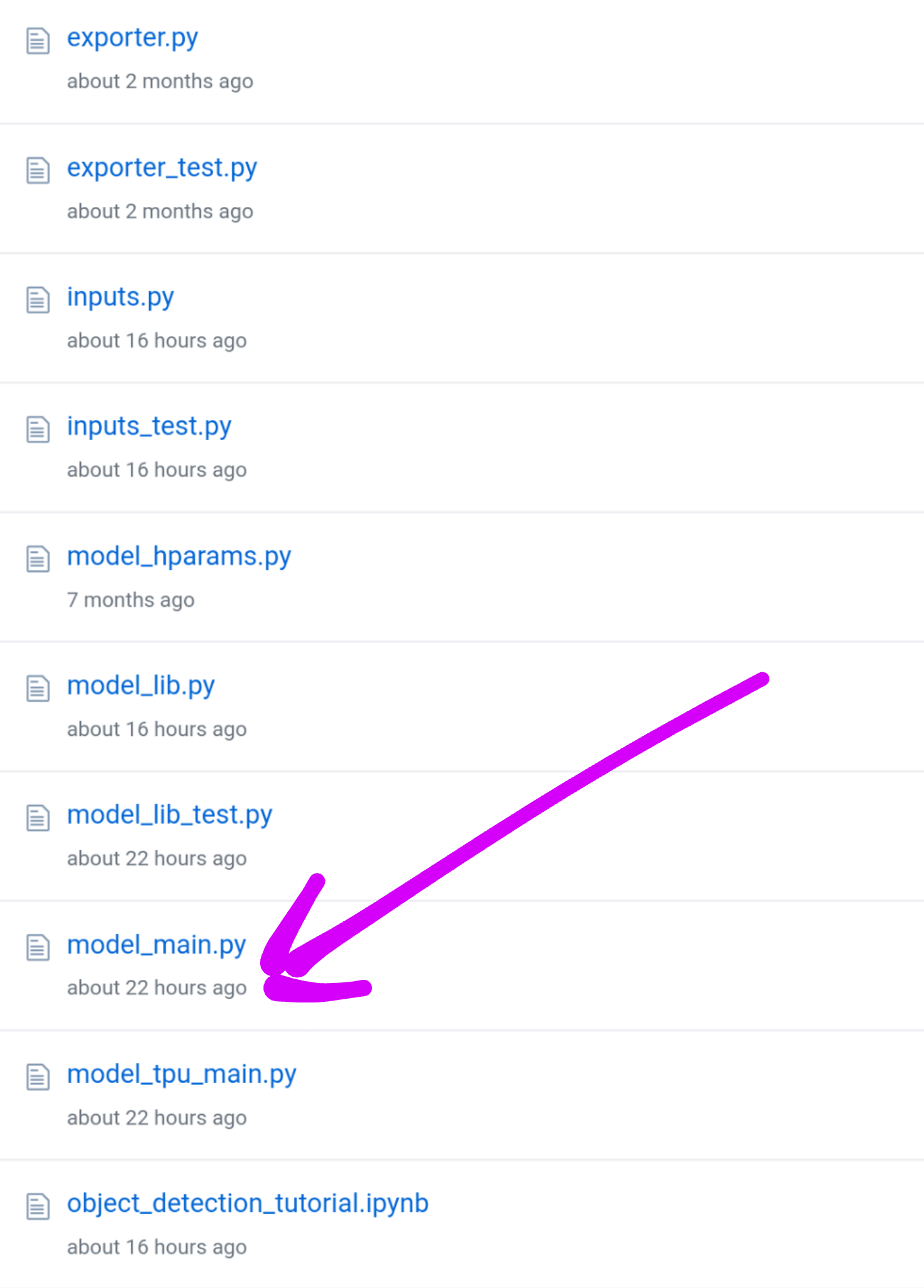
ok so the thread you're posting to was closed a long text ago because the problem was resolved long ago. the current error you're encountering is because train.py no longer exists in models/research/object_detection/. it was changed a few updates ago.
npeirson
on 10 Sep 2018
Hi,
I have been stuck on this problem for a few months now! Does anyone have a solution to this frustrating error?
Thanks
 TechGenius28
on 22 Sep 2018
TechGenius28
on 22 Sep 2018
It hasn't existed for a few months. Try this.
npeirson
on 22 Sep 2018
Related issues
 airmak
·
3Comments
airmak
·
3Comments
 nmfisher
·
3Comments
nmfisher
·
3Comments
 mbenami
·
3Comments
mbenami
·
3Comments
 sun9700
·
3Comments
sun9700
·
3Comments
 frankkloster
·
3Comments
frankkloster
·
3Comments
Most helpful comment
Same problem here....
