Models: Problem on how to get the mAP by object detection API and how to get a txt file which contain [image_name,score,boxes]
Follow the tutorial of Object Detection API, I have trained my own data successful, when I try to eval my model by using eval.py I juet get precision at 0.5IOU and I cannot get a txt file which contain
[image_name,score,boxes]
I want to get test time as well, but there isn't a way to get it. Are there anybody can give me some suggestion? Thanks a lot.
 YanLiang0813
All 21 comments
Did you get any text file/xml file/some file of readable format, or the location in the source code where the final boxes have been detected?
 alakhag
on 25 Jun 2017
alakhag
on 25 Jun 2017
The best way I found to do this was using the Jupyter Notebook provided. https://github.com/tensorflow/models/blob/master/object_detection/object_detection_tutorial.ipynb
In the last box, you receive the variables: (boxes, scores, classes, num_detections) from sess.run, which you can write to a file as you wish
 timisplump
on 27 Jun 2017
timisplump
on 27 Jun 2017
Yes, this is the preferred way to access the output from the model.
 tombstone
on 28 Jun 2017
tombstone
on 28 Jun 2017
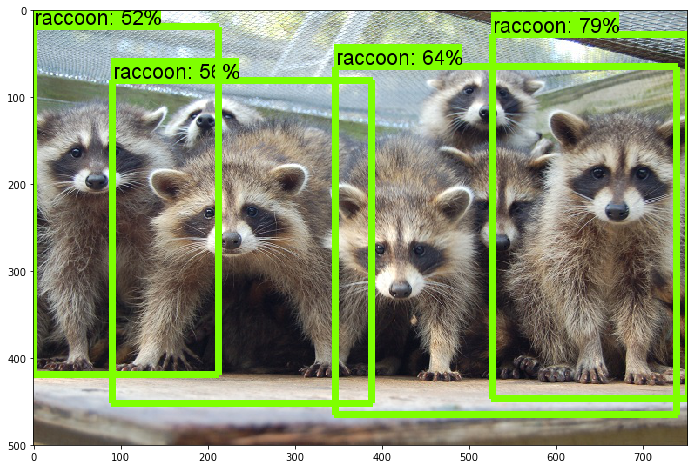
Hi @timisplump and @tombstone .. I have very basic question.. I used the tutorial code.. (boxes, scores, classes, num_detections) are returned as arrays of size 100 each, regardless of the number of objects (boxes) detected in the image.. How do I use their values to get the classes and their accuracy for an image. For example, in the following image....4 racoons were detected with different accuracy levels.. How do I get the same data from boxes, scores and classes arrays.. Thanks in advance !
 RakeshChandran
on 6 Aug 2017
RakeshChandran
on 6 Aug 2017
@RakeshChandran Well those 3 lists boxes, scores, classes are parallel to each other. That is, the ith element in each corresponds to each other. Rather, the bounding box, boxes[i] is of class, classes[i] and the model has instilled a coverage confidence, scores[i] in this box. I'm not 100% sure how to come up with the optimal threshold for confidence, but I would filter the boxes by their confidences as predicted by the scores array, and only include the confidences above a certain threshold. You can tweak this constant based on your model and dataset. Starting with something like 50% might work (as above, all of the predicted raccoons have > 50% confidence).
timisplump
on 7 Aug 2017
Thanks a lot for your response @timisplump .. I finally figured it out.
RakeshChandran
on 8 Aug 2017
@RakeshChandran no problem! best of luck with the models.
timisplump
on 8 Aug 2017
Thank you @timisplump
RakeshChandran
on 9 Aug 2017
Hi @timisplump and @tombstone .. How do we view the accuracy of the train and test process in AWS. Presently I am able to see only the loss.
RakeshChandran
on 3 Sep 2017
can someone please explain how to get mAP after running the tutorial. I have results, in the sense, successful detection on images. But I'm not able to figure out how to find the mAP and IOU. Please help, greatly appreciate it!
 shreyas0906
on 20 Jan 2018
shreyas0906
on 20 Jan 2018
Looking for same thing. Did you get any solution.?
 Fahimkh
on 21 Jan 2018
Fahimkh
on 21 Jan 2018
Did you get any solution about mAP?
 PythonImageDeveloper
on 21 Feb 2018
PythonImageDeveloper
on 21 Feb 2018
@RakeshChandran you can print it in object_detection/utils/visualization_utils.py .
just after line 123 write print(display_str_list).you will get list of predicted class with scores
 HarshalGarg
on 19 Mar 2018
HarshalGarg
on 19 Mar 2018
The best way I found to do this was using the Jupyter Notebook provided. https://github.com/tensorflow/models/blob/master/object_detection/object_detection_tutorial.ipynb
In the last box, you receive the variables:
(boxes, scores, classes, num_detections)fromsess.run, which you can write to a file as you wish
Hi @timisplump Could you provide more detail about mAP by object_detection_tutorial.ipynb? which means when we got (boxes, scores, classes, num_detections), how could we calculate mAP?
 frankdeepl
on 12 Sep 2018
frankdeepl
on 12 Sep 2018
Hi @Fahimkh @zeynali @shahparth123, Do you get any solution about mAP?
frankdeepl
on 12 Sep 2018
@dongsheng20170812
Try http://scikit-learn.org/stable/modules/generated/sklearn.metrics.average_precision_score.html
or https://github.com/benhamner/Metrics/blob/master/Python/ml_metrics/average_precision.py
I believe that when I did it (a while ago so I can't remember very well), I wrote the mAP function myself, but these can be a guide to write them
timisplump
on 12 Sep 2018
@HarshalGarg whether that line is in function definition draw_bounding_box_on_image_array
 rkolaf
on 20 Mar 2019
rkolaf
on 20 Mar 2019
https://github.com/shreyas0906/Detecting-Volleyball-in-images Hope this helps
shreyas0906
on 20 Mar 2019
  maxIter = boxes.shape[0]
  i = 0
  while i < maxIter:
    print("object:",i)
    ymin = boxes[i][0][0]
    xmin = boxes[i][0][1]
    ymax = boxes[i][0][2]
    xmax = boxes[i][0][3]
    print("ymin:",ymin)
    print("xmin:",xmin)
    print("ymax:",ymax)
    print("xmax:",xmax)
    classID = classes[i][0]
    print("class id:", classID)
    score = scores[i][0]
    print("score:", score)
    i = i+1
I think this should answer your question
 shamik111691
on 25 Mar 2019
shamik111691
on 25 Mar 2019
Hello,
I was wondering if anybody could help me with this issue, I would really appreciate it as it would be helpful for my research purposes. I used the tensorflow object detection api (faster rcnn) to perform object detections. I want to write the detections to a xml/txt file in this order : frame,bb_left, bb_top, bb_width, bb_height, confidence
 anzy0621
on 11 Jul 2019
anzy0621
on 11 Jul 2019
Hello,
I was wondering if anybody could help me with this issue, I would really appreciate it as it would be helpful for my research purposes. I used the tensorflow object detection api (faster rcnn) to perform object detections. I want to write the detections to a xml/txt file in this order : frame,bb_left, bb_top, bb_width, bb_height, confidence
Hi. Did you find some solution???
Could you share. Tank you
 jhonjam
on 21 Apr 2020
jhonjam
on 21 Apr 2020
Related issues
 25b3nk
·
3Comments
25b3nk
·
3Comments
 trungdn
·
3Comments
trungdn
·
3Comments
 airmak
·
3Comments
airmak
·
3Comments
 Mostafaghelich
·
3Comments
Mostafaghelich
·
3Comments
 chenyuZha
·
3Comments
chenyuZha
·
3Comments
Most helpful comment
@dongsheng20170812
Try http://scikit-learn.org/stable/modules/generated/sklearn.metrics.average_precision_score.html
or https://github.com/benhamner/Metrics/blob/master/Python/ml_metrics/average_precision.py
I believe that when I did it (a while ago so I can't remember very well), I wrote the mAP function myself, but these can be a guide to write them