Model-viewer: Model-Viewer sometimes renders blurry (wrong res?) on some devices when some sort of zoom is used
Description
We're receiving reports from some customers that content is rendering blurry. We seem to have it tracked down to zoom settings (in the browser/in Windows/not sure).

_Note the super blurry image on the left – backgrounds are actually different_
Live Demo
https://prefrontalcortex.de/labs/siemensstadt-ar-v2/
https://www.siemensstadt.siemens.com/en/ar-map
We were able to reproduce the issue (both on 0.9 and 1.1 actually, so not 100% sure about the "regression" remark) by going to the Chrome dev tools, enabling "mobile mode", and then setting the zoom settings to 150%:

Note that when you refresh the page in that 150% mode, everything is crisp and clear and nice, until you set it to 100%, go back to desktop mode, repeat the process. So the assumption would be that under specific circumstances (e.g. page is scaled, Windows is scaled, mobile is "zoomed in", somehow the resulting canvas resolution is wrong.
Actually just found another way to reproduce:
- Open https://prefrontalcortex.de/labs/siemensstadt-ar-v2/
- Hover over a non-model-viewer part (e.g. some button)
- use Ctrl + Mousewheel to change page zoom
- Note that at 100%, everything is sharp
- 90% and 110% are the worst with very noticeable blur
- at 80% and 125% it's slightly noticeable
- at both lower and higher zooms it's not noticeable at all, looks sharp
Browser Affected
- [X] Chrome
- [ ] Edge
- [X] Firefox
- [ ] IE
- [ ] Safari
OS
- [ ] Android
- [ ] iOS
- [ ] Linux
- [ ] MacOS
- [X] Windows
 hybridherbst
All 4 comments
I have no repro, but probably because I don't have a windows machine. I spent a lot of time getting this zoom stuff right, as it's a total disaster of browser incompatibility. I can't imagine why it would get worse and then better as you continue to zoom, and so I think it's unlikely I'll be able to improve it on my end. I think regarding the effort involved vs the number of users affected, this probably won't meet the bar to fix anytime soon. If you want to send a PR, I'll be happy to review.
Also, you may well get different behavior depending on whether the model-viewer element is sized by pixels vs by %.
 elalish
on 3 Sep 2020
elalish
on 3 Sep 2020
Unfortunately the number of people on Windows machines which also have some sort of zoom permanently active on their machines seems to be "bigger than usual" in corporate scenarios (at least that's what we're seeing here)...
I'll look into the code, for me it _feels_ kind of like a rounding error thing (making it worse at factors of 0.9 and 1.1 because they are close to 1), but that's just a guess...
hybridherbst
on 3 Sep 2020
OK, now I'm pretty sure this is a rounding error.
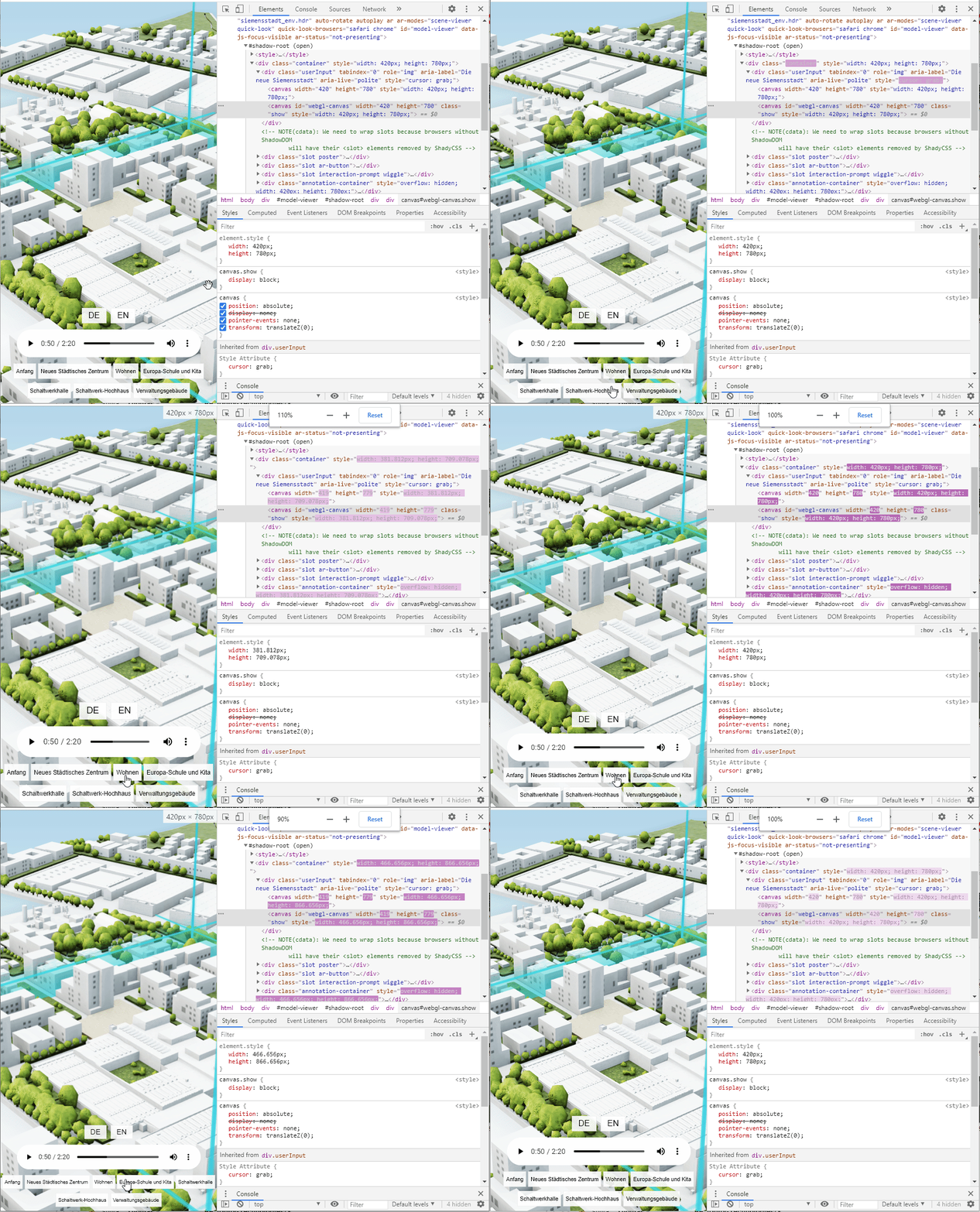
You can see that width and height of canvas#webgl-canvas are toggling between 420x780 (sharp) and 419x779 (blurry), probably resulting in a texture that's one pixel off being remapped (which would indeed result in different levels of bluriness depending on browser implementation, filtering, the mood of the graphics card or whatever).
It _looks_ like those values should actually stay fixed, and in fact setting them to 420x780 manually makes everything nice & crisp at all zoom levels.
hybridherbst
on 3 Sep 2020
Interesting, thanks for the tip! I remember messing around with rounding for another canvas issue I had. I might even know where to fix this. Can you test a PR for me if I make one?
elalish
on 3 Sep 2020
Related issues
 cdata
·
5Comments
cdata
·
5Comments
 gjcope
·
4Comments
gjcope
·
4Comments
 pepsmeister
·
5Comments
pepsmeister
·
5Comments
 hatsumatsu
·
5Comments
hatsumatsu
·
5Comments
 tiagovignatti
·
4Comments
tiagovignatti
·
4Comments