Moby: Detect exposed ports from inside container
What
There should be a simple way for a container to detect the portmappings assigned to it. (from inside the container)
Why
There are a variety of cases where an application needs to know the _real_ external IP address and port at which it can be reached. Some examples:
- torrent client
- FTP server (passive mode)
- TeamCity build agent
- others
The external IP can be detected reliably through the use of an intermediary. However the port mappings cannot be reliably automatically detected.
Why don't you use non-dynamic ports?
The use of static ports (e.g. docker run -p 1234:1234 syntax), plus hardcoding the same portmappings into the image, allows the container to know what its port mappings are without dynamic discovery.
However this solution does not allow you to run the same image in multiple containers on the same host (as the ports would conflict), which is an important usecase for some images. It also assumes that the ports baked into the image will never be used by any other docker image that a user is likely to install, which is not a very good assumption.
Why don't you use the REST API?
Allowing a container to have access to the REST API is problematic. For one thing, the REST API is read/write, and if all you need is to read your portmappings, that's a dangerous level of permissions to grant a container just to find out a few ports.
 drewcrawford
All 110 comments
I'm interested in this as well. Is there a way to do this?
 newhoggy
on 2 Mar 2014
newhoggy
on 2 Mar 2014
yes :). if you bind mount the docker client and /var/run/docker.sock into your container, you can inspect yourself. This is an insecure approximation of introspection, which is being worked on (for eg #4332 )
the long term plan is to provide a safe way to do this - am I'm presuming that includes only allowing containers to look up their own info, without the writeable risks.
 SvenDowideit
on 3 Mar 2014
SvenDowideit
on 3 Mar 2014
I am interested in that as well. Here is a scenario: on startup my containers have to register themselves (ip + port) in a service discovery directory. It means that I have to know both the external IPs and ports.
 eyal-lupu
on 9 Oct 2014
eyal-lupu
on 9 Oct 2014
WRT Service discovery. I make heavy use of Consul for this purpose. I leave a Consul agent listening on each host that I use. That agent knows what it's IP address is. Whenever something registers with that host it's assumed to be running on that host.
As noted by others, when registering with a service discovery tool, knowing the actual exposed port is critical. I don't much like the idea of needing to have something on the host (outside the container) register the service that's in the container. But that requires that the service inside the container knows what port to register with.
I'm guessing that it would be possible to feed the real port into the container via the environment. As noted in this bug and others similar to it (#7421), determining the "proper IP" is not something that is always easily done algorithmically as the host may have more than one interface. With that said, when the container is being created, the entity creating it (be it a person, service, etc) should be able to pass the IP in as an environment variable on its own (since while the correct IP may not be known to Docker, it should be known to whatever is doing the creating). What the creator doesn't know is what random port was chosen by Docker as the exposed one. And hard-coding isn't always desirable since each host may have different containers running and using different ports.
 c1pherx
on 16 Oct 2014
c1pherx
on 16 Oct 2014
I am interested in that, to automatically change the port livereload listens to.
 ghost
on 14 Nov 2014
ghost
on 14 Nov 2014
+1
I really need this for registering container services on etcd from inside the container!
For example, if I have a bunch of NodeJS containers serving my Application (with elastic resizing) and I have a bunch of NGinx containers on its front balancing requests, I would like to have NGinx instances to lookup at etcd for available NodeJS containers (along with IP:port) so that I could reconfigure NGinx to automatically reconfigure itself for added/removed NodeJS containers during operations.
 flaviostutz
on 1 Feb 2015
flaviostutz
on 1 Feb 2015
We require this as well for service discovery. I know there are other ways of solving that, but would much prefer it if a container could register itself instead of using linked containers etc. That just creates more moving parts, in an microservice architecture where you already have a lot of moving parts, any way of reducing it is useful.
 ali-mosavian
on 25 Feb 2015
ali-mosavian
on 25 Feb 2015
+1. Absolutely a requirement for service discovery. Right now, there are hacks and work arounds but the container really needs to have some way to either directly query the host daemon or for the information be passed into the environment at runtime.
 mlehner616
on 26 Feb 2015
mlehner616
on 26 Feb 2015
 jessfraz
on 26 Feb 2015
jessfraz
on 26 Feb 2015
+1!
 pikeas
on 9 Mar 2015
pikeas
on 9 Mar 2015
+1. This is needed for service discovery of apps running on multiple hosts.
 selimekizoglu
on 11 Mar 2015
selimekizoglu
on 11 Mar 2015
+1. Extremely need this feature for distributed testing of different devices, where test framework running in a container should send to tested device port number, where device must answer. Now I have to use bridged interface for workaround, but it would be great to know port mappings.
 savermyas
on 17 Mar 2015
savermyas
on 17 Mar 2015
+1 for example if you run Couchbase in a container, you need to know your (dynamically mapped) bucket port, which cannot be set on the client but is discovered via Couchbase-internals.
 thijsterlouw
on 20 Mar 2015
thijsterlouw
on 20 Mar 2015
+1. We have an application that registers itself with another one of our services. We are currently using a small script to calculate a port to explicitly map and injecting it as an env variable. We'd like to start using things like the mesosphere stack and even ECS but current solutions in these environments start to look like ugly hacks really quickly.
 danbeaulieu
on 26 Mar 2015
danbeaulieu
on 26 Mar 2015
+1 hacking around to have this, need to get my containers auto-registered into Consul...
 melo
on 28 Mar 2015
melo
on 28 Mar 2015
@melo try registrator
 deardooley
on 28 Mar 2015
deardooley
on 28 Mar 2015
@deardooley yeah, I saw that one… Probably the best bet at this moment.
Thanks
melo
on 28 Mar 2015
If that doesn't work, maybe check out adama/serfnode. It's an in house project, but does work well for a class of problems. Maybe it will be a fit for you. Praying Docker gets this into trunk.
Rion
----- Reply message -----
From: "Pedro Melo" [email protected]
To: "docker/docker" [email protected]
Cc: "Rion Dooley" [email protected]
Subject: [docker] Detect exposed ports from inside container (#3778)
Date: Sat, Mar 28, 2015 2:38 PM
@deardooley yeah, I saw that one… Probably the best bet at this moment.
Thanks
Reply to this email directly or view it on GitHub:
https://github.com/docker/docker/issues/3778#issuecomment-87290816
deardooley
on 28 Mar 2015
@danbeaulieu Mesosphere already has a solution for injecting the port mappings into your containers.
This is because when you launch a mesos docker task, docker isn't the one that picks the random port. Instead mesos picks one out of the range of ports that you have set up as available to use. They are also nice enough to inject those port mappings into your container as environment variables!
So lets say I have this task specification
{
  "container": {
    "type": "DOCKER",
    "docker": {
      "network": "BRIDGE",
      "image": "centos:centos7",
      "portMappings": [
        { "containerPort": 8080, "hostPort": 0, "servicePort": 9000, "protocol": "tcp" },
        { "containerPort": 161, "hostPort": 0, "protocol": "udp"}
      ]
    }
  },
  "id": "centos-test",
  "instances": 1,
  "cpus": 0.25,
  "mem": 128,
  "cmd": "env"
}
Because my only command was env we can see on the stdout in the mesos interface what environment variables are being passed to the container:
HOSTNAME=64fbcdadd439
HOST=rh-mesos-dev01
PORT1=31002
PORT0=31001
MESOS_TASK_ID=centos-test.4b1fc7df-d7d4-11e4-b243-3af6fdd773cc
PATH=/usr/local/sbin:/usr/local/bin:/usr/sbin:/usr/bin:/sbin:/bin
PWD=/
PORT_8080=31001
PORTS=31001,31002
container_uuid=64fbcdad-d439-2b4a-1ce8-33442781101d
SHLVL=1
HOME=/root
MARATHON_APP_ID=/centos-test
PORT_161=31002
MARATHON_APP_VERSION=2015-03-31T18:32:24.486Z
PORT=31001
MESOS_SANDBOX=/mnt/mesos/sandbox
_=/usr/bin/env
So you can see your application can detect the external port by using the PORT_
FYI I have only tested this with a Marathon deployment, but hopefully they implemented this at the framework level so that a docker deployment from any of the tools (i.e. Chronos) would include this info.
 ajodock
on 31 Mar 2015
ajodock
on 31 Mar 2015
@ajodock Ah that is great info I missed in the docs. (Though I do wish there was more documentation on the full implications of using network:BRIDGE)
My use case is a bit more complex and would need further functionality than just port injection but it is outside of the scope of this issue. Thanks for the info!
danbeaulieu
on 1 Apr 2015
In case any of you +1 people have cared to subscribe… stop with it already. That meme is so frustrating. If you have nothing to contribute, don't say anything.
 vmaatta
on 14 Apr 2015
vmaatta
on 14 Apr 2015
@vmaatta 
deardooley
on 15 Apr 2015
@vmaatta just trying to avoid having the issue closed because of "lack of interest".
This feature is very much needed to achieve proper service discovery when running containers across a cluster. For example when specifying the resources needed by a container in a dynamic way (using swarm for example).
Having access to the dynamic port assigned by Docker will allow to register the services without having to run agents like Consul or use other tools such as registrator.
 bfil
on 15 Apr 2015
bfil
on 15 Apr 2015
:+1:
 kytwb
on 19 May 2015
kytwb
on 19 May 2015
++
 koliyo
on 19 May 2015
koliyo
on 19 May 2015
For people searching for a (hacky) solution, I have created a script that takes the responsibility of searching for a free port and then passes host IP and port to the container:
https://gist.github.com/Hades32/82b4f4115ed9045a0d15
 Hades32
on 5 Jul 2015
Hades32
on 5 Jul 2015
+1 -> critical for service discovery and load balancing across a cluster of containers.
 fractos
on 8 Jul 2015
fractos
on 8 Jul 2015
- 1 ... much needed for Eureka Service Discovery
 david-billings
on 7 Aug 2015
david-billings
on 7 Aug 2015
+1 - need for Consul.
 iSynaptic
on 28 Aug 2015
iSynaptic
on 28 Aug 2015
+1 - hazelcast (in a container) needs to know the external port to communicate correctly with other nodes on other hosts
 vkruzik
on 8 Sep 2015
vkruzik
on 8 Sep 2015
+1 for microservices application registry
 linux-china
on 16 Sep 2015
linux-china
on 16 Sep 2015
+1 - need for Consul!
 alexherington
on 24 Sep 2015
alexherington
on 24 Sep 2015
_USER POLL_
_The best way to get notified when there are changes in this discussion is by clicking the Subscribe button in the top right._
The people listed below have appreciated your meaningfull discussion with a random +1:
@toddkazakov
@creack
@deardooley
@tslater
@dverbeek84
@hubayirp
@erheme318
@jp-reads
 GordonTheTurtle
on 25 Sep 2015
GordonTheTurtle
on 25 Sep 2015
@GordonTheTurtle +1 on making snarky comments without reading the thread. This is a 21 month old feature request that's a major pain point for many real world use cases. A formal proposal was made and rejected. It continually comes up as a tangential requirement in many other feature requests. Don't belittle people for affirming their support for an well defined and discussed feature request that's been in place since v0.7.6.
deardooley
on 25 Sep 2015
What do you want us to say? Please please please implement? We've managed to find a workaround around by specifying the external port as a command line arg which is picked up by our Eureka config but it's far from ideal and requires additional overhead.
+1 indicates that other people are affected by this and want it implemented. what is the point of rehashing the same comments over and over?
david-billings
on 25 Sep 2015
+1, both in and port would be nice to have as environment variables.
 mastoj
on 6 Oct 2015
mastoj
on 6 Oct 2015
To have these settings as env-vars would be great! So +1 from mee too.
 starwarsfan
on 7 Oct 2015
starwarsfan
on 7 Oct 2015
Definitely +1
 lukaszraczylo
on 9 Oct 2015
lukaszraczylo
on 9 Oct 2015
+1 for this, please. this is vital for service discovery!
 cookandy
on 14 Oct 2015
cookandy
on 14 Oct 2015
Nomad from Hashicorp might help those (like me) that are waiting for this…
Cannot give my personal experience with it, just starting to test it now.
melo
on 16 Oct 2015
:+1: for service discovery!
 willrstern
on 16 Oct 2015
willrstern
on 16 Oct 2015
+1
 bitsofinfo
on 23 Nov 2015
bitsofinfo
on 23 Nov 2015
+1 VERY IMPORTANT for service discovery
 starlight36
on 1 Dec 2015
starlight36
on 1 Dec 2015
I am here to +1 as well for all the same reasons others have +1'ed this. Service discovery in cluster management.
 mikeatlas
on 30 Dec 2015
mikeatlas
on 30 Dec 2015
+1 I need to know the dynamic port for the current container from inside a django project and it's REALLY annoying that I can't just get it! Why can I get all the info about any linked containers but NOT the current container?!
 burritoIand
on 25 Jan 2016
burritoIand
on 25 Jan 2016
+1
 vayasin
on 25 Jan 2016
vayasin
on 25 Jan 2016
+1
 thechile
on 26 Jan 2016
thechile
on 26 Jan 2016
One way to solve this if you have control of starting the container is to iterate over a range of static ports. I think this covers a lot of cases, since in a production environment you'd probably be a little less cavalier about having dynamic configurations, or have more networking abstraction. Here's an example in BASH;
#!/bin/bash
# This script probably won't work very well if you `set -e`

# Start a container with a static port mapping, passing the external port via an
# environment variable. Returns either a 64 char ID (you should check the
# validity of this ID before you try too much with it) or the standard error output
# from docker. We use CONTAINER_NAME as an identifier, so it must not be
# used elsewhere on this docker host.
function start_container() {
  docker run --name=${CONTAINER_NAME} \
    -e APP_HOST_PORT=${HOST_PORT} \
    -p ${HOST_PORT}:${CONTAINER_PORT} \
    -d ${IMAGE} ${COMMAND} 2>&1
}

#  This port needs to be set dynamically, so we have a bit of a chicken-egg problem.
# We solve this by iterating over a set of ports until we successfully bind.
HOST_PORT=$LOWER_PORT
TESTS_ID="$(start_container)"
# Keep iterating while "port is already allocated" is found in the string returned by
# `start_container()`
while [ "x$(echo $TESTS_ID | awk '/port is already allocated/')" != "x" ]; do
  # Stop (for good measure) and remove the container we just created
  docker ps -a --format "{{.Names}}" | awk "/${CONTAINER_NAME}/" | xargs docker stop 2> /dev/null
  docker ps -a --format "{{.Names}}" | awk "/${CONTAINER_NAME}/" | xargs docker rm 2> /dev/null
  # Decide if we should exit the loop
  if [ $LOWER_PORT -ge $UPPER_PORT ]; then
    echo "could not find unoccupied port"
    exit 1
  fi

  # Increment the port
  HOST_PORT=$(($HOST_PORT + 1))
  # Try again
  TESTS_ID="$(start_container)"
done
 pnovotnak
on 26 Jan 2016
pnovotnak
on 26 Jan 2016
The problem gets worse when schedulers like Docker Swarm start containers. Even if we would take care of the ports by explicitly defining them (what we actually don't want to/shouldn't), we wouldn't know which node will take the containers (yes there is affinity, but that's not the point of scheduling) and so we would need to pick free ports across all nodes which limits horizontal scaling just to solve a problem like this.
 vlerenc
on 26 Jan 2016
vlerenc
on 26 Jan 2016
This falls under the umbrella of introspection. Pls refer to https://github.com/docker/docker/issues/8427
 mavenugo
on 26 Jan 2016
mavenugo
on 26 Jan 2016
+1 This would be incredibly useful when using docker to run a test environment
 antonpiatek
on 5 Feb 2016
antonpiatek
on 5 Feb 2016
I can't believe this has been open for so long and never addressed. Are people just using hacks or hard coding stuff?
 rhyas
on 24 Feb 2016
rhyas
on 24 Feb 2016
@rhyas We are using hardcoded ports right now. I really wish for an elegant solution because this defeats the purpose of containers and service discovery.
vayasin
on 24 Feb 2016
@vlerenc Why wouldn't you put containers that must communicate with each other on an overlay network?
 cpuguy83
on 24 Feb 2016
cpuguy83
on 24 Feb 2016
@cpuguy83 Not everything is containerized - so not everything can join the overlay network (unless there is the capability to join non-containerized services to overlay networks _easily_). Service discovery needs to work with both containerized and non-containerized services. Since service registration often depends on the service to register itself with the service discovery store, the dockerized services need to know how they are externally accessible in order to register themselves.
iSynaptic
on 24 Feb 2016
@iSynaptic Fair enough.
What about ipvlan/macvlan instead of port forwarding? Or even routing the bridge networks directly?
cpuguy83
on 24 Feb 2016
Seems like such a critical piece for robust service discovery. I'm guessing most people are just relying on things like registrator for this?
 kitotik
on 21 Mar 2016
kitotik
on 21 Mar 2016
+1
Using static ports are not an optimal solution when running docker compose and docker swarm.
 jotunskij
on 25 Mar 2016
jotunskij
on 25 Mar 2016
+1 renders microservice discovery in a cluster of hosts impossible otherwise.
 amirabiri
on 4 Apr 2016
amirabiri
on 4 Apr 2016
in the meantime, for anyone running a JVM based app in a container, I made this library which might be of help for you if you need to auto discover your ip/ports and that of your peers. It leverages registrator and is a drop in library you can use in your JVM based container app to do self discovery to form other clusters:
https://github.com/bitsofinfo/docker-discovery-registrator-consul
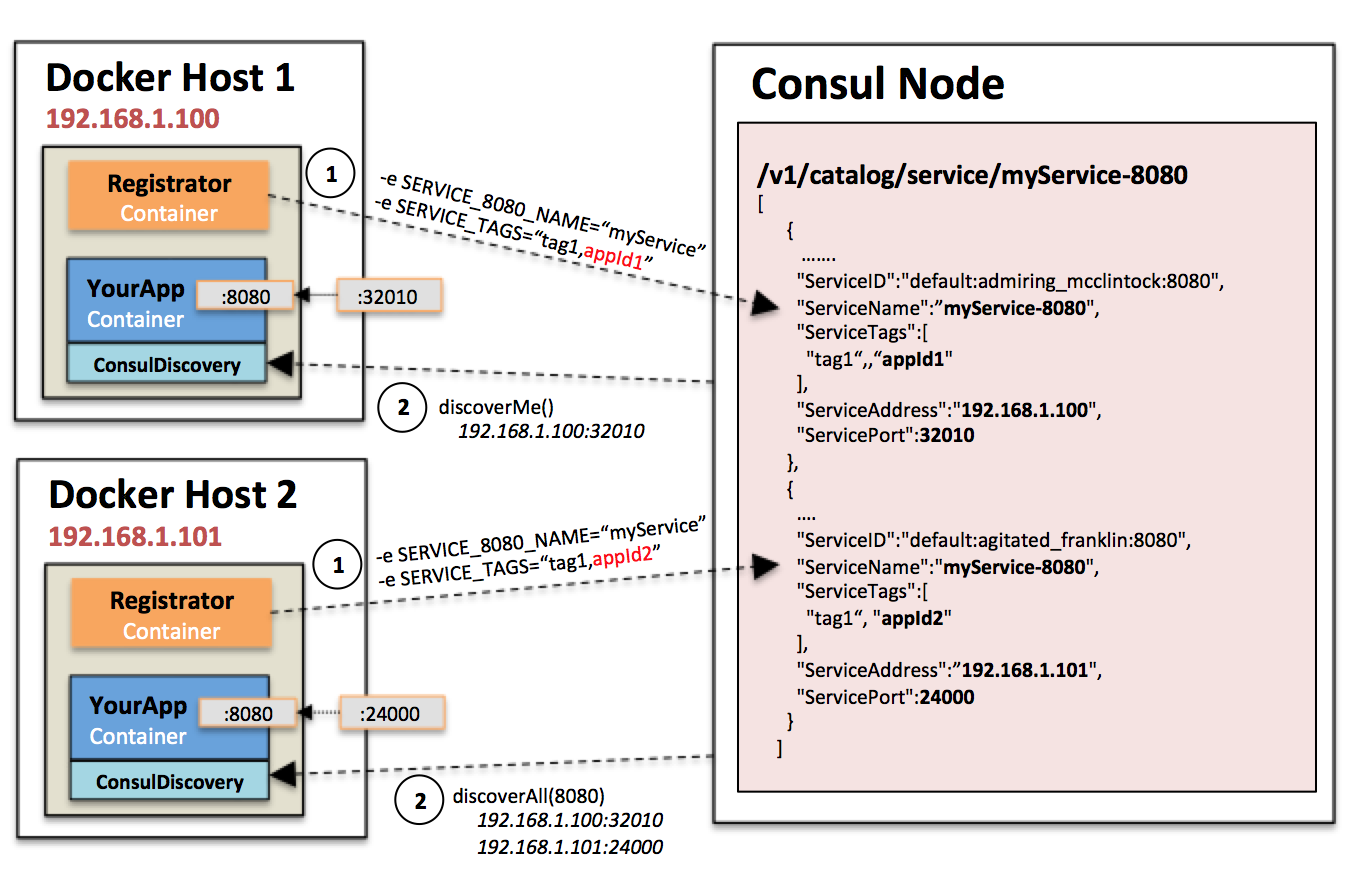
bitsofinfo
on 5 Apr 2016
I also try to use registrator, I have also problem to connect registered service witch the specific container.
Like @bitsofinfo instead of adding manual UNIQUE_ID I add hostname of container to consul tags.
I prepare PR to registrator to add hostname automatically during registering service.
https://github.com/gliderlabs/registrator/pull/396
 slawekjaranowski
on 15 Apr 2016
slawekjaranowski
on 15 Apr 2016
+1
 fr34kyn01535
on 17 Apr 2016
fr34kyn01535
on 17 Apr 2016
I'm waiting for this feature too, but seems no plan for it yet so far. Here is my workaround, its useful when working with docker-compose.
Its pretty tricky I know, but it works for me, hope its useful for someone else.
To docker-compose up, I run a small python script first to get a free port, which in this case, from the remote server:
freeport.py
#!/usr/bin/python
# -*- coding: utf-8 -*-
import socket

s = socket.socket()
s.bind(('', 0))

print s.getsockname()[1]
s.close()
up.js
'use strict';

const shell = require('shelljs');
shell.config.fatal = true;
const server = require('./server');
const user = require('./user');
const composefile = require('./composefile');
const dstdir = require('./dstdir');
const branch = require('./branch');

const nginxport = parseInt(shell.exec(`ssh ${user}@${server.host} -p ${server.port} "python" < ${__dirname}/freeport.py`, { silent: true }).stdout);
shell.exec(`ssh ${user}@${server.host} -p ${server.port} "USER=${user} BRANCH=${branch} NGINX_PORT=${nginxport} docker-compose -f ${dstdir}/${composefile} up"`);
.compose-common.yaml
version: "2"
services:
    app:
        image: node
        container_name: sctv-app-${USER}-${BRANCH}
        volumes:
            - .:/code
        working_dir: /code
    nginx:
        image: nginx
        container_name: sctv-nginx-${USER}-${BRANCH}
        volumes:
            - ./data/static:/usr/share/nginx/html
.compose-development.yaml
version: "2"
services:
    app:
        extends:
            file: .compose-common.yaml
            service: app
        command: npm run dev
        ports:
            - "9696"
            - "8080"
        environment:
            - NODE_ENV=development
            - NGINX_PORT=${NGINX_PORT}
        links:
            - redis
            - mongo
            - mongo_ramdisk
    nginx:
        extends:
            file: .compose-common.yaml
            service: nginx
        ports:
            - "${NGINX_PORT}:80"
When I need to run other docker-compose commands, ps for example, I inspect the exposed port of the target container first:
'use strict';

const shell = require('shelljs');
shell.config.fatal = true;
const server = require('./server');
const user = require('./user');
const composefile = require('./composefile');
const dstdir = require('./dstdir');
const branch = require('./branch');

const nginxport = parseInt(shell.exec(`ssh ${user}@${server.host} -p ${server.port} "docker inspect --format='{{(index (index .NetworkSettings.Ports "'"'"80/tcp"'"'") 0).HostPort}}' sctv-nginx-${user}-${branch}"`, { silent: true }).stdout);
shell.exec(`ssh ${user}@${server.host} -p ${server.port} "USER=${user} BRANCH=${branch} NGINX_PORT=${nginxport} docker-compose -f ${dstdir}/${composefile} ps"`);
 thenewvu
on 19 Apr 2016
thenewvu
on 19 Apr 2016
+1
 skyrocknroll
on 10 May 2016
skyrocknroll
on 10 May 2016
+1
 imasen
on 12 May 2016
imasen
on 12 May 2016
Wow, having just run into this, I'm stunned that there's no simple way to do this.
 naphthalene
on 12 May 2016
naphthalene
on 12 May 2016
This is not as important as it used to be with Docker overlay networking. For anything except for external/DNS type of configuration, containers can register themselves using their internal IP and not even expose/publish ports anymore.
And, if a container does need to be published externally, it would need a fixed port anyway, so those containers can expect themselves to be available on a fixed port.
willrstern
on 12 May 2016
There are some applications where knowing what your externally routed IP or DNS name is important - such as testing registration flows where emails are sent with links (that have to be generated by an application running in the container). I'm sure there's a way to work around it though: setting a fixed port solves the problem to an extent.
naphthalene
on 13 May 2016
There are plenty of use cases left where having in-container access to host and port networking information is useful. Static port allocation isn't needed in an environment with service discovery. It would still be a great help to have this sort of introspection available from within the container.
 joshrivers
on 17 May 2016
joshrivers
on 17 May 2016
Having the same problem, just created a work around. I have created an agent container which will be available on each node so a container can requests it exposed port. https://github.com/npalm/docker-discovery-agent
 npalm
on 10 Jun 2016
npalm
on 10 Jun 2016
I am using this workaround that is simple and (almost) secure, since it does not expose the socket of the docker remote api to a container, which is a HUGE security issue (since it allows any user account on the container to easily get root privileges in the host)
The workaround is pretty easy:
- On the host, start a simple socket server that expose _only_ the docker port list (it can be easily wrapped in a background process that starts with the system, and can be firewalled)
ncat -k -l -p 5555 -c 'read i && echo $(docker port $i | paste -d, -s)' - Start the container with the docker host ip in an environment variable
docker run --rm -ti -p 8000 -p 8742 -e "pippo=$(ip route get 8.8.8.8 | awk 'NR==1 {print $NF}')" ubuntu /bin/bash - To get the list of natted port from inside a container
echo $(hostname) | nc $pippo 5555
It can be used from everywhere inside a container, eg: from java
try(Socket echoSocket = new Socket(System.getenv("pippo"), 5555)) {

            PrintWriter out = new PrintWriter(echoSocket.getOutputStream(), true);
            BufferedReader in = new BufferedReader(new InputStreamReader(echoSocket.getInputStream()));

            // Container ID
            out.println("2bdb596c16be");

            // One line with all the infos
            System.out.println(in.readLine());

            System.out.println("Done");

        }
 totomz
on 19 Jul 2016
totomz
on 19 Jul 2016
Tried https://github.com/docker/docker/issues/3778#issuecomment-233689747 though have to modify a bit to get it to work on Mac.
Steps:
$ brew tap brona/iproute2mac
$ brew install iproute2mac
$ ncat -k -l -p 5555 -c 'read i && echo $(docker port $i | paste -sd, -)' &
$ docker run --rm -it -e "pippo=$(ip route get 8.8.8.8 | awk 'NR==1 { print $NF }')" -p 8123 -p 8512 ubuntu /bin/bash
In container
$ apt-get update; apt-get install -y netcat
$ echo $HOSTNAME | nc $pippo 5555
8123/tcp -> 0.0.0.0:32774,8512/tcp -> 0.0.0.0:32773
$ echo $HOSTNAME 8123 | nc $pippo 5555
0.0.0.0:32774
$ echo $HOSTNAME 8512 | nc $pippo 5555
0.0.0.0:32773
Result (respectively per request):
8123/tcp -> 0.0.0.0:32774,8512/tcp -> 0.0.0.0:32773
0.0.0.0:32774
0.0.0.0:32773
Note:
8123and8512are just for examplepastecommand is reformatted- in container
$HOSTNAMEis used instead of version with parenthesis - if you specify also port then you get spesific result
Creds: @totomz
 degree
on 20 Jul 2016
degree
on 20 Jul 2016
Bumping this. This is a pretty critical feature if you run any kind of service discovery, in my case ringpop. Can we not just have a flag for docker that when set exposes a number of environment variables in the format of PORT_[INTERNAL PORT NUMBER_[TRANSPORT_TYPE]=EXTERNAL_PORT and likewise an EXTERNAL_IP flag for the container IP?
 sashahilton00
on 5 Aug 2016
sashahilton00
on 5 Aug 2016
IMHO the point is that a service _should not know that it is running _in* a container*. This is the point, and this is why you have to do workarounds to get information about the "running environment" in a container.
Your software should be able to run _inside_ a container as it were _outside_ without any modification. If you run your application in an "hold fashion" environment, let's call it physical server, how would you handle a natted port at network level? The service discovery is supposed to run in the host, at that level it has all the informations it requires.
IMHO this is way we will never have these informations inside a container - by design (and honestly I agree, even if sometime is a pain)
totomz
on 5 Aug 2016
@totomz +1 for a great status on this topic.
Given that Docker 1.12 gives that "from the host"-side registration for free with the Swarm stuff, I think it is unlikely this will ever show up...
I do agree that it is a pain. There is a comment above from 2015 I made asking for this, but I moved on, with Nomad first, and now with Swarm.
Having said that, I would like to have at least the option of having this inside the container. There are some situations where you want the service inside the container to register itself and keep the registration alive (for example, see Consul Time to Live checks).
The current situation forces us to use an external system, even if we don't need it for anything else. Not a great price to pay, but still...
melo
on 5 Aug 2016
+1 for service discovery.
 matheusmessora
on 5 Aug 2016
matheusmessora
on 5 Aug 2016
@totomz whilst I agree it would be nice for a service not to need any kind of knowledge of whether it is running within a container, if you rely on software to spin up/down instances depending on the load of your application, in most cases the app does require some knowledge of the container it is running in, as I cannot manually ssh in to each dynamically created instance and change the port number to suit. Service discovery is not limited to the host in all cases, in our case it uses services distributed across multiple servers. Short of sharing the container network with that of the physical host, there is no real way to do service discovery outside of each individual server when using docker's ephemeral port mapping. I did try to keep the spec. for what the env vars should be to a bare minimum, and also suggested that docker should be started with a flag such as --with-introspection to enable said env vars. Currently the lack of such vars means that docker is opinionated in such a way that it is not much use for running microservices with frequently changing instances.
sashahilton00
on 6 Aug 2016
I agree, having these info as an env would save a lot of time...but is wrong :)
(everything is IMHO, I am just a regular user of docker)
It is possible (and even better) to move the service logic at the host level, with a "service manager" running at the host level.
Here the "service manager" can connect to the docker api and intercept events (new containers added/removed), start/stop containers given the load of the system, access all networking informatioms ( nattep ports, host gateway - because 99% of times you need the public gateway ip, not the host ip). Services inside a contaiber can (and should) expose metrics to the outside world; so it should be easy to grab these metrics and use them in your service registry
The point is: keep he service inside the continer "stupid", and write the "docker-aware" code where docker is, in the host. Think about existing services, how would you register a "mysql service"? adding a second layer in the container of mysql? then a redis container? then an apache container? Instead of replicating the "service logic code" just add a watcher service in the host
totomz
on 6 Aug 2016
@totomz I think better depends on your view point. In an theoretical sense maybe it is, but in practice, it is harder to have the logic running on the host side and feeding it to the application; it means that there is yet another codebase to maintain, and introduces more room for error. A great majority of the service discovery frameworks expect your app to be able to know what port your service is running on, and I am not about to rewrite parts of Hyperbahn/Eureka to dance around what docker thinks is best for me. At the end of the day, docker is supposed to be a container into which any app can be put into. It is not supposed to be something I actively have to work around, as this means that any benefits that I would have had from faster rollouts is wasted writing code to make the app work around docker opinions. By that point, I might as well just write my code normally and have a bash script to git clone and fire up a new instance when necessary. If docker tries to impose a set of opinions as to how we should write our applications, it ceases to be as useful a tool. If I want my apps to know what external host:port I am running on, docker should provide them. Docker should be pretty much invisible in terms of me noticing it when working on an app, and things like this issue mean that I waste time searching for workarounds to something that shouldn't be a problem at all.
sashahilton00
on 6 Aug 2016
@totomz I see the merits of your argument, and I do think that many of us should be striving to build systems that work within the pattern that you are describing. I also hope that your opinions about what is "wrong" and "better" are not representative of their Docker community and ethos. Just because it is possible to build a '12-factor' system using the patterns you describe doesn't mean that the _only_ way to use Docker should be to subscribe to those opinions and limitations. Docker can be used for GUI apps. Docker can be used with an init daemon and an SSH server. Docker can be used in a large number of use cases and to serve a large number of needs, and not everybody has to sign up for a large, multihost, overlay networked, orchestrated, stateless deployment to get value out of using Docker.
Unless you can demonstrate that fulfilling this feature request will prevent you from using Docker in the way that serves you best, then there is nothing wrong in providing information into the container. Serving more use cases makes Docker more useful, not less. Please keep in mind that the people asking for this feature are asking for Docker to be made better for everyone, not taking something away from your pure stateless Docker idea.
Two additional thoughts about the actual feature request:
1) This request, and ones like it, are necessitated by the huge danger involved in giving container access to the Docker HTTP port. If there was a simplified, read-only Docker monitoring port, then the need for this request would be greatly mitigated.
2) Thinking outside the box, and using the tools we have available right now (Docker 1.12), it seems like we could implement this form of container introspection by running a dynamic DNS server upstream of the built-in Docker DNS server, and passing in runtime flags to forward requests to that DNS server. You could then do SRV or TEXT record lookups for data about yourself, and read that information to provide runtime information for your app. If I find some free time, I may come up with a POC of this.
joshrivers
on 8 Aug 2016
What he said. Though @joshrivers could you clarify what you mean by:
This request, and ones like it, are necessitated by the huge danger involved in giving container access to the Docker HTTP port.
If it is set as an environment variable, then it should just be a string such as PORT_1234_TCP=21314 right? Why is having the container know the external port/ip it is running on a problem?
sashahilton00
on 8 Aug 2016
@sashahilton00 sorry for the confusion on that: docker port and docker socket are interchangeable terms, but we have other docker ports in this conversation, don't we.
What I meant was that if you could connect to the docker socket (ie. /var/run/docker.sock or port 4243) safely from the containers, we wouldn't need to inject this kind of information using another mechanism...we could just ask the docker daemon what our port is. Security for the docker socket is a big issue, though, so we can't do that, and it's not really clear that the docker socket will ever be a safe thing to expose generally, so we do need to provide alternative extension points (such as injected environment variables) for providing runtime information about a container to that container. (It appears that this point was made in the initial comment on this issue. Sorry for repeating the obvious)
If we avoided using random port, we could provide our assigned external port number to the container ourselves. However the random port functionality is useful. It looks like libnetwork.OptionPortMapping has this information before container-create is called, so there is no reason it couldn't also put it into an env variable. Probably somewhere within the execution of buildSandboxOptions in container_options.go. The only reason I see not to do that is that the other functionality that does the same thing (links) is deprecated, and maybe we are hesitant to create another environment thing to maintain and handle the edge cases of. A more general introspection service (or the ability for a plugin to perform some work during the container create phase) might keep the complexity away from this part of the code.
joshrivers
on 11 Aug 2016
Adding a generic introspection interface for containers is tracked through https://github.com/docker/docker/issues/8427. Challenges for Swarm mode (containers that are part of a service) will be that those containers are not exposed directly, but through a load balancer; if you docker inspect such a container you'll see that there's no port-mapping visible.
 thaJeztah
on 11 Aug 2016
thaJeztah
on 11 Aug 2016
+1 for service discovery
 panga
on 5 Dec 2016
panga
on 5 Dec 2016
If port exposure detection is added, hopefully it can be turned on/off per-container. From a security point of view, if I compromise an app in a container and I'm able to easily figure out what ports are exposed, that can be very useful for data exfiltration or other malicious purposes...
 jlk
on 25 Jan 2017
jlk
on 25 Jan 2017
As others have mentioned, a much better solution is to use an overlay network where every container will have it's own unique IP. In this case, the service can register itself without knowing anything about the outside world.
We use flannel, but now days docker has it's own implementation.
ali-mosavian
on 11 Feb 2017
+1
Any news about this? Trying to use ECS and dynamic assigned ports with Eureka.
 andreloc
on 20 Feb 2017
andreloc
on 20 Feb 2017
 gfiedler
on 2 Mar 2017
gfiedler
on 2 Mar 2017
general introspection infrastructure is being discussed in https://github.com/docker/docker/pull/26331 .
Maybe this feature can be added on top of that PR.
 AkihiroSuda
on 16 Mar 2017
AkihiroSuda
on 16 Mar 2017
docker-aware-eureka-instance is using the mounted docker.sock of the host as introspection interface. This design has a few disadvantages. An alternative introspection interface (respecting security considerations) usable inside of a Docker container would be nice.
gfiedler
on 22 Mar 2017
@AkihiroSuda I've been following #26331 as a solution for this, and as I just commented in there, the lack of /port in the initial implementation was unfortunate, given that this request is present since 2015.
Having said that, at least there is a path forward. The question is: should we keep this ticket as the place to discuss it? Or maybe just create a clean one, from scratch, mentioning this ones?
Thank you,
melo
on 5 Apr 2017
It took me nearly 30 mins to read carefully of each discussions, however, there is a dead end waiting for me.
I am using spring-cloud-eureka for service discovery, and using container service on Aliyun, since I have no privilege to manage my container so all those solutions is not a help for me.
 cswanghan
on 11 Apr 2017
cswanghan
on 11 Apr 2017
+1
Trying to wrap CS:GO into a docker with exposed UDP port.
This works fine with one docker running, but trying to add scaling requires CS:GO server to start on different ports on each instance. Reason is that udp port number seems to be sent over the raw game protocol between the CS:GO client and CS:GO server. The port needs to be static and not mapped to other port. NAT is fine and works great, but not mapping of ports.
If I could get a unique port number assigned by docker in an environment variable or get it using service lookup would be fine and easy to include into my startup scripts. A requirement would be that it works with kubernetes and docker swarm.
When reading this thread, I see the opinion that the software running within docker should be written to be able to handle mapped ports. But that argument failed to take into account closed source 3rd party software.
Edit: It seems like CS:GO do not send the port over the protocol after all. Problem still persists cause the backend need to report correct port to our tournament server anyhow, and there is not way to know the exposed port from within the docker container. Currently trying to solve this somehow, would be so great to get the exposed port in an envrionment variable.
 glootdev
on 4 Jan 2018
glootdev
on 4 Jan 2018
What a lot of the solutions also fail to consider is use with docker-compose --scale. I have 32 redis instances I want to spin up on the same host using docker-compose. This necessitates either making 32 entries in the docker-compose file each with a fixed port (or its variation... somehow dynamically creating the docker-compose file with fixed ports) or having a single entry and relying on random port assignment. On startup, ok, I can run a little script to go figure out what all the assignments are and register them in consul. Not awesome, but I can deal.
Here's the rub. If one of my redis instances dies and restarts -- it gets a new assigned port. So now I need to run some kind of external scanner to find redis instances and re-register them with consul.
Isn't a cleaner solution to simple have the container self-register with consul?
What is so incredibly frustrating about this request is not only the age, but the ease with which exposing this information to the container could be achieved. It is disappointing that Docker continues to ignore the needs of its community in this way.
 erichorne
on 18 Jan 2018
erichorne
on 18 Jan 2018
Absolutely nuts. People have been asking for this very simple thing since 2014 and the developers won't do it because REASONS. Docker already allows you to pass in environment variables, why not just pass in an environment variable template that can include a mapped port number.
So that the following works:
docker run -P -e PORT=%{DOCKER_EXPOSED_8080} hello-cannot-be-discovered-because-REASONS-world
This mechanism doesn't tell the service its being run inside a container (although, it seems like you can already detect that by other means), but also solves the main problem here.
You can extend it to deal with other properties as well such as what has been set for a ulimit so people can set their JVM heap sizes accordingly.
 bradleat
on 15 Feb 2018
bradleat
on 15 Feb 2018
I think my own solution for CSGO will be:
- Start docker instance.
- Digg out exposed port (I know CSGO port is 27000).
- Store the port in a file on the newly started container.
- Start-script in my container waits for the file to appear.
ID=$(docker run -d -P myown_csgo:latest) && docker exec $ID bash -c "echo \"$(docker port $ID 27000/udp | sed s/[^:]*://)\" > /tmp/exposed_port"
Test if it worked:
docker exec $ID cat /tmp/exposed_port
32779
glootdev
on 16 Feb 2018
Supporting templating in various things, e.g. env and labels, seems reasonable to me.
There is precedent for it in services already.
I'd expect the template to be run on the types.ContainerJSON type.
cpuguy83
on 16 Feb 2018
I think in linux you are free to lookup a free port prior to starting the dockers and then pass that in an environment variable. You should not depend on anything more than that or a simple variable as I think a good practice is to have docker unaware applications... (ie they could run without docker)
 MartinKosicky
on 17 Feb 2018
MartinKosicky
on 17 Feb 2018
@MartinKosicky ; actually it's not always true that the port can be pre-selected. When using docker-compose, docker-compose chooses the port for you when scaling. There is no way for the container to know what port was assigned to it. For applications that require the actual exposed port (because the app might expose it as a URL, for example; or it might self-register with service discovery), this is a big problem. It seems like such a simple thing to just provide metadata as an environment variable; the app doesn't need to know about the metadata at all, the container entrypoint can take care of everything. The app only needs to have a concept of exposed ports vs. listening ports; which many do.
erichorne
on 17 Feb 2018
@erichorne .. hmm yes ur right, in that case you need a component outside your container what port you are forwarded to... well in that case, Docker why not give us this feature? :) , in that case the nicest solution was to not pass that as an environment variable but prior to running your main app, run a script that contacts something outside docker to give you port mappings (using your HOSTNAME, and a env defined loopback)... and this script would set those ENV variables which I previously said you should pass... it's not very nice, but I would not sacrafise the ability to have the ability to have my app run outside docker the same way as inside, environment variables give you this decoupling
MartinKosicky
on 17 Feb 2018
Cannot believe this is not a feature. People here have wasted hours, months and years to develop hacks to solve this, but docker guys seem to think its not important.
 lakshaykaushik2506
on 16 Apr 2018
lakshaykaushik2506
on 16 Apr 2018
@lakshaykaushik2506 Every feature takes time to design and build. If you want something on an OSS project then you should make a formal proposal and back that up with some engineering. It's not Docker Inc's job to take on every feature request.
It's also possible to do this without having a feature built in to Docker, and despite what many people think, Docker does strive not to make lock-in style features where you write applications that only work in Docker.
I do like the idea of supporting templates for things like env vars, and this was brought up very recently, however there are security implications for such a feature (as in, it's difficult to provide authorization control for these templates) which need to be fully thought through.
cpuguy83
on 16 Apr 2018
@cpuguy83 "It's not Docker Inc.'s job to take on every feature request." <-- that is not entirely true, it is absolutely Docker Inc.'s job to take on feature requests with a strong demand or with many votes, otherwise, if Docker Inc. does not do this then it risks disenfranchising the Docker community and it creates resentment, hurting Docker Inc.
 alan-czajkowski
on 16 Apr 2018
alan-czajkowski
on 16 Apr 2018
any solution????
 junneyang
on 12 Jul 2018
junneyang
on 12 Jul 2018
+1
I would still very mush like this feature in docker, even if it's just a ENV that's always set in the container. Consul service discovery need the exposed port. I can't use the swarm mode load balancer because the one to one mapping to healthy nodes won't work then.
 vincentfree
on 13 Jul 2018
vincentfree
on 13 Jul 2018
Another hacky solution: One could read-mount /var/run/docker.sock and read the container port mapping with curl and jq (Helpful link to a blog). Then you could pass the port as an argument to your app.
Now your application works inside and outside a container.
 nickkoro02
on 17 Jul 2018
nickkoro02
on 17 Jul 2018
Unfortunately you can PUT/POST to a read-only sock file, so from a security perspective that would be bad.
#Note that no containers exist
$ docker ps -a
CONTAINER ID        IMAGE               COMMAND             CREATED             STATUS              PORTS               NAMES

#Start up a container and do a POST from inside it to the sock file
$ docker run -it --rm -v /var/run/docker.sock:/var/run/docker.sock:ro centos:centos7 curl -XPOST -H "Content-Type:application/json"  --unix-socket /var/run/docker.sock http:/containers/create?name=test  -d '{"Image": "centos:centos7"}'
{"Id":"1ebde038faadb1ef6765b5076df82a0894b8803e9679a74fd0c810c8dea2aaed","Warnings":null}

#Verify that the test container was created from the post
$ docker ps -a
CONTAINER ID        IMAGE               COMMAND             CREATED             STATUS              PORTS               NAMES
1ebde038faad        centos:centos7      "/bin/bash"         3 seconds ago       Created                                 test
Socks expect two way communication (you need to request something to read). In this case this sock file is pointing you to an API, and to read anything you need to write your GET request to the sock.
All making it read-only will do is prevent you from changing its file permissions, or deleting it, but that is about it. If anyone were to break into your container they could easily start up a new privileged container with full access to the host file system/networking/etc.
ajodock
on 17 Jul 2018
general introspection infrastructure is being discussed in #26331 .
Maybe this feature can be added on top of that PR.
Unfortunately 26331 has been closed.
 brychcy
on 18 Jun 2019
brychcy
on 18 Jun 2019
My "solution" to this issue is to have a shell script that wraps the docker run command. This script first determines random ports and then passes these ports inside the docker container using environment variables:
function get_port {
    # Here's where the following code snippet comes from:
    # <https://unix.stackexchange.com/questions/55913/whats-the-easiest-way-to-find-an-unused-local-port>
    read LOWERPORT UPPERPORT < /proc/sys/net/ipv4/ip_local_port_range
    while :
    do
            port="`shuf -i $LOWERPORT-$UPPERPORT -n 1`"
            ss -lpn | grep -q ":$port" || break
    done
    echo "$port"
}

# Determine random ports.
OR_PORT=$(get_port)
PT_PORT=$(get_port)

# Keep getting a new PT port until it's different from our OR port.  This loop
# will only run if we happened to choose the same port for both variables, which
# is unlikely.
while [ "$PT_PORT" -eq "$OR_PORT" ]
do
    PT_PORT=$(get_port)
done

# Pass our two ports and email address to the container using environment
# variables.
docker run -d \
    -e "OR_PORT=$OR_PORT" -e "PT_PORT=$PT_PORT" -e "EMAIL=$EMAIL" \
    -p "$OR_PORT":"$OR_PORT" -p "$PT_PORT":"$PT_PORT" \
    phwinter/obfs4-bridge:0.1
Needless to say, this is just an ugly workaround. I'd rather have users run the docker container directly instead of having to run this wrapper script.
 NullHypothesis
on 29 Jun 2019
NullHypothesis
on 29 Jun 2019
I wonder if the right solution these days, is to implement #26331 as a volume plugin - that might even simplify some of the ux complexities of the original PR (and allow experimentation)
SvenDowideit
on 13 Aug 2019
Related issues
 mohanraj-r
·
245Comments
mohanraj-r
·
245Comments
 mjsalinger
·
174Comments
mjsalinger
·
174Comments
 shykes
·
153Comments
shykes
·
153Comments
 mingfang
·
157Comments
mingfang
·
157Comments
 PanJ
·
324Comments
PanJ
·
324Comments
Most helpful comment
@vmaatta