Hello all
To help us in generating examples and working on our project together, I have requested an Open Source Account to https://www.gitpod.io.
What do you think? Have you tried it? Am open to any comments/suggestions 👍
Cheers
Romain
 rdewolff
All 22 comments
Can you elaborate more on how you would use it here? I am probably misunderstanding what is it about.
 FredyC
on 24 Mar 2020
FredyC
on 24 Mar 2020
Hi! @FredyC :slightly_smiling_face:
Gitpod is an online IDE for GitHub and GitLab that launches ready-to-code dev environments for any project with a single click.
In the case of this project with a single click Gitpod will launch a workspace and automatically:
- clone the mobx repo.
- install the dependencies.
- run
yarn build. - start
yarn watchandyarn docs:start.
Gitpod is free for OSS and can be used to simplify code contributions. A lot of popular OSS projects out there are already using it simplify contributors onboarding some of them are:
- https://github.com/freeCodeCamp/freeCodeCamp
- https://github.com/facebook/docusaurus
- https://github.com/mozilla/pdf.js/
You can find a brief list of them at https://contribute.dev

I have it set up on My fork of the repo you can give it a try via this link:
https://gitpod.io/#https://github.com/nisarhassan12/mobx
This is how it looks:

Edit:
If you're interested then I can make PRs for automating the project as shown and for listing it on contribute.dev :slightly_smiling_face:
 nisarhassan12
on 25 Mar 2020
nisarhassan12
on 25 Mar 2020
Thanks @nisarhassan12 for the great explanation.
GitPod allows you to setup complex projects in a click. You can specify Docker config if needed and set everything up. Once this is done, any one can replicate the setup with a simple click.
Too many times I wanted to contribute to an open source project but the project setup was too complex or the doc was not clear enough for me. By having a GitPod ready setup, we ensure anyone can jump in in a matter of seconds.
What do you think?
Looking forward reading more feedback ;)
rdewolff
on 25 Mar 2020
Too many times I wanted to contribute to an open source project but the project setup was too complex or the doc was not clear enough for me. By having a GitPod ready setup, we ensure anyone can jump in in a matter of seconds
Thanks, @rdewolff I completely agree with you :100: .
setting up projects can be tricky and can require time and energy to be spent on what is not part of the actual contribution itself.
This can be painful and frustrating especially if you are someone who is just starting out.
Also, Gitpod can significantly help those with cheap, low-end or old devices like Raspberry Pi, Chromebooks or old computer with low processing capabilities.
It just requires a Web browser and takes as much memory a normal browser process would need while providing the computing powers from the cloud.
nisarhassan12
on 25 Mar 2020
Ok, I've opened that link, it's cool there is IDE and runs relevant tests on change. That is indeed a painful process on most projects.
The panel for creating PR is somewhat hidden, especially with Dark Reader extension that icon in right panel is nearly invisible so I was rather confused about how to send those changes back. Also, it doesn't seem possible to make a draft pull request which is a shame.
Trying to run npm run perf doesn't work, I assume it's some Docker configuration? Not sure, I am not Unix guy.
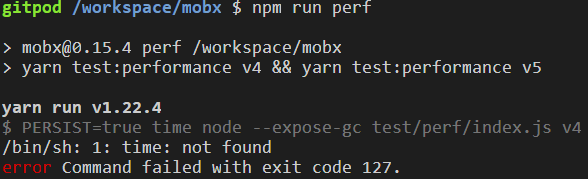
Either way, if I understand it correctly, you have the working setup now, so it's merely about submitting it to this repo and guiding people to use it? If that's it I am all for doing it :)
FredyC
on 25 Mar 2020
I tried gitpod in the past and it is pretty cool indeed. Note that we do
also have some sandbox integration setup (although I don't think anybody
used it yet). Does it need some clarification in our GH templates when to
use which? E.g CS for bug reports, Gitpod for PRs (including bug reports
with unit tests)?
On Wed, Mar 25, 2020 at 6:48 AM Daniel K. notifications@github.com wrote:
Ok, I've opened that link, it's cool there is IDE and runs relevant tests
on change. That is indeed a painful process on most projects.The panel for creating PR is somewhat hidden, especially with Dark Reader
extension that icon in right panel is nearly invisible so I was rather
confused about how to send those changes back. Also, it doesn't seem
possible to make a draft pull request which is a shame.Trying to run npm run perf doesn't work, I assume it's some Docker
configuration? Not sure, I am not Unix guy.[image: image]
https://user-images.githubusercontent.com/1096340/77509403-ea9e7d00-6e6c-11ea-8c45-c46954666819.pngEither way, if I understand it correctly, you have the working setup now,
so it's merely about submitting it to this repo and guiding people to use
it? If that's it I am all for doing it :)—
You are receiving this because you are subscribed to this thread.
Reply to this email directly, view it on GitHub
https://github.com/mobxjs/mobx/issues/2316#issuecomment-603671271, or
unsubscribe
https://github.com/notifications/unsubscribe-auth/AAN4NBGN2PXKBDSSF7ZCH7TRJGSNPANCNFSM4LSSPMWA
.
 mweststrate
on 25 Mar 2020
mweststrate
on 25 Mar 2020
Also, I wonder how it works when you want to edit existing PR and add more changes to it. The link to GitPod will be available somewhere? It would be nice if maintainers can use it as well, not just the author of PR.
FredyC
on 25 Mar 2020
We could update the docs, update the main README.md and the Github Issue template file to show :
Bug report - [CodeSandbox template link]
PR - [GitPod template link]
rdewolff
on 25 Mar 2020
Also, I wonder how it works when you want to edit existing PR and add more changes to it. The link to GitPod will be available somewhere? It would be nice if maintainers can use it as well, not just the author of PR.
Thanks, @FredyC Gitpod also simplifies the onboarding process for maintainers. You can make edit and review Pr from within the IDE.
Docs can help you with that:
https://www.gitpod.io/docs/pull-requests/
https://www.gitpod.io/docs/code-reviews/
nisarhassan12
on 25 Mar 2020
- PR - [GitPod template link]
Wait, how is that useful? You don't see the PR template until you have some actual commit you want to push in. Nobody is going try to create PR just so they can see instructions. This would need to be partially in README and probably in CONTRIBUTING as well.
@nisarhassan12 So contributor would need to install browser extension just so they can see Gitpod button there? Nah, nobody is going to do that except those who are planning to contribute repeatedly. For code reviews, it's probably fine and might be really helpful.
FredyC
on 25 Mar 2020
- PR - [GitPod template link]
Wait, how is that useful? You don't see the PR template until you have some actual commit you want to push in. Nobody is going try to create PR just so they can see instructions. This would need to be partially in README and probably in CONTRIBUTING as well.
@nisarhassan12 So contributor would need to install browser extension just so they can see Gitpod button there? Nah, nobody is going to do that except those who are planning to contribute repeatedly. For code reviews, it's probably fine and might be really helpful.
I understand what you mean. For the PR, the idea of giving the gitpod link is so people can get started quickly. They can click the link and it will open it in GitPod directly, ready to work on their idea.
And you don't need the Chrome (or any other browser) plugin. The usage of GitPod is simply to open https://www.gitpod.io#<git-repo-url> and it will open it.
EDIT: grammar
rdewolff
on 25 Mar 2020
Wait, how is that useful? You don't see the PR template until you have some actual commit you want to push in. Nobody is going try to create PR just so they can see instructions. This would need to be partially in README and probably in CONTRIBUTING as well.
@nisarhassan12 So contributor would need to install browser extension just so they can see Gitpod button there? Nah, nobody is going to do that except those who are planning to contribute repeatedly. For code reviews, it's probably fine and might be really helpful.
@FredyC We will add the required documentation in README or CONTRIBUTING.
The browser extension is not needed at all we can use the following button with some description.

Example: https://github.com/facebook/docusaurus/blob/master/CONTRIBUTING.md#online-one-click-setup-for-contributing
Edit:

nisarhassan12
on 25 Mar 2020
The browser extension is not needed at all we can use the following button with some description.
I do understand that, but if it won't be visible enough, people won't even know something like that is possible. I guess it's merely about spreading it to multiple projects so people can actually get used to it.
I think what could be useful is to have some sort of bot (maybe GitHub Actions can do that) that sends a comment on "bug" labeled (maybe others) issues with instructions and links to Gitpod so people without extension get to know about it.
FredyC
on 25 Mar 2020
think what could be useful is to have some sort of bot (maybe GitHub Actions can do that) that sends a comment on "bug" labeled (maybe others) issues with instructions and links to Gitpod so people without extension get to know about it.
there is already a Gitpod bot

View this Pr for example: https://github.com/freeCodeCamp/freeCodeCamp/pull/38432
nisarhassan12
on 25 Mar 2020
Yea, but it seems to work for PRs only. I would like to have the same button available on the issue with specific labels so people can just click and work that particular issue. Ideally, if that link can somehow keep a reference to the issue and include it in a commit message, but that's far fetched :)
Anyway, these are just additional steps. Anyone feel free to submit a PR with a configuration for this and possibly fixed issue for running perf.
FredyC
on 25 Mar 2020
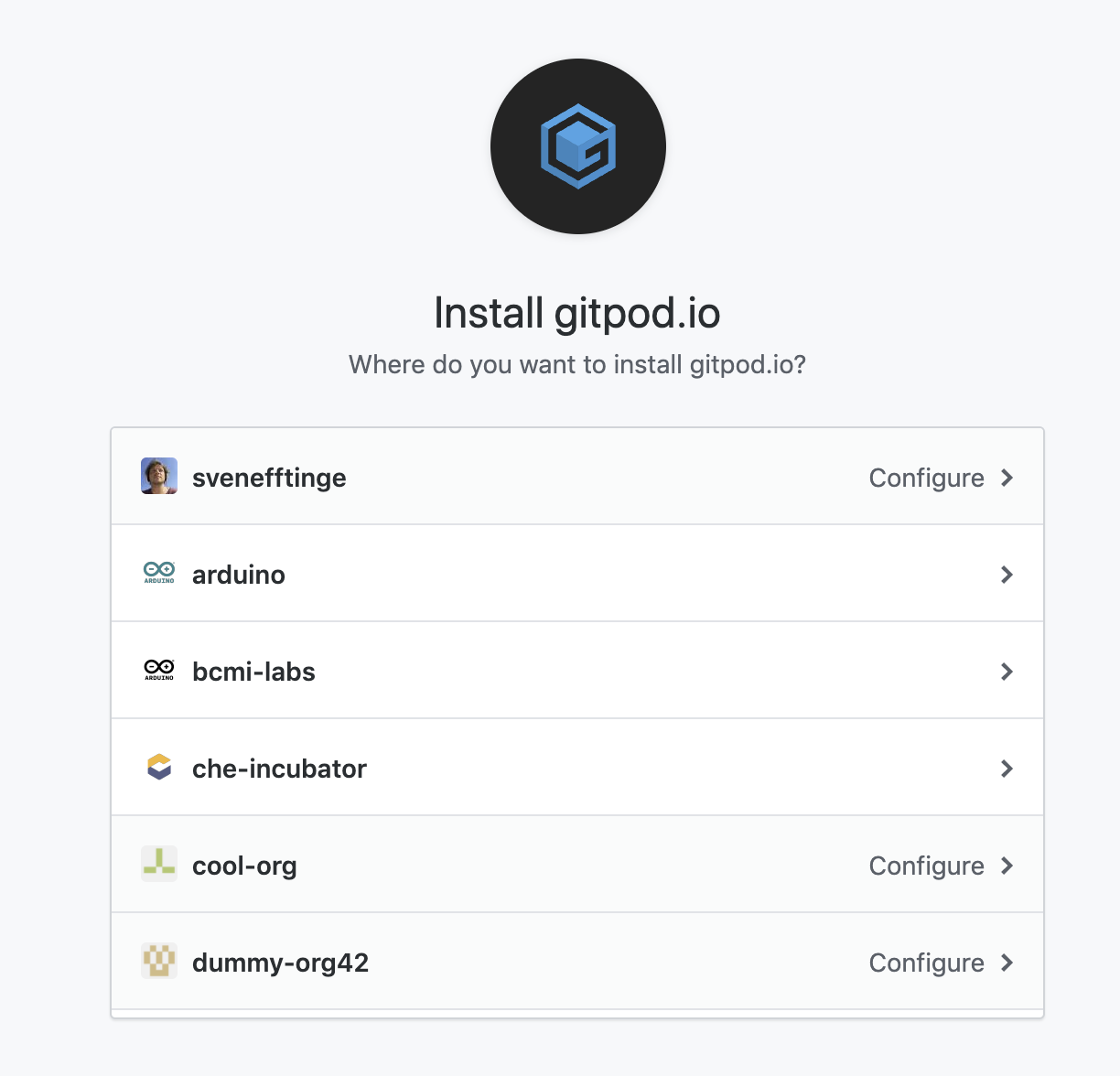
Wait, I just noticed GitPod is not available for organizations, just personal accounts. Paid plans have the same limitation 👀

MobX is an organization account. Or is it meant like you can have it configured for org account but it will open on personal forks? That's kinda confusing.
FredyC
on 25 Mar 2020
Wait, I just noticed GitPod is not available for organizations, just personal accounts. Paid plans have the same limitation eyes
Sorry, we know this is super confusing. The Gitpod App https://github.com/apps/gitpod-io can only be installed by individual developers on their own account (i.e. there is no org billing or so). It can then be enabled/disabled & configured for any accounts or organizations that the developer maintains:
nisarhassan12
on 25 Mar 2020
@FredyC
Also, it doesn't seem possible to make a draft pull request which is a shame.
We agree it's a shame, and would love to have draft PR support soon. The issue is https://github.com/gitpod-io/gitpod/issues/360
Trying to run npm run perf doesn't work, I assume it's some Docker configuration? Not sure, I am not Unix guy.
This is because time was not installed in Gitpod (only the default Bash function). We've just installed and deployed time, so it should be available very soon: https://github.com/gitpod-io/workspace-images/commit/261c0b0ca4439711b986560fddbcbb69d5afb355
@nisarhassan12 So contributor would need to install browser extension just so they can see Gitpod button there? Nah, nobody is going to do that except those who are planning to contribute repeatedly.
It's just one browser extension that adds a "Gitpod" button to issues in PRs, Issues across all of GitHub, not just for MobX.
The extension only prefixes the URL of the GitHub page you're on with https://gitpod.io#
nisarhassan12
on 25 Mar 2020
It's just one browser extension that adds a "Gitpod" button to issues in PRs, Issues across all of GitHub, not just for MobX.
I get that, but that's hardly going to convince person who wants to contribute for the first time. They need to learn about the existence of it in other way first. They might want to do it later when they get used to Gitpod and multiple repos support it.
That's why I think the Github Action could be a better option is it doesn't need any changes on the user side.
Thanks for adding time and working on draft PR support.
FredyC
on 25 Mar 2020
Yea, but it seems to work for PRs only. I would like to have the same button available on the issue with specific labels so people can just click and work that particular issue. Ideally, if that link can somehow keep a reference to the issue and include it in a commit message, but that's far fetched :)
Thanks for bringing this up :) I agree.
Gitpod somewhat keeps the reference of the issue when you open a workspace from an issue:
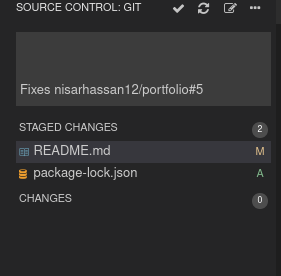
Also, the branch name that it generates is quite relevant to the issue.
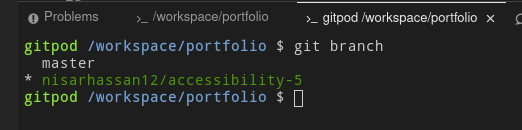
Yeah! I totally agree. we must provide a comment on every issue which will not only have the Gitpod button but also have some description that indicates How to use the automated Gitpod setup or a link to the relevant documentation.
nisarhassan12
on 25 Mar 2020
This issue has been automatically marked as stale because it has not had recent activity. It will be closed if no further activity occurs. Thank you for your contributions.
![stale[bot] picture](https://avatars3.githubusercontent.com/in/1724?v=4&s=40) stale[bot]
on 8 Apr 2020
stale[bot]
on 8 Apr 2020
Thanks, bot, this is solved :)
FredyC
on 8 Apr 2020
Related issues
 geohuz
·
3Comments
geohuz
·
3Comments
 joey-lucky
·
3Comments
joey-lucky
·
3Comments
 cafreeman
·
4Comments
cafreeman
·
4Comments
 rodryquintero
·
3Comments
rodryquintero
·
3Comments
 mdebbar
·
3Comments
mdebbar
·
3Comments
Most helpful comment
Also, I wonder how it works when you want to edit existing PR and add more changes to it. The link to GitPod will be available somewhere? It would be nice if maintainers can use it as well, not just the author of PR.