Mobx: How do I subscribe to @computed object in mobx?
Question
I want to subscribe to a computed property that returns a simple object.
Codesandbox: https://codesandbox.io/s/epic-noether-g8g0x
I made a simple example of my situation to show exactly what the problem is:
const zeroSize = {
    width: 0,
    height: 0
};

class Item {
    @observable size = zeroSize;
}

class Collection {
    @observable childrens: Item[] = [];

    @computed get size() {
        return this.childrens.length > 0 && this.childrens[0] ? this.childrens[0].size : zeroSize;
    }

    constructor() {
        reaction(() => this.size, size => {
            // Expected { width: 0, height: 1000 }
            // Actual { width: 0, height: 0 }
            console.log('-----size=', toJS(size));
        });
    }
}

const item1 = new Item;
const collection1 = new Collection;
collection1.childrens.push(item1);
item1.size.height = 1000;
 khusamov
All 13 comments
Interesting, I don't exactly know the answer, but if you flip those last two lines it works as expected. I am sure someone else can come up with a better one :)
 FredyC
on 24 Oct 2019
FredyC
on 24 Oct 2019
But I do not want to change these lines in places.
khusamov
on 24 Oct 2019
I always recommend against using reactions. If you need to run a side-effect, use autorun - it will automatically subscribe to any dependencies needed to run the side effect.
  constructor() {
    autorun(() => {
      console.log('-----size=', toJS(this.size));
    });
  }
 spion
on 24 Oct 2019
spion
on 24 Oct 2019
But reaction recommends the use of mobx. What was it made for, then? )))
khusamov
on 24 Oct 2019
You are returning the size of the first item. The size object itself hasn't actually changed, its still the same object (the size of the first item). Its properties however have changed, but you are not reacting to those, only to the object.
Autorun prevents these reasoning puzzles quite nicely and its the best way to avoid having to solve them.
spion
on 24 Oct 2019
 khusamov
on 24 Oct 2019
khusamov
on 24 Oct 2019
Keep in mind that if you do things like trigger some window resizing based on this reaction you will still have a bug, because it will only react to changes which is the first item, not on the item changing its internal size.
To fix the bug you actually need to add to toJS() in the first reaction function. That will force dependency on the first item size. But at that point you're basically using autorun so why not just do that?
What you are seeing in the console is the latest version of the object, as the console takes the object reference rather than the value. toJS gives you the real snapshot of the value. Please use autorun.
spion
on 24 Oct 2019
What was it made for, then? ))
Reaction does't run the effect immediately by default.
Reaction runs the effect only if returned value differs from the one returned previously.
Consider:
reaction(
  () => {
    // runs anytime the size or width or height changes
    return this.size.width * this.size.height;
  },
  area => {
    // runs only if area differs
    console.log(area);
  }
);

autorun(() => {
  // runs anytime the size or width or height changes
  const area = this.size.width * this.size.height;
  console.log(area);
});
 urugator
on 24 Oct 2019
urugator
on 24 Oct 2019
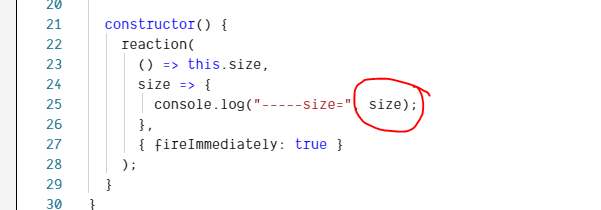
I don't think it's the problem of the toJS() function.
If you add this line console.log("-----size=", size.height);
, you will notice the height is still 0 not 1000, which means this reaction still can't catch the internal change of size object.
 luc99hen
on 25 Oct 2019
luc99hen
on 25 Oct 2019
I realized that I do not understand how to use mobx!
khusamov
on 25 Oct 2019
He said and I am closing 😎
FredyC
on 25 Oct 2019
Prompted how to solve this problem
https://stackoverflow.com/questions/58536450/how-do-i-subscribe-to-computed-object-in-mobx/58562815#58562815
khusamov
on 30 Oct 2019
This thread has been automatically locked since there has not been any recent activity after it was closed. Please open a new issue for related bugs or questions.
![lock[bot] picture](https://avatars1.githubusercontent.com/in/6672?v=4&s=40) lock[bot]
on 29 Dec 2019
lock[bot]
on 29 Dec 2019
Related issues
 weitalu
·
3Comments
weitalu
·
3Comments
 josvos
·
3Comments
josvos
·
3Comments
 cafreeman
·
4Comments
cafreeman
·
4Comments
 bb
·
3Comments
bb
·
3Comments
 Niryo
·
3Comments
Niryo
·
3Comments