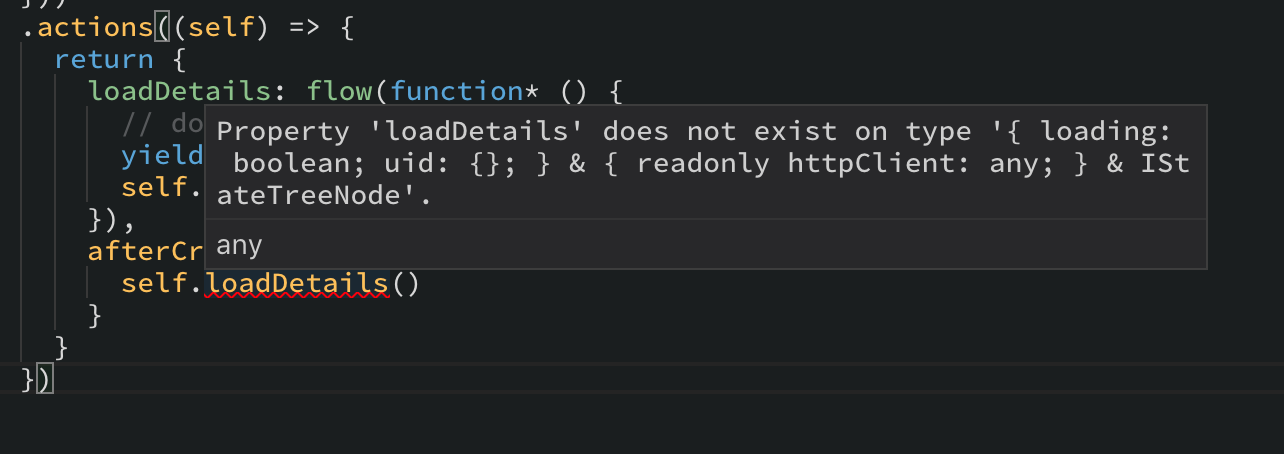
Mobx-state-tree: Typescript checking fails recognize actions
 yordis
All 20 comments
It's a known limitation of TypeScript, there should be an example in the readme :)
 mattiamanzati
on 18 Jan 2018
mattiamanzati
on 18 Jan 2018
@mattiamanzati I am guessing you are talking about splitting your store? Or declare multiple views functions?
These are actions btw, I am assuming that now shouldn't be the same as views?
yordis
on 18 Jan 2018
@mattiamanzati also in this case is because it is missing the function, in other cases is because I am not passing the function as a property which I wouldn't because it is an action no property.
Which in tha case I assume that I should do
const TodoState = types.model({
title: types.string
});
type ITodoStateType = typeof TodoState.Type;
interface ITodoState extends ITodoType {}
const Todo = TodoState
.actions(self: ITodoState => ({
setTitle(v: string) {
self.title = v
}
}))
but at that moment which one should I use as the value of another field Todo or TodoState?
.model({
myTodo: Todo or TodoState // <---- Go goes here
})
All the questions is based on assumptions because the documentation is not very clear for 🔰 beginners how to use the package. Probably that is the root of the issues.
yordis
on 18 Jan 2018
@yordis yes this can indeed be a bit confusing in typescript, the type of self is what self was before the action blocks starts, and only after that part finishes, the actions will be added to the type of "self".
There are two simple workaround for that 1) to declare several action blocks:
.actions(self =>({
   loadDetails() { /* stuff */ }
}))
.actions(self => ({
   afterCreate() {
      self.loadDetails()
}))
That works, but is a bit cumbersome and doesn't work if the relation is circular. A better solution is to follow inside the actions deifnitions the module pattern, where are functions are declared in the closer, and in the end just export. So you get this:
.actions(self => {
  function loadDetails() {
    // stuff
   }
   function afterCreate() {
      loadDetails() // (note, no self here, just called directly!)
   }
  // expose functions to outside world (only the ones that are needed outside + the lifecycle hooks
   return { loadDetails, afterCreate }
})
Hope that helps! Feel free to open a PR to clarify that in the readme where you would have expected it. (maybe in the typescript tips section?)
 mweststrate
on 19 Jan 2018
mweststrate
on 19 Jan 2018
@mweststrate I would love to know what is the cost of calling many times actions, views?
Trying to figure out what is the best guide for Typescript users in terms of organization of the code.
Also this example
.actions(self => {
  function loadDetails() {
    // stuff
   }
   function afterCreate() {
      loadDetails() // (note, no self here, just called directly!)
   }
  // expose functions to outside world (only the ones that are needed outside + the lifecycle hooks
   return { loadDetails, afterCreate }
})
Fail for me in some of the code for me in the past because expected me to actually do self.FUNCTION because the mutations should happen in the actions. there is some weird situations with it which I will trying to replicate it so we can document how it works and what we should do.
yordis
on 19 Jan 2018
This is a little concern about it
import { flow, getEnv, types } from 'mobx-state-tree'

const mock = (value: any ) => {
  return new Promise((resolve) => {
    resolve(value)
  })
}

export const UserStore = types
  .model('User', {
    loading: types.optional(types.boolean, true),
    uid: types.identifier()
  })
  .views((self) => ({
    get httpClient() {
      return getEnv(self).httpClient.get()
    }
  }))
  .actions((self) => {
    const loadDetails = function* (where: string) {
      console.log('Started: ', where)

      yield mock('123')

      console.log('Almost there: ', where)

      yield mock('456')

      self.loading = false

      console.log('Finished: ', where)

    }

    return {
      loadDetails: flow(loadDetails),
      afterCreate() {
        self.loadDetails('flow')

        // VS

        const gen = loadDetails('manually')
        console.log(gen.next().value)
      }
    }
  })


const store = UserStore.create({
  uid: "123"
})
Output
Started:  flow
Started:  manually
Object {}
Almost there:  flow
Finished:  flow
I think it is worth to document about it unless you have some workaround for this issue.
yordis
on 19 Jan 2018
@mattiamanzati Confirmed that I can't do what you suggested
This code fails on execution
.actions((self) => {
    const loadDetails = async () => {
      const response = await UserService(self.httpClient).getUser(self.uid)
      const userDetails = response.data[0]
      self.details = userDetails
    }

    return {
      afterCreate() {
        loadDetails()
      }
    }
  })
Error
: [mobx-state-tree] Cannot modify 'User@/currentUser/user(id: qCJsXVWRqHccTORjJa2OlrW5ukx1)', the object is protected and can only be modified by using an action.
- don't worry about the
actioncall performance itself, it is O(1) - it will be part of the
afterCreateaction, so you can still mutate fine.
For the flows, pull the flow up, so define it as:
const loadDetails = flow(function* (){ /* stuff */ })

return { loadDetails }
It is flow that promisifies the generator, attaches middleware etc
mweststrate
on 19 Jan 2018
@mweststrate still the situation about pulling out to the function it keep giving me the error about updating the store outside of the an action for some reason.
yordis
on 19 Jan 2018
Are you on the latest version of MST?
mweststrate
on 19 Jan 2018
"mobx-state-tree": "^1.3.1",
yordis
on 19 Jan 2018
@mweststrate hah here is the catch.
If I use async instead of generator it will give me the error for sure. Maybe because I am not wrapping it with flow ...
Which is weird because everything started from an action (meaning that afterCreate is an action), but internals I guess.
yordis
on 19 Jan 2018
oh yes, you have to wrap it with flow
mweststrate
on 19 Jan 2018
@mweststrate better to document that one because I got that when I create an async action I have to wrap it but this is not technically an action but a function being call inside an action (we can export it as an action but that is an effect)
So all the async operations most be wrap with flow if we want to do any mutation.
yordis
on 19 Jan 2018
Like here https://github.com/mobxjs/mobx-state-tree/blob/master/docs/async-actions.md#using-generators ;-)?
mweststrate
on 19 Jan 2018
@mweststrate I saw that section but what people could miss from it is that in anywhere in your code you should use flow
If I would create an action that requires some async I would use it because I read the documentation but because this was a function call inside another action then it wasn't clear. The documentation talks about the advantage and usage of generators but do not explain this situation that well, unless you run into this issues I am facing because of Typescript forcing me to change the code style to be everything a closures, you wouldn't extract those functions and you would leave it as direct actions
yordis
on 19 Jan 2018
Feel free to create PR to make things more clear 😊
Op vr 19 jan. 2018 12:27 schreef Yordis Prieto notifications@github.com:
@mweststrate https://github.com/mweststrate I saw that section but what
people could miss from it is that in anywhere in your code you should use
flowIf I would create an action that requires some async I would use it
because I read the documentation but because this was a function call
inside another action then it wasn't clear. The documentation talks about
the advantage and usage of generators but do not explain this situation
that well, unless you run into this issues I am facing because of
Typescript forcing me to change the code style to be everything closures.—
You are receiving this because you were mentioned.Reply to this email directly, view it on GitHub
https://github.com/mobxjs/mobx-state-tree/issues/610#issuecomment-358939942,
or mute the thread
https://github.com/notifications/unsubscribe-auth/ABvGhIancYfuZPy_iAUrHfyyfh13Q69Xks5tMHwJgaJpZM4Rjav1
.
mweststrate
on 19 Jan 2018
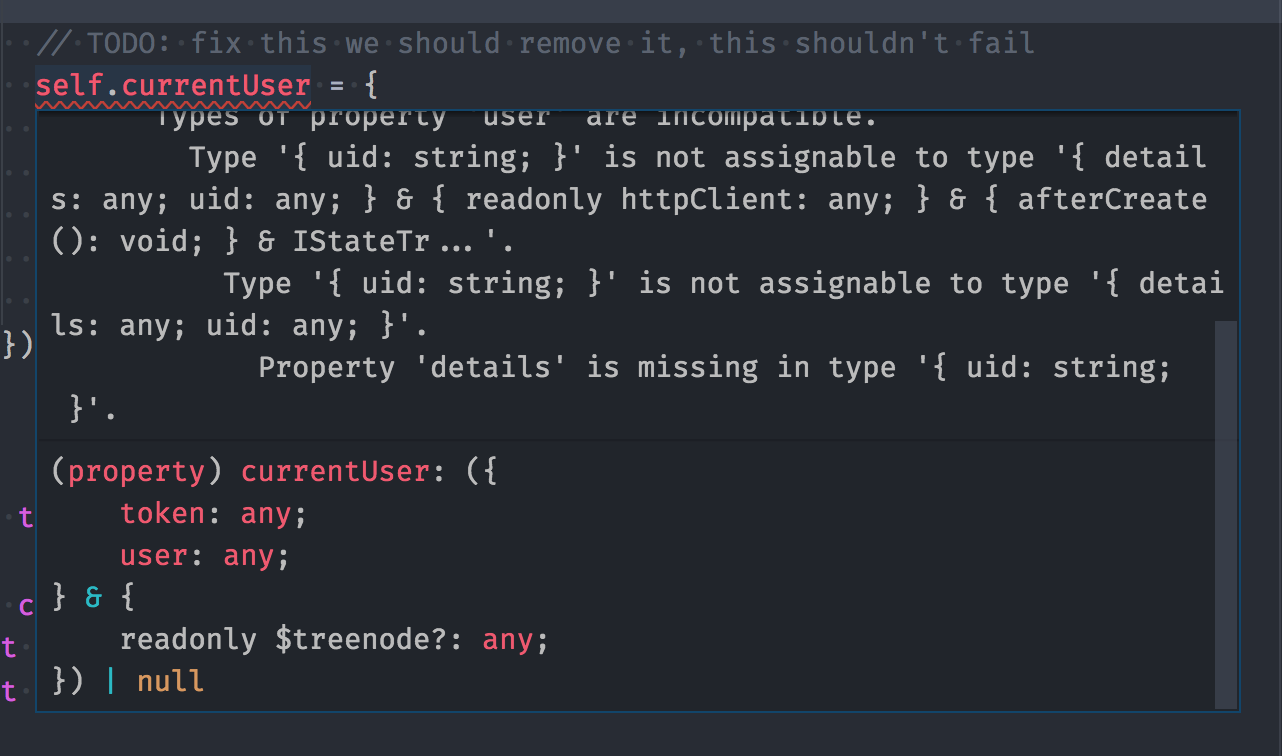
@mweststrate look at this code
const ApplicationStore = types
  .model('ApplicationStore', {
    currentUser: types.maybe(CurrentUserStore)
  })

const CurrentUserStore = types
  .model('CurrentUser', {
    token: types.string,
    user: UserStore
  })

const UserStore = types
  .model('User', {
    details: types.maybe(UserDetailsStore),
    uid: types.identifier(types.string)
  })
Notice that my User store have .maybe type so it shouldn't fail when I do not have values for it.
yordis
on 22 Jan 2018
Readme section has been updated. Thanks for the PR @yordis
mweststrate
on 15 Mar 2018
@mweststrate Should the forward declaration approach work with Promises? When I run this code it tells me I can't modify the store.
const MyStore = types
  .model("MyStore", {
    isLoading: types.optional(types.boolean, false)
  })
  .actions(self => {
    function handleSignup() {
      self.isLoading = true;

      return fakeSignup().then(handleSignupSuccess);
    }

    function handleSignupSuccess() {
      self.isLoading = false;
    }

    return {
      handleSignup,
      handleSignupSuccess
    }
  })
 Peterabsolon
on 20 May 2018
Peterabsolon
on 20 May 2018
Related issues
 erkieh
·
4Comments
erkieh
·
4Comments
 elado
·
4Comments
elado
·
4Comments
 lostfictions
·
4Comments
lostfictions
·
4Comments
 xgenvn
·
3Comments
xgenvn
·
3Comments
 EricForgy
·
4Comments
EricForgy
·
4Comments
Most helpful comment
@yordis yes this can indeed be a bit confusing in typescript, the type of
selfis whatselfwas before theactionblocks starts, and only after that part finishes, the actions will be added to the type of "self".There are two simple workaround for that 1) to declare several action blocks:
That works, but is a bit cumbersome and doesn't work if the relation is circular. A better solution is to follow inside the actions deifnitions the module pattern, where are functions are declared in the closer, and in the end just export. So you get this:
Hope that helps! Feel free to open a PR to clarify that in the readme where you would have expected it. (maybe in the typescript tips section?)