Mobx-state-tree: Error updating to MST 1.1.0 from 1.0.1
Hi guys, we are having some issue with frozen types after updating to the last version. In our rootStore (we have one for redux dev tools), we are having this issue, but the most important thing here, is that this just happen when we build the project with CRA and upload to the server.
_RootStore.js_
const RootStore = types
  .model('RootStore', {
    languageStore: types.optional(LanguageStore, getSnapshot(languageStore)),
    folderStore: types.optional(FolderStore, getSnapshot(folderStore)),
    authStore: types.optional(AuthStore, getSnapshot(authStore)),
    templateStore: types.optional(TemplateStore, getSnapshot(templateStore)),
    geniallyStore: types.optional(GeniallyStore, getSnapshot(geniallyStore)),
    myBrandStore: types.optional(MyBrandStore, getSnapshot(myBrandStore)),
    inspirationStore: types.optional(
      InspirationStore,
      getSnapshot(inspirationStore)
    ),
    invoiceStore: types.optional(InvoiceStore, getSnapshot(invoiceStore)),
    modalStore: types.optional(ModalStore, getSnapshot(modalStore))
  })
  .actions(self => ({
    afterCreate() {
      self.authStore.fetchUserData();
    }
  }));
const rootStore = RootStore.create(); // THE ERROR IS HERE WITH TEMPLATE STORE (SEE BELOW)

export default rootStore;
The error is in this store, templateStore, we are using frozen on it like this:
const TemplateStore = types
  .model('TemplateStore', {
    templates: types.array(Template),
    status: types.enumeration('State', ['loading', 'loaded', 'error']),
    search: types.optional(types.string, ''),
    templateType: types.maybe(types.string),
    filters: types.frozen, // <-- This
    secondaryFilters: types.frozen, // <-- This
    tags: types.array(types.string),
    templatesBuyedLength: types.maybe(types.number, 0)
  })
... actions, views and stuff
Create the template store:
const templateStore = TemplateStore.create({
  status: 'loading',
  templates: [],
  filters: {
    isNew: undefined,
    subcategoryBusiness: undefined,
    subcategoryEducation: undefined,
    subcategoryOthers: undefined
  },
  secondaryFilters: {
    premium: undefined,
    free: undefined,
    buyed: undefined
  },
  tags: []
});
export { TemplateStore };
export default templateStore;
All is working fine with 1.0.1, we modified the frozen with Object.assing like an inmutable... did you change anything in version 1.1.0 about frozen that we need to understand?
Thanks!!
 chemitaxis
All 20 comments
Sorry guys, the console error:
mobx-state-tree.module.js:52 Uncaught Error: [mobx-state-tree] Cannot add an object to a state tree if it is already part of the same or another state tree. Tried to assign an object to '/templateStore/filters', but it lives already at '/filters'
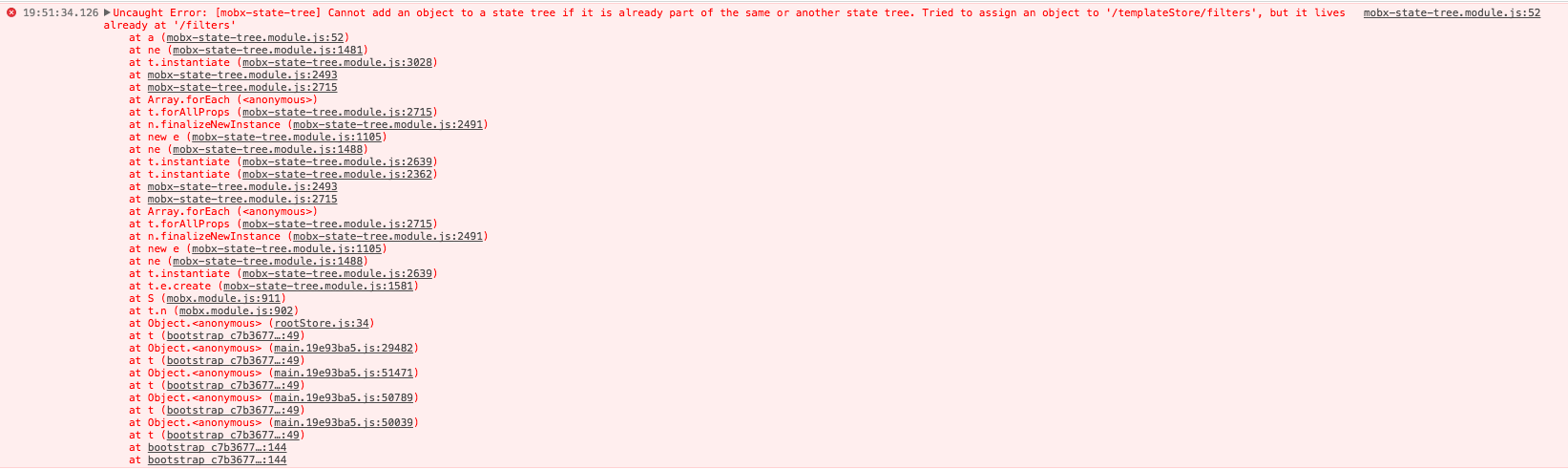
I repeat, if we use 1.0.1 all works fine. Thanks again!
chemitaxis
on 7 Nov 2017
@chemitaxis Could you please create a repository with code that reproduces this error?
 d4rky-pl
on 8 Nov 2017
d4rky-pl
on 8 Nov 2017
Yes, I will... I come back when it has done...
chemitaxis
on 8 Nov 2017
Hi again @d4rky-pl, here you have the repo: https://github.com/chemitaxis/error_frozen_mobx_state_tree
Steps to reproduce the error:
- Clone the repo (
git clone https://github.com/chemitaxis/error_frozen_mobx_state_tree.git) - Enter in the folder and install the dependencies (
npm i) - View debug mode and all works fine (
npm start) - Build the project (
npm run build) - Install
serveto enable a dev server for testing the builded code. (npm i -g serve) - Run the server (
serve -s build) - Open the url (default value http://localhost:5000).
- Open the console to view the error.
Uncaught Error: [mobx-state-tree] Cannot add an object to a state tree if it is already part of the same or another state tree. Tried to assign an object to '/exampleStore/frozenProp', but it lives already at '/frozenProp'

The most important thing here is that in development all works fine, but when you build the project and run it, you have the error... 🤔
I mention to @mattiamanzati and @mweststrate because I think this is very strange error... Thank so much for your help!
chemitaxis
on 8 Nov 2017
@chemitaxis just a quick question: what kind of value do you assign to the filters? Note that it should be a plain, immutable, serializable value. Maybe you are accidentally assigning another MST node? (the error seems to suggest that)
 mweststrate
on 8 Nov 2017
mweststrate
on 8 Nov 2017
Hi! This is the point, I’m just creating the store, not assigning any value to the filter... and it works in dev mode but not when I build the code... you can test the code, very easy test concept... I hope it solve your question. Thanks!
chemitaxis
on 8 Nov 2017
Oh, I think I know what's going on, frozen is not froze in production, so canAttachNode() can be attached in production, but not in dev... Hard to test, but should be that! Can you please try to manually freeze the value before assigning it to check if it works?
 mattiamanzati
on 8 Nov 2017
mattiamanzati
on 8 Nov 2017
I think I found the problem. The behaviour of getSnapshot for frozen values is different between the versions:
- Since 1.1.0 there's a check if we're in production mode and objects are frozen only in development, this was introduced as a feature in 74590410
- When creating a new Node, there's a check to see if the
$treenodemetadata can be attached to it, this happens in node.ts#L49 wherecanAttachNodeis called and it checks withObject.isFrozen - This causes different behaviour between production and development:
- since
types.frozenobjects are actually frozen in development, they don't have$treenodeso they're treated as a simple object every time and information about them ever being part of the tree is lost - in production objects are not frozen so
canAttachNodereturnstrue, this adds$treenodeto object makingisStateTreeNodereturn true and causing a failure
- since
@chemitaxis the workaround for the problem that I see right now would be to avoid initializing global objects as default export and instead create an instance in place:
types.optional(LanguageStore, () => LanguageStore.create())
You could export your store object creation as a function from your file:
export default () => TemplateStore.create({
  // ... etc
});
But I don't think it's a nice pattern and you should make sure all types.optional are set properly instead (or pass the extra data in inlined .create()).
d4rky-pl
on 8 Nov 2017
@mattiamanzati damn, I spent too long redacting this and you already found the problem :joy:
d4rky-pl
on 8 Nov 2017
Hi @d4rky-pl and @mattiamanzati, than you so much for your answers ;)
I shall try to clarify this stuff...
- @mattiamanzati how can I manually freeze the value before assigning it to check if it works. I don't know how to do that, sorry :(
- @d4rky-pl You say that I can do that:
types.optional(LanguageStore, () => LanguageStore.create())inside my rootStore (I don't have any problem with it). Is this a bad pattern? - @d4rky-pl The second option:
export default () => TemplateStore.create({
  // ... etc
});
you say that is a bad practice, right? Better use first option and call inline the .create() method, correct?
Thanks again guys!
chemitaxis
on 8 Nov 2017
Ok, for point 1, something like this, const o = Object.freeze(obj); right? 😄
chemitaxis
on 8 Nov 2017
Yep :)
mattiamanzati
on 8 Nov 2017
@mattiamanzati you said...
can be attached in production, but not in dev...
The error happens in production, it would be:
can be attached in dev, but not in production...
Right? Sorry, I'm reading the text two or three times...
chemitaxis
on 8 Nov 2017
Yeah, sorry, writing from mobile while waiting at traffic lights xD
mattiamanzati
on 8 Nov 2017
@chemitaxis since you're setting up the initial state here, the best option would be to make all your store fields types.optional and pass the default values there. But yes, the first option will also be fine.
d4rky-pl
on 8 Nov 2017
@mweststrate What would be the solution for this problem? Should MST always treat values passed to types.frozen as immutable and never attach $treenode to them?
d4rky-pl
on 15 Nov 2017
Solution would be to add a method over the IType interface in internals (e.g. canAttachNode) that returns true or false if node should be attached. And instead of using the current one that should be used instead :)
mattiamanzati
on 15 Nov 2017
Ok, master branch has an updated version that should fix the issue, can somebody please check if using the version built from master branch fixes the issue? :)
mattiamanzati
on 23 Nov 2017
Sorry, I'm out of office this week, I will try on weekend!!
El jue., 23 nov. 2017 a las 14:18, Mattia Manzati (notifications@github.com)
escribió:
Ok, master branch has an updated version that should fix the issue, can
somebody please check if using the version built from master branch fixes
the issue? :)—
You are receiving this because you were mentioned.
Reply to this email directly, view it on GitHub
https://github.com/mobxjs/mobx-state-tree/issues/513#issuecomment-346615947,
or mute the thread
https://github.com/notifications/unsubscribe-auth/ABWsedSKUSOAkhHF19fTWKwLJVcBajQQks5s5XCQgaJpZM4QVQ2t
.
chemitaxis
on 23 Nov 2017
Assuming it is fixed in 1.1.0. Otherwise, feel free to reopen
mweststrate
on 28 Nov 2017
Related issues
 benkuly
·
3Comments
benkuly
·
3Comments
 A-gambit
·
3Comments
A-gambit
·
3Comments
 misantronic
·
3Comments
misantronic
·
3Comments
 EricForgy
·
4Comments
EricForgy
·
4Comments
 elado
·
4Comments
elado
·
4Comments